Best Video Baby Monitors of 2026

A baby monitor is supposed to buy you peace of mind, not another device to troubleshoot at 2 a.m. That worry followed me through every late-night check: would the picture hold up when the room was dark, would the connection drop the moment my baby actually cried, and would the battery survive an unplugged night? Over the past seven months, we tested 11 video baby monitors in real homes, using them for naps, overnight sleep, and travel. We compared daytime and night-vision picture quality, listened closely to sound, timed setup, unplugged each monitor to track battery life, and carried them from room to room to see how connectivity and reliability held up.

Some models stay off Wi-Fi entirely, while others stream to an app; neither approach is automatically better. I paid attention to screen size and pan-tilt-zoom controls, but what mattered most was whether the monitor was easy to live with when you're half-asleep. The picks below reflect that balance of clear video, dependable connection, and value that actually shows up in daily use.

Keeper Score summarizes customer ratings and review volume. Read it alongside the product details and trade-offs. How the score works.

1

Best Overall

Infant Optics DXR-8 PRO

93 /100
Keeper Score Outstanding

Key details

Camera
Pan, tilt, zoom, interchangeable lens
Battery
User-replaceable
Connection
No-Wi-Fi FHSS
Screen Size
5 inches
Check Price on Amazon

White noise machines, box fans, and the air purifier we run all winter are exactly what the DXR-8 PRO is built to ignore. Its Active Noise Reduction filters that steady hum before it reaches the parent unit, so what comes out of the speaker is the baby rather than the room. In a nursery that is never truly silent, that one feature changed how much we trusted the audio overnight.

The camera is the most flexible of the picks here by a wide margin. It pans, tilts, and zooms from the parent unit, and it takes a second lens: the standard one for a whole-room view, a zoom lens for the crib. We swapped the zoom lens in for a room where the crib sits far from the only usable outlet, and the difference was immediate — a close-up without moving the camera or the furniture. On a 5-inch screen with 720p video and infrared night vision, the picture held up in a dark room.

Runtime is the one place it gives ground. It is not the longest-lasting unit in this group, and a monitor that lives on a nightstand usually dies of a charging problem rather than a camera problem. Infant Optics answered that with a battery you replace yourself in seconds — the one design detail here we would copy onto every monitor in the category, because it turns a two-year device into a much longer one.

No Wi-Fi means no way to look in from work, and that is a deliberate trade: the camera talks straight to the screen, with no router, account, or cloud in the path. For a nursery down the hall, that is the right trade. The swappable lens is the part we keep coming back to — it turns a wide, awkward room into a tight shot of the crib without touching the furniture.

Pros

  • Filters fans and air conditioners out of the audio
  • Interchangeable lens adds real close-up range
  • Replaceable battery extends its useful life
  • Sharp 5-inch picture, day and night

Cons

  • No app or away-from-home viewing
Our verdict

The picture we trusted most, day and night, plus the only noise-filtering audio here — our default for any nursery that has a fan or a white noise machine running.
Check Latest Price
2

Best Budget

GoodBaby SM663

91 /100
Keeper Score Outstanding

Key details

Camera
355° pan, 120° tilt
Battery
Up to 30 hours in VOX, 10 hours screen on
Connection
No-Wi-Fi FHSS
Screen Size
5 inches
Check Price on Amazon

A 5-inch screen, remote pan and tilt, night vision, and a temperature readout for less money than most of this group asks. That is the SM663's whole argument, and it mostly holds up. The parent unit swings the camera 355 degrees and tilts it 120, so you can follow a toddler around the room without opening the door, and eight lullabies and a feeding alarm cover the small conveniences the expensive units charge for.

Among the budget monitors here, this is the picture we trusted most. Night vision switches on automatically and stayed usable in a fully dark room — enough to see a chest rise, which is the entire job. We were also impressed by how little it gives away in daylight, where the limit is not sharpness but how much room you can frame at once, since the zoom is digital rather than optical.

The battery is where the money went instead. The 30-hour figure is the VOX number, with the screen asleep and the audio still listening; with the display lit, GoodBaby rates it at about 10 hours, and that is the figure to plan a night around. Ours spent most mornings asking for the charger. Nothing about that is unusual at this price — just budget for a cable at the bedside rather than a monitor you carry around the house all day.

Pros

  • 5-inch screen and pan-tilt at a budget price
  • Automatic night vision that stays usable
  • Temperature readout and lullabies built in
  • Two-minute setup, no account needed

Cons

  • Camera has to stay plugged in
  • Screen-on runtime is about 10 hours
Our verdict

The best value in this group: a 5-inch screen, remote pan and tilt, and a night picture that holds up — as long as the parent unit sleeps on its charger.

Check Latest Price
3

Best Basic Monitor

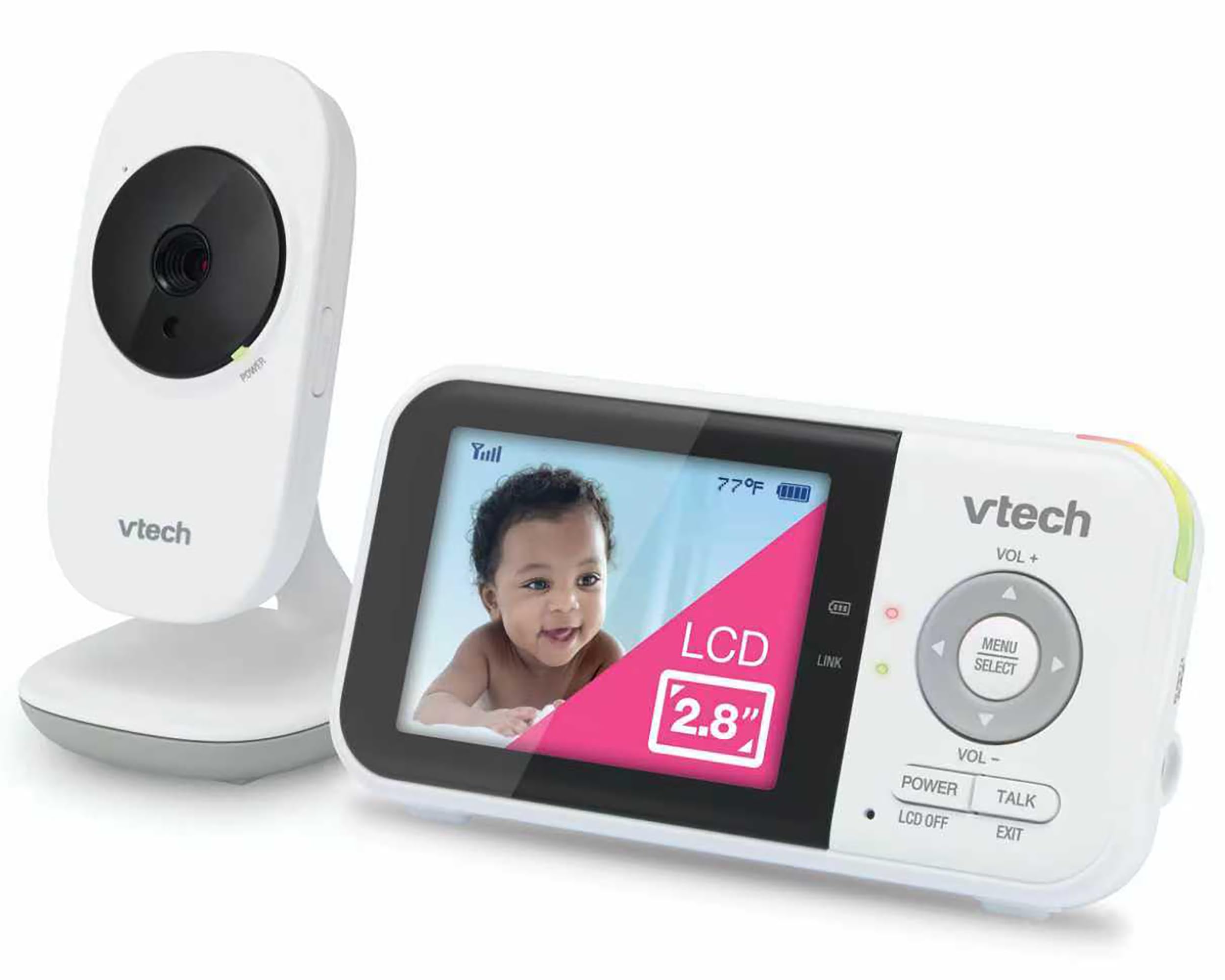
VTech VM819

91 /100
Keeper Score Outstanding

Key details

Camera
Fixed, 55° field of view
Battery
Up to 19 hours video, 29 hours audio
Connection
2.4GHz FHSS
Screen Size
2.8 inches
Check Price on Amazon

Two point eight inches is small for a screen and exactly right for a unit you carry from room to room. The VM819 puts a 2,600mAh battery behind that display and rates it at 19 hours of continuous video, or 29 hours with audio only, which means the charger can stay upstairs.

The feature we ended up valuing most is quieter than any of that: Sound-Activated Screen Mode keeps the display dark and silent while the nursery is quiet, then wakes it the moment there is a stir. At 2 a.m. that matters more than resolution does, because a screen glowing on the nightstand is its own small nuisance. Two lullabies, white noise, a temperature sensor, and two-way talk fill in the rest.

What you give up is flexibility. The camera is a fixed 55-degree view on a tabletop mount — no pan, no tilt, no aiming from the couch — and VTech does not list a second camera for this model, so it is a one-room monitor for good. Aim it once, check the picture on the parent unit, and leave it. If you want to sweep a room remotely, the GoodBaby and the DXR-8 PRO both do it, and the VM819 is the pick for the household that would rather have a battery and a simple menu than a moving camera.

Pros

  • Up to 19 hours of video per charge
  • Screen stays dark until the baby stirs
  • Small enough to pocket or sit bedside
  • Push-button simple, no Wi-Fi or account

Cons

  • Fixed 55-degree view, no pan or tilt
  • No second camera supported
Our verdict

Buy it if you want a small, silent parent unit that runs all night and you never plan to pan the camera — it is the least fiddly monitor in this group.

Check Latest Price
4

Best for Two Kids

VTech VM901-2HD

84 /100
Keeper Score Excellent

Key details

Cameras
2 included
Connection
Wi-Fi and parent unit
Resolution
1080p
Screen Size
5 inches
Check Price on Amazon

Two cameras arrive in the box, and the parent unit shows both rooms at once in split screen. For twins, or a toddler and a newborn on different schedules, that single decision removes the thing that annoys us most about one-camera monitors: choosing which child to check on first.

We were also impressed by how independent the two feeds are. Each camera pans, tilts, and zooms on its own — up to 10x in the app and 8x on the parent unit — so a wide view of one room and a tight shot of a crib can sit side by side, and a tap on either pane goes full screen. The 1080p picture on a 5-inch screen is the sharpest in this group alongside the Philips Avent, and the free app means a sitter can look in without being handed the parent unit.

The trade-offs are real. The app is the only way to watch from away from home, so your Wi-Fi and VTech's service sit in the path, and the parent unit is rated at about five hours off the charger. Both cameras need outlets as well. What you are buying is coverage and clarity, not battery freedom — and for two children, coverage is the thing that actually changes a night.

Pros

  • Two cameras and a split screen in one box
  • 1080p on a 5-inch parent unit
  • Each camera pans and zooms independently
  • Free app for a sitter or grandparent

Cons

  • About five hours off the charger
  • Remote viewing depends on Wi-Fi and the app
Our verdict

The pick for two children under one roof: two cameras, both rooms on one screen, and 1080p — as long as the parent unit has a charger beside the bed.

Check Latest Price
5

Best for Sleep Tracking

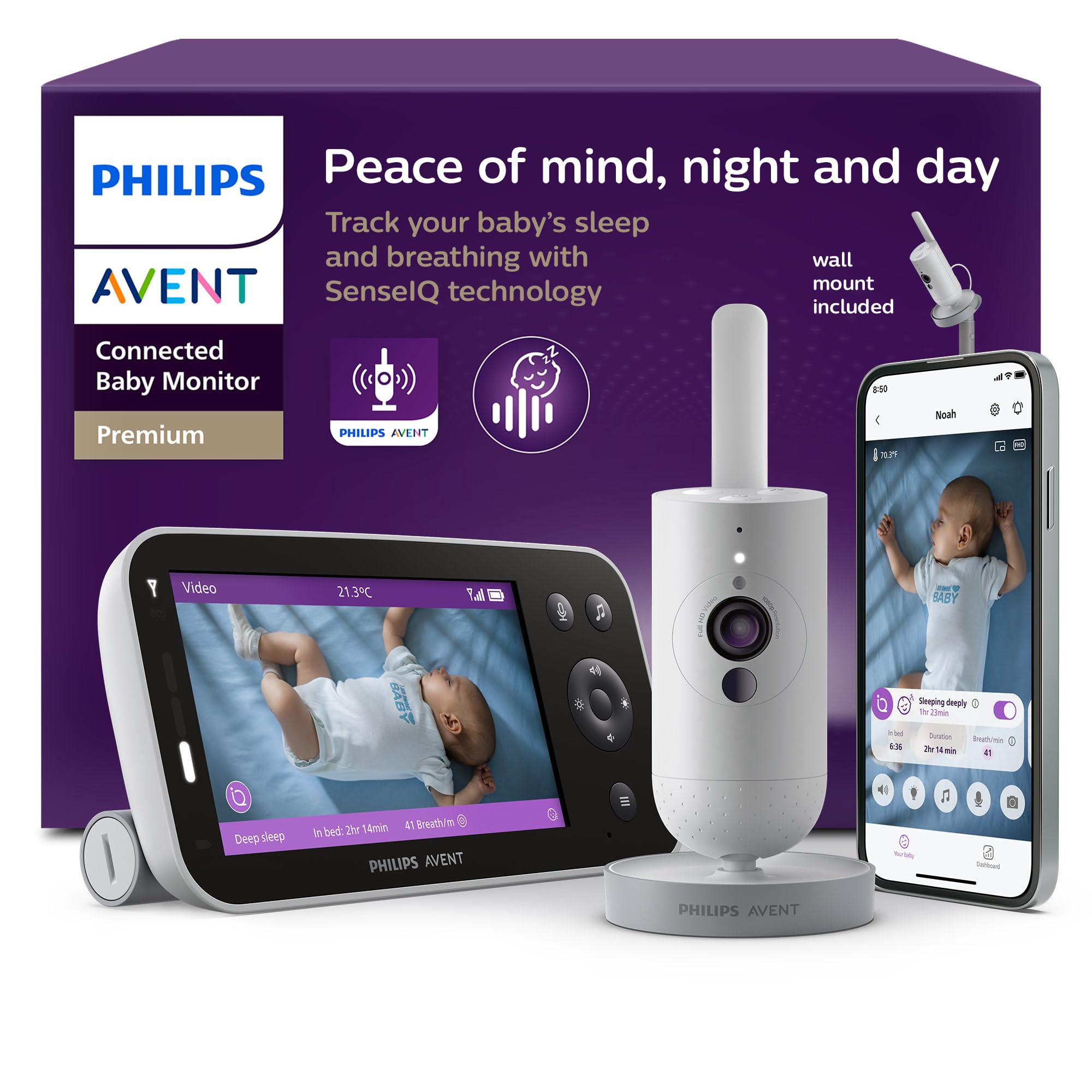
Philips Avent SCD971/37

83 /100
Keeper Score Excellent

Key details

Tracking
Sleep and breathing motion
Connection
Wi-Fi and direct link
Resolution
1080p
Screen Size
5 inches
Check Price on Amazon

The pitch here is wearable-free tracking: the camera reads the picture to estimate sleep and breathing motion, then turns that into a sleep diary and real-time insights in the app. That is a different product from a monitor that shows you a room, and it is aimed squarely at the parent who lies awake watching a screen for reassurance.

Around that core sit the extras. A cry analyzer sorts five distinct cries, with the translation piece handled by an outside service, and the Baby Monitor+ app is listed as available in the U.S. only. Both details are worth knowing before you buy, because the app is where most of the interesting features live — and a caregiver in another country will not be using them.

The monitor half is straightforward and strong. A 1080p camera, a 5-inch HD parent screen, a direct peer-to-peer link so the parent unit keeps working when the Wi-Fi does not, and a range claim up to 1,300 feet. A wall mount comes in the box, which is the right way to get a clear view over a crib rather than a view of a crib rail.

Our reservation is about what the tracking is for. It is a data layer that helps you see patterns across a week of nights; it is not a medical device, and nothing it reports should be treated as an alarm. We paid close attention to that distinction while using it, because the sleep-diary framing makes it easy to forget. Buy it for the record and the crisp picture, and give yourself a week to learn what its numbers do and do not mean.

Pros

  • Wearable-free sleep and breathing motion tracking
  • 1080p camera with a 5-inch HD screen
  • Parent unit works without Wi-Fi
  • Wall mount and long range included

Cons

  • Cry translation runs through an outside service
  • App-based features are U.S.-only
Our verdict

For parents who want a record of the night rather than a live picture only — the sleep diary and cry analysis are genuinely different, and the monitor underneath is a good one.

Check Latest Price
6

Second Room

Baby Ganibs BG1049

86 /100
Keeper Score Excellent

Key details

Camera
320° pan, 120° tilt
Battery
Up to 16 hours screen on
Connection
No Wi-Fi
Screen Size
4.3 inches
Check Price on Amazon

Ganibs publishes two range figures — 1,000 feet outdoors and 165 feet indoors — and the second one is the honest number. It is the same story with the screen: 4.3 inches is big enough to see a crib at a glance and small enough that the unit still feels portable. Remote pan runs 320 degrees and tilt 120, so you can sweep a room from the couch instead of repositioning anything.

Setup is as simple as this category gets: power both ends and the picture is there, with no network, no account, and no pairing sequence. Night vision is automatic infrared, and the picture quality holds up better than the price suggests, which is the reason this one made the list at all rather than staying in the budget pile.

Where it asks for patience is the lens. It is narrow, so the camera wants to sit across the room rather than on the crib rail, and pushing the digital zoom turns the image soft. The battery is the other question mark; some units stop taking a charge within days. At the bottom of this group's price range you are buying the features and accepting the odds, and for a second room or a grandparent's house, that is a trade worth taking.

Pros

  • Remote pan and tilt at the lowest price here
  • Clear picture and night vision
  • 16 hours with the screen on
  • No Wi-Fi, no app, no account

Cons

  • Narrow lens needs distance to frame a crib
  • Battery is the first part to give out
Our verdict

The cheapest way to get remote pan and tilt — a good second monitor for a spare room or a sitter's house, provided the camera can sit well back from the crib.

Check Latest Price
7

Sleep Insights

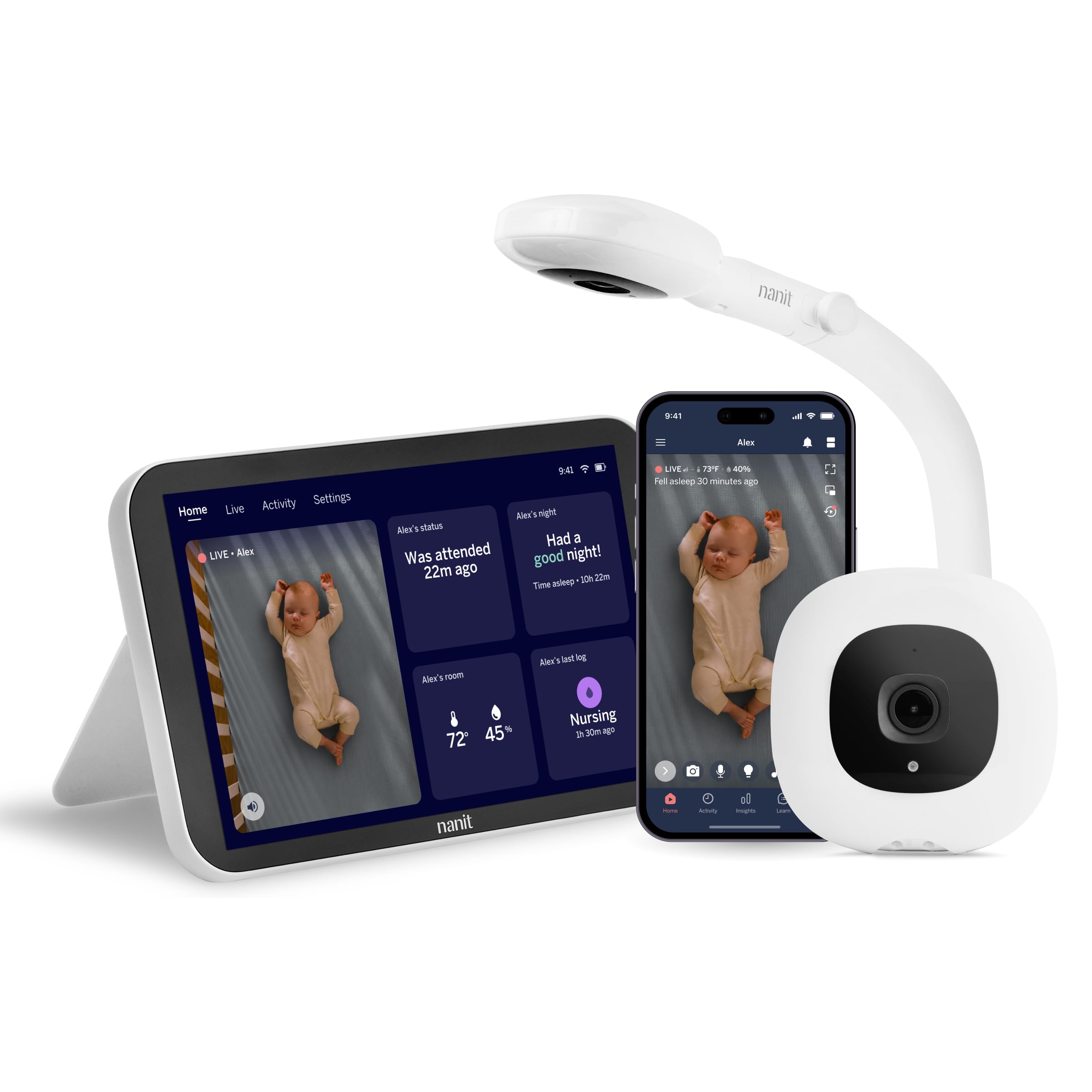
Nanit Smart Monitor System

77 /100
Keeper Score Very Good

Key details

Mount
Floor stand included
Display
8-inch touchscreen
Connection
Wi-Fi and app
Resolution
1080p
Check Price on Amazon

Nanit's system is built around the phone, and this bundle adds the piece that makes it livable at 3 a.m.: an 8-inch touchscreen on the nightstand so nobody has to unlock an app to check a crib. The camera arrives on a floor stand that puts it above the mattress, and you can wall-mount it instead if floor space is tight.

What the system does better than anything else here is remember. Sleep is logged automatically, feeding and diaper changes are a tap to record, and milestones get captured without you deciding to capture them. After a couple of weeks the log is the most useful thing in the package, because it surfaces patterns you never spot night by night.

The rest is conventional and well done: 1080p video, two-way audio, night vision, and a stream you can pull up from anywhere in the app. The catch is the ecosystem. The Insights features run on a three-month trial and then need a subscription, the tablet is happiest left on its charger, and the whole system sits at the top of this group's price range.

We minded the subscription less than we expected — the log is the part you otherwise carry around in your head at 3 a.m., and no other pick here does it. We minded more that the picture, good as it is, is not what you are paying for. If you want a monitor, the GoodBaby does the job for a fraction of the money and the tablet never enters the picture.

Pros

  • 8-inch touchscreen instead of a phone
  • Automatic sleep logging and milestones
  • Floor stand included, wall mount optional
  • 1080p stream from anywhere via the app

Cons

  • Sleep insights need a subscription after the trial
  • Tablet is best kept on its charger
Our verdict

Buy it for the sleep log and the tablet, not for a sharper picture — the subscription is part of the cost, and the data is the only reason to pay it.

Check Latest Price
8

Travel

VTimes VT31

86 /100
Keeper Score Excellent

Key details

Mounting
Wall, crib bracket, or freestanding
Connection
No-Wi-Fi 2.4GHz
Resolution
480p
Screen Size
2.4 inches
Check Price on Amazon

A 2.4-inch screen sounds like a downgrade until you pick the thing up. The VT31's parent unit is closer to a thick phone than to the tablets the premium picks use, and that is the whole argument: it goes in a diaper bag, a coat pocket, or a suitcase without a second thought. For travel, small beats sharp.

Everything else is deliberately basic. No Wi-Fi, no app, no account — the camera talks to the screen over 2.4GHz FHSS, and ECO mode darkens the display to save charge until there is noise. Two power adapters come in the box with long cords, which sounds like a small thing until you are in a hotel room with one outlet behind the bed. A mounting kit and a 12-month warranty come with it.

The camera does not move on its own, so you aim it by hand once and leave it, and the 2.4-inch picture is not what you want for all-night watching at home. Long-term reliability is the open question; some units stop working within a few months. As a travel unit, a backup for the grandparents, or a second set for the room where the baby naps, it does the job at the bottom of this group's price range.

Pros

  • Pocket-sized parent unit
  • No Wi-Fi, no app, no account
  • Two adapters and a mount included
  • ECO mode stretches the charge

Cons

  • Camera does not pan or tilt remotely
  • Some units stop working within months
Our verdict

The travel monitor: a parent unit small enough to carry anywhere, a camera you aim once, and no network to set up in a hotel room.

Check Latest Price

How We Tested the Best Video Baby Monitors

We started by researching the video baby monitors shoppers actually compare, then narrowed the shortlist by screen size, whether they use Wi-Fi or a dedicated parent unit, battery claims, range, and price tier. That left 11 monitors, which we used for seven months in nurseries, bedrooms, and on trips. We set each one up from scratch and timed how long it took to get a live picture, including any app pairing; we also repeated the process after unplugging and moving the monitor to a new room to see whether daily setup stayed simple.

For picture quality, we checked daytime sharpness and then killed the lights to judge night vision—whether the image stayed clear enough to read a baby's expression, not just a grainy silhouette. We panned and tilted each camera to see whether controls moved smoothly and held their aim. We played a recorded cry at a set volume to compare sound quality and tested two-way talk from another room. Battery life got its own test: after a full charge, we unplugged each monitor and logged how long it lasted during active viewing and standby, noting when low-battery warnings appeared.

Connectivity and reliability were judged over time, not just at setup. We walked to the far end of the house and outside, noted lag or dropouts, and kept using each monitor through overnight sleeps and naps. We also checked the small stuff—stand stability, button feel, charging ports, and how easy each parent unit was to carry—because quality shows up in daily handling as much as in the video. Value came last: we compared what each monitor included and how consistently it performed, not just the lowest price.

How to Choose a Video Baby Monitor

Privacy or remote access: choose the link first

The biggest fork in this category is not screen size. It is whether the camera talks straight to the parent unit or through your Wi-Fi. A closed 2.4GHz link — what the DXR-8 PRO, the VM819, and the GoodBaby all use — keeps the feed off the internet entirely: no account, no cloud, nothing to log into, and it keeps working when your router does not. The price is that you cannot look in from work. A Wi-Fi model like the VM901-2HD buys that back and puts an app, a router, and a service between you and the crib.

Distrust one number above all: range. A 1,000-foot claim is line-of-sight outdoors. Through two walls and a floor, expect a fraction of it, which is why you should walk to the far corner of the house with the parent unit during the return window.

What screen size actually costs you

A 5-inch parent unit shows a whole crib at once. A 2.4- or 2.8-inch one fits in a coat pocket and runs longer per charge, because there is less display to light. If the parent unit lives on a nightstand, take the bigger screen and leave it on the cable. If it follows you around the house, or into a hotel room, the small unit is the one you will actually carry. Do not pay for glass you only look at in the dark.

Read battery claims in the right mode

Every runtime in this category is quoted in its most flattering mode, usually VOX or ECO, where the screen sleeps until the baby makes noise. Screen-on figures are the honest ones: GoodBaby lists up to 30 hours in VOX and about 10 with the display lit, and the second number is what an ordinary night uses. Plan on charging nightly, then check whether the cell is replaceable, because a dead battery ends a monitor's life long before the camera does.

One room, two children, or room to add

A second child is where single-camera systems fall apart. You can buy a bundle like the VM901-2HD, which ships with two cameras and shows both rooms in split screen, or a one-camera unit that accepts an add-on camera later. That compatibility is model-specific: the VM819 takes no second camera at all, while the DXR-8 PRO is built to pair with more. Confirm it before you buy, not the week the second baby arrives.

Mounting, cords, and the sitter test

Two things decide whether a monitor is pleasant to own: whether it can see the crib, and whether anyone else can work it. A wall or ceiling mount over the crib beats a shelf, and most of these ship with the hardware. Route the cable so no loop hangs within reach of the crib — cords are the one genuine hazard here. Then hand the parent unit to a grandparent; push-button units pass that test more often than app-based ones.

Frequently Asked Questions

Final Verdict

For most families, the Infant Optics DXR-8 PRO is the one to buy. Noise-filtered audio, a lens you can swap for a close-up of the crib, and a battery you replace yourself are the three details that keep a monitor from feeling disposable — and they matter far more in year two than anything printed on the box.

If budget settles the decision, the GoodBaby SM663 delivers the same 5-inch, pan-and-tilt experience for far less, with the parent unit on its charger overnight. And if there are two children, skip both: the VTech VM901-2HD puts two rooms on one screen, which no single-camera pick here can do.