Best Podcast Mixers of 2026

A podcast mixer does something hard to describe until you've recorded without one: it takes every mic in the room, blends them into a single mix, and sends that mix back to each pair of headphones, so nobody hears a delay and nobody talks over anybody. The differences between models only show up once you've got a guest on a phone line and three people waiting for you to press record.

The advice I keep giving friends is to count the people in the room, add one, and that's how many mic inputs you actually need. Headphone outputs matter more than most listings admit, and a mixer that can't send a separate mix to a remote guest will hand you an echo the second they unmute.

We've spent the past six months running eight of these through real tapings — two-host shows, solo voiceovers, and one remote interview that nearly fell apart — and the ones worth your money are the ones that stayed quiet and stayed simple when we were tired.

Keeper Score summarizes customer ratings and review volume. Read it alongside the product details and trade-offs. How the score works.

1

Best Overall

Zoom PodTrak P4

93 /100
Keeper Score Outstanding

Key details

Power
2 AA batteries, up to 3.5 hours
Recording
SD card, 4 tracks plus pads
Mic Inputs
4 XLR, phantom power
Headphone Outputs
4, individual volume
Check Price on Amazon

Four headphone jacks, each with its own volume knob, is the detail that turns the Zoom PodTrak P4 from a small recorder into a podcast studio. Everyone at the table hears themselves, nobody needs a splitter, and the soft-spoken guest can be turned up without changing anyone else's mix. Pair that with four XLR inputs carrying phantom power and you have the mixer we recommend first for a normal two-to-four-person show.

What kept us coming back was how little gets between you and a recording. Gain is set with a knob per channel before you hit record, the four sound pads drop in a theme or a sting, and every input lands on an SD card as its own track, so one botched sentence doesn't ruin the take. The automatic mix-minus for phone and USB call-ins is the feature we leaned on more than expected: the caller hears the show without hearing themselves back, which is the difference between a usable remote interview and an echo chamber.

The USB side is narrower than the rest of the box. As a computer interface the P4 is two in, two out — a stereo mix rather than four separate tracks — so if your editing happens in a DAW, you're pulling files off the card afterward. For plenty of shows that's an improvement: the card records whether or not the laptop behaves.

It's also small enough to live in a bag, and it runs from USB power at the desk or two AAs away from one. Past four voices, or if you want faders under your fingers instead of buttons, the LiveTrak L-8 is the step up.

Pros

  • Four XLR inputs with phantom power
  • Four headphone outs with individual volume
  • Multitrack recording to an SD card
  • Automatic mix-minus for call-in guests

Cons

  • AA batteries drain quickly with phantom power
Our verdict

Most podcasters should buy this one: four clean XLR inputs, four headphone outs, and multitrack recording that doesn't depend on a computer.

Check Latest Price
2

Best All-In-One

RØDECaster Pro II

87 /100
Keeper Score Excellent

Key details

Channels
9
Recording
microSD, USB drive, or computer
Mic Inputs
4 XLR studio preamps
Sound Pads
8 SMART pads
Check Price on Amazon

A mixer, an interface, a recorder, and a rack of voice processing in one desktop unit: the RØDECaster Pro II is built to replace the pile of gear most shows accumulate rather than sit beside it. Four studio preamps, a bank of eight SMART pads, and multitrack recording to a computer, a microSD card, or a USB drive — the last two without a computer in the room at all.

The APHEX presets are the part we underrated going in. One tap gives a voice broadcast polish, compression and EQ doing the unglamorous work, and a host who has never touched a compressor can sound finished without learning one. The pads fire a theme, a sting, or a live mix-minus phone call, and Bluetooth and Wi-Fi cover the sources that never had a cable to begin with.

It's the most capable all-in-one here, and it's also the pick that asks the most of you. Routing lives in menus, and setting a show up the way you want it takes an evening rather than ten minutes; the payoff is that the second show takes two minutes. Against that, power is the caveat we can't wave away.

For a show recorded in one room, on a schedule, with a host who wants to run everything from the desk, nothing else in this set covers as much ground. For a two-person show with a laptop nearby, the Duo does most of it for less money and takes half the desk.

Pros

  • Four studio preamps with APHEX processing
  • Eight programmable SMART pads
  • Records standalone to microSD or USB
  • Bluetooth and Wi-Fi source inputs

Cons

  • Some units arrive dead or fail to power on
Our verdict

If you want one box to run the whole show, this is it — four preamps, broadcast-ready presets, and multitrack recording with or without a computer.

Check Latest Price
3

Best for Recording Without a Computer

Zoom LiveTrak L-8

88 /100
Keeper Score Excellent

Key details

Power
Battery or AC adapter
Inputs
8 channels, 6 combo XLR
Recording
12 tracks to SD at 24-bit/96kHz
Headphone Outputs
4 with 3 monitor mixes
Check Price on Amazon

Shows that outgrow four voices, or that mix instruments in with the talking, are where the Zoom LiveTrak L-8 starts making sense. Six combo inputs handle mics or line sources, two more stereo channels take a keyboard or a playback rig, and the whole thing records 12 tracks at 24-bit/96kHz straight to an SD card while it sends the same show to a computer over USB.

The recording is the headline, but the monitoring is what sold us. Four headphone outputs split into three independent monitor mixes, so the host who wants more of themselves and the guitarist who wants less of everything can both be happy without an argument. In this set it's the strongest option for capturing a show and keeping everyone's ears sorted at the same time.

The cost is friction. Deeper settings live behind button menus, so anything beyond levels and faders takes a sequence of presses — a real adjustment next to the PodTrak's knobs. Screen and power-supply faults have also left units unusable, which is worth weighing if this machine will be the only recorder at a paying gig.

Pros

  • Six combo inputs plus two stereo channels
  • 12 tracks to SD at 24-bit/96kHz
  • Three separate monitor mixes
  • Runs on battery or AC power

Cons

  • Deep settings hide behind button menus
Our verdict

The recorder-first choice for bigger ensembles: 12 tracks to a card, three monitor mixes, and battery power when the venue's outlets are a rumor.

Check Latest Price
4

Best Compact Two-Host Setup

RØDECaster Duo

85 /100
Keeper Score Excellent

Key details

Faders
4 broadcast-quality
Preamps
76dB gain, -131.5dBV EIN
Mic Inputs
2 combo XLR/instrument
Sound Pads
6 SMART pads, bank switching
Check Price on Amazon

Take the RØDECaster idea and shrink it to something that fits under a monitor and you get the Duo: two combo jacks, four faders, a touchscreen that taps back, and six SMART pads with bank switching. It's the compact version of the family, and for a solo host or a two-person show it's the version that makes sense to us.

The extra faders aren't decoration. With only two microphone inputs, the remaining channels are there for the non-mic sources — a USB guest, a headset feed, a music bed — and having a physical fader for each is a calmer way to duck a theme than hunting through a software mixer on screen. The Revolution preamps are specified at 76dB of gain with a very low noise figure, and the APHEX processing does the same polish as its bigger sibling. Budget about 20 minutes before your first usable recording.

Two microphone inputs is the ceiling, and that's the reason to look at the Pro II if guests keep multiplying. Boot failures and noisy headphone outputs are the other thing to know; buy where returns are simple, and update the firmware before your first session.

Pros

  • Two ultra-low-noise Revolution preamps
  • Four broadcast-quality faders
  • Six SMART pads with bank switching
  • Touchscreen with haptic feedback

Cons

  • Only two microphone inputs
  • Noisy headphone outputs on some units
Our verdict

For a solo host or a two-person show, the compact pick: two clean preamps, four faders, and processing that makes a voice sound finished — as long as two mics is genuinely your ceiling.

Check Latest Price
5

Best for Music and Many Sources

Yamaha MG10XU

92 /100
Keeper Score Outstanding

Key details

Chassis
Powder-coated metal
Effects
SPX digital effects
Channels
10
Mic Preamps
Class A D-PRE
Check Price on Amazon

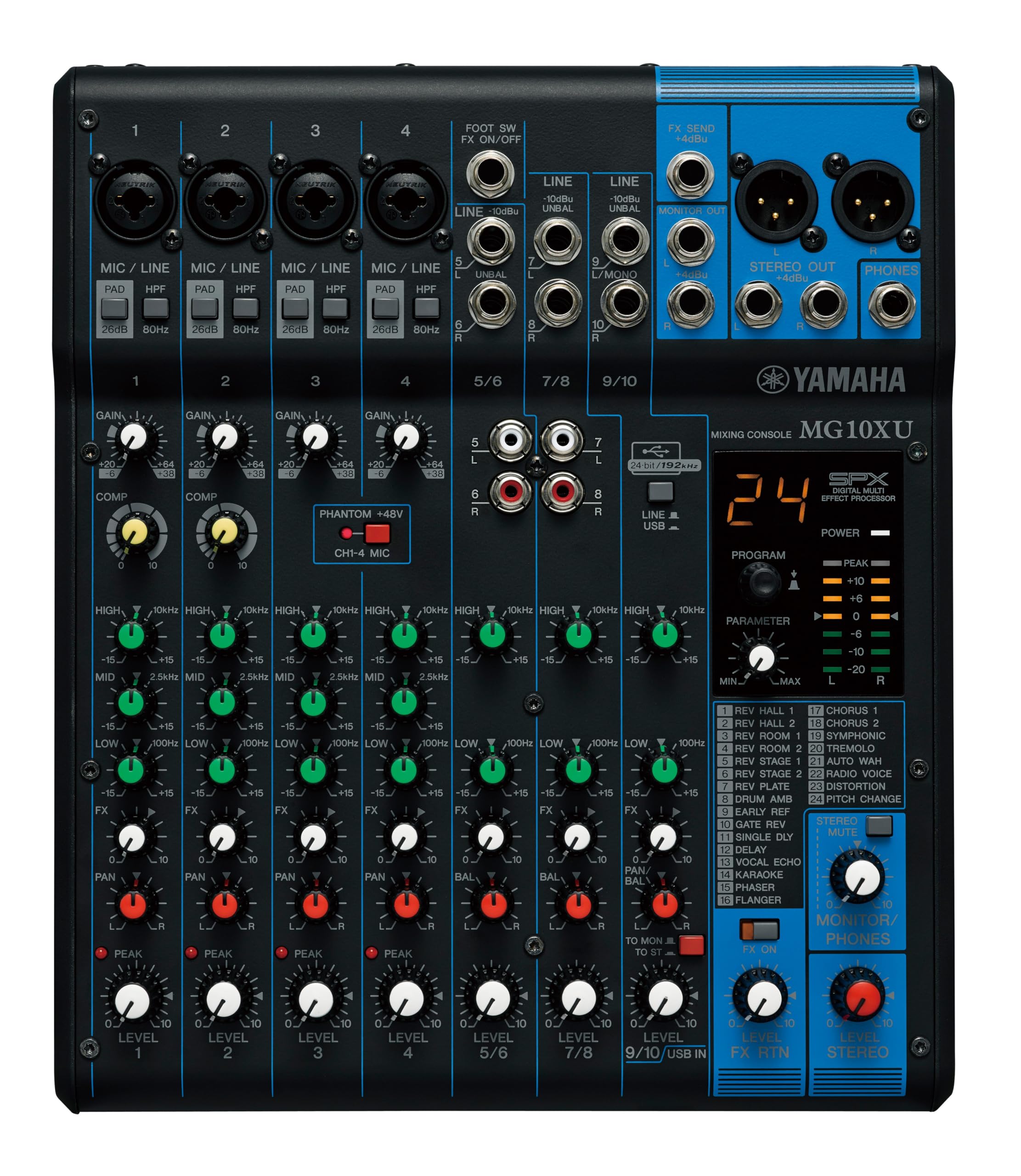
The Yamaha MG10XU isn't a podcast console and doesn't pretend to be one. It's a small live and studio board — 10 input channels, a powder-coated metal chassis, 7.7 pounds — that happens to do useful things for a show with instruments, several mics, or a need for real EQ under your fingers.

The preamps are why it earns a place. Yamaha's Class A D-PRE circuits sound clean and full, the one-knob compressors tighten a voice without a manual, and the three-band EQ with a high-pass filter lets you kill desk rumble and boxiness on the way in. The SPX effects are a genuine bonus rather than a checkbox: reverbs and delays you can dial per channel and change mid-sentence.

The USB port is the compromise. It's a stereo send, not multitrack, and its level runs low enough that the recording software often needs its input gain pushed hard. Feed the main outputs into a separate interface or recorder if you want clean multitrack, and use USB when you just need the mix inside a call or a stream.

Where it wins in this set is the music-heavy show: two hosts, a guitar, a keyboard, and a guest on a wireless mic, all mixed with faders and EQ and sent out as one clean stereo feed. For a four-mic spoken-word podcast with per-person tracks, the PodTrak P4 does the job with less fuss.

Pros

  • Clean Class A D-PRE preamps
  • One-knob compressors and three-band EQ
  • SPX digital effects per channel
  • Rugged powder-coated metal chassis

Cons

  • USB output is a low-level stereo mix
Our verdict

A real mixing desk for a music-heavy show: clean Yamaha preamps, EQ and compression per channel, and a metal case that travels.

Check Latest Price
6

Best Budget Podcast Console

MAONO AME2

85 /100
Keeper Score Excellent

Key details

Channels
10
Mic Input
XLR, 48V phantom power
Sound Pads
11 customizable
Connectivity
Bluetooth, USB-C, 6.35mm
Check Price on Amazon

Eleven sound pads is a strange place to start a review, but it's where the MAONO AME2 earns its keep: intro stings, ad reads, a laugh track for the comedy show, all triggered from the desk without touching a laptop. Three of those pads can record, so you can capture a bit live and fire it back later in the same session.

The rest of the console is more capable than the money suggests. The XLR input carries 48V phantom power and a three-level gain switch, which makes it easier to match a hot dynamic mic or a sensitive condenser; there's a 6.35mm input for a guitar, Bluetooth for a phone, and six reverb modes plus 12-step auto-tune if your show wants that sort of thing. Ten channels of control sit flat on a desk and stay out of the way.

The level controls are the daily annoyance: gain comes in three big steps rather than a smooth sweep, so pulling a quiet speaker above the noise takes some juggling. As a first console for a solo show or a duo that wants pads and effects while spending carefully, it still covers more ground than anything else here at the price.

Pros

  • Eleven customizable sound pads
  • XLR input with 48V phantom power
  • Guitar input and Bluetooth playback
  • Six reverb modes and auto-tune

Cons

  • Long-term reliability is the question mark
  • Three-step gain makes fine levels fiddly
Our verdict

Pads, phantom power, and Bluetooth on a small budget — a genuinely useful first console, provided you buy it where returns are easy.

Check Latest Price
7

Budget Analog Setups

Behringer XENYX 802S

89 /100
Keeper Score Excellent

Key details

USB
Stereo interface
Channels
8
Mic Inputs
2 XLR
Equalization
Analog EQ per channel
Check Price on Amazon

Eight inputs, two XLR microphone channels, and a stereo USB connection: the Behringer XENYX 802S is the cheapest way into a real analog front end in this set. The board is small, the controls are ordinary knobs and faders, and there's nothing to configure — plug in, set gain, go.

We like it best as the mixer for a two-person show that already has an interface or a recorder, or as a submixer adding clean inputs to a bigger rig. The honest limit is the microphone count — two XLR channels means two voices, full stop — and the USB carries a stereo mix rather than separate tracks, so plan your editing around that. It also arrives without a USB cable in some boxes, so check before your first session.

Pros

  • Two XLR inputs on a quiet analog path
  • Stereo USB connection to a computer
  • Simple knob-and-fader layout

Cons

  • Two XLR inputs cap the show at two voices
  • USB carries a stereo mix, not separate tracks
Our verdict

The budget answer for a two-voice show: two clean XLR channels, a stereo USB path, and nothing to configure.

Check Latest Price
8

Two-Mic Streams

FIFINE SC8

84 /100
Keeper Score Excellent

Key details

Audio
Virtual 7.1 surround
Inputs
USB-C, optical, 3.5mm aux
Channels
5
Mic Input
XLR, 48V phantom power
Check Price on Amazon

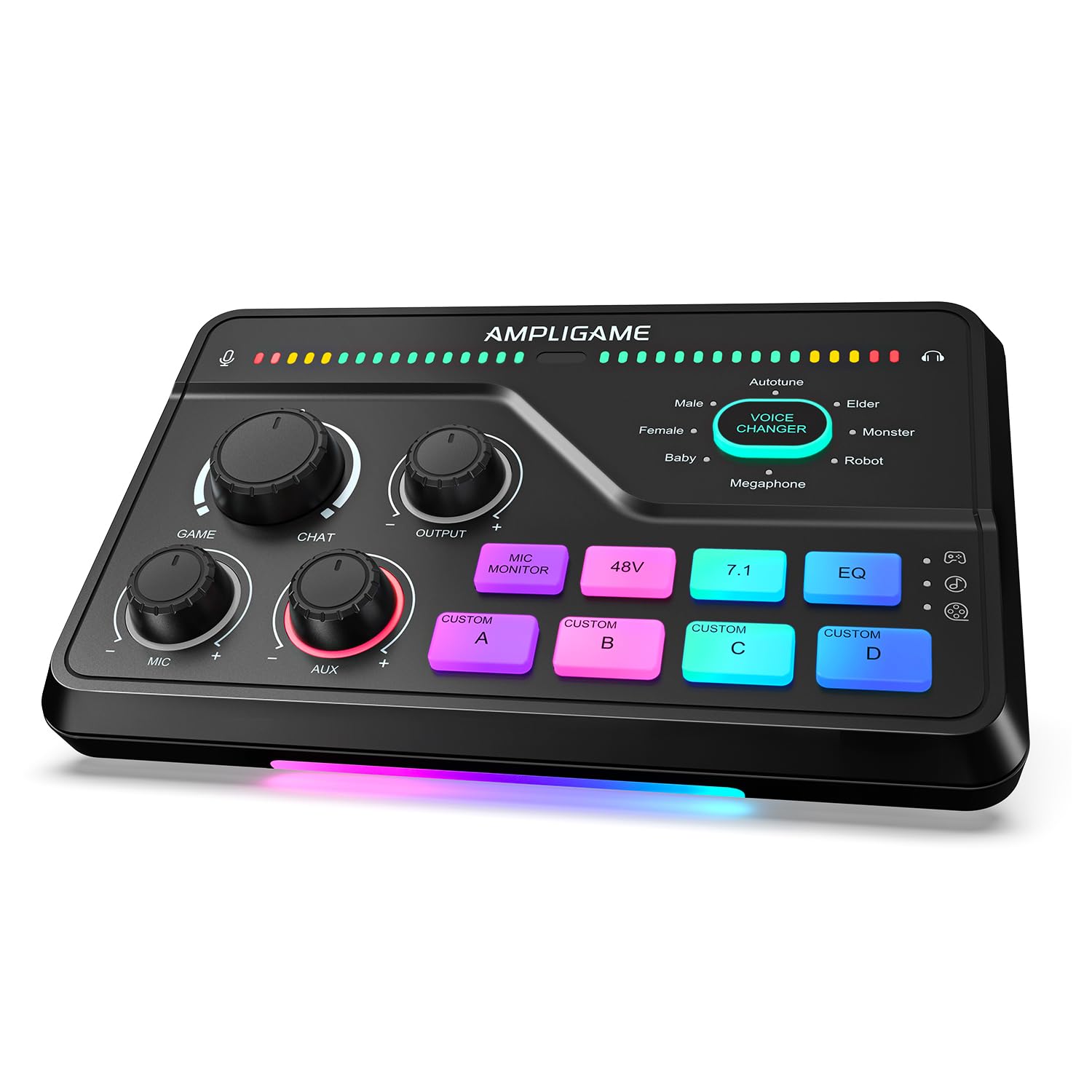
The FIFINE SC8 comes from the streaming side of the desk: RGB lighting, a voice changer, and a dial built for balancing game audio against chat. Underneath the gamer trim it's a five-channel USB mixer with an XLR input, which is enough to run a two-person podcast if you don't need anything fancier.

What it does unusually well is routing. There's optical input for a console or a TV, a 3.5mm aux for a phone or a second computer, and USB-C to the machine you're recording on, plus a dedicated game/chat knob that rides two sources against each other without a software mixer. Three EQ modes and virtual 7.1 are aimed at footsteps rather than voices, but the EQ is handy for warming up a thin mic.

For podcast work, the 48V XLR port handles a condenser and the two combo inputs let you run a host and a guest, or a mic and a guitar. The four custom buttons cover the same ground as a small soundboard, and the whole thing is plug-and-play out of the box.

The catch is the computer you plug it into. It's happiest on Windows; Mac users have had a rougher time, and console compatibility is hit or miss. None of that matters on a Windows desk with two mics — it's the least fussy way into that setup here — but if you record on a Mac, spend a little more on the 802S or the PodTrak P4 instead.

Pros

  • XLR input with 48V phantom power
  • Game/chat dial balances two sources
  • Optical, aux, and USB-C inputs
  • Four programmable sound buttons

Cons

  • Mac compatibility is unreliable
Our verdict

A cheap, capable two-mic mixer for a Windows desk, with routing that bigger podcast boards don't offer.

Check Latest Price

How We Tested Podcast Mixers

The shortlist started with specs rather than reputation: XLR input count, headphone outputs, whether the unit doubles as a USB audio interface, whether it runs on batteries, and whether it can route a separate mix to a remote guest. That filtered a crowded field down to eight mixers, which we ran for six months.

Every unit went through the same three sessions — a two-host show recorded at a kitchen table, a solo voiceover in a blanket-lined closet, and a remote interview with a guest joining over a phone or USB connection. For sound quality, we recorded the same dynamic mic at matched gain on each box and listened back for hiss, hum, and how much clean gain we had before the noise floor crept in.

Setup got a stopwatch: unboxing to first usable recording, then the time it took to start a second session, because mixers that made us rebuild routing every time lost ground fast. We judged controls with our hands full of script, reaching for mute and level mid-sentence, tapping sound pads to see whether a jingle fired instantly or a beat late, and noting how solid the faders felt under a thumb. Power and battery life came from running each battery-capable unit through a full taping on cells to see whether it finished the session or dimmed out halfway.

Connectivity was the messy part: phone, computer, Bluetooth, and optical patched in at once, then a long listen for echo loops and dropouts. We kept running notes on freezes, firmware quirks, and anything that needed a reboot mid-record, and weighed all of it against what each unit costs — counting only the features we actually used. The favorites are still set up in our recording room.

How to Choose a Podcast Mixer

Count Microphones, Not Channels

A ten-channel mixer might have four microphone preamps, and an eight-input board might have two. Channels count stereo pairs as a single fader, which is why the numbers look generous and the reality often doesn't. Write down how many XLR microphones will be live at once — two hosts, a guest, a fourth chair for the occasional panel — and buy against that figure. The Behringer XENYX 802S has eight inputs but stops at two voices, which is fine only if two is genuinely your show.

Decide Where the Recording Lives

There are three paths and they behave differently. Record multitrack on the mixer to an SD card and the computer becomes optional. Send separate channels over USB and every voice lands on its own track in your editing software. Mix down to stereo and you're committed to whatever balance you had at the time.

The middle option is where buyers get caught: the USB port on an analog board usually carries a stereo mix, not a channel-per-mic feed. If per-voice editing matters, check the USB channel count before you buy rather than after.

Monitoring and Remote Guests

Count headphones as carefully as microphones. A shared headphone amp means shared volume, and a host who can't hear themselves leans into the mic. Individual outputs with their own knobs, like the four on the PodTrak P4, are the cheap fix; separate monitor mixes, as on the LiveTrak L-8, are the better one for a band. For remote callers, look for mix-minus, which sends the guest the show without their own voice coming back. If the mixer can't do it, your call software has to.

How Much Menu Do You Want?

Processing is sold as a feature and paid for in attention. One-tap presets, like the APHEX voices on the RØDECaster units, let a host who isn't an engineer sound finished. A strip of knobs and faders, like the Yamaha's, gives more control but assumes you know what each one does. Be honest about who runs the show. If the answer is the host, mid-sentence, favor hardware controls and presets over anything three menus deep, and expect a learning session before the first recording either way.

Power, Footprint, and the Desk

Mixers fail at the boring parts: no outlet near the table, no space beside the laptop, one more cable that wasn't in the box. Battery power earns its keep for field recording and badly wired venues, but phantom power drains cells quickly, so plan on USB or mains at the desk. Check depth before you commit — the RØDECaster Duo is 9.25 inches, the Pro II is 12 — and remember that a console with faders wants a flat surface, not a shelf above the keyboard.

Frequently Asked Questions

Final Verdict

The Zoom PodTrak P4 is the mixer most podcasters should buy. Four XLR inputs, four independent headphone outs, sound pads, and multitrack recording to a card cover a two-to-four-person show without dragging a computer into the room, and automatic mix-minus keeps remote guests from echoing back.

If the show is bigger, or the desk wants faders and processing, the LiveTrak L-8 and the RØDECaster Pro II earn the extra spend. On a tight budget, the XENYX 802S handles two voices and a USB stream without fuss.