Best Monitor Light Bars of 2026

A monitor light bar is a simple idea: a thin strip of LEDs that rests on top of your screen and throws light down onto the keyboard instead of into your eyes. Simple idea, fussy execution. A good one lights the desk without leaving a bright band across the top of the display, and the wrong one does exactly that while creeping forward every time you bump the desk.

I've had one clamped to my monitor for three years, and it's the only desk purchase I'd repeat without thinking. Over the past six months, my team and I tested 12 of them — plain USB-powered strips alongside models with wireless remotes, rear backlights, and motion sensors — on flat, curved, and ultrawide screens.

Here's what first-time buyers get backwards: the dimmest setting matters more than the brightest, since that's the one you'll use at 10 p.m. And the clamp matters as much as the light — a bar that sags or slides mid-typing ends up in a drawer. The picks below are the ones we kept plugging back in.

Keeper Score summarizes customer ratings and review volume. Read it alongside the product details and trade-offs. How the score works.

1

Best Overall

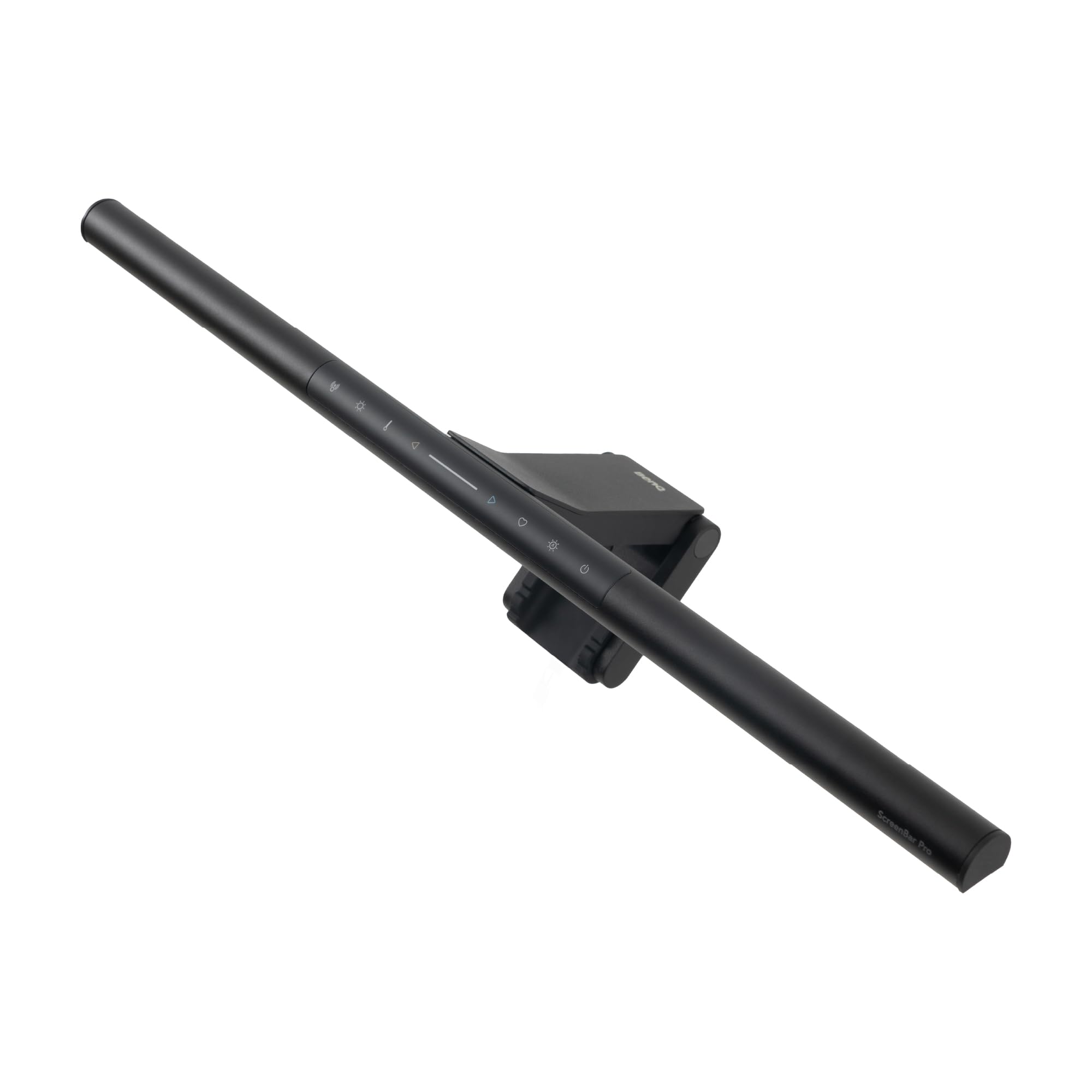
BenQ ScreenBar Pro

94 /100
Keeper Score Outstanding

Key details

Controls
On-bar touch, motion sensor
Monitor Fit
0.17-2.56 in thick, 1000-1800R
Desk Coverage
500 lx over 33 x 20 in
Center Brightness
1,000+ lx at center
Check Price on Amazon

Thirty-three by twenty inches is the number that decides this one. That's the desk area BenQ rates the ScreenBar Pro to light at 500 lux, with more than 1,000 lux at the center, and it's the widest coverage of any bar we're recommending here. On a desk holding two displays, or a display and a spread of paperwork, that's the difference between a bright keyboard and a genuinely lit work surface.

The clamp is the other half of the argument. It's rated for monitors from 0.17 to 2.56 inches thick and for curves between 1000R and 1800R, and it's shaped to hang on backs that slope or step in rather than sitting flat against them. That's the broadest fit in this group, and it's why this is the bar to hand someone with a thick gaming panel or a thin-bezel ultrawide without a follow-up question.

The ultrasonic sensor turned out to be the feature we used most: it picks up movement in a circle about four feet across, switches the light on as you sit down, and shuts it off five minutes after you leave. Auto mode has one quirk — brightness adjusts, but the color temperature holds at a neutral white — so if you want a warmer cast in the evening you step out of auto and set it yourself. The controls along the top of the bar make that a two-second job.

It draws 5 watts over USB-C, and BenQ includes an adapter as well as the cable. Use the adapter if your monitor's USB port powers down with the display, because a bar that dies every time your screen sleeps is a bar you eventually stop switching on.

Pros

  • Widest desk coverage in this group
  • Clamp fits thick panels and 1000R-1800R curves
  • Motion sensor lights the desk as you sit
  • Controls sit on the bar, not a remote

Cons

  • Front light only, no rear bias light
Our verdict

If your desk is where you spend your day, this is the one we tell you to buy: the widest coverage here and the clamp that fits the most monitors.

Check Latest Price
2

Best Value

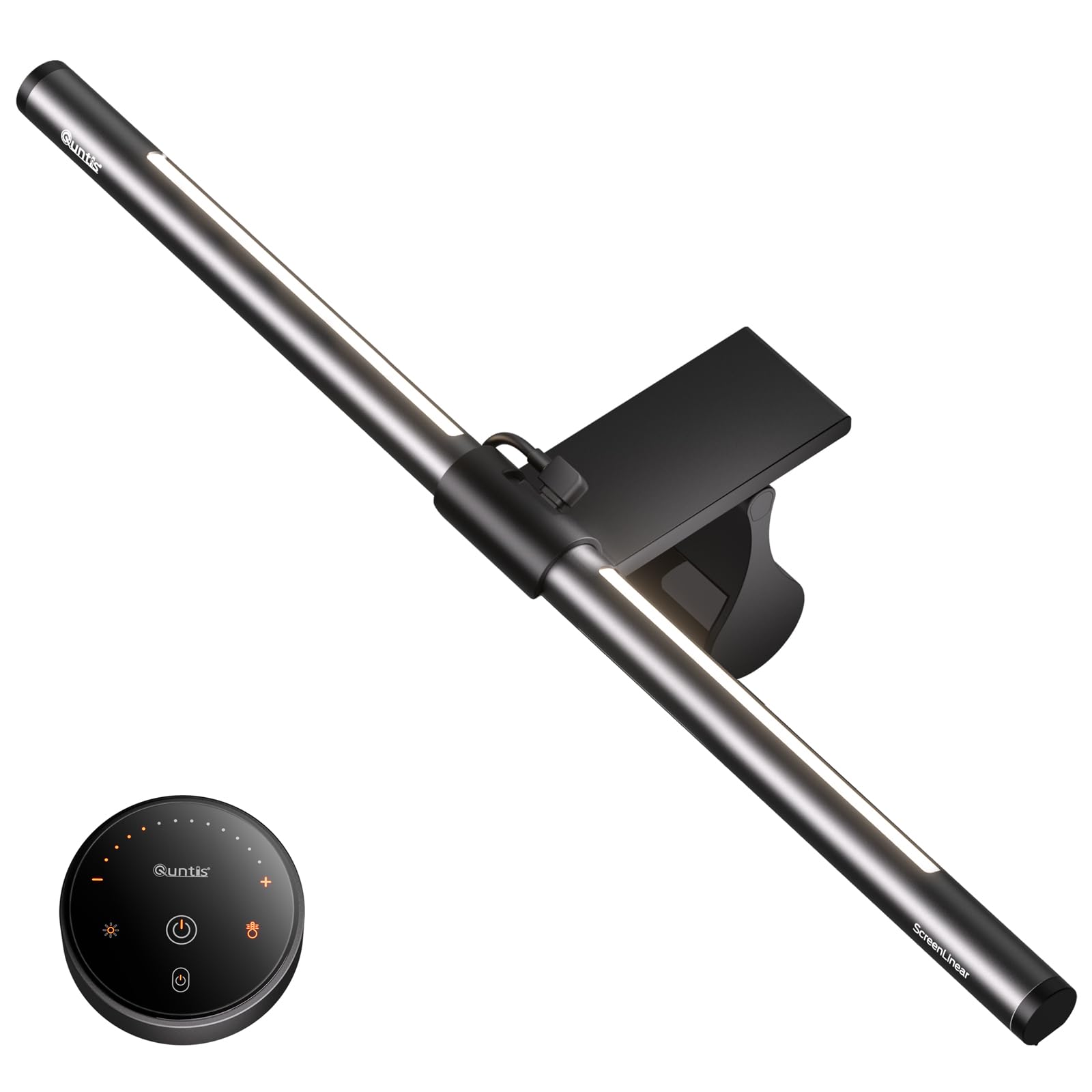
Quntis ScreenLinear Pro

93 /100
Keeper Score Outstanding

Key details

Width
15.7 in
Controls
Touch on the bar
Auto Dimming
Adjusts to 900 lux
Light Source
78 LEDs, Ra98
Check Price on Amazon

Watch it through an afternoon and the useful part is what you don't do. The ambient sensor reads the room and holds the desk at roughly 900 lux, so the light fades down as the sun goes and comes back up when you kill the overheads. Automatic dimming is usually the line between a cheap bar and a serious one, and this Quntis sits on the right side of it.

The light itself is better than the money suggests. Seventy-eight LEDs behind an asymmetric lens, a color rendering index of Ra98, and flicker-free output certified to the IEC blue-light standards — printed pages look white rather than green, and the beam lands on the keyboard instead of washing the panel. We noticed the color first, before we noticed anything else about the light. For a bar just under three-quarters of an inch deep, it covers a single-monitor desk comfortably.

The clip is where the budget shows. It's a weighted bracket that hangs over the top edge, and how steady it feels depends entirely on what that edge looks like: flat and slim, it stays put; thick, tapered or curved, it can shift when you knock it, and a bar that leans forward throws light at the screen. Check the thickness and shape of your monitor's top before ordering.

What you give up against the BenQ ScreenBar Pro is coverage and reach — a 15.7-inch bar, a narrower clamp range, no motion sensor — and with no remote, every adjustment is a reach to the touch panel. What you keep is automatic dimming and color quality, which is most of what you notice day to day.

Pros

  • Ambient sensor dims to about 900 lux automatically
  • Ra98 color rendering at a budget price
  • Flicker-free, certified low blue-light output
  • Slim 0.78-inch body sits close to the panel

Cons

  • No remote; adjustments mean reaching for the bar
Our verdict

We recommend it to anyone who wants automatic dimming and honest color without paying much — it covers a single-monitor desk well.

Check Latest Price
3

Best for Bias Lighting

BenQ ScreenBar Halo 2

93 /100
Keeper Score Outstanding

Key details

Controls
Wireless dial with display
Lighting
Front, rear or both
Monitor Fit
0.17-2.36 in thick, 1000-1800R
Color Temperature
2700-6500K stepless
Check Price on Amazon

There are no buttons on the Halo 2 at all. Brightness, color temperature, the front light and the rear light all run through a wireless dial that sits on the desk and shows the value you've landed on. We liked having the readout in front of us, and we found the dial can overshoot when you're nudging brightness by a single step — the sort of thing you learn in a week and then stop noticing.

The rear light is the reason this bar exists. It washes the wall behind the monitor, which cuts the contrast between a bright screen and a dark room, and that contrast is what makes late-night work feel like staring into a headlight. Front, rear or both, each adjusted separately, with 2700K to 6500K of stepless color temperature and no glare thrown forward onto the panel.

As a front light it's excellent without being bigger than the ScreenBar Pro: the same 0.17 to 2.36 inches of monitor thickness, the same 1000R to 1800R curve range, a motion sensor included, and an aluminum body that feels like the price. It's the better choice over the Pro when the room is dark while you work and you want the wall lit, not when you simply want the brightest desk.

BenQ also includes a webcam accessory so a camera can ride on top of the bar instead of fighting it for the same strip of bezel — a small inclusion that matters when your day is a stack of video calls.

Pros

  • Adjustable rear light cuts screen-to-room contrast
  • Wireless dial with a brightness readout
  • Wide 2700-6500K stepless color range
  • Webcam accessory included

Cons

  • Costliest bar in this set
Our verdict

Buy it when you work in a dark room: the rear light and the wireless dial are what the money buys, and nothing else here does both.

Check Latest Price
4

Best Midrange Pick

Quntis Light Bar with Remote

91 /100
Keeper Score Outstanding

Key details

Width
15.7 in
Dimming
Stepless, remote control
Lighting
Front and rear, 84 LEDs
Monitor Fit
0.16-2.36 in thick, curved
Check Price on Amazon

Take the rear-light idea from the Halo 2, put it on a midrange budget, and you have this Quntis. Two light sources — 84 LEDs across the front and a softer glow behind — three modes, stepless dimming and a wireless remote, for a good deal less than the BenQ. We think that's the right trade for a desk where the room lights stay off in the evening.

The clamp is the clever bit. It's a sliding counterweight that extends to grip thin bezels and curved tops, rated for monitors 0.16 to 2.36 inches thick, which is exactly the fit problem that sends most people back to a desk lamp. Set it once and it hangs without the forward lean you get from a fixed bracket.

Light quality is good rather than exceptional: color rendering is rated at 95, the front beam is soft-edged but even, and the rear glow is enough to register against a dark wall without turning into a feature of its own. The memory function restores your last setting on power-up, which sounds minor until you've re-dialed the same brightness every morning for a month.

The frame is aluminum rather than plastic, which you notice in the hand, and 7.5 watts over USB is modest enough to run from a monitor port — though as with any of these, a wall adapter keeps the light alive when the display sleeps.

Pros

  • Front and rear lighting at midrange money
  • Sliding counterweight grips thin and curved bezels
  • Stepless brightness and color from a wireless remote
  • Memory restores your last setting at power-up

Cons

  • Remote is the only control; no buttons on the bar
Our verdict

Front light, rear light and a remote for midrange money; it suits a shared desk where the overheads stay off at night.

Check Latest Price
5

Best for Curved Monitors

ONWAY Curved Light Bar

89 /100
Keeper Score Excellent

Key details

Extras
Webcam mount, 10 RGB modes
Curved Fit
1000R-1800R, 27-34 in
Light Source
88 LEDs, Ra95
Color Temperature
3000-6500K stepless
Check Price on Amazon

A light bar is essentially a plank balanced on the top edge of a monitor, and a curved panel turns that edge into a slope. ONWAY's answer is a flexible clip rated for 1000R and 1800R curves on 27- to 34-inch screens, including irregular shapes and very thin bezels. There's a camera base built into the top as well, which matters once the bar has claimed the one strip a webcam normally sits on.

That makes it our pick for curved gaming setups, and the light holds up its end: 88 LEDs behind a 45-degree asymmetric lens, Ra95 color rendering, stepless adjustment from 3000K to 6500K, and automatic brightness that tracks the room. We like the small four-button touch remote too — it's flat, it's wireless, and it saves reaching over the screen to change anything.

Ten RGB backlight modes are the headline for a certain buyer and the honest caveat for everyone else: they wash the wall in color, they look good at night, and they do nothing for reading a document, so treat them as decoration rather than a reason to buy. Auto-dimming, a 1.8-meter USB-C cable in the box and a memory that holds your last setting are the parts that earn their keep. It's a gaming-desk product that happens to light work well, rather than the reverse.

Pros

  • Rated for 1000R and 1800R curved panels
  • Built-in camera base for a webcam
  • Stepless 3000-6500K with auto-dimming
  • Wireless four-button touch remote

Cons

  • Plastic body next to aluminum rivals
  • Built around 27-34 inch curved screens
Our verdict

Curved panels are exactly what this bar is built for — 1000R and 1800R, 27 to 34 inches — and the camera base solves the webcam squeeze.

Check Latest Price

How We Tested Monitor Light Bars at Our Own Desks

We started by pulling specs on more than 40 bars and cut anything that skipped adjustable color temperature, only fit panels under an inch thick, or needed a power source we couldn't recreate at home. That left 12, running from basic USB strips to premium models with wireless controllers and rear backlights. We mounted them on the three monitors we actually work at: a 27-inch flat panel, a 34-inch ultrawide, and a curved gaming screen.

Most of the testing happened after dark, which is when these earn their keep. Each night we dropped every bar to its lowest setting and looked for the two failure modes that matter — a bright hotspot where the LEDs sit against the screen, and a beam strong enough to wash out the top inch of the display. We slid printed pages and keyboards underneath to see whether the bottom rows fell into shadow, then walked brightness and color temperature up and down through every step to check for jumps and flicker.

Mounting got its own round. We clamped each bar to a thin bezel, a thick one, and the curved screen, noting which ones needed two hands or a counterweight to sit level. Then we bumped the desk on purpose, typed hard, and raised and lowered the monitors on their arms to see what slipped. Over six months we watched how they aged — hinges going soft, dust on the diffuser, cables sagging across the desk instead of tucking behind the monitor — and whether the remote or motion sensor on the pricier ones was worth the extra spend over a plain touch bar.

How to Choose a Monitor Light Bar

Look at coverage, not wattage

Two numbers describe what a bar actually does: how bright it gets, and over how much desk. A bar rated at 1,000 lux into a narrow pool can put less usable light on your paperwork than one rated at 500 lux across 33 by 20 inches, which is roughly a wide monitor plus the space in front of it.

Wattage tells you almost nothing — the bars here that publish it draw 5 to 7.5 watts. Compare brightness and coverage together, and be wary of a listing that quotes only one of them.

Measure the top edge of your monitor

Clamps are not universal. Depending on the model, the bars here take anything from 0.16 to 2.56 inches of monitor thickness, and some stop well short of that, so a thick gaming panel or a monitor with a bulging back can rule a bar out entirely.

Curved screens need a curvature rating as well: 1000R is a tighter curve than 1800R, and a bar rated for neither will lean forward and throw light at the panel. Run a ruler over the top edge and check the curve spec before you order — it's the one detail you can't adjust after the box arrives.

Decide where the controls live

There are three arrangements here: touch buttons on the bar, a wireless remote, and a dial with a display. On-bar controls are fine if the bar sits within reach and you set the light once. A remote or dial earns its money when the bar is above eye level, when you want the light off without leaning across the desk, or when you adjust it several times a day.

Auto-dimming is the other control decision. It's genuinely useful, but on some bars it also locks the color temperature, so check that manual control is quick before you rely on it. And note where the bar gets power: a monitor's USB port shuts off with the display, while a wall adapter keeps the light independent.

Weigh a rear light against a dark room

Front light is the job; rear light is comfort. A glow on the wall behind the monitor lowers the contrast between a bright screen and a dark room, which is what makes late-night sessions feel like staring into a headlight.

If you work in daylight or with the overheads on, a rear light is decoration and you can skip it. If the room is dark when you work, it's worth real money. Just don't confuse it with RGB backlighting, which is atmosphere rather than eye comfort.

Frequently Asked Questions

Final Verdict

Most people should buy the BenQ ScreenBar Pro. It lights the widest desk in this group, its clamp covers the thicknesses and curves that trip the others up, and the motion sensor means the light is simply on when you sit down.

If budget decides, the Quntis ScreenLinear Pro keeps automatic dimming and excellent color for far less, as long as your monitor's top edge is flat enough for its clip. And if your screen is curved, order the ONWAY.