Best Vertical Mice of 2026

The first week with a vertical mouse feels like a mistake. Your hand sits at an angle it isn't used to, your aim goes sideways, and you keep reaching for a mouse that isn't there. Then around day ten, the ache that used to arrive by mid-afternoon doesn't, because tilting your hand toward a handshake position untwists the forearm. That's the switch I never undid.

The decisions that actually matter here mostly aren't on the box. Anywhere from about 50 to 60 degrees of tilt works for a full day, and the sensor numbers run far past what spreadsheets and browser tabs need. What separates the good ones is duller stuff: a grip that stays put when your hands warm up, thumb buttons you can hit without shifting your palm, and multi-device pairing that switches cleanly. We've had 14 vertical mice on our desks for three months, and the pattern held.

Battery life, quiet clicks, and a sensible price ended up mattering more than I expected — fewer cables, fewer complaints on calls, less second-guessing. The picks below are the ones we kept reaching for after testing ended.

Keeper Score summarizes customer ratings and review volume. Read it alongside the product details and trade-offs. How the score works.

1

Best Overall

TECKNET Ergonomic Mouse

89 /100
Keeper Score Excellent

Key details

Battery
2 AAA, up to 24 months
Warranty
3 years
DPI Range
800/1200/1600/2400/3200/4800
Connection
Bluetooth 5.0/3.0 and 2.4 GHz USB-A
Check Price on Amazon

The TECKNET TK-MS007 is the vertical mouse we recommend first to most people because it gets the arithmetic of everyday use right: three devices, six DPI steps up to 4,800, and a claimed 24 months from two AAA batteries. That battery figure is the one that matters on a busy desk; you can stop thinking about charging for a long stretch. At 4.32 ounces, the body moves easily without feeling flimsy, and the three-year warranty is the longest in this group. That matters on a part you click thousands of times a day.

The shape is a near-vertical handshake, not a full 90-degree grip, so the transition from a flat mouse is less jarring. The six buttons cover the basics, and the DPI button on top lets you jump between slow precision and faster navigation without opening software. We appreciated that the layout stays simple: no software maze, no charging cable, no extra app to manage. For a workday mix of documents, browser tabs, and spreadsheets, that simplicity is the point.

The TECKNET is not the most sculpted mouse here. The ProtoArc has a more deliberate small-hand shape, and the Razer feels more substantial. But it is the one we reach for when we want a vertical mouse to disappear into a desk setup. If you mainly browse, write, and switch between a work laptop and a home desktop, this is the sensible default.

Pros

  • Three-device switching at a budget price
  • Up to 24 months on two AAA batteries
  • 4,800 DPI with six presets
  • Three-year warranty

Cons

  • Scroll wheel can loosen over time
Our verdict

For most people making the switch, the TECKNET is the vertical mouse we recommend first: it handles three devices, long battery life, and a three-year warranty without asking for a premium spend.

Check Latest Price
2

Best for Smaller Hands

ProtoArc EM11 NL

89 /100
Keeper Score Excellent

Key details

DPI
2400 DPI
Battery
500 mAh USB-C rechargeable
Hand Fit
Under 7.5 in hand length
Connection
Dual Bluetooth and 2.4 GHz USB-A
Check Price on Amazon

The EM11 NL starts with a measurement: it is built for hand lengths under 7.5 inches. That sounds like a narrow brief, but it is exactly why the mouse feels secure in a smaller hand. The 58-degree body fills the palm without forcing the wrist into a full handshake, and the thumb rest gives you a place to park rather than grip. We noticed the difference most when moving between a laptop and a desktop: the shape stays stable, and the three-device pairing is quick.

Charging is by USB-C, and the 500 mAh cell is a welcome change from hunting for AA batteries. The seven buttons cover forward and back plus DPI, but they are not programmable, so don't buy this for macro work. The soft finish can also feel slippery if your hands are dry; a textured pad helps.

What makes it a runner-up rather than the top pick is the fit limit: large hands will feel under-supported, and the top pick's three-year warranty is longer. For a small-handed right-hander who wants USB-C charging and three devices without a large body, the EM11 NL is the better match.

Pros

  • Built for hands under 7.5 inches
  • Three devices via Bluetooth and 2.4G
  • USB-C rechargeable
  • Two-year warranty

Cons

  • Heavy at 250 g
Our verdict

If your hand measures under 7.5 inches, the EM11 NL is the vertical mouse we point to first: it switches across three devices and charges over USB-C without making you adapt to a large body.

Check Latest Price
3

Best Premium

Razer Pro Click V2 Vertical

81 /100
Keeper Score Excellent

Key details

DPI
30,000 DPI
Battery
Up to 6 months
Buttons
6
Connection
2.4 GHz, Bluetooth (3 hosts), USB-C wired
Check Price on Amazon

The Pro Click V2 Vertical is the one for a desk with too many screens. It connects over 2.4 GHz, Bluetooth with three hosts, or USB-C wired, so you can move between a desktop, laptop, tablet, and two other devices with a button press. The 30,000 DPI sensor is overkill for spreadsheets, but it gives creative and gaming work plenty of headroom, and the six-button layout includes Razer's AI prompt shortcut for anyone who works in Synapse.

Build quality is the other reason it costs more. The body feels solid, the clicks are crisp, and the RGB underglow is a fun desk detail rather than a gimmick. The base support keeps the mouse planted when you lift your hand, and the six buttons are easy to reach once you settle into the grip. Battery life is rated at up to six months, and USB-C tops it up when you need to.

If you want one premium mouse for a multi-device creative desk, this is the pick. If you mainly write and browse, the TECKNET does the same everyday job with a longer warranty and a simpler setup. The Razer earns its premium only when the extra devices, higher sensor ceiling, and lighting are part of your daily work.

Pros

  • Switches among five devices
  • 30,000 DPI sensor
  • Solid build and RGB underglow
  • Up to six months of battery

Cons

  • Heavy at 0.41 kg
  • Busy thumb cluster won't suit every grip
Our verdict

The Pro Click V2 Vertical is for the buyer who wants one premium mouse across a whole desk of devices and does not mind a heavier body to get it.

Check Latest Price
4

Best for Left-Handed

Logitech Lift Left

87 /100
Keeper Score Excellent

Key details

DPI
4000 DPI
Battery
1 AA, up to 24 months
Hand Fit
Small to medium left hands
Connection
Bluetooth and Logi Bolt USB-A
Check Price on Amazon

Left-handed vertical mice are still a short list, and the Lift is the one we can point to without asking you to relearn a right-handed body. The 57-degree shape, textured grip, and thumb rest are mirrored for the left hand, so the wrist lands in the same neutral position as the right-handed version. The quiet clicks are a genuine advantage in a shared office or a room where someone else is sleeping.

The Lift is built for small-to-medium left hands, and a larger hand will feel short on the body. The buttons are light and responsive, and the Logitech software lets you reassign the two side buttons. Battery life is rated at up to 24 months on one AA, and Bluetooth plus the Logi Bolt receiver makes pairing straightforward.

Compared with the TECKNET, the Lift gives up DPI range and a third device slot, but it earns its place for left-handed buyers who want a quieter, more sculpted mouse. It is also the one left-handed pick here that does not feel like a compromise on the shape itself.

Pros

  • True left-handed vertical shape
  • Quiet clicks
  • Bluetooth and Logi Bolt
  • Up to 24 months on one AA

Cons

  • Light buttons can trigger accidental clicks
  • One-year warranty trails the budget pick
Our verdict

For left-handed desk workers with small-to-medium hands, the Lift is the obvious starting point: it mirrors the shape properly and stays quiet in shared rooms.

Check Latest Price
5

Budget First-Timers

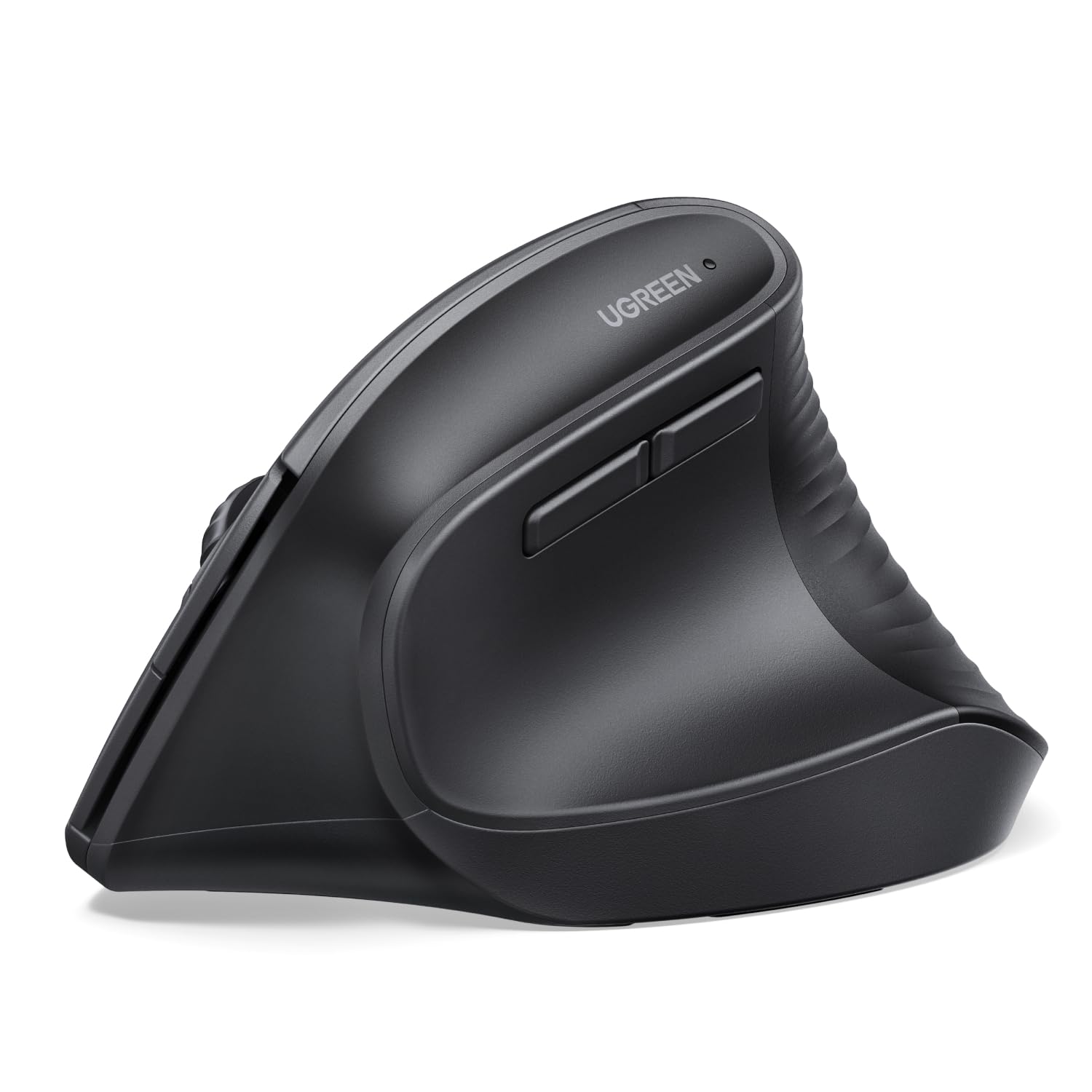
UGREEN Ergonomic Wireless Mouse

88 /100
Keeper Score Excellent

Key details

DPI
1000/1600/2000/4000
Battery
1 AA
Buttons
5
Connection
Bluetooth and 2.4 GHz USB-A
Check Price on Amazon

The UGREEN is the cheapest way into a vertical shape that still covers the basics. It has a natural handshake angle, 4,000 DPI across four steps, silent clicks, and three-device switching over Bluetooth or the 2.4 GHz receiver. At 170 g it is light enough to move with your fingertips, and the PTFE feet glide smoothly on a desk mat. For a first vertical mouse or a second one for a laptop bag, that combination is hard to argue with.

The body is compact and the light weight makes it easy to push around a small desk. The silent clicks are quiet enough for a shared room, and the three-device switching is genuinely useful if you move between a work laptop and a personal desktop. For a budget mouse, the 4,000 DPI sensor is more than enough for documents and browsing.

It runs on one AA battery rather than a built-in cell, which is one less cable to pack but one more thing to keep on hand. For light work, travel, and a backup desk mouse, the UGREEN earns its place as the budget alternative. Just don't expect the same sculpted fit as the top pick.

Pros

  • Three-device Bluetooth and 2.4G
  • 4,000 DPI with silent clicks
  • Light 170 g body
  • Lowest-cost entry here

Cons

  • Durability feedback includes early failures
  • Compact body won't suit large hands
Our verdict

The UGREEN is the low-risk way to try a vertical mouse if you mainly want the shape and multi-device pairing on a tight budget, provided you keep the warranty in mind.

Check Latest Price

How We Chose and Tested Vertical Mice

We started with every vertical mouse we could find from brands we've had good luck with, then cut the list by reading spec sheets and customer reviews for the things that actually fail: flaking rubber coatings, scroll wheels that skip, receivers that need re-pairing. That left 14 mice in the mid-range, spanning right- and left-handed shapes, battery-powered and rechargeable models, and a mix of Bluetooth and dongle connections. Each one got three months of real use — full workdays of spreadsheets and email, evening photo editing, and weekend laptop sessions on the couch.

Wrist comfort was judged by the hour rather than the spec sheet. We noted where our palm and forearm landed after an hour of writing, whether the wrist stayed bent to reach the buttons, and whether fingers slid on the side grip once the afternoon got warm. For button responsiveness, we mapped every button to a real task and then reached for the thumb buttons mid-sentence without adjusting our grip. Smoothness came from tracing slow circles in a drawing app and clicking small targets in photos, where a jumpy sensor gives itself away.

Connectivity meant pairing each mouse to a work laptop, a personal desktop, and a tablet, then switching all day while logging dropouts, wake-up lag, and how many tries a re-pair took. Battery life was tracked from a full charge to the first low-battery warning, along with whether a mouse takes AA batteries or charges over USB-C. After three months we went back through for reliability — double-clicks that fired on their own, scroll wheels that skipped a line, coatings gone shiny — and weighed what each one came with against the rest of the field.

How to Choose a Vertical Mouse

Start With Hand Size

A 57- or 58-degree body is not a universal fit. It changes the forearm position, but the length and palm height still have to match your hand. The ProtoArc EM11 NL is explicit about its limit: it is built for hand lengths under 7.5 inches. The Logitech Lift is likewise aimed at small-to-medium hands. Measure from the crease at your wrist to the tip of your middle finger before you choose, and treat a larger body as a separate purchase decision rather than a safer default.

Treat Clicks as a Wear Part

The switch under the left button takes more abuse than any other part of a mouse, and vertical models are no exception. When a mouse starts missing clicks or registering doubles, the ergonomic shape cannot make up for it. Look for a simple button layout and a warranty that covers the way you actually use the mouse. The TECKNET's three-year coverage is the longest here; the Razer runs two years, and the UGREEN one. If you click all day, that support matters more than an extra DPI step.

Count Your Devices Before You Choose Connectivity

Bluetooth is convenient for a laptop, while a 2.4 GHz receiver is the steadier choice for a desktop. Multi-device switching is where the useful differences sit. The TECKNET and ProtoArc each pair with three devices, the Logitech Lift covers two through Bluetooth and Logi Bolt, and the Razer can move among five. If you only use one computer, a simpler two-device mouse is fine. If you regularly jump between a work laptop, a home desktop, and a tablet, buy for the switching first.

Choose Battery Chemistry to Match Your Habits

AA and AAA batteries are the low-maintenance route: the TECKNET and Lift are rated for up to 24 months, and the UGREEN runs on one AA. A built-in cell is tidier: the ProtoArc charges over USB-C, while the Razer is rated for up to six months and also works while wired. Pick the one you will actually maintain. If you hate hunting for batteries, pay for USB-C charging. If you hate charging cables, a long-life AA mouse is the calmer choice.

Weigh the Body Against Your Desk Work

Weight changes how a vertical mouse feels more than the spec sheet suggests. The UGREEN is the lightest here at 170 g, and the TECKNET is close at 4.32 ounces, so both are easy to push around a small desk. The ProtoArc is 250 g and the Razer 0.41 kg; that mass feels planted for deliberate work but takes more effort in quick repetitive movement. If you share a desk or pack the mouse away, lighter is easier. If you want stability and a substantial grip, the heavier bodies earn their keep.

Frequently Asked Questions

Final Verdict

For most desk workers, the TECKNET TK-MS007 is the vertical mouse we recommend first. It covers three devices, 4,800 DPI, and up to 24 months on two AAA batteries, and its three-year warranty is the strongest here. If your hand is under 7.5 inches, the ProtoArc EM11 NL is the better fit and adds USB-C charging. Left-handed buyers should start with the Logitech Lift Left; the Razer is the premium choice for a multi-device creative desk, and the UGREEN is the budget trial.