Best Tablet Keyboards of 2026

The trip where I finally left my laptop at home lasted four days. By the second morning I'd learned what separates a good tablet keyboard from a bad one: the screen kept sliding down its stand, the keys clacked loudly enough to bother the row ahead of me, and the Bluetooth dropped out mid-sentence. A good one holds the screen steady, types quietly, and stays paired.

I've carried one daily since — through commutes, coffee shops, and one cramped flight — and over the past six months my team and I put 12 through the same routine, from slim Bluetooth boards to magnetic two-piece cases with trackpads. Key sound, connection stability, and how much weight they added to a bag separated the field fast. Size surprised me most: full-size keys are a pleasure at a desk and a nuisance on your lap.

The mistake first-time buyers make is judging on key feel alone. The attachment decides how you'll actually use it: a magnetic, detachable keyboard lifts off when you want to read in bed, while a fixed folio commits you to one shape. Both kinds are below.

Keeper Score summarizes customer ratings and review volume. Read it alongside the product details and trade-offs. How the score works.

1

Best Overall

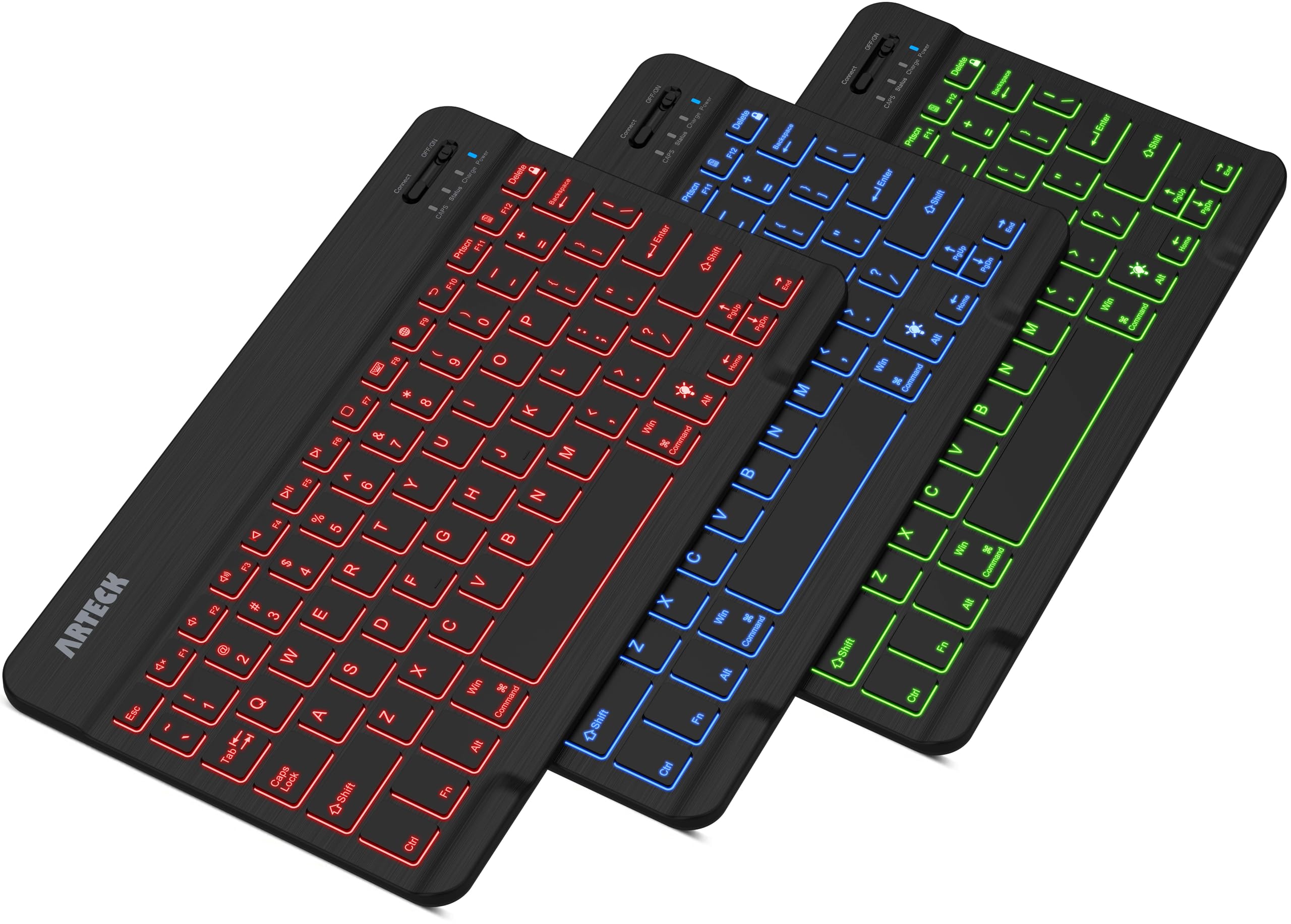
Arteck HB030B Backlit Bluetooth Keyboard

89 /100
Keeper Score Excellent

Key details

Weight
5.9 oz
Battery
Rechargeable, rated up to 6 months
Backlight
7 colors, 2 brightness levels
Dimensions
9.7 x 5.9 x 0.24 in
Check Price on Amazon

Seven backlight colors and two brightness levels sound like a party trick until you're answering email on a dim flight with the tablet brightness turned down. That's where this Arteck separated itself from the rest of the group: the keys stay readable without lighting up the whole row, and the light shuts off on its own when you stop typing. Just as useful, it isn't tied to one tablet — iPadOS, Android, Windows, and macOS all pair the same way.

The board is 9.7 inches wide and a quarter-inch thick, small enough to sit beside a 10- or 11-inch tablet in a bag, and at 5.9 ounces it barely registers. Scissor keys give a short, even stroke that kept our typing close to normal speed, and the zinc plate keeps the whole thing from flexing mid-sentence. Pairing took seconds on each device we tried, and reconnecting after a sleep took a single keypress.

Six months between charges is the rated figure — two hours of typing a day with the backlight off — and a USB cable covers the rest. Because it's a bare keyboard, you'll still need a case, kickstand, or stand to prop the screen, which is the one thing the case-style picks here solve for you. The two-year warranty is longer than most in this group, and it's the pick we keep reaching for.

Pros

  • Backlight with seven colors and two brightness levels
  • Rechargeable battery rated at six months
  • Pairs with iPadOS, Android, Windows, and macOS
  • Slim 0.24-inch body at 5.9 ounces

Cons

  • Sits flat, with no tilt adjustment
  • Charge can stop holding over time
Our verdict

Buy the Arteck if you want one keyboard for any tablet: backlit keys, a rechargeable battery rated in months, and no pairing drama.

Check Latest Price
2

Best Budget iPad Keyboard

OMOTON Ultra-Slim Bluetooth Keyboard

91 /100
Keeper Score Outstanding

Key details

Keys
78, QWERTY with 12 iOS hotkeys
Weight
5.64 oz
Battery
2 AAA, rated up to 400 hours
Dimensions
11.2 x 4.7 x 0.2 in
Check Price on Amazon

Two AAA batteries, not included, are the first thing to know about this OMOTON. The second is that the trade pays off for a keyboard that lives in a bag: no charging cable to forget, and a rated 400 hours that the listing frames as four hours of typing a day. Buy a spare pair, keep them in the same pocket, and stop thinking about it.

At 0.2 inch thick it's the slimmest board here, and the 11.2-inch width is close to an iPad's, so the keys sit at something near laptop spacing instead of the cramped arrangement you get on nine-inch keyboards. We found the key weight light but predictable, and the 12 iOS hotkeys — volume, brightness, music — save a trip into Settings. Pairing is a two-tap affair.

The catch is scope: this is an iOS and iPadOS keyboard, so Android and Windows tablet owners should look at the Arteck or the K480 instead. For an all-Apple household it's the least fussy option in the group, and the plain white finish reads closer to Apple's own keyboard than to a budget accessory.

Pros

  • Twelve iOS shortcut keys for volume and brightness
  • 0.2-inch profile at near-iPad width
  • Pairs quickly with iPads and iPhones
  • Rated up to 400 hours on two AAA batteries

Cons

  • Keycaps can pop off with use
  • Works only with iOS and iPadOS
Our verdict

For iPad and iPhone owners who want a thin, quiet keyboard and don't mind feeding it batteries, this is the simplest buy here.

Check Latest Price
3

Best iPad Keyboard Case

Logitech Combo Touch

90 /100
Keeper Score Outstanding

Key details

Modes
Type, Read, Sketch, View
Power
No battery or charging
Backlight
Yes, with iPadOS shortcut row
Connection
Smart Connector
Check Price on Amazon

No charging port, no pairing button, no battery to think about: the Combo Touch takes power and data straight from the iPad's Smart Connector the moment it snaps on. We hadn't expected that to matter as much as it did. There's no Bluetooth menu to visit, no dead keyboard on a train, and no re-pairing after a tablet update.

The keyboard is a full-size backlit membrane board with a complete row of iPadOS shortcuts, including separate screenshot and dictation keys. The trackpad is the real story: it's large enough for two-finger scrolling and text selection without the pinch-and-hope routine smaller pads force. The kickstand folds into four positions for typing, reading, sketching, and viewing, and the keyboard lifts off when you want the iPad flat on a table.

All that hardware has a cost. At 572 grams, keyboard and woven case turn a thin tablet into something closer to a small laptop, and the fit is snug enough that we left the iPad in its shell rather than pulling it out between tasks. On a train tray table that trade is exactly right; on a commute where you type twice a week, a standalone board does the job for far less weight.

Pros

  • Powered by the Smart Connector, so nothing to charge
  • Large multi-gesture precision trackpad
  • Backlit keys with a full iPadOS shortcut row
  • Four modes: Type, Read, Sketch, View

Cons

  • Fits only iPad (A16) and 10th generation
Our verdict

If your iPad is your main computer, this is the case to get: no charging, a large trackpad, and keys that feel like a laptop's.

Check Latest Price
4

Best Premium iPad Folio

Apple Magic Keyboard Folio

88 /100
Keeper Score Excellent

Key details

Design
Two-piece, magnetic
Weight
1.96 lb
Trackpad
Built-in multi-touch
Compatibility
iPad (A16) and iPad (10th gen)
Check Price on Amazon

Two pieces, joined by magnets: a back panel that protects the iPad and carries an adjustable stand, and a keyboard that comes away whenever you want to read or sketch. It sounds like more fiddle than it's worth. In practice the detachability is what we used most — swing the keyboard behind the iPad for a magazine-style read, then click it back for email.

Typing is the best of any folio in this group. The keys have real travel, there's a 14-key function row above them, and the trackpad handles the same gestures as a Mac's, so selecting text and switching apps stops being a reach for the screen. It also never needs charging or pairing, which you only appreciate when you go back to a Bluetooth case.

This is the most expensive case in the roundup by a wide margin, and it earns that only if you want the trackpad and the function row rather than a protective shell. For an iPad (A16) or 10th-generation owner who types every day and reads in between, nothing else in this group feels this considered.

Pros

  • Built-in trackpad and 14-key function row
  • Adjustable stand on the magnetic back panel
  • No pairing or charging to manage
  • Keyboard detaches for reading and sketching

Cons

  • Two pieces come apart easily in a bag
  • Keys are not backlit
Our verdict

Worth it for iPad (A16) and 10th-gen owners who type daily: the best keys and trackpad on any folio here, backlight aside.

Check Latest Price
5

Best Budget Keyboard Case

Harvopu iPad Keyboard Case

88 /100
Keeper Score Excellent

Key details

Stand
3 anti-slip grooves
Trackpad
Multi-touch
Backlight
7 colors
Compatibility
iPad (A16) 11-inch and 10th gen
Check Price on Amazon

What you get here isn't a keyboard in a sleeve, it's a whole iPad case: a leather-look shell, a holder for the Apple Pencil, three anti-slip grooves for the screen angle, a seven-color backlight, and a trackpad, for a fraction of what Apple's folio costs.

The trackpad is what changes daily use. Having one means you stop reaching for the screen to place a cursor in the middle of a sentence, and the multi-finger gestures are there when you want to switch apps without lifting your hands. We were also glad of the backlight and the full row of iPadOS shortcuts on the evenings when the room was darker than the screen.

Fit is the thing to check before you order: this is cut for the iPad (A16) 11-inch (A3354, A3355, A3356) and the 10th-generation 10.9-inch (A2696, A2757, A2777), and nothing else. In navy it reads more like a slim folio than a gadget case, which is good news if the iPad comes to meetings with you.

Pros

  • Trackpad, backlight, and Pencil holder in one case
  • Seven backlight colors
  • Three grooves for stand angles
  • Cut for iPad (A16) 11-inch and 10th gen

Cons

  • Keyboard can stop holding a charge
  • Magnetic keyboard slips out of position
Our verdict

A lot of iPad case for the money — trackpad, backlight, Pencil holder, and stand — as long as you own one of the two models it fits.

Check Latest Price
6

Best for Multiple Devices

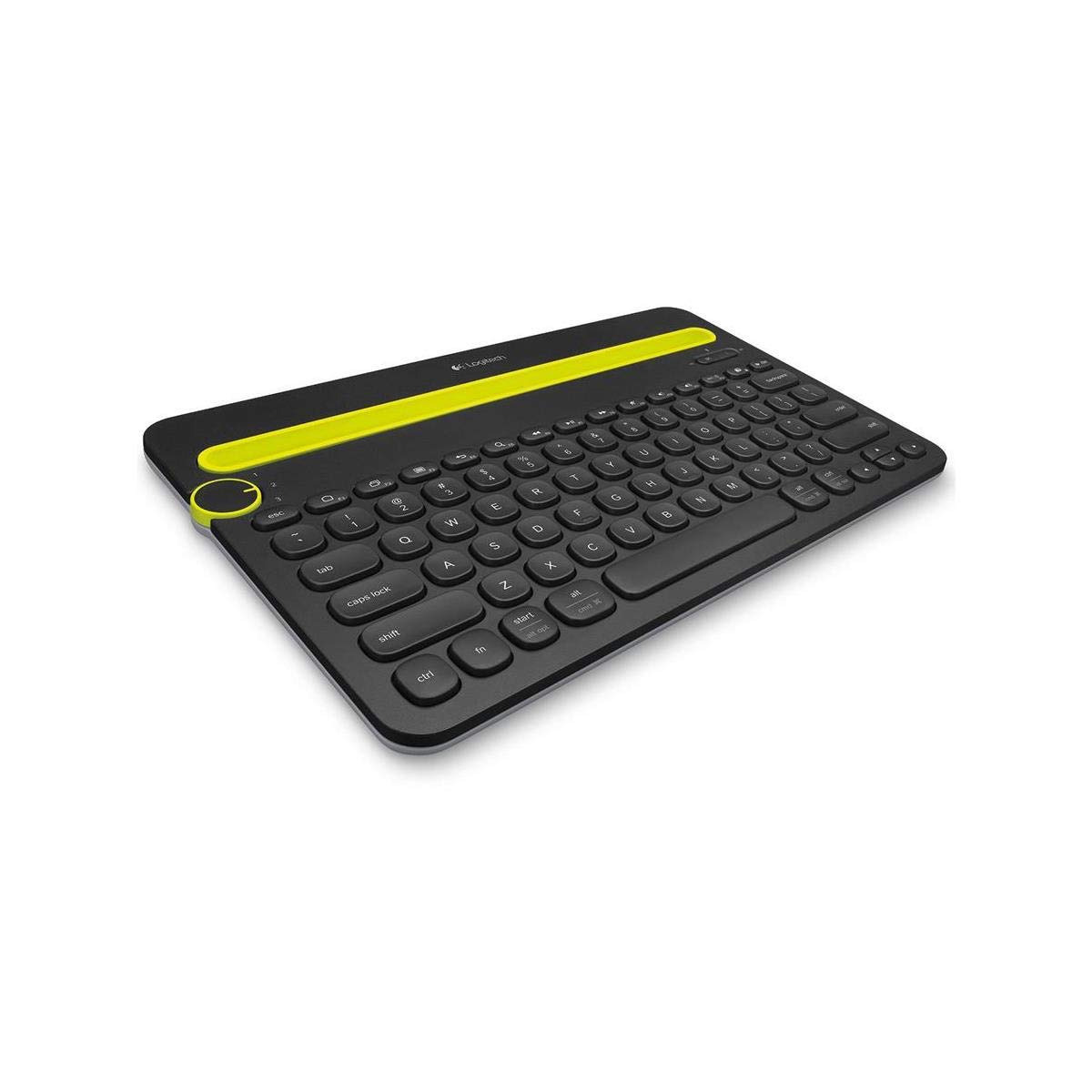
Logitech K480 Wireless Multi-Device Keyboard

89 /100
Keeper Score Excellent

Key details

Cradle
Fits tablets up to 10 in wide
Weight
1.8 lb
Battery
2 AAA, rated up to 24 months
Devices
3 via Easy-Switch dial
Check Price on Amazon

A dial at the top left switches this Logitech between three paired devices, and there's a cradle above the keys deep enough to stand a tablet or phone in while you type. That is the whole idea, and it's a good one for a kitchen table or a shared desk where a tablet, a phone, and a work laptop take turns.

It's a slab at 1.8 pounds, laptop territory, but that weight is why it doesn't skate across a table when you're typing one-handed with a phone in the other. Key spacing is closer to a full-size board than the ten-inch keyboards here, which is the reason to choose it if you do long-form typing at a desk rather than on a train.

This is the one pick that isn't really a tablet accessory — it's a keyboard that happens to work with tablets, and if the tablet is your third screen rather than your only one, that's the right relationship. Logitech rates the two AAA batteries at up to 24 months, so it's a leave-it-on-the-desk object rather than something you pack.

Pros

  • Easy-Switch dial pairs three devices at once
  • Cradle holds a phone or tablet while you type
  • Two AAA batteries rated up to 24 months
  • Covers Windows, macOS, Chrome OS, iPadOS, and Android

Cons

  • Cradle is too narrow for tablets over 10 inches
  • Keys feel clunky and loud
Our verdict

The pick for a desk with three devices: one dial moves typing between tablet, phone, and laptop, and the tablet sits in the cradle.

Check Latest Price
7

Light Travel Typing

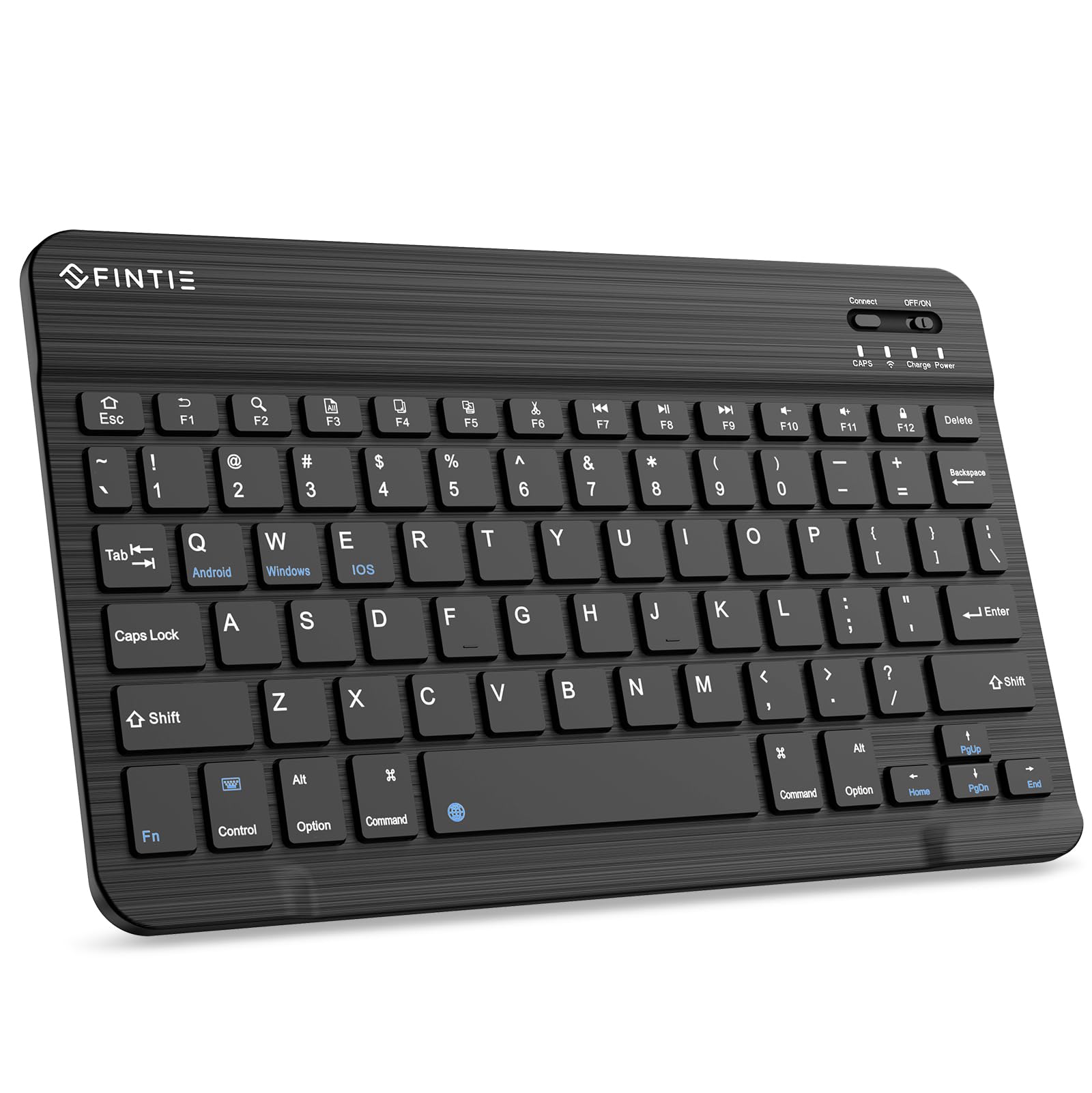
FINTIE 10-Inch Wireless Bluetooth Keyboard

87 /100
Keeper Score Excellent

Key details

Keys
78, scissor switch
Charging
USB-C, about 2 hours
Dimensions
9.74 x 5.91 x 0.26 in
Check Price on Amazon

At 0.26 inch thick and roughly the footprint of a ten-inch tablet, the FINTIE is the sort of keyboard you leave in a bag and forget about until you need it. The base is magnetic, so it holds to a compatible folio instead of sliding around loose on a table.

Bluetooth pairing covers iOS and Android, and the scissor keys have a soft, quiet action that suits a library or a shared office better than a clicky board would. Short bursts — a search bar, a photo caption, a few paragraphs of email — feel natural within an afternoon of use.

Charging is over USB-C and takes about two hours, and the keyboard sleeps on its own between sessions, which is the difference between a board that's ready when you pull it out and one that isn't. It has held its pairing across weeks of intermittent use in our bag.

Where it earns its place is as the second keyboard: the Fire tablet in the kitchen drawer, the Android tablet that only does email, the tote that already has a laptop in it. It's light, quiet, and inexpensive enough to keep as a spare, and it pairs in seconds when you finally pull it out.

Pros

  • USB-C charging in about two hours
  • Scissor keys with a magnetic base
  • Just over a quarter-inch thick
  • Pairs with iOS and Android tablets

Cons

  • Keys can work loose with use
  • Compact key spacing takes adjustment
Our verdict

A good spare: thin, rechargeable over USB-C, and soft enough to type on in a quiet room, as long as you don't need full-size keys.

Check Latest Price
8

iPad Pro Workstation

Apple Magic Keyboard for iPad Pro 11-inch

88 /100
Keeper Score Excellent

Key details

Keys
Backlit, scissor, function row
Weight
1.6 lb
Trackpad
Glass with haptic feedback
Compatibility
iPad Pro 11-inch (M4 and M5)
Check Price on Amazon

This keyboard fits exactly one tablet line: the iPad Pro 11-inch in its M4 and M5 versions. If you own anything else, stop here — and if you own that iPad, the fit is the reason to consider it, because nothing else in this group attaches with so little effort.

The keys are backlit and scissor-based beneath a 10-key function row, and the trackpad is glass with haptic feedback, so clicks feel physical without anything actually moving. Typing here is the closest any of these gets to a MacBook, and the function row means brightness and volume don't require a trip to Control Center.

The two-cantilever hinge holds the screen at whatever angle you set and folds into front and back protection when you're finished. USB-C pass-through charging means the iPad's own port stays free while you work, and at 1.6 pounds the whole assembly is noticeable in a bag but not on a desk.

Expensive is the honest word — this is the priciest keyboard in the roundup, and it makes sense only if the iPad Pro is doing real work: drafting, editing, spreadsheets. For that buyer it's the difference between a tablet and a laptop, and the penalty is a battery that empties sooner than you expect.

Pros

  • Glass trackpad with haptic feedback
  • Backlit scissor keys with a function row
  • Two-cantilever hinge for smooth angle adjustment
  • USB-C pass-through charging

Cons

  • Top-heavy on a lap or soft surface
  • Draws on the iPad's battery
Our verdict

For iPad Pro 11-inch (M4 or M5) owners who actually work on the tablet: the best typing and trackpad here, at flagship money.

Check Latest Price

How We Tested 12 Tablet Keyboards

We started with a shortlist of roughly 30 keyboards drawn from retailer best-seller lists and spec sheets, then cut it to 12 using three filters: whether the maker listed fit for current tablet sizes, whether the attachment was magnetic, detachable, or a fixed folio, and whether the price made sense for what it added. Over six months, each one lived in a tote bag, a backpack sleeve, and on more than one tray table.

Typing came first: the same 500-word document typed at a kitchen table, then again on my lap on the couch, counting typos and noting how far my right hand had to travel to reach the trackpad. For sound, I recorded a paragraph at arm's length on a quiet evening, compared the clack against a library baseline, then typed next to a colleague a few feet away and asked if it registered at all. Backlit models got their own pass — full brightness for an hour a day to see how quickly the battery fell.

Connectivity testing was unglamorous. We paired each keyboard, walked into the next room, let the tablet sleep, and timed the reconnect, then counted dropouts across a week of daily use. Magnetic setups got a gentle shake while held by the screen, and the whole package rode in a bag of keys and cables for a week to see whether the tablet peeled loose or the hinge softened. We weighed each one with its tablet attached, too — a keyboard that turns a slim tablet into a brick lost points no matter how good the keys felt.

Last came value: what each one charged for backlighting, a trackpad, or a function row, and whether those extras justified the bulk.

How to Choose a Tablet Keyboard

A Case or a Standalone Keyboard

A keyboard case gives you three things at once: somewhere to prop the screen, protection for the tablet, and often a trackpad. The trade is that it fits one model, so it becomes clutter the moment you upgrade. A standalone board such as the Arteck or the Logitech K480 is thinner, cheaper, and works with whatever you own now or buy next, but you need a case, kickstand, or stand to hold the tablet up.

Choose the case if the tablet is your main computer. Choose standalone if the tablet is one of several devices, or if you already like the case you have. One trap: universal keyboards still ship with one operating system's shortcut row printed on the keys, so check the top row matches your tablet before you buy.

Check the Model Number, Not the Screen Size

iPad cases are cut per generation. The 10.9-inch 10th-generation iPad (A2696, A2757, A2777) and the 11-inch iPad (A16) (A3354, A3355, A3356) look nearly identical and are not interchangeable, and iPad Air covers several different shells.

Find the A-number under Settings, then General, then About before ordering anything with a hinge or a magnet. For standalone keyboards the equivalent check is the operating system: the OMOTON is iOS-only, while the Arteck and the K480 also cover Android and Windows.

Keys, Spacing, and Backlight

A ten-inch keyboard has to fit 78-odd keys into roughly the footprint of a paperback, and every board here compromises somewhere. The OMOTON gets close to iPad width and near-laptop spacing; the compact FINTIE trades key size for a smaller bag footprint.

Backlighting is the feature people underestimate. Three picks here light the keys, and if you type on night flights or in a dim living room it's worth more than a slightly better key feel. Try a paragraph of touch-typing on a nine-inch board before you commit to one.

Power: Rechargeable or AAA

Rechargeable boards need a cable; AAA boards need spare cells. Neither is better — the question is where you'll be when the power runs out. Compare the ratings knowing they are best-case: six months on the Arteck assumes two hours a day with the backlight off, and 400 hours on the OMOTON assumes four hours a day.

For travel, a rechargeable board plus a power bank is the safer pairing. For a desk, AAA cells rated in months are one less cable to lose.

Bluetooth or Smart Connector

Smart Connector cases like the Combo Touch skip pairing entirely, because the keyboard draws power and data from the tablet itself. Bluetooth boards pair in seconds but can drop mid-sentence, and having to re-pair is the most common frustration in this category.

If you type all day on one tablet, the connector is worth the bulk. If you move between devices, a Bluetooth board with a device dial or a quick-switch key earns its place instead.

Frequently Asked Questions

Final Verdict

The Arteck HB030B is the keyboard we point most tablet owners to. It works with iPadOS, Android, Windows, and macOS, the backlight makes it usable in a dim cabin, and its rechargeable battery is rated in months rather than hours.

Two requirements change the answer. If you only ever type on an iPad and want the thinnest board available, the OMOTON does the same job on two AAA batteries. If you want the keyboard attached to a case with a trackpad, the Logitech Combo Touch is the one to try — on an iPad (A16) or 10th generation specifically.