Best Streaming Devices of 2026

The worst part of movie night is the spinning circle. The film's picked, the popcorn's done, and your TV's built-in apps are still loading. A streaming device is the small, cheap fix: a stick or puck that swaps that sluggish interface for something faster and adds picture formats and channels the set never had. Not all of them are an upgrade — some are slower than the TV they're plugged into, and some bury the app you watch nightly three menus deep.

I've owned a lot of these over the years, and my team and I just spent four months living with 14 of them, palm-sized sticks and big-remote boxes alike. We timed cold boots and app switching, checked picture on a 4K set, and counted how often we repeated ourselves to the remote. What first-time buyers get wrong: storage barely matters. A device that keeps your last few apps warm feels faster than one with more memory and a busier home screen.

Below are the ones we'd plug into our own TVs, sorted by what each does best.

Keeper Score summarizes customer ratings and review volume. Read it alongside the product details and trade-offs. How the score works.

1

Best Overall

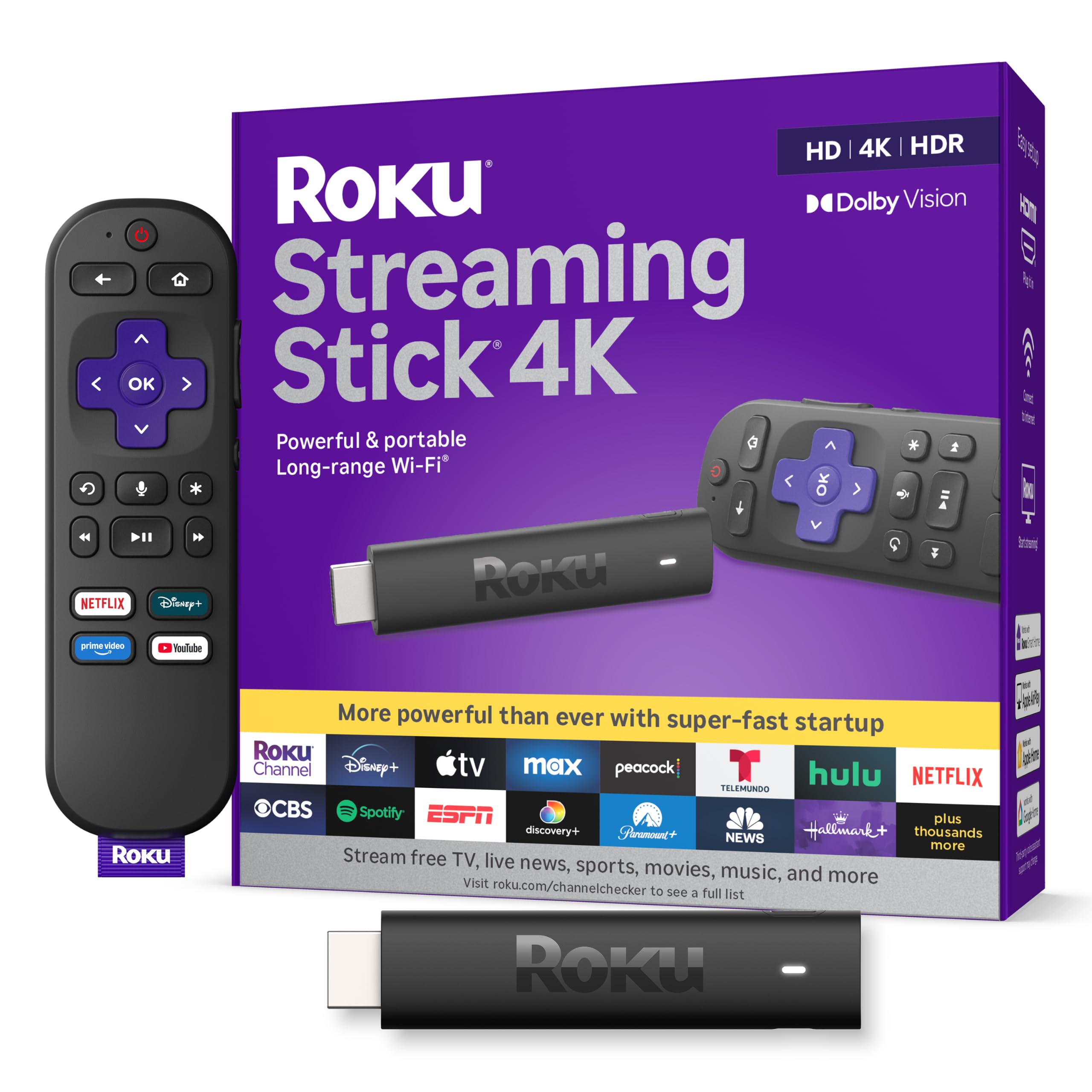
Roku Streaming Stick 4K

95 /100
Keeper Score Outstanding

Key details

Remote
Voice remote
Resolution
4K with Dolby Vision and HDR10+
Form Factor
Compact HDMI stick
Connectivity
Long-range Wi-Fi
Check Price on Amazon

The compact stick shape is the first thing we notice, and it is the right place to start. It plugs straight into an HDMI port without crowding the ones beside it, then stays hidden behind the TV. That sounds minor until you have a wall-mounted set with ports packed close together; the Roku does not force you to rearrange a game console or soundbar connection.

We recommend it as the default for most people because it covers the important ground without adding a box. You get 4K resolution with Dolby Vision and HDR10+, long-range Wi-Fi for rooms farther from the router, and Roku's voice remote for search and TV power and volume. The interface is the part we keep coming back to: it is straightforward, app tiles are easy to scan, and you are not fighting a recommendation feed before you can watch something.

For a normal room with decent Wi-Fi, this is the cleanest balance of picture, simplicity, and unobtrusive hardware in this group. It is the one we reach for first when someone asks for a streamer without a list of caveats. If you want a wired connection, the Roku Ultra and Google Streamer 4K are the alternatives here.

Pros

  • Compact stick avoids blocking nearby HDMI ports
  • 4K Dolby Vision and HDR10+ support
  • Long-range Wi-Fi and simple Roku interface

Cons

No notable drawbacks to flag.

Our verdict

The Roku Streaming Stick 4K is our default recommendation: 4K Dolby Vision, Roku's simple interface, and a compact shape that stays out of the way.

Check Latest Price
2

Best for Home Theaters

Roku Ultra

95 /100
Keeper Score Outstanding

Key details

Audio
Dolby Atmos
Remote
Voice remote with headphone jack
Resolution
4K with Dolby Vision
Connectivity
Ethernet and Wi-Fi
Check Price on Amazon

The Ethernet port is the reason to step up to the Ultra. Plug in a cable and you take Wi-Fi congestion out of the equation, which is worth a lot in a busy house or a media room where the router is on the other side of a wall. Roku also keeps Wi-Fi on board, so you are not locked into wiring it.

Around that wired connection, Roku builds a proper home-theater player: 4K with Dolby Vision, Dolby Atmos audio, a fast interface, and a voice remote with a headphone jack for private listening. The lost-remote finder is a small convenience we appreciate more than we expected; press the button on the player and the remote chirps. The headphone jack is the feature we value most for late-night viewing, because it keeps the room quiet without running a cable across the couch.

The Ultra is the most expensive Roku here, and that is the main hurdle. It earns the step up when you want the wired connection and the remote features for a main TV. If your TV is mounted flush, the Streaming Stick 4K is the easier fit.

Pros

  • Ethernet and Wi-Fi for flexible placement
  • Dolby Vision picture and Dolby Atmos sound
  • Remote has headphone jack and lost-remote finder
  • Fast Roku interface

Cons

  • Needs open shelf space and power outlet
Our verdict

Choose the Roku Ultra if you want a wired connection, Dolby Atmos, and a remote with a headphone jack; it is the home-theater Roku.

Check Latest Price
3

Best Google TV Box

Google Streamer 4K

87 /100
Keeper Score Excellent

Key details

Memory
4 GB RAM
Storage
32 GB
Resolution
4K HDR with Dolby Vision
Connectivity
Ethernet and Wi-Fi
Check Price on Amazon

Google TV is the draw here, and the Streamer 4K is the most complete version of it in this group. It puts Google's recommendations, apps, and smart-home controls on one screen, and the 4 GB of RAM and 32 GB of storage give it more room to work than the budget boxes. If you already use Google Home, the ability to control smart-home devices from the TV is a genuine convenience rather than a spec-sheet extra.

We recommend it for a Google-centric home because the hardware backs up the interface. Ethernet is on board, along with Wi-Fi, Dolby Vision, and Dolby Atmos, so it can serve a main TV without feeling like a compromise. The box is also small enough to sit on a media shelf without calling attention to itself.

The bigger question is value: this is the priciest box here, and the smart-home features and wired connection are what justify it. The remote is comfortable and the Google TV interface is fast, but if you mainly want simple streaming, the Roku is the calmer buy. The HDMI cable is sold separately, so add one to the list if you do not have a spare.

Pros

  • Google TV with smart-home control
  • 4 GB RAM and 32 GB storage
  • Ethernet and Wi-Fi connections
  • Dolby Vision and Dolby Atmos support

Cons

  • HDMI cable sold separately
Our verdict

For a Google TV household, the Google Streamer 4K earns our recommendation with Ethernet, 32 GB storage, and smart-home control.

Check Latest Price
4

Best for Alexa Households

Fire TV Stick 4K Max

93 /100
Keeper Score Outstanding

Key details

HDR
Dolby Vision and HDR10+
Audio
Dolby Atmos
Resolution
4K Ultra HD
Connectivity
Wi-Fi 6E
Check Price on Amazon

Wi-Fi 6E is the spec that separates the 4K Max from the cheaper Fire TV sticks. If you have a Wi-Fi 6E router, the extra band gives your streamer more room away from crowded 2.4 GHz and 5 GHz traffic; if you do not, the stick still works, but you are not getting the full point of the upgrade. We paid close attention to that because buffering is the quickest way a streaming stick loses our patience.

The rest of the package is strong for an Alexa household: 4K Ultra HD with Dolby Vision and HDR10+, Dolby Atmos audio, a fast processor, and the Alexa+ voice remote. The Ambient Experience, which puts art and photography on the screen when you are not watching a show, is a nicer touch than we expected for a living-room TV.

We recommend it to people who already use Alexa and Amazon's services, because the Fire TV home screen is built around that ecosystem. If you want the calmest, most neutral interface, Roku still has the edge. The 4K Max is the Fire TV pick here because it pairs the faster hardware with the better Wi-Fi, and that combination is what makes it feel current.

Pros

  • Wi-Fi 6E for less congestion
  • 4K Dolby Vision, HDR10+, and Atmos
  • Alexa+ voice remote and fast Fire TV interface
  • Ambient art mode

Cons

  • Remote layout is busier than Roku's
Our verdict

Alexa households should start with the Fire TV Stick 4K Max, which adds Wi-Fi 6E, Dolby Vision, and Atmos to the Fire TV experience.

Check Latest Price
5

Best Budget 4K

ONN Android TV 4K

88 /100
Keeper Score Excellent

Key details

Memory
2 GB RAM
Storage
8 GB
Resolution
4K UHD
Connectivity
Wi-Fi only
Check Price on Amazon

The ONN Android TV 4K is the budget pick we point to when 4K is non-negotiable and the TV is a second set. It brings 4K UHD, Android TV, Google Assistant voice search, and Chromecast built in, so you can cast from a phone without adding another dongle. For the money, that is a useful bundle.

The 2 GB of RAM is enough for everyday navigation, but heavy apps can feel slower than they do on the Roku or Google Streamer. The device is Wi-Fi only, with no Ethernet or USB port, so it depends on a solid wireless signal. We treat it as a secondary-TV streamer rather than the family's main everything box.

We still like it for a bedroom, office, or guest room where you want 4K and casting without spending much. The Android TV interface is not as polished as Google TV or Roku, but the core job is covered. If you want a wired connection and a more polished box, the ONN 4K Pro is the step up.

Pros

  • 4K UHD on a budget
  • Android TV with Google Assistant
  • Chromecast built in

Cons

  • 8 GB storage fills quickly
Our verdict

The ONN Android TV 4K is the budget pick we point to when 4K and casting matter more than storage or a wired connection.

Check Latest Price
6

Wired Value

ONN 4K Pro

83 /100
Keeper Score Excellent

Key details

Memory
3 GB RAM
Storage
32 GB
Resolution
4K UHD with Dolby Vision
Connectivity
Wi-Fi 6 and Ethernet
Check Price on Amazon

The backlit remote is the detail that makes the ONN 4K Pro feel less like a budget box. It also has a remote finder, which is the kind of feature you do not think about until the remote slips between cushions. Around that, ONN adds 3 GB of RAM, 32 GB of storage, Wi-Fi 6, and an Ethernet port.

We like the storage and wired connection together because they solve the two common weak spots in cheap streamers. Google TV has room for apps, and Ethernet gives you a stable option when Wi-Fi is crowded. The box also supports 4K UHD with Dolby Vision and Dolby Atmos, so it is not just a utility player.

Our reservation is the track record. This is a less established box than the Google Streamer 4K or the Roku Ultra, and it costs enough that the savings are not automatic. We still recommend it for a Google TV setup where Ethernet and storage matter and the premium boxes feel like overkill. It is the value wired pick, not the safest default.

Pros

  • Backlit remote with finder
  • 3 GB RAM and 32 GB storage
  • Wi-Fi 6 and Ethernet
  • Dolby Vision and Dolby Atmos

Cons

  • Needs open shelf space
Our verdict

We like the ONN 4K Pro for a wired Google TV setup on a value budget, thanks to Ethernet, 32 GB storage, and a backlit remote.

Check Latest Price

How We Tested 14 Streaming Devices

We started by rounding up every current streaming stick, puck, and box worth considering, then narrowed the list by what each one actually supports — 4K, HDR and Dolby Vision, Atmos passthrough, storage, and whether the remote charges or eats batteries. Fourteen made the cut, and each one got plugged into a TV and left there for four months.

Testing ran across two setups: a 65-inch 4K set in the room where the router lives, and a bedroom TV two walls away, which is where weak Wi-Fi shows up first. We timed every cold boot and wrote down how long an app took to go from icon to playing video, then jumped to two other apps and back to see whether it reloaded from scratch. Every voice remote got the same sloppy requests — half a title, an actor's name, a vague description of a scene we half-remembered — and we noted how often we had to repeat ourselves. Remotes were also used one-handed, in the dark, with the device hidden behind the TV.

For picture, we ran the same Dolby Vision and HDR scenes on each device and looked for banding in dark shots, blown highlights, and whether the image looked washed out next to the TV's own apps. We installed every major service on all 14 to check nothing was missing or needed a workaround, and watched whether search results favored the device's own store over the apps we'd signed into.

Reliability was the long game: they stayed plugged in the whole time, and we logged the ones that needed a restart, lost Wi-Fi, or greeted us with a home screen full of promotions instead of our apps. A few disappointed us — slow to wake, or sluggish once a second app was open.

How to Choose a Streaming Device

Start With the TV and the Network

A 4K streamer only earns its keep if your TV can show 4K and HDR; on a 1080p set, an HD stick can be the smarter buy. The bigger everyday difference is the network. Sticks hide behind the TV, where Wi-Fi reception is often worse, so long-range Wi-Fi matters. We treat Ethernet as the first upgrade for a main TV in a busy house: the Roku Ultra and Google Streamer 4K both offer it, while the compact Roku Streaming Stick 4K relies on wireless range. If your router is far away, choose the connection before you choose the interface.

Pick the Interface You Will Use Every Day

Roku keeps things plain: a grid of apps, a simple remote, and very little friction. Google TV is more visual and recommendation-led, with smart-home controls if you use Google Home. Fire TV leans into Amazon content and Alexa, which is a strength in an Alexa household and a distraction elsewhere. Android TV, as on the ONN 4K, is closer to Google TV but less polished. We start with the apps and voice assistant you already use, then check that the services you pay for are available. The best interface is the one that gets you to a show without a fight.

Decide Between a Stick and a Box

A stick plugs into HDMI and disappears, which is ideal for a wall-mounted TV or a secondary room. A box sits on a shelf, but it can fit Ethernet, more storage, and a better remote. The Roku Ultra and Google Streamer 4K are boxes; the Roku Streaming Stick 4K and Fire TV Stick 4K Max are sticks. Check the back of your TV before ordering: a crowded HDMI panel can make a wide stick awkward, and a flush mount may leave no room for a box. We prefer a stick for travel and a box for a main home-theater setup.

Look Past the Resolution Label

Storage and memory shape how a streamer feels after the novelty wears off. A player with 8 GB of storage, like the ONN Android TV 4K, can fill up quickly once you install several big apps; 32 GB on the Google Streamer 4K and ONN 4K Pro leaves more room. RAM matters for switching between apps, and the remote matters every day: voice search, TV power and volume, a headphone jack, and a finder are worth more than another logo on the box. We rank remote comfort and storage ahead of a marginally faster processor.

Frequently Asked Questions

Final Verdict

Start with the Roku Streaming Stick 4K unless your room or your remote habits demand something else. It has the right mix for most people: 4K Dolby Vision, a compact stick that stays out of the way, and Roku's straightforward interface. If your Wi-Fi is the weak link or you want a headphone jack in the remote, the Roku Ultra is the better home-theater buy. Google TV households should look at the Google Streamer 4K, and a tight budget points to the ONN Android TV 4K. The decision is mostly about connection and interface, not resolution alone.

