Best Retro Cameras of 2026

Half the charm of a retro camera is that it slows you down: a real shutter button, a chunky dial, and no screen glowing between you and what's in front of you. The other half is the risk. Plenty of these cameras are better looking than the photos they take, and some of them charge you real money every time you press the button. What you want is something that looks the part and still gives you color and detail worth keeping — whether that's a film scan, a print you stick on the fridge, or a JPEG you text to a friend.

I've been carrying one in my jacket pocket for months now, and our team has put 12 of them — film, instant, and screen-free digital — through the same ordinary situations since early spring. The first lesson for anyone shopping this category is that the format matters more than the feature list: instant film runs roughly a dollar a print, 35mm costs you again at the lab, and a screenless digital camera is the cheaper way to get that soft, grainy look if you shoot a lot. The second lesson is that pocketability is not a marketing word — a camera you leave at home because it's bulky takes zero good pictures. The picks below are the ones we'd genuinely hand to a friend.

Keeper Score summarizes customer ratings and review volume. Read it alongside the product details and trade-offs. How the score works.

1

Best Overall

Kodak Ektar H35

87 /100
Keeper Score Excellent

Key details

Flash
Built-in
Weight
3.53 oz
Film Format
35mm half-frame
Shots Per Roll
About 72 from a 36-exposure roll
Check Price on Amazon

Two pictures for every frame on the roll is the whole idea here, and it is why the Ektar H35 is our top pick. A 36-exposure roll of 35mm comes back as roughly 72 images, because each frame is exposed at half size. That halves what you spend per shot on film and developing while keeping the grain, the color shift, and the wait — the parts people are actually chasing when they say they want a retro camera.

Everything else follows the same logic. The lens is focus-free, so there is no ring to turn. The shutter is fixed at 1/100 second. The flash switches on by twisting a silver ring around the lens rather than digging through a menu. In a jacket pocket it disappears, which is how we carried it through an ordinary week of errands — no bag, no strap, no fuss. At 100 g and 4.3 by 1.8 by 2.6 inches, it rides along beside a phone without adding a bulge.

What you agree to in return is the film workflow. Half-frames are vertical, so you turn the camera sideways when you want a landscape, and it is worth telling the lab at drop-off that the roll is half-frame so every picture comes back as its own scan. Do that and a roll costs you about half what a normal 35mm habit would.

Pros

  • Doubles the frames from every roll
  • Pocketable at 100 g
  • Built-in flash with no menus
  • Simple enough for a first film camera

Cons

  • Film, processing, and a AAA battery are not included
  • Fixed shutter and automatic exposure allow no manual control
Our verdict

If you want real film without a real film budget, start here: about 72 frames per roll, a flash you switch on with a twist, and nothing to configure.

Check Latest Price
2

Best Instant Camera

Fujifilm Instax Mini 41

89 /100
Keeper Score Excellent

Key details

Flash
Built-in, automatic
Film Type
Instax Mini
Kit Extras
Case and 64-pocket album
Film Included
40 sheets
Check Price on Amazon

The box is the pitch. You get the Mini 41 body in black, 40 sheets of Instax Mini film split into two twin packs, a vintage-style carrying case, a 64-pocket album, and shutter accessories. Nobody has to buy a second thing before the first picture.

That is why this is the one we hand to someone who has never owned a camera. Load a pack, switch it on, press the shutter, and a print the size of a business card slides out. Auto exposure adjusts shutter speed and flash together, so indoor and outdoor shots both come out, and the selfie mirror beside the lens plus close-up mode make front-facing pictures far easier than they have any right to be. Of the instant cameras we tested, this is the one that felt least like a gadget and most like a small ritual.

The limit sits at the edges of the exposure range. Dark rooms and backlit subjects can come back muddy or soft, and the glossy print is small enough that a group shot at arm's length leaves faces the size of a thumbnail. Shooting toward the light and moving in close for portraits is most of the technique.

Pros

  • Camera, film, case, and album in one box
  • Selfie mirror and close-up mode
  • Automatic exposure and flash
  • Retro black body that looks the part

Cons

  • Film refills are the real ongoing cost
  • No manual exposure override
Our verdict

The easiest way into instant photography: one box with the camera, 40 prints' worth of film, a case, and an album, plus exposure simple enough for a beginner.

Check Latest Price
3

Best Hybrid Instant

Fujifilm Instax Mini EVO

88 /100
Keeper Score Excellent

Key details

Screen
2 in
Effects
10 lenses x 10 film styles
Film Type
Instax Mini
Phone Printing
Bluetooth app
Check Price on Amazon

Ten lenses and ten film styles, dialed in on two knurled wheels on the top plate, come to 100 looks, and you see each one on the 2-inch screen before you commit a print. That preview is why the Mini EVO earns a place here: it is the only instant camera in this guide that lets you decide afterwards whether a shot is worth the film.

The rest of the package is unusually practical. Prints come out at 2 by 3 inches from Instax Mini film, dual shutter buttons let you shoot portrait or landscape without turning your wrist, and a selfie mirror sits beside the lens. The phone app does the thing people end up using most: send a picture from your camera roll over Bluetooth and print it, or save shots from the camera to a microSD card and pull them across later.

Two things to know first. Film is sold separately, which stings at this end of the market, and the EVO's record on powering up is the shakiest in this set — some units arrive dead or stop turning on in a way the Mini 41 simply does not. Buy from a seller with an easy return window. When it works, it is the most versatile instant camera of the group by a distance.

Pros

  • Preview and choose before you print
  • Prints photos from your phone
  • Saves digital copies to microSD
  • Dual shutter buttons and selfie mirror

Cons

  • Film sold separately
  • Some units fail to power on
Our verdict

For anyone who wants prints without wasting film on bad shots: 100 looks, a screen to check them on, and a phone printer built in.

Check Latest Price
4

Best Screen-Free Digital

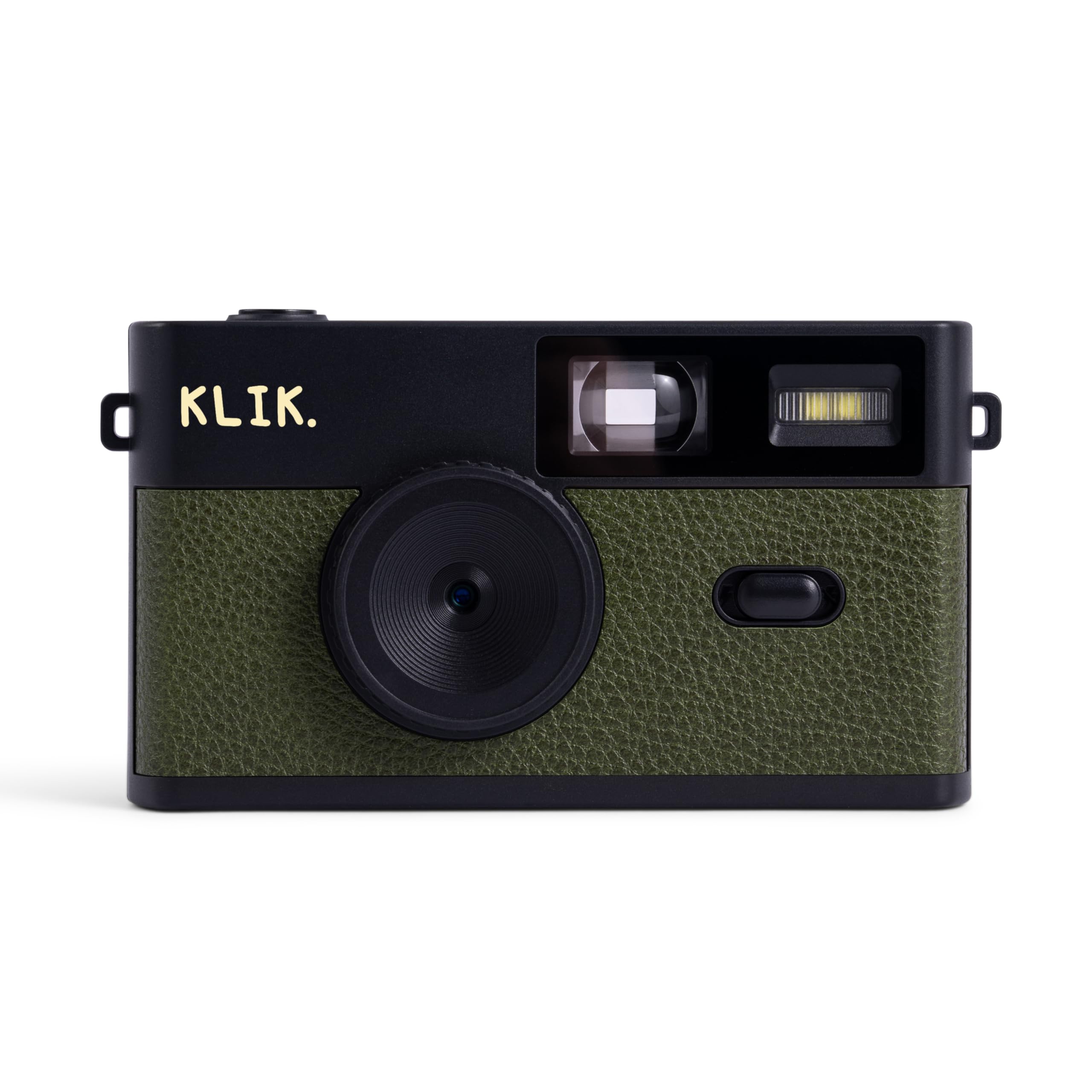
Klik Screen-Free Camera

84 /100
Keeper Score Excellent

Key details

Flash
Built-in LED
Screen
None
Battery
About 500 shots per charge
Resolution
8 MP
Check Price on Amazon

The screen is missing on purpose. You get an 8 MP sensor, a fixed-focus lens that focuses from about half a meter to infinity, three film-look filters, a built-in LED flash, and USB-C for both charging and transferring. It weighs 95 g, measures 4.5 by 2.6 by 1.3 inches, and ships with an SD card, a wrist strap, and the cable. The battery is rated for 500 shots between charges.

What we came to appreciate is how the missing screen changes the way you shoot. There is nothing to check, so you frame, press, and move on — much closer to the disposable-camera experience than any screen-equipped compact manages. The filters do most of the work of making files look like film, and USB-C transfer gets them onto a phone or laptop without a card reader. Fixed focus is the real boundary: step inside about 20 inches and faces go soft, so close portraits need a step back, not a zoom.

Pros

  • No screen, so no checking after every shot
  • USB-C charging and photo transfer
  • About 500 shots per charge
  • SD card and wrist strap included

Cons

  • 8 MP leaves little room to crop
  • Stills only, no video
Our verdict

The screen-free camera we recommend first: pocketable, flash-equipped, rechargeable, and the closest thing here to shooting a disposable without buying film.

Check Latest Price
5

Best Budget

CHUZHAO M1

85 /100
Keeper Score Excellent

Key details

Video
1080p
Screen
1.54 in waist-level
Resolution
12 MP
Card Included
16 GB
Check Price on Amazon

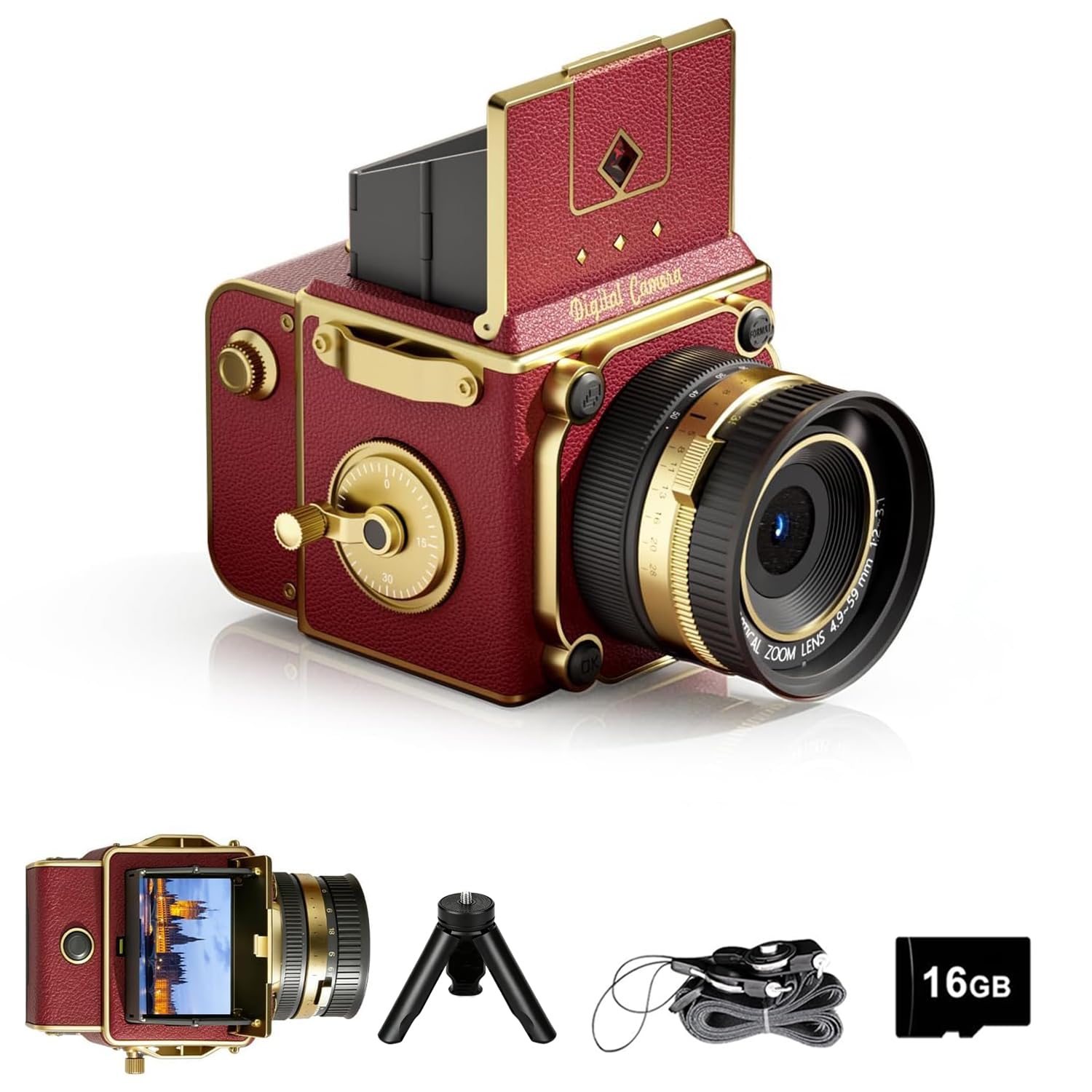
At the bottom of this group sits the CHUZHAO M1, a twin-lens-reflex-styled camera you hold at your waist and look down into. It is the least expensive camera here by a wide margin, and it is the one that gets the most attention when you take it out.

The specification list reads better than the money suggests: 12 MP stills, 1080p video, autofocus, a 1.54-inch screen on top, and a 16 GB card in the box. The waist-level framing is genuinely different from holding a camera to your eye. People do not straighten up for you the way they do for a lens at face height, and you get more relaxed pictures because of it. The trade is that direct sun blows out the bright parts of a scene, so shade and open shade are your friends.

We still reach for it for picnics and afternoons out, and it is the one we hand a teenager first, because the styling is the point and the price makes the risk small. What the money does not buy is light: there is no flash, so after dark the M1 is finished for the day.

Pros

  • TLR styling you shoot from the waist
  • Autofocus, 1080p video, and a 16 GB card included
  • Least expensive camera in this guide

Cons

  • No flash, so daylight only
  • 1.54-inch screen is fiddly to compose on
Our verdict

Buy it as a second camera or a first one for a teenager: the most distinctive body here for the least money, as long as you shoot in daylight.

Check Latest Price
6

Evening Snapshots

Voxcamy DC053

91 /100
Keeper Score Outstanding

Key details

Flash
Built-in
Screen
None
Resolution
12 MP
Card Included
8 GB
Check Price on Amazon

Twelve megapixels, a built-in flash, and no screen: the Voxcamy DC053 is the other screen-free camera worth your attention, and it makes a different trade from the Klik. You get more resolution, an 8 GB card in the box, and a flash that is genuinely there for evenings and indoor shooting.

The unusual part is the filter system. Rather than three presets you either like or do not, the DC053 lets you copy your own filter files onto the card, so the look can match whatever you already edit with. There is an OTG adapter in the box as well, which means you plug the camera straight into a phone and pull pictures across without going through a computer. For a camera this simple, that is a surprisingly grown-up workflow.

Where it beats the Klik is resolution and filters you control yourself; where it falls behind is setup, because a custom filter file is one more thing to prepare before a trip and the preloaded looks on the Klik need nothing at all. The flash is what settles it for us. If your pictures happen at night, at tables, and indoors, this is the screen-free camera we reach for.

Pros

  • 12 MP stills and a built-in flash
  • Custom filter files you load yourself
  • OTG adapter for phone transfers
  • 8 GB card and pouch included

Cons

  • Stills only, no video
  • Fixed focus rules out close-ups
Our verdict

A screen-free camera for people who want more resolution, a real flash, and their own filters rather than three presets somebody else chose.

Check Latest Price
7

Street Shooting

EJXHKNF M31

80 /100
Keeper Score Excellent

Key details

Zoom
16x digital
Screen
2 in waist-level IPS
Autofocus
Contrast detection
Card Included
16 GB
Check Price on Amazon

A 2-inch screen sits on top of the M31, angled upward, so you hold the camera at chest height and look down to frame. It is the same posture as a twin-lens reflex and a very different one from holding a phone at arm's length, and it is the first thing anyone notices when you take it out.

Behind that screen: autofocus, a 16x digital zoom, three color modes covering original, vintage, and black-and-white, video recording, a 16 GB card, and a 1,000 mAh battery rated at about four hours. The red body is unapologetically decorative, and the whole camera weighs around 370 g, which is light enough to dangle from the included strap between shots.

In use it is a daylight camera, and the autofocus takes its time when the light drops — point it at a shaded doorway and you will wait for it. The color modes are worth using properly: the vintage setting warms files enough that they look deliberate rather than like a phone filter with the saturation turned down.

We kept coming back to how the screen changes the pictures rather than the specification sheet. Shooting from the chest gets you closer to a scene without the camera-to-the-eye moment that makes people pose, and that is worth more here than another megapixel. Take it for daylight street shooting and short clips; take the Kodak if what you want is actual film.

Pros

  • Chest-height waist-level screen
  • Autofocus and 16x digital zoom
  • Three color modes and video recording
  • 16 GB card included

Cons

  • No flash, so daylight only
  • 16x zoom is digital, not optical
Our verdict

Buy it for the waist-level screen: chest-height framing makes people relax, and it is the most distinctive shooting experience among the retro digitals here.

Check Latest Price

How We Tested the Best Retro Cameras

We started with about 40 cameras on the market, cut anything with thin review history or a price that didn't match what it delivered, and narrowed to 12 across three formats: 35mm film, instant, and screen-free digital. Those 12 then went through four months of ordinary use rather than a lab bench.

Every camera had to survive a jacket pocket and a jeans pocket, and we noted which ones were too thick for the second. They came to a birthday dinner, a weekend trip, a few slow Tuesday afternoons with the dog, and one very sunny afternoon in open shade. We shot the same brick wall and the same long-suffering friend's face in bright light, indoors, and in a dim restaurant, then compared color, sharpness at the edges, and how badly each built-in flash blew out skin tones.

Ease of use got the stopwatch treatment: how long from unboxing to first photo, how many shots we fumbled because a button was in the wrong place, and — on the screen-free models — how often we fired blind and got nothing worth keeping. We logged shots per charge on the digitals and transferred the files to a phone to see how fussy the process really was, and we ran each vintage filter against the unfiltered frame to check how much detail it ate. For film and instant cameras we tallied cost per shot including developing, timing how long prints took to come up and whether they came out of a bag unscathed.

How to Choose a Retro Camera

Start with film, instant, or digital

Film gives you the most authentic look and the cheapest body, but you pay per roll and per development, and you wait days to see anything. Instant puts a print in your hand in a couple of minutes and costs the most per picture. A screen-free digital asks for nothing after the purchase: no film, no lab, just a cable.

Pick by how often the camera will actually come out. Something that leaves the drawer twice a month suits film, because a roll lasts. Something that comes out every weekend will cost you in film and prints, and that is where the Klik or the Voxcamy earns its keep.

Check for a flash before anything else

Two cameras here have no flash at all, and that decides where they can go. Without one you have a daylight camera: golden hour, windows, overcast afternoons. Indoors at night it will underexpose and there is nothing to do about it.

If birthdays, bars, and winter evenings are on your list, a built-in flash is the feature to insist on. Small flashes like these are built for faces at conversation distance rather than whole rooms, so plan to get closer than you would with a phone.

Ignore the megapixel badge

The number on the box is the least useful thing about a camera in this category. A tiny sensor paired with a very large megapixel claim is interpolating: the files get big, the detail does not. What you actually see in a picture comes from the lens, the focus, and the light.

Where resolution matters is at the other end. An 8 MP file does not leave much room to crop before it falls apart, so if you like reframing later, favor the 12 MP models. The same skepticism applies to zoom: digital zoom crops the middle out of the frame, and only optical zoom gets you closer.

Match the screen to how you shoot

There are three ways these cameras frame a shot, and the choice is more personal than it looks. A small conventional LCD, like the 1.54-inch screen on the CHUZHAO, lets you check framing but is hard to read in sun. A waist-level screen, as on the M31, changes your posture and, in our experience, your pictures.

No screen at all, as on the Klik and the Voxcamy, is the most liberating and the least forgiving: you get a few frames you did not expect and a few you cannot explain. If you have only ever shot with a phone, screen-free is the bigger adjustment; if you are buying for a child, it is the smaller one.

Plan how the photos get out

Every digital camera here needs a route off the card. USB-C is simplest: the Klik and the Voxcamy both include a cable, and the Voxcamy adds an OTG adapter so a phone can pull files directly. A card reader works with all of them. The Instax Mini EVO is the exception in a good way, saving to a microSD card (not included) and printing straight from your phone.

For the film cameras, the lab is your transfer method. Ask for scans when you drop the roll off, or you will end up photographing prints with your phone.

Frequently Asked Questions

Final Verdict

The Kodak Ektar H35 is our pick because it makes real film affordable frame by frame: a half-frame body the size of a deck of cards, a built-in flash, and about 72 pictures from a roll that would otherwise give you 36.

If you want a print in your hand without a lab in the loop, the Instax Mini 41 bundle is the better buy, with film, case, and album in the box. And if you would rather never buy film again, the Klik delivers the disposable-camera feel with USB-C charging and roughly 500 shots between charges.