Best PC Power Supplies of 2026

The power supply is the one part of a build you'll never look at again — and the one that can take everything else with it. A unit that can't hold its voltage through a sudden spike doesn't just cut your game short; it can take the GPU with it. Over the past eight months we've built and rebuilt systems around 14 of them, from 500W budget units to 1000W platinum models.

Efficiency is the badge everyone shops by, and it mostly tells you about your electric bill — not whether the 12V rail stays flat when your graphics card spikes. What actually separates these units is duller: whether the 12V-2x6 cable is native or dongled off an adapter, whether the fan is audible from across a quiet room, and whether the cables come off when you don't need them.

The picks below run from a bare-bones supply for a simple build to units with headroom for a top-tier card. Each earned its spot the same way: stable power, quiet at idle, and cables that didn't make me dread the back of the case.

Keeper Score summarizes customer ratings and review volume. Read it alongside the product details and trade-offs. How the score works.

1

Best Overall

Corsair RM850e (2025)

92 /100
Keeper Score Outstanding

Key details

Output
850W
Cabling
Fully modular
Warranty
7 years
Efficiency
Cybenetics Gold
Check Price on Amazon

The cable we cared about most in the RM850e's box is the native 12V-2x6. It means a current graphics card plugs straight into the power supply with no adapter in between, and the ATX 3.1 rating covers the brief power spikes a big GPU pulls — Corsair puts the unit's tolerance at twice the card's rated draw. Fewer connections between the wall and the GPU is a small thing right up until a connector works loose.

Eight hundred and fifty watts with a Gold-level certificate is the capacity we suggest most people start from, rather than the 1000W units that look better in a spec list. The cable set is fully modular, so you connect the 24-pin, the PCIe leads and one SATA run and leave the rest in the bag instead of bundling it behind the tray. Inside, Corsair uses 105°C-rated capacitors and supports Modern Standby, which shortens wake-from-sleep.

Cooling is a 120mm rifle-bearing fan on a deliberately gentle curve, and in our time with it the unit stayed quiet through gaming loads — no whine, no rattle, nothing that rose above the case fans. That isn't the total silence of a semi-passive design, but it's close enough that we stopped noticing it.

Installation is the part people underestimate. Three or four modular cables are far easier to route than a fixed harness, and this set makes the turn behind a mid-tower's motherboard tray without a fight. That isn't a specification, but it's the difference between a build that takes an afternoon and one that takes the evening.

Pros

  • Native 12V-2x6 skips the GPU adapter
  • Quiet through sustained gaming loads
  • Fully modular cabling keeps the case tidy
  • 105°C capacitors and Modern Standby support

Cons

  • 850W leaves little headroom for a flagship GPU
  • Seven-year warranty trails the ten-year flagships
Our verdict

The 850W Gold unit we recommend first for a gaming build: a native 12V-2x6 cable, effortless modular cabling, and quiet running under load.
Check Latest Price
2

Best for Quiet Builds

be quiet! Pure Power 13 M 850W

88 /100
Keeper Score Excellent

Key details

Output
850W
Cabling
Fully modular
Warranty
10 years
Efficiency
80 PLUS Gold, Cybenetics Platinum
Check Price on Amazon

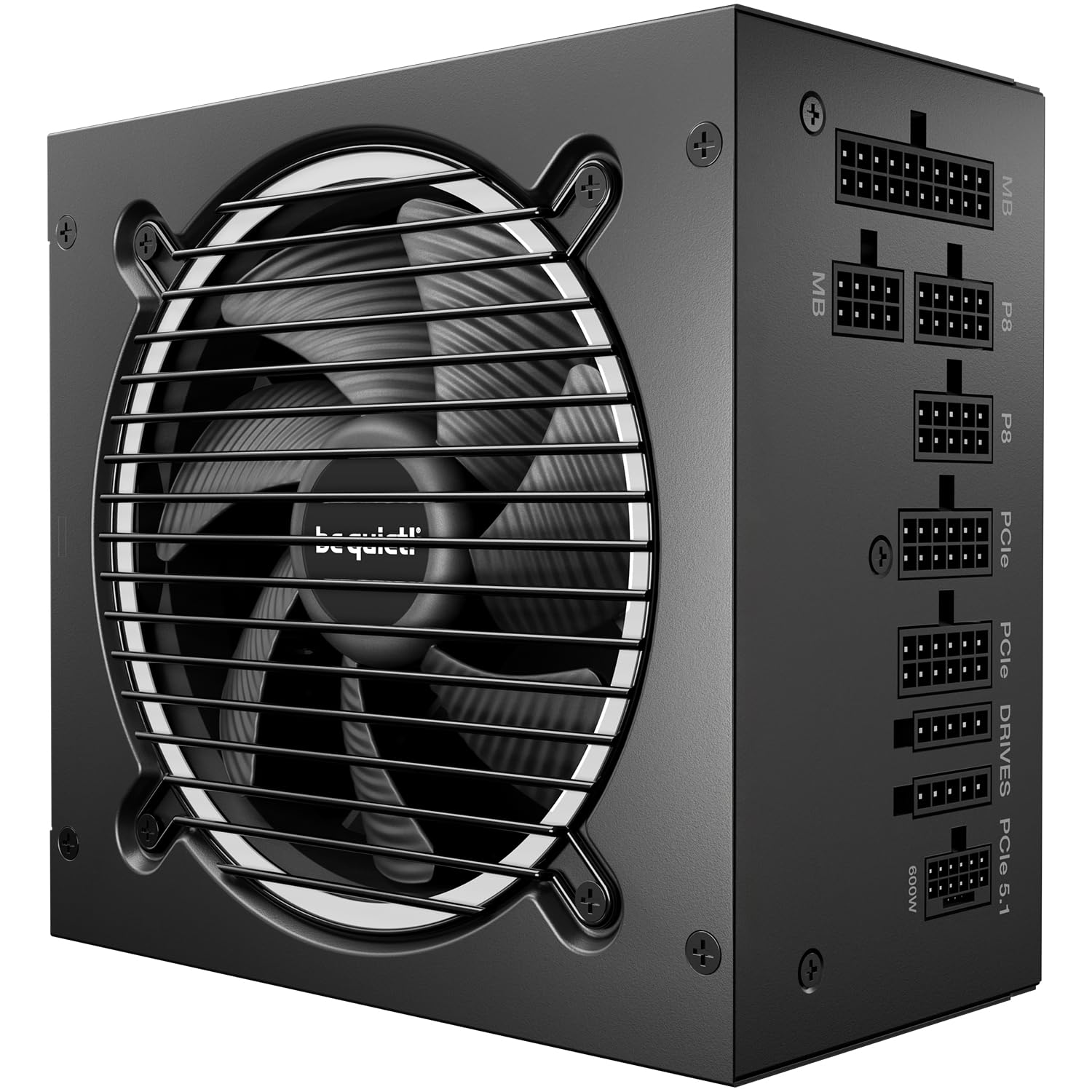
The fan in this one doesn't turn at all until the load asks it to. That semi-passive, zero-RPM behavior is the whole argument for the Pure Power 13 M: through idle and ordinary desktop work there's no fan noise because there's no fan running, and when it does spin up it was the quietest unit in this group at load. If the PC lives in a bedroom, a shared office or anywhere near a microphone, start here.

Be quiet! backs the acoustics with a second certificate beyond the 80 PLUS Gold badge: Cybenetics rates the unit Platinum for efficiency and A++ for noise, and the noise rating is the one we pay attention to on a build like this. Inside, an LLC topology and a single 12V rail do the technical work of holding voltage steady, and the 12V-2x6 connector is native, so a modern card connects without an adapter.

Ten years of warranty matches the longest in this group, and the fully modular cable set follows the same logic as the Corsair's: connect what you need and bag the rest. What we can't tell you is how any unit will behave in year five — but a decade of coverage on the part that usually fails first is the reassurance we look for.

Pros

  • Fan stops entirely at idle and light load
  • Cybenetics A++ rating for acoustics
  • Native 12V-2x6 and full modular cabling
  • Ten-year warranty

Cons

  • Cable runs can be tight in a full tower
Our verdict

If the PC sits near a bed or a microphone, this is the one to buy: silent at idle, the quietest unit here under load, and covered for a decade.

Check Latest Price
3

Best for High-End GPUs

Corsair RM1000x

88 /100
Keeper Score Excellent

Key details

Output
1000W
Cabling
Fully modular, embossed
Warranty
10 years
Efficiency
Cybenetics Gold
Check Price on Amazon

Think of the RM1000x as the RM850e with the ceiling taken off. Same Corsair cable philosophy, same Cybenetics Gold rating, same fully modular layout — plus 1000W, ten years of warranty instead of seven, and embossed cables with low-profile combs that hold their shape behind the tray.

The extra capacity exists for one scenario: a flagship graphics card with a power-hungry CPU beside it. Corsair rates the unit at up to 91% efficiency and full ATX 3.1 compliance, which brings PCIe 5.1 and the transient spikes that come with it, and the native 12V-2x6 connector keeps an adapter out of the path to the card.

It's the heaviest unit in this group and feels like it — a big transformer, one 120mm fan, a lot of metal. We don't think most people should buy it, and we also think the people who already know what card they're installing should buy it once rather than upgrading in a year's time.

At 1000W the unit loafs through most gaming sessions, so the fan rarely ramps and the noise you hear will be your graphics card. That's the real argument for capacity beyond what you need: not headroom for its own sake, but a power supply that never has to work hard.

Pros

  • 1000W with ATX 3.1 transient tolerance
  • Embossed cables with low-profile combs
  • Ten-year warranty and a native 12V-2x6

Cons

  • Costs significantly more than the RM850e
  • Heavier than anything else in this group
Our verdict

Buy this if you already know a flagship card is going in the machine — 1000W, ten years of cover and the tidiest cables Corsair makes.

Check Latest Price
4

Best Premium

ASUS ROG Strix 1000W Platinum

92 /100
Keeper Score Outstanding

Key details

Output
1000W
Cabling
Fully modular
Warranty
10 years
Efficiency
80 PLUS Platinum
Check Price on Amazon

This is the most expensive power supply in our lineup and the only Platinum-rated one, which is the short honest version of what you're paying for. The parts list explains the rest: gallium nitride MOSFETs, large heatsinks over the critical components, and dual ball bearings in the fan where most units at this price use a sleeve bearing.

We noticed the quiet before we noticed the efficiency. Asus runs a 0dB mode that keeps the fan stopped during light gaming, and the heatsinks mean it stays stopped longer than we expected; under a sustained load the fan comes in and stays unobtrusive. Ten years of warranty and a fully modular cable set round out the package, and both match the best here.

Asus markets its GPU-First voltage sensing hardest, claiming up to 45% better voltage delivery to the card. We can't verify a figure like that from the outside, and the honest version of the benefit is steadier power under heavy load — the sort of thing you notice on a bad unit and never think about on a good one. What we can say is that a 1000W Platinum unit with a decade of cover is the least anxious purchase in this guide, provided the budget is there.

Pros

  • Platinum efficiency and GaN MOSFETs
  • 0dB mode keeps the fan off in light gaming
  • Ten-year warranty and modular cables

Cons

  • Bulky fully sleeved cables need a deep channel
Our verdict

The no-compromise choice for a showcase build: Platinum efficiency, a fan that stays off in light gaming, and ten years of cover.

Check Latest Price
5

Best Value Fully Modular

Rosewill VMG 750W

85 /100
Keeper Score Excellent

Key details

Output
750W
Cabling
Fully modular
Warranty
5 years
Efficiency
80 PLUS Gold
Check Price on Amazon

Rosewill spends the specification sheet on parts rather than logos: 100% Japanese electrolytic capacitors, a fluid dynamic bearing fan, and excursion ratings of up to 235% for the unit and 300% on the GPU rail. Those percentages describe how far it can overshoot its rating for a fraction of a second — exactly what a modern card asks for when it jumps from idle to full load.

For the money, this is the unit we point people to when they want modular cables without paying flagship prices. You get a fully modular set, a native 12V-2x6 connector, ATX 3.0 and 3.1 compatibility, and a five-year warranty that comfortably covers a typical upgrade cycle.

Where it gives ground is at the top. 750W is comfortable for a mid-range card and a six- or eight-core CPU, and it stops being comfortable with a flagship, so treat it as a ceiling rather than a starting point. Within that ceiling it ran cool, stayed quiet, and gave us nothing to think about — which, for a power supply, is the highest praise going.

Pros

  • Fully modular for a budget price
  • Native 12V-2x6 rated to 450W
  • Japanese capacitors and an FDB fan
  • Quiet in normal use

Cons

  • 750W rules out a flagship graphics card
Our verdict

The value pick for a modular build with a modern GPU connector: Gold-rated, quiet, and far cheaper than the flagships here.

Check Latest Price
6

Best Budget

ASRock PRO 750G

89 /100
Keeper Score Excellent

Key details

Output
750W
Cabling
Non-modular
Warranty
3 years
Efficiency
80 PLUS Gold
Check Price on Amazon

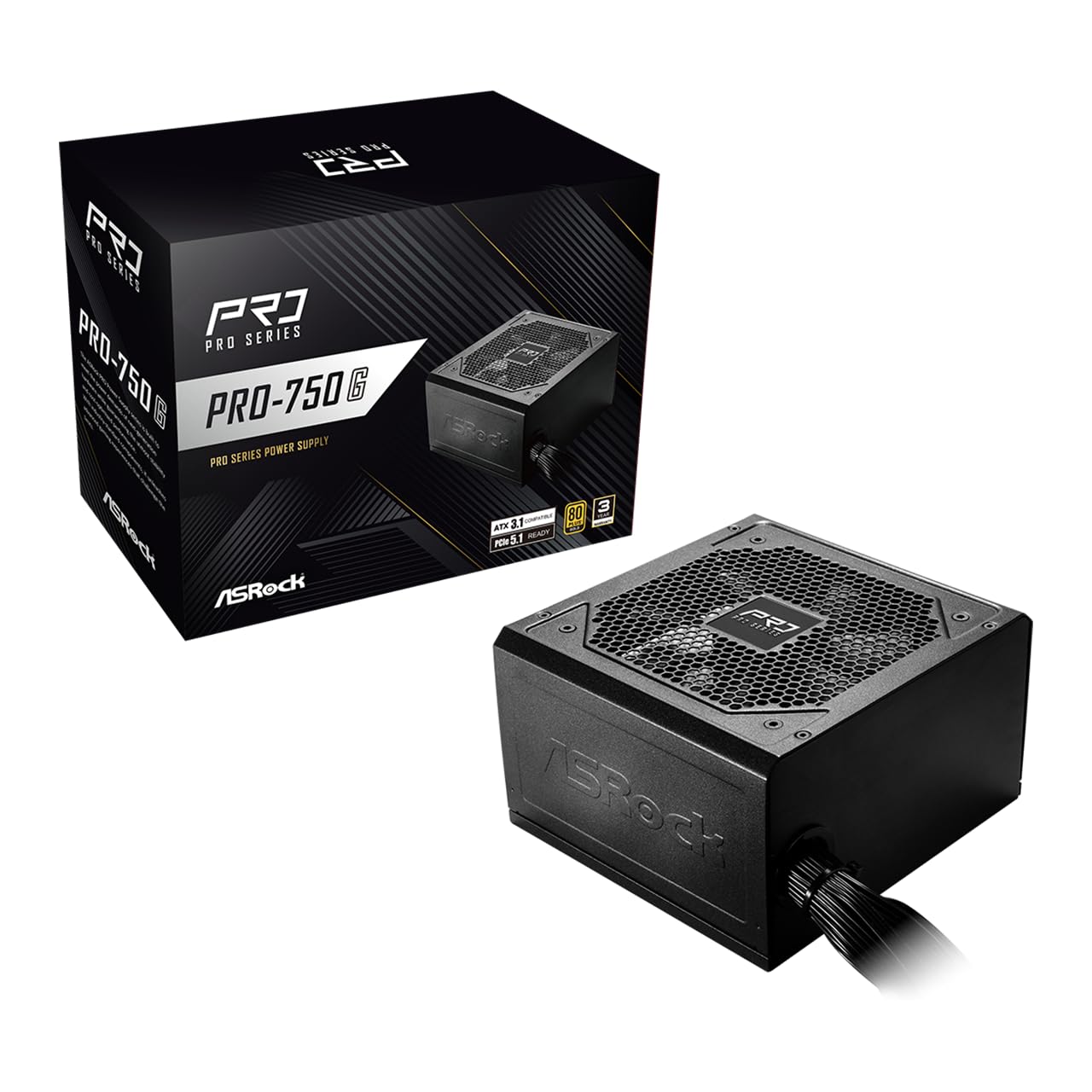
Every connector this unit can supply is attached permanently, so a non-modular build means finding a home for cables you may never plug in: the Molex run, the second EPS, the spare SATA chain. In a case with a power-supply shroud that's a couple of velcro ties and a shrug. In a small mATX box with no basement, plan the routing before you screw anything down.

What you get for putting up with that is the most modern feature set at the lowest price here: 750W with 80 PLUS Gold, ATX 3.1 and PCIe 5.1 compliance, and a native dual-color 12V-2x6 connector rated to 450W. The dual-color plug is a small piece of thoughtful design — the second colour shows through if the connector isn't fully seated, which is the mistake that ruins GPU connectors.

Our reservation is about time. Three years of cover is the shortest here by a wide margin, and on a part that's meant to outlive two graphics cards, that limits how confidently we can recommend it for a long-term build. For a first PC on a tight budget, or a machine that will be handed down in a few years, it's the sensible place to save.

Pros

  • 750W Gold with a native 12V-2x6
  • Dual-color plug shows a partial insertion
  • Compact body suits small cases
  • Lowest price for modern connectors here

Cons

  • Non-modular bundle crowds a small case
  • Three-year warranty is the shortest here
Our verdict

The cheapest route to a modern 750W Gold unit with the right GPU connector — best for a first build or a machine you'll hand down.

Check Latest Price
7

Everyday Gaming Builds

MSI MAG A650BN

93 /100
Keeper Score Outstanding

Key details

Output
650W
Cabling
Non-modular
Efficiency
80 PLUS Bronze
Form Factor
ATX
Check Price on Amazon

Check the connectors before you fall for the wattage. The A650BN's PCIe output is a single daisy-chained cable with two 8-pin ends, and the CPU side is one 8-pin — fine for a mid-range card with a pair of 8-pin sockets, not fine for anything that wants three separate leads or a 12V-2x6.

The rest is honest budget hardware: 650W continuous, 80 PLUS Bronze, a DC-DC design, and the full protection set — over-voltage, over-current, over-power, over-temperature and short circuit — which matters more on a cheap unit than on an expensive one, precisely because it's the cheap unit. The 120mm fan is a low-noise design, and in a mid-tower it never rose above the case fans.

It's non-modular, so the cables you don't use live in the case with you. With a shroud that's invisible; without one it's the usual tangle. The unit itself is compact — under six inches on its longest side — which buys back some of that room.

We keep it in the guide because this is the part people actually put in a first build: cheap enough to leave room for a better GPU, quiet enough to forget, and sized for the 1080p card most people start with. Pair it with a card that needs two 8-pins and no more, and it does the job it's asked to do.

Pros

  • Compact body fits small builds
  • Full protection set at a budget price
  • Quiet 120mm fan

Cons

  • One daisy-chained PCIe cable caps GPU choice
  • Non-modular bundle in a case without a shroud
Our verdict

A compact, quiet 650W workhorse for a 1080p build with a mid-range card — as long as that card doesn't want more than two 8-pins.

Check Latest Price
8

Older, Low-Power PCs

Thermaltake Smart 500W

93 /100
Keeper Score Outstanding

Key details

Output
500W
Cabling
Non-modular
Standard
ATX 12V 2.31
Efficiency
80 PLUS White
Check Price on Amazon

No 12V-2x6, no PCIe 5.1, no modular cables and an 80 PLUS White certificate — the Smart 500W is the least modern power supply we're recommending, and that's precisely why it's still here. It's for the machine that needs none of it: an office desktop, a home server, a ten-year-old tower that needs a working power supply more than it needs a good one.

What it does have is 500W of continuous output rated at 40°C, two PCIe 6+2 connectors, active power factor correction, and the basic protections — over-power, over-voltage and short circuit. It's built to ATX 12V 2.31 and EPS 12V 2.92, which is the standard an older board expects, and the 120mm fan keeps it quiet in a way that's surprising at this end of the market.

Our caveat is longevity. This is a dated design, and a 500W White unit is the kind of part that gets replaced rather than repaired. For a second PC, a workshop machine or an office box, that arithmetic works. For the main machine, it doesn't.

So buy it for a system that draws well under its rating, with integrated graphics or a slot-powered card, and don't buy it for anything you intend to upgrade — there's no connector here for a modern GPU and no headroom for one. The ASRock PRO 750G costs more and asks nothing of you in return.

Pros

  • Very cheap for a 500W unit
  • Quiet 120mm fan
  • Rated for 500W continuous at 40°C

Cons

  • No modern GPU connector, only PCIe 6+2
  • 80 PLUS White is the lowest efficiency here
Our verdict

Buy it for an office PC, a server or an old tower that needs a working power supply — not for anything you plan to upgrade.

Check Latest Price

How We Tested These Power Supplies

We built the shortlist from spec sheets first: current ATX 3.1 and PCIe 5.1 support, a native 12V-2x6 connector instead of an adapter, and enough EPS and SATA leads to fill an ordinary case. Then we narrowed by efficiency rating, warranty length, and what actually came in the box. Fourteen units arrived over the following weeks — a few 500–650W budget supplies, the bulk in the 750–850W range, and three 1000W units — and we lived with them for eight months.

Each one went into a real build: a mid-tower gaming machine with a current-gen GPU, a cramped microATX case that punishes long bodies and stiff cables, and a home-office PC that stays on for weeks. On the bench we loaded every unit for an hour and watched the 12V rail on a multimeter, noting how far it drifted and whether it snapped back when a GPU stress loop hit. We also cut power mid-task to see whether the machine rode through a flicker, and checked standby draw with the system asleep.

Noise got a decibel meter at one meter, at idle and under load, plus the more honest test of whether I could hear the fan from the next room with the panel on. I routed every cable inside a case with a glass side panel, which makes a mess impossible to hide, and fitted the fixed-harness supplies in the small case to see how much of the bundle ended up where it didn't belong. Across eight months we rechecked the units that ran continuously, listened for bearing noise and coil whine, measured body length against drive cages, and weighed what each box included against its price.

How to Choose a Pc Power Supply

Size the Wattage to the GPU, Then Add a Little

Start with the graphics card, because it decides everything else. A current mid-range card and a six- or eight-core CPU are comfortable on 650W to 750W, a flagship card pushes you to 850W, and a flagship plus a heavily overclocked CPU is where 1000W starts to make sense. Buying more than you need won't hurt anything, but watts you never draw are money that could have gone into a better fan, a longer warranty or modular cables.

The trap is reading wattage as a quality signal. A cheap 1000W unit spends its budget on the number on the box rather than the parts behind it, and the ATX 3.1 rating is the more useful line to look for — it's what covers the brief spikes a modern GPU pulls.

The GPU Connector Dates Fastest

A 12V-2x6 connector carries up to 450W to a card on a single cable. If your GPU uses one, you want it native on the power supply rather than adapted from three or four 8-pins: fewer connection points, no adapter bracket, and nothing extra to seat. Look for ATX 3.1 and PCIe 5.1 on the box, and count the PCIe leads if your card wants more than two.

Then seat it properly. Push until the latch clicks and the plug sits flush, because a partly inserted 12V-2x6 is the one mistake in a build that damages hardware. The dual-color plug on the ASRock PRO 750G exists to make a partial insertion visible, and it's a genuinely good idea.

Modular Cabling Earns Its Price in a Small Case

Fully modular means every cable detaches, so the ones your build doesn't use stay in the box. That matters most in a compact case with no power-supply basement, where a fixed harness has to go somewhere and airflow is usually where it ends up. In a mid-tower with a shroud the difference is largely cosmetic, and a non-modular unit is a reasonable place to save money.

Cable length is the other half of fit. Full towers with a bottom-mounted bay can leave a 24-pin run stretched, so check the reach before you commit to a case with a lot of distance between the bay and the motherboard header.

What Quiet Actually Means, and What Warranty Tells You

A 120mm fan and a low-noise claim tell you very little, and an efficiency badge tells you nothing about sound — the two are measuring different things. What matters is the fan curve, the bearing type, and whether the unit can stop the fan entirely at low load. Semi-passive designs like the be quiet! Pure Power 13 M are silent at idle and only spin up under load, which is the behavior that matters in a bedroom or a studio.

Coil whine is separate from fan noise and can turn up on any unit at any price, so buy somewhere with an easy return path. Warranty length is the closest thing to a reliability specification you can read: three years says something different from ten.

Frequently Asked Questions

Final Verdict

We recommend the Corsair RM850e (2025) for most builds. It has the modern connector, a Gold certificate, a fully modular cable set and enough wattage for any card short of a flagship, and it stays quiet while doing it.

If silence matters more than anything else, the be quiet! Pure Power 13 M is the one to pick: it goes completely still at idle and carries a longer warranty. Building around a flagship card? Step up to the RM1000x, which is the same design with the ceiling taken off.