Best Hybrid Cameras of 2026

A hybrid camera promises one body that handles both stills and video, and plenty keep that promise only on paper. The tell is never the spec sheet — it's what happens when the light drops, a subject starts moving, or you're three minutes into a clip and the battery warning appears. The keepers are the ones that stay out of your way: quick to wake, honest about focus, small enough that you actually bring them.

Over the past six months, my team and I have carried nine of them through dim restaurant dinners, a windy weekend hike, a backyard birthday, and a lot of ordinary Tuesdays. We watched for the things reviews rarely settle — image quality once the light goes, how a lens mount or film pack limits what you can add later, battery life on a video-heavy day — and whether the appearance and filter options were charm or genuinely useful. The nine below are the ones we kept reaching for.

Keeper Score summarizes customer ratings and review volume. Read it alongside the product details and trade-offs. How the score works.

1

Best Overall

Canon EOS R50 Lens Kit

87 /100
Keeper Score Excellent

Key details

Video
4K 30p oversampled from 6K
Sensor
24.2MP APS-C CMOS
Autofocus
Dual Pixel CMOS AF II, 651 zones
Viewfinder
0.96x electronic
Check Price on Amazon

The RF mount is what sold us on the R50 as the default here. Every other camera in this guide has a lens you're committed to; this one starts with an 18-45mm kit zoom and can take a fast prime or a longer telephoto later, which is the difference between a first camera and a last one. The kit lens itself is modest — f/4.5-6.3 is daylight glass — so plan on a second lens eventually.

Inside is a 24.2MP APS-C sensor paired with Canon's DIGIC X processor, and autofocus is the part we trusted most. Dual Pixel CMOS AF II covers the frame with 651 zones and recognizes people, animals, and vehicles, so a subject that moves stays locked while you shoot at up to 15 fps with the electronic shutter. For someone stepping up from a phone, that's the feature that quietly rescues the most pictures.

Video is genuinely hybrid rather than a checkbox: 4K up to 30p, uncropped and oversampled from 6K, so wide lenses stay wide, plus Full HD at up to 120p for slow motion. There's even a Close-up Demo movie mode built for showing a product to camera. The 0.96x electronic viewfinder is what we missed when we moved over to the screen-only PowerShot V1 — in bright light a finder is the difference between framing and guessing — and the 3-inch touchscreen articulates for self-recorded video and low angles.

The cost of all that is weight and money. At 1.7 pounds with the kit lens it's the heaviest camera here, and it's the priciest kit in the group. What you get in return is a body with nothing missing on day one: a finder, a built-in flash, and a mount that will outlive the lens it shipped with.

Pros

  • Interchangeable RF mount takes better lenses later
  • Dual Pixel AF II tracks people, animals, and vehicles
  • 4K 30p oversampled from 6K and uncropped
  • Electronic viewfinder plus articulating touchscreen

Cons

  • Kit lens is dim at f/4.5-6.3
  • 1.7 pounds with the kit lens
Our verdict

If you want one camera for photos and video that you can grow into, the R50 is the hybrid we recommend first — the RF mount and the autofocus are what earn it.

Check Latest Price
2

Best for Video and Vlogging

Canon PowerShot V1

86 /100
Keeper Score Excellent

Key details

Lens
16-50mm equivalent, f/2.8-4.5
Video
4K, 10-bit Canon Log 3
Sensor
1.4-type, 22.3MP stills / 18.7MP video
Cooling
Built-in fan
Check Price on Amazon

Sixteen millimeters is the number that makes the PowerShot V1 make sense. At the wide end you can hold the camera at arm's length and still get your own face and the room behind you in the frame, and the zoom runs to 50mm equivalent when you want to tighten on a detail. The f/2.8-4.5 aperture is brightest at that wide end, which is where handheld video usually happens.

The 1.4-type sensor is why the footage holds up indoors. It's far larger than the chip in a typical point-and-shoot, and in our indoor shooting the V1 kept color and detail in the shadows where small-sensor cameras smear. Add 10-bit Canon Log 3 for flat footage that grades, and a built-in cooling fan that extends how long it can record high-resolution video, and you have a compact that behaves like a working camera.

What it doesn't have is a viewfinder. We didn't mind at all for video — the 3-inch screen articulates and faces forward — but for stills in direct sun you're composing off a panel. The other limit is reach: 50mm equivalent is where the zoom stops, so portraits and distant details are crops rather than optics. At 15.04 ounces it's light enough to hold for a good while, and since the box is camera-only with no charger, plan on a USB-C adapter and an SD card on day one.

Pros

  • Wide 16-50mm equivalent zoom for handheld framing
  • 1.4-type sensor holds up in low light
  • 10-bit Canon Log 3 with a built-in cooling fan
  • Articulating screen faces forward for solo shooting

Cons

  • No viewfinder for stills in bright light
  • Zoom stops at 50mm equivalent
Our verdict

For handheld video and the stills that come with it, the V1's wide 16-50mm zoom and 1.4-type sensor make it the most forgiving camera here to shoot one-handed.

Check Latest Price
3

Best Instant Hybrid

Fujifilm Instax Mini Evo

92 /100
Keeper Score Outstanding

Key details

Screen
2-inch LCD
Weight
1.1 lb
Effects
10 lens and 10 film effects
Film Format
Instax Mini
Check Price on Amazon

The Mini Evo's real trick isn't printing — it's letting you decide what deserves film, and that's the feature that makes it worth carrying. You shoot digitally, review on the 2-inch screen, and print only the frames worth keeping, the opposite of a classic instant camera where every shutter press costs a print. Two dials combine 10 lens effects with 10 film effects, and you see the result before you commit.

That changes how the camera gets used. At a party we shot freely and printed a handful at the end, with nobody left holding a blurry one. The selfie mirror and the second shutter button on the front make upright shots easy, and the free Instax Mini Evo app prints photos from your phone as well as tripping the shutter remotely.

The limits are the format and the screen. Mini prints are small, so faces read and fine texture doesn't — treat the output as a keepsake rather than something to enlarge. The 2-inch panel is tight for framing, and that's the thing we noticed most when we picked up the Wide Evo's 3.5-inch display afterwards. Otherwise it's an easy camera to carry at 1.1 pounds, and the microSD slot means the digital originals aren't stranded on the camera.

Pros

  • Choose which shots get printed before spending film
  • 10 lens and 10 film effects on two dials
  • Prints phone photos through the free app
  • Selfie mirror and dual shutter buttons

Cons

  • Small prints lose fine detail
  • 2-inch screen is tight for framing
Our verdict

We point anyone who wants instant prints without wasted film at the Mini Evo: shoot freely, print the keepers, and print from your phone too.

Check Latest Price
4

Wide Group Shots

Fujifilm Instax Wide Evo

82 /100
Keeper Score Excellent

Key details

Screen
3.5-inch LCD
Effects
10 lens and 10 film effects, 5 film styles
Resolution
16MP
Film Format
Instax Wide, 3 x 5 prints
Check Price on Amazon

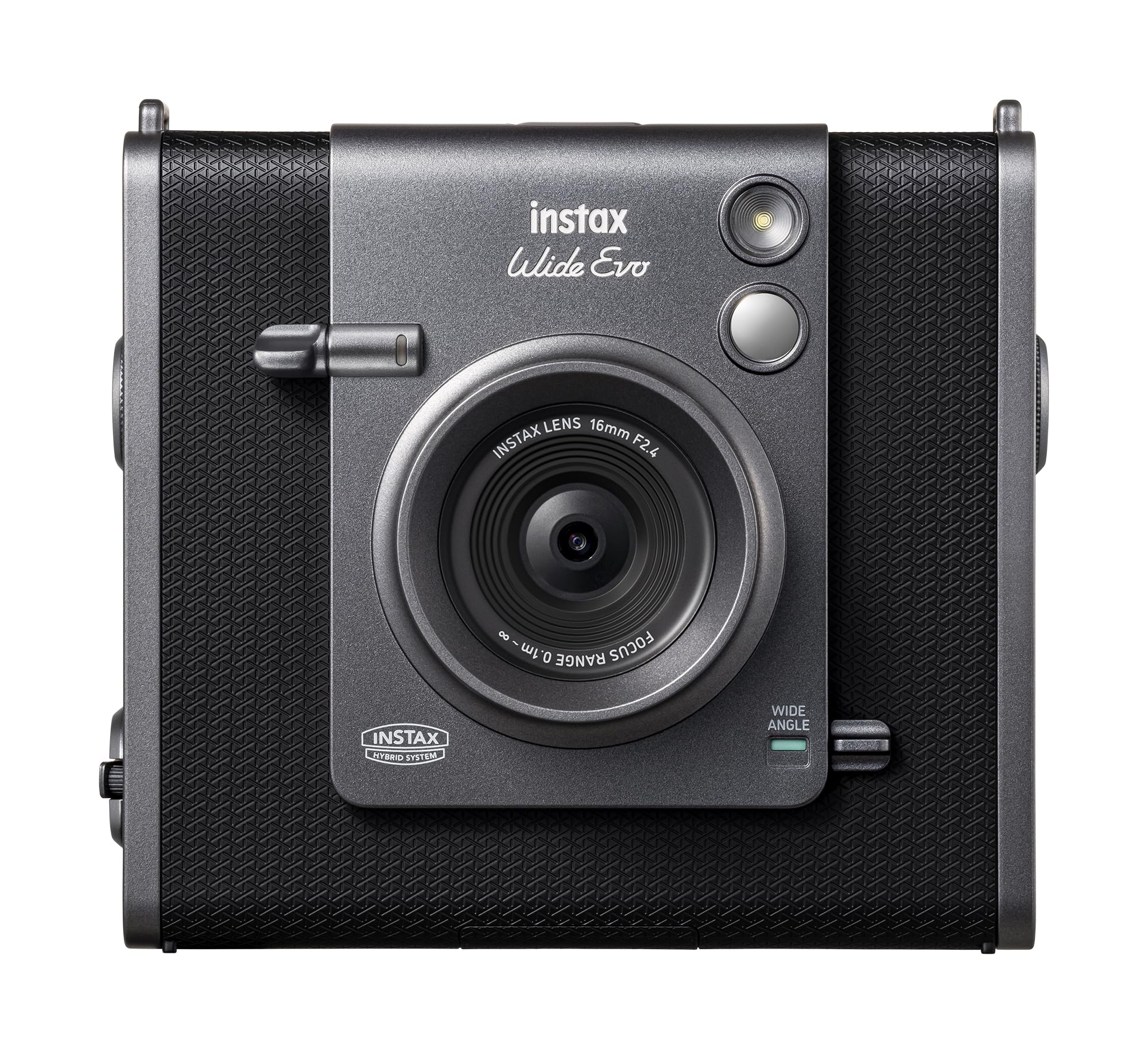
A 3 x 5 inch print is a different object from a Mini frame. The Wide Evo's film is big enough for two people at a table, a street corner, or a skyline, and that's the reason to pay more than the Mini Evo — the format, not the feature list.

Behind the film it's a 16MP camera with a wide-angle lens and a 3.5-inch LCD, and that screen is the upgrade we noticed most: composing and reviewing are far more pleasant than squinting at a 2-inch panel. A degree dial cycles through 10 lens effects, 10 film effects, and five film styles, so you can dial in a look before you print. Half-press the shutter lever and focus locks where you left it, the kind of small control that makes shooting into a crowded scene less fiddly. Prints come out at a print-ready 318 DPI.

The extras are sensible: a shoulder strap and lens cap come in the box, it ships with a USB-C cable, and the Instax Wide Evo app handles phone prints. At 0.49 kg it weighs about what the Mini Evo does, so the extra bulk is in the print, not the body. What it doesn't have is a viewfinder, so bright daylight means composing on the screen instead.

Pros

  • Big 3 x 5 prints hold groups and scenes
  • 16MP capture and a roomy 3.5-inch screen
  • Dial-driven lens, film, and style effects
  • Strap, lens cap, and USB-C cable included

Cons

  • The most expensive instant camera in this group
  • No viewfinder, so daylight framing is screen-only
Our verdict

If your prints are of places and groups rather than single faces, the Wide Evo's 3 x 5 frames and 3.5-inch screen are worth the step up in price.

Check Latest Price

How We Tested Nine Hybrid Cameras Over Six Months

We started with a shortlist of roughly 40 cameras built from spec sheets, review complaints, and price bands, then cut it to nine we could live with — filtering out duplicates of formats we already had and keeping a mix of interchangeable-lens bodies, fixed-lens compacts, and instant cameras that print as they shoot. Nine cameras, six months, no studio: each one went into a bag and out into the week.

Every camera came to a dim restaurant dinner, a windy weekend hike, and a backyard party where we handed it to a friend who shoots only on a phone. We walked while filming to see how autofocus and stabilization coped with a moving subject, timed how long a full battery lasted while alternating clips and stills, and shot the same backlit scene on each to compare how much highlight detail survived.

Compatibility came next: whether an older lens adapted cleanly to a new mount, whether the film pack or memory card was something we could buy locally, and whether accessories ended up costing more than the camera itself. We checked how far each zoom reached before the edges softened, then noted the less measurable things — how the body felt after two hours on a strap, whether the filter and effect modes were worth using twice, and whether the price made sense next to the prints and footage you actually got. Some won on image quality alone; others earned their place by being the one we grabbed on the way out the door.

How to Choose a Hybrid Camera

Decide which kind of hybrid you're buying

A stills-and-video hybrid behaves like a camera you already understand: it takes a memory card, records 4K, and works like a compact or a mirrorless body. An instant hybrid is a printer with a lens attached — it makes small physical prints and belongs at parties, weddings, and trips, not on a tripod at a recital.

Most people searching this term want the first. If what you actually want is a print in your hand by the end of the evening, buy the second and don't expect it to film the school concert. The mistake is buying one while hoping for the other: no camera here does both jobs well.

Mount, fixed zoom, or fixed lens

The EOS R50 takes interchangeable RF lenses. The PowerShot V1 has a fixed 16-50mm equivalent zoom. The Instax bodies have one fixed lens for shooting to film. Interchangeable is the more expensive path and the more flexible one — a fast prime fixes low light in a way no menu setting can.

A fixed 16-50mm covers wide scenes and handheld video, which is where most casual footage happens, and it keeps the body small. If you genuinely never plan to buy a second lens, spend the money on the sensor instead of the mount.

What to check on the video side

Frame rate and how the camera produces it matter more than the number on the box. The R50 records 4K up to 30p oversampled from 6K and uncropped, so wide lenses stay wide; the V1 records 10-bit footage with Canon Log 3, which is flatter and grades cleanly if you intend to color-correct.

Autofocus with subject detection is the other half. A camera that holds a face while you move makes handheld footage usable without a gimbal, and it matters more than resolution for most family video. Grade your footage and 10-bit Log is worth paying for; post straight to social and reliable tracking is worth more.

Viewfinder or screen only

An electronic viewfinder is what separates a stills camera from a video one in practice. The R50's 0.96x finder is the difference between composing and guessing in bright light. The V1 and both Instax bodies make you use the screen, which keeps them small and is fine for video on a tabletop and for prints you compose casually.

The trap is that a viewfinder is the one thing you can't add later. Shoot outdoor stills in daylight and it belongs near the top of your list, ahead of megapixels.

Instant film: format and running cost

Two formats run through this group: Instax Mini in the Mini Evo, and Instax Wide in the Wide Evo, which prints 3 x 5. Bigger frames hold more people and more scene, and they're the reason the Wide Evo costs more.

The other cost is waste. Printing blind, the way a classic instant camera makes you, burns film on bad frames; both Fujifilm bodies here preview first and print on demand, and both print phone photos. Choose by what you'll do with the prints — faces for a wallet, scenes for a wall.

Frequently Asked Questions

Final Verdict

Buy the Canon EOS R50 if you want one camera for photographs and video that you can grow into. The RF mount and the autofocus are worth carrying 1.7 pounds for, and it's the only pick here that gets better when you buy a lens. If most of your shooting is handheld video, take the PowerShot V1 instead: lighter, wider at the start, no viewfinder.

And if hybrid means a print in your hand, start with the Instax Mini Evo — it lets you shoot freely and spend film only on the keepers. Move up to the Wide Evo when 3 x 5 prints of places and groups are the point, not the occasional fridge photo.