Best FPV Drones of 2026

An FPV drone promises to put you inside the flight—until the battery warning chirps and you remember you’re responsible for a flying camera. That mix of thrill and panic is why I don’t trust a spec sheet alone. Over six months, we’ve flown nine FPV drones—goggle kits, motion-controller bundles, and budget quadcopters with a screen on the controller—across open fields, tree-lined paths, a windy lakeshore, and an empty parking garage. What separated them wasn’t top speed; it was clean video near trees, predictable controls in a gust, and a battery that lasted long enough to enjoy the flight.

Battery life is the spec that decides whether a flight feels fun or frantic, and I also came to care about build quality, propeller guards, easy start and stop controls, and a controller that makes sense without a manual. Camera quality isn’t just resolution: I looked for footage that stayed crisp through a quick turn and held detail in shade. Value came down to what was in the box and whether the drone made me want a second pack—the picks below are the ones that earned it.

Keeper Score summarizes customer ratings and review volume. Read it alongside the product details and trade-offs. How the score works.

1

Best Overall

DJI Avata 2 Fly More Combo

91 /100
Keeper Score Outstanding

Key details

Camera
4K/60fps, 1/1.3-inch sensor
Weight
13.3 oz
In The Box
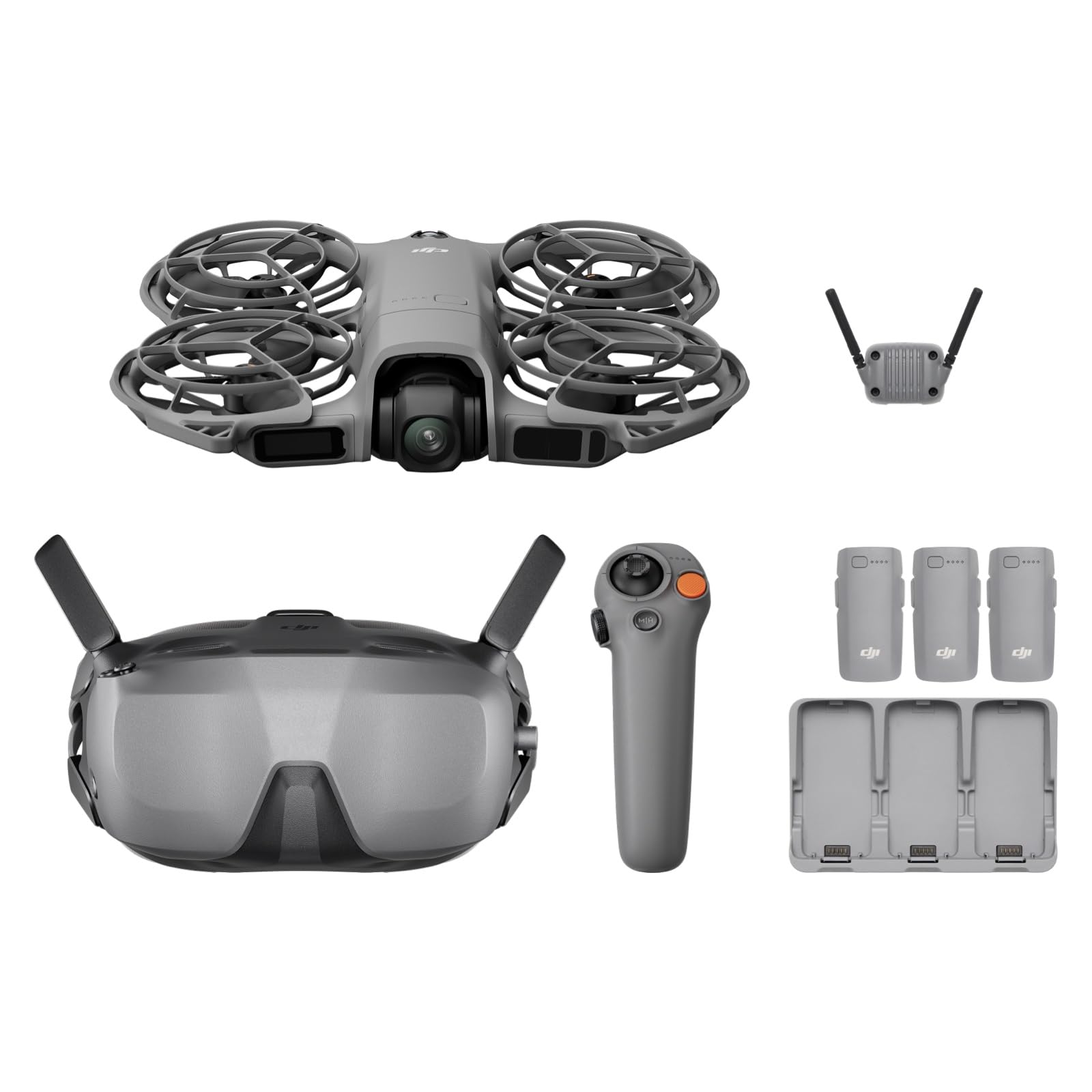
Goggles 3, RC Motion 3, 3 batteries
Listed Flight Time
Up to 23 minutes
Check Price on Amazon

Propellers caged in molded ducts are the reason we're comfortable recommending the Avata 2 to someone who has never flown FPV. A branch or a garage wall meets plastic instead of spinning blades, and that changes how close you're willing to fly — which is the whole point of wearing goggles. The 155° field of view does the rest: the picture wraps far enough around that tight gaps read as gaps rather than guesswork.

The camera is the best in this group by a distance — a 1/1.3-inch sensor recording 4K at up to 60fps, with RockSteady and HorizonSteady holding the horizon where you left it while you throw the drone around. Stabilization earns its keep in exactly the flying FPV encourages: low, fast and close, where lesser cameras turn to soup.

With the RC Motion 3 it's the friendly version of FPV. Point the controller where you want to go, squeeze the trigger, and press a button for a flip or a roll without touching a stick. Manual mode is a different animal and it needs the FPV Remote Controller 3, which isn't in this box — worth knowing before you assume the combo covers everything you'll eventually want.

Two things to go in knowing. There's no obstacle sensing aboard, so the ducts are your safety net rather than a sensor bubble. And 23 minutes is a ceiling per battery, the longest single-pack figure here, though hard flying eats into it; the three packs and the charging hub are what keep an afternoon going, not the sling bag.

Pros

  • Ducted guards shrug off impacts
  • 1/1.3-inch sensor shoots 4K at 60fps
  • Goggles 3, motion controller and three batteries included
  • Flips and rolls without stick skills

Cons

  • No obstacle sensing onboard
Our verdict

Ducted props make crashing survivable, the goggles make flight immersive, and three batteries keep a session going — our pick for anyone who wants the real goggles-on thing.
Check Latest Price
2

Best for Beginners

DJI Neo 2 Motion Fly More Combo

91 /100
Keeper Score Outstanding

Key details

Camera
4K
Weight
5.33 oz
In The Box
Goggles N3, RC Motion 3, 3 batteries
Obstacle Sensing
Omnidirectional
Check Price on Amazon

Half the size of our top pick and a fraction of the outlay, the Neo 2 combo still puts Goggles N3 on your face and a 4K picture from the nose of the drone. At 151 g it barely registers on the walk to the field, and the full-coverage prop guards mean early mistakes cost you a walk to pick it up rather than a repair bill.

What sold us on it as the beginner pick is the omnidirectional obstacle sensing. It's the difference between learning in an empty field and learning almost anywhere: fly at a wall and the drone stops rather than testing it. Palm takeoff and landing removes the hunt for a flat launch pad, and the digital transceiver in this combo is what keeps the live feed steady when the drone slips behind a hedge.

Battery life is the compromise. Three packs come in the box because each one is short, and the two-way hub lets you top them up in sequence — treat the batteries as the reason to buy this combo rather than the plainer one. There's no memory card slot either; footage lives in the drone's built-in storage, so decide how you'll offload before a day out, not after.

Pros

  • Omnidirectional sensing protects early flights
  • 151 g, well under the 250 g line
  • Goggles N3 and motion controller in the box
  • Palm takeoff, gesture control and ActiveTrack

Cons

  • Short flight time per battery
  • No memory card slot; recording stays internal
Our verdict

The gentlest route into goggles-on FPV: light enough to carry anywhere, guarded on all sides, and smart enough to stop before a beginner hits something.

Check Latest Price
3

Young Beginners

RELIDOL PK01

85 /100
Keeper Score Excellent

Key details

Camera
1080p
Weight
4.06 oz
Controller
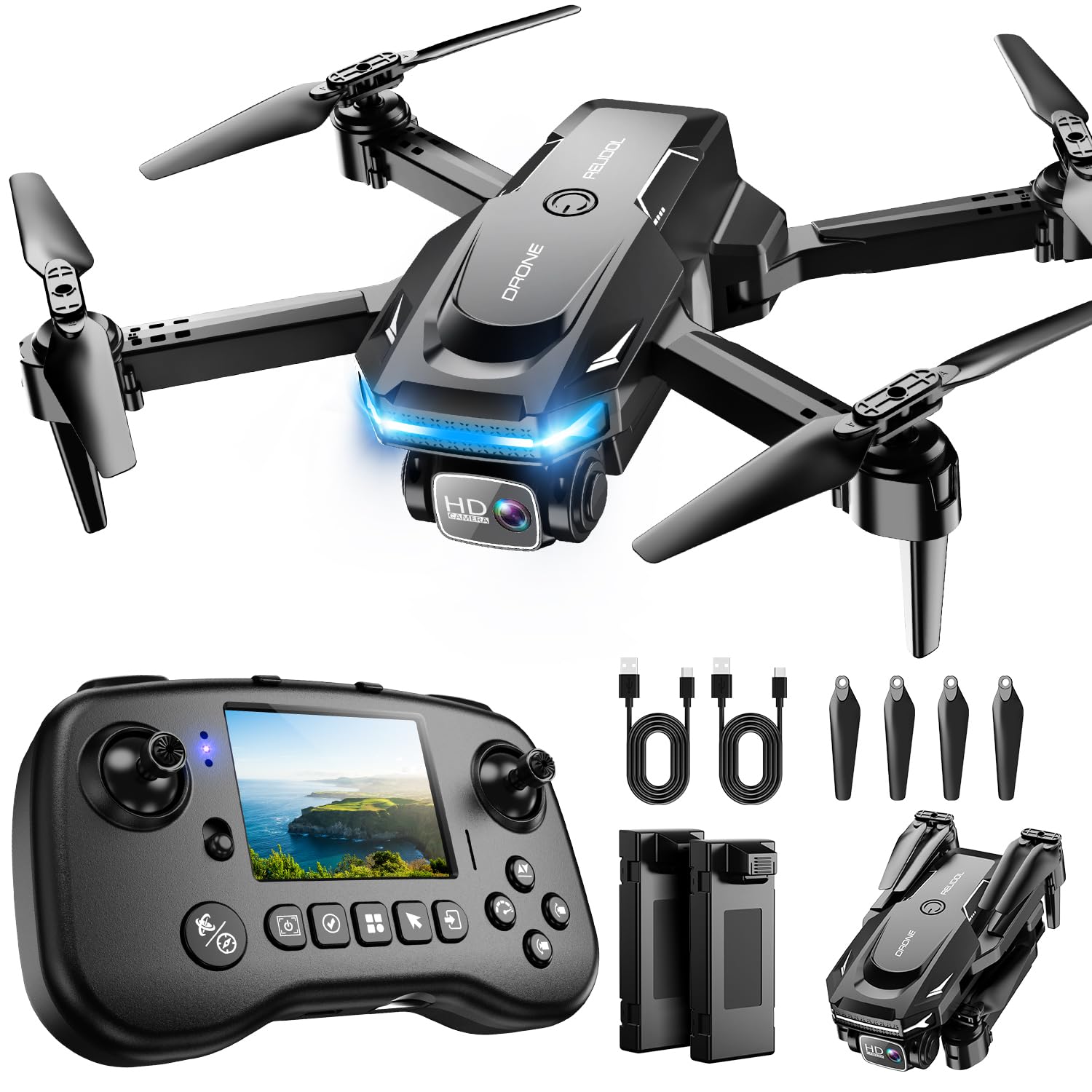
Built-in screen, no phone needed
Maximum Range
30 meters
Check Price on Amazon

The PK01's best idea is the screen built into its controller. No phone clamped into a holder, no app fighting for the Wi-Fi, no draining the device you might need later — flip out the controller, see what the drone sees, and fly. For a first drone that's a genuinely good trade, and it's why this is the one to hand to a kid without a lecture first.

It isn't FPV in the goggle sense. A 30-meter maximum range and a 1080p camera make it a backyard flier that shows you a live picture from the nose, not something you'll be diving through gaps with. What it does cover is what a beginner actually wants in the first month: one-key start, an emergency stop, 3D flips, two batteries, and a fold that fits a backpack pocket.

At just over four ounces it's a calm-day flyer, and you'll want a microSD card before the first flight, since the card isn't in the box. Neither point is a dealbreaker at this end of the market. They're the reasons it stays in the yard instead of following you to a cliff.

Pros

  • Built-in screen means no phone needed
  • One-key start and emergency stop
  • Two batteries in the box

Cons

  • 30-meter range keeps it in the yard
Our verdict

A starter drone for kids and curious beginners: the screen in the controller is the whole idea, and it isn't a substitute for a goggles-on FPV kit.

Check Latest Price
4

Budget Aerial Video

Loiley X69

84 /100
Keeper Score Excellent

Key details

Camera
2K
Flight Time
About 26 minutes with two batteries
Folded Size
5 x 3 x 2 inches
Positioning
Optical flow
Check Price on Amazon

Search the low end for an FPV drone and you'll meet a lot of drones like this one. The X69 has a camera, a live feed to your phone and two batteries, and none of that makes it an FPV drone in the sense the Avata 2 or the Neo 2 are. What it is: the cheapest way here to find out whether aerial video is something you'll stick with.

The pieces are sensible for the money. Optical flow positioning holds a hover indoors better than the drift-prone toys that came before this generation, one-key takeoff and landing removes the panic from a first flight, and it folds to roughly paperback size with a bag to carry it in. Two batteries stretch a session rather than defining one.

The 2K camera is fine for clips you'll send to family; it isn't the reason to buy. What you're paying for is the novelty of seeing your street from above without risking a real drone, and that's a legitimate thing to want. If the bug bites, you'll want goggles and a guarded airframe next — the X69 is the trial run, not the destination.

Pros

  • Optical flow steadies the hover indoors
  • Folds small with a carry bag included
  • Two rechargeable batteries included

Cons

  • Live view is a phone screen, not goggles
Our verdict

The least expensive way here to try aerial video, with the caveats that your live view is a phone screen and the flying stays beginner-simple.

Check Latest Price

How We Tested the Best FPV Drones

We started with more than 30 listings and narrowed them by specs, price, and format—goggle kits, motion-controller bundles, and screen-on-controller models—then flew nine over six months. We skipped listings with vague battery claims or no clear path to replacement props, since those are the details that decide whether a drone stays fun after the first weekend.

Flights happened in the same places: open fields on windy afternoons, tree-lined park paths, a lakeshore, and an empty parking garage after hours. On each outing we started with slow hovering and simple turns, then moved to punch-outs, figure-eights around markers, and low passes under branches. We flew toward a fence and a tree line to see how the video feed handled obstruction, handed the controller to a first-time pilot, and noted whether we wanted a second flight.

Battery life got its own log: we timed takeoff to low-battery warning, counted how many packs filled a typical session, and recorded recharge time. For camera quality, we shot the same golden-hour scene and shaded path, then watched footage on a laptop for detail, color, and jitter. For reliability, we repeated flights, watched for dropped video or unresponsive controls, and inspected props and guards after every bump. Value came down to what was in the box and whether the extras made a session smoother; fun was whether the drone made us grin or felt like work.

How to Choose an Fpv Drone

Goggles or a Screen?

Two very different products get sold as FPV drones. One sends the camera's view to a headset, so you fly from inside the picture; the other sends it to your phone or to a screen in the controller, so you're looking down at a rectangle while the drone flies itself. The first is what people mean by FPV, and it's what the Avata 2 and the Neo 2 deliver. The second is a camera drone with a live feed.

Decide which one you're shopping for before you compare anything else, because the experience isn't close and neither is what you'll spend. If you're buying for a child, the screen version is the honest starting point. If you want the rush, buy the goggles.

Count Batteries, Not Minutes

FPV flying is inefficient — you hover, sprint, turn and land — so real flight time lands under whatever the box claims. Compare per-pack figures rather than totals, because some budget listings add both batteries together and present the sum as flight time. Then count the packs. Three batteries and a charging hub, as in both DJI combos, mean a session with breaks; a single pack means a session that ends early. A spare battery does more for your flying than any other accessory.

Buy for the Crash, Not the Spec Sheet

Every FPV pilot crashes; the only question is what happens next. Ducted or full-coverage guards put plastic between the propellers and the world, which is why we favor the guarded DJI airframes over anything with bare blades. Obstacle sensing helps, but only the all-around kind — a sensor that looks forward won't save you when you're flying backwards toward a fence.

Buy spare propellers with the drone, learn over grass, and treat a tough shell as a feature worth paying for rather than a spec-sheet afterthought.

Weight, Registration and Rules

In the U.S., drones over 250 g generally need FAA registration, and that line is a useful shopping filter. The Neo 2 is 151 g and sits under it; the Avata 2 is 377 g and doesn't. FPV flying also assumes you can see the aircraft, which in practice means a second person spotting while you're in the goggles. Rules vary by country and by where you launch, so check the current ones for your area — and keep first flights away from people, roads and airports.

Which Controller Comes in the Box

The controller shapes the flying more than top speed does. A motion controller like the RC Motion 3 is point-and-go: intuitive within minutes, excellent with goggles, and able to throw a flip at the press of a button. A conventional radio with manual mode is what freestyle pilots use, and it's a skill you build over months. Both DJI combos here ship with the motion controller, so if manual flight is the goal, price in the separate FPV Remote Controller 3 before you commit.

Frequently Asked Questions

Final Verdict

The Avata 2 is the one to buy if you want the real thing: goggles on, guards on, a camera that holds up in fast low passes, and enough battery in the box for a proper session. It's the strongest of these at both flying and filming.

If you're still learning, or you want the drone to catch its own mistakes, the Neo 2 is the better first purchase — lighter, smarter, and easier to live with. And if you're not sure the hobby will stick, the budget pair will tell you for very little, as long as you go in knowing the FPV is happening on a screen.