Best Audio Interfaces for Content Creators of 2026

An audio interface does one unglamorous job: it turns the analog signal from your mic or guitar into clean digital audio your computer can record. What separates a good one from a maddening one is rarely on the spec sheet. It's whether the preamp gives you enough clean gain before hiss creeps in, whether the knobs land where your hand expects, and whether it acts the same on day 40 as it did on day one. We spent six months with 10 of them.

Here's what I tell friends who ask: you need fewer inputs than you think. Most creators record one voice at a time, maybe a guitar, and paying for preamps you'll never touch is money that could have bought a better single channel. The real dealbreaker is compatibility — an interface that fights your computer at setup will wreck a session faster than any tonal shortcoming.

Our picks run from palm-sized one-input boxes that live in a backpack to rack units built for a full band, and each earned its place by being simple to set up and boringly reliable once it was.

Keeper Score summarizes customer ratings and review volume. Read it alongside the product details and trade-offs. How the score works.

1

Best Overall

Focusrite Scarlett Solo 3rd Gen

93 /100
Keeper Score Outstanding

Key details

Mic Inputs
1 XLR
Connectivity
USB-C, bus powered
Max Resolution
24-bit/192 kHz
Instrument Input
1 Hi-Z
Check Price on Amazon

One XLR input and one instrument input is the entire front panel of the Scarlett Solo, and for most content creators that is the right amount of interface. The preamp is quiet, the 56 dB gain range covers the dynamic mics podcasters tend to use, and Air mode adds a lift in the upper mids that makes a close-miked voice sound less flat. It is the interface we recommend first to anyone recording alone.

Having two separate jacks does more for a creator than the spec sheet suggests. The microphone stays on the XLR input while a guitar stays plugged into the Hi-Z input, so you can track both at once or leave the instrument connected without breaking down your vocal chain. The halo meters around the gain knobs shift from green to amber to red as the signal approaches clipping, and after an afternoon with them we trusted our level-setting far more than we had with a software meter.

Setup is a USB-C cable and a driver, with no power supply to find a socket for, and the bundled software is broad: Pro Tools Intro+, Ableton Live Lite, Cubase LE, and the Hitmaker Expansion. Windows is where to be deliberate. Install Focusrite's own driver before opening your DAW and skip third-party ASIO wrappers, which is where most of the setup friction in this category starts.

Where it stops is anything that needs two microphones — a co-host or a two-person interview belongs with the SSL 2 MKII Plus instead. For everyone else, the combination of quiet gain, a 5.65-inch-wide body that tucks under a monitor, and software you would otherwise buy separately is why it holds the top spot.

Pros

  • Separate XLR and instrument inputs
  • 56 dB of clean gain with Air mode
  • Deep bundle: Pro Tools Intro+, Ableton, Cubase
  • USB-C bus power, no adapter to carry

Cons

  • Single mic input rules out two-person recording
Our verdict

For solo podcasters and on-camera creators, we recommend the Scarlett Solo: one genuinely quiet preamp, a separate instrument input, and the most complete software bundle of the single-input interfaces here.
Check Latest Price
2

Best Budget

Mackie Onyx Artist 1.2

88 /100
Keeper Score Excellent

Key details

Mic Input
1 XLR
Monitoring
Zero-latency direct
Max Resolution
24-bit/192 kHz
Instrument Input
1 Hi-Z
Check Price on Amazon

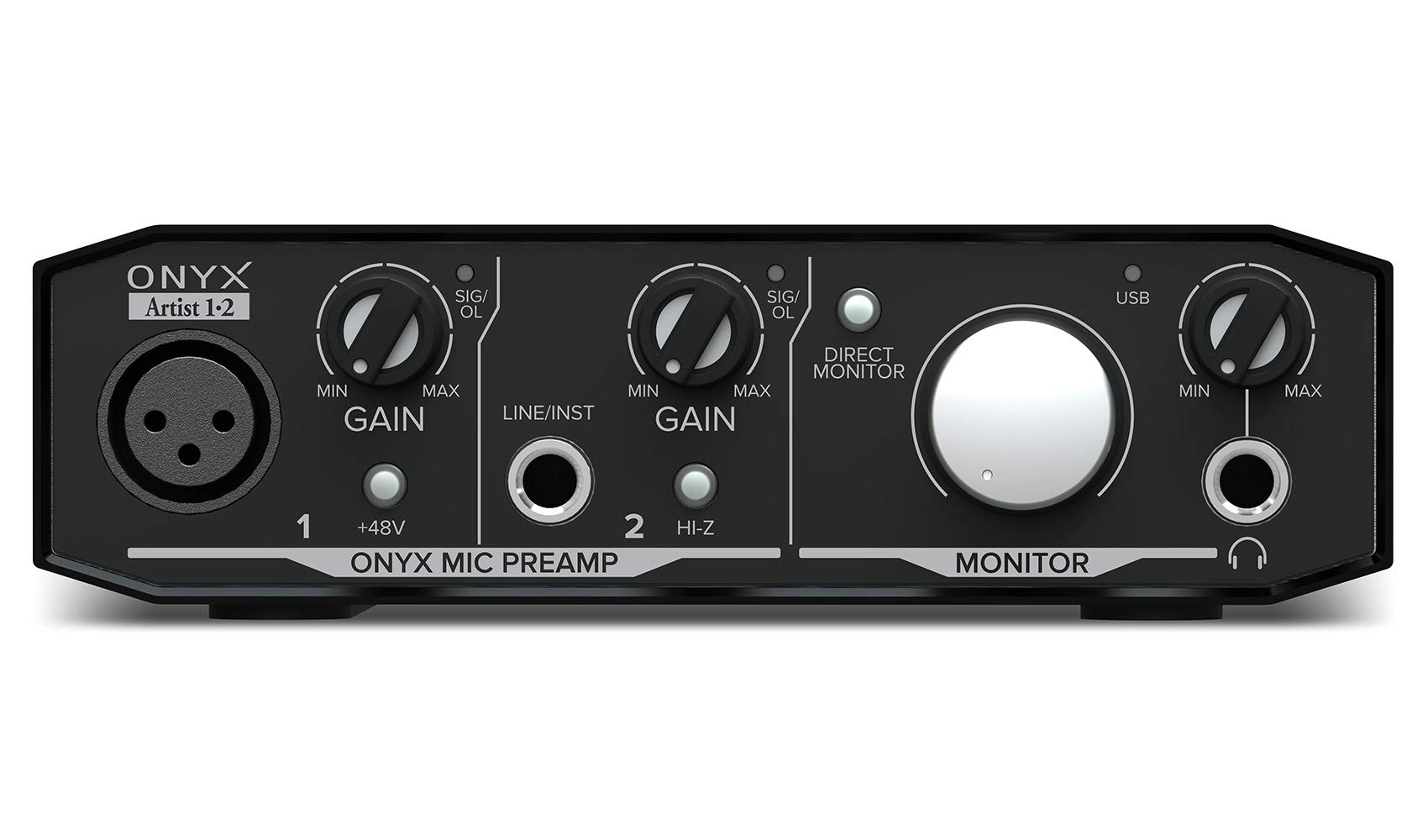
The Onyx Artist 1.2 is the least expensive interface on this list, and nothing about it feels like a compromise on build. The chassis is metal, the knobs have real weight, and at 1.2 pounds it can live in a bag without a case. For a first recording setup, a second desk, or a classroom station, that is a lot of reassurance.

The Onyx preamp is the real story. It is clean and quiet, with 48V phantom power for a condenser and 24-bit/192 kHz conversion, and direct monitoring is genuinely zero-latency, which matters the first time you try to sing along to a backing track. We think it is the right first interface for a podcaster who would rather spend the budget on a microphone.

The layout takes a minute to learn: channel one is XLR only, so the microphone lives there, and the 1/4-inch input with its Hi-Z switch is channel two — one mic and one guitar at once, never two mics. Gain is the other thing to get used to. The useful travel on each knob is narrow, so move in small increments and set levels against your DAW meter rather than by ear alone. A Pro Tools First license and a 23-plugin collection round it out.

Pros

  • Onyx preamp sounds clean and quiet
  • Metal body that survives a bag
  • 24-bit/192 kHz with zero-latency monitoring
  • Pro Tools First and 23 plugins included

Cons

  • Headphone output is quiet with high-impedance headphones
Our verdict

If the budget is the hard limit, buy the Onyx Artist 1.2 — a metal body, a clean Onyx preamp, and 24-bit/192 kHz conversion for the least money in this group.

Check Latest Price
3

Best for Vocal Character

Universal Audio Volt 1

90 /100
Keeper Score Outstanding

Key details

Weight
1.2 lb
Mic Preamp
1, with Vintage 610 mode
Headphone Out
Direct-drive
Max Resolution
24-bit/192 kHz
Check Price on Amazon

Vintage mode is the reason to look at the Volt 1. Flick the switch and the preamp takes on the character of Universal Audio's 610 tube console — a little more weight in the low mids, a slightly softer top. On a close-miked speaking voice the result sounds finished before you open a plugin.

The rest of the box is quietly well judged. The brushed-aluminum case looks like studio gear rather than a dongle, the headphone output is direct-drive so it holds level with real headphones, and zero-latency monitoring means you hear yourself without a delay. MIDI devices connect without an adapter, and the bundle includes Melodyne, Ampeg and Marshall amp models, and the LUNA DAW.

We choose the Volt 1 over the Scarlett Solo when the voice is the product — interviews, narration, anything where a thin-sounding take sends you hunting for EQ. It is also the better-looking of the two on a desk, which counts for creators who film their own setup.

It will not grow with you, though. There is one mic preamp, and Vintage mode is a fixed voicing rather than a dial you can pull back partway; you either like what it does to your voice or you do not. If you need two microphones, this is not the box.

Pros

  • Vintage 610 mode adds body to vocals
  • Clean, quiet preamp with very low latency
  • Brushed metal build that looks the part
  • Bundled Melodyne, Ampeg, and LUNA

Cons

  • One mic preamp only
  • Vintage voicing cannot be dialed back
Our verdict

The Volt 1 earns its place on voice: Vintage mode gives spoken word weight and polish that the plainer preamps here make you chase with plugins.

Check Latest Price
4

Best for Streaming

SSL 2 MKII Plus

90 /100
Keeper Score Outstanding

Key details

Outputs
4 line outs
Loopback
Stereo
Mic Preamps
2 XLR
Max Resolution
32-bit/192 kHz
Check Price on Amazon

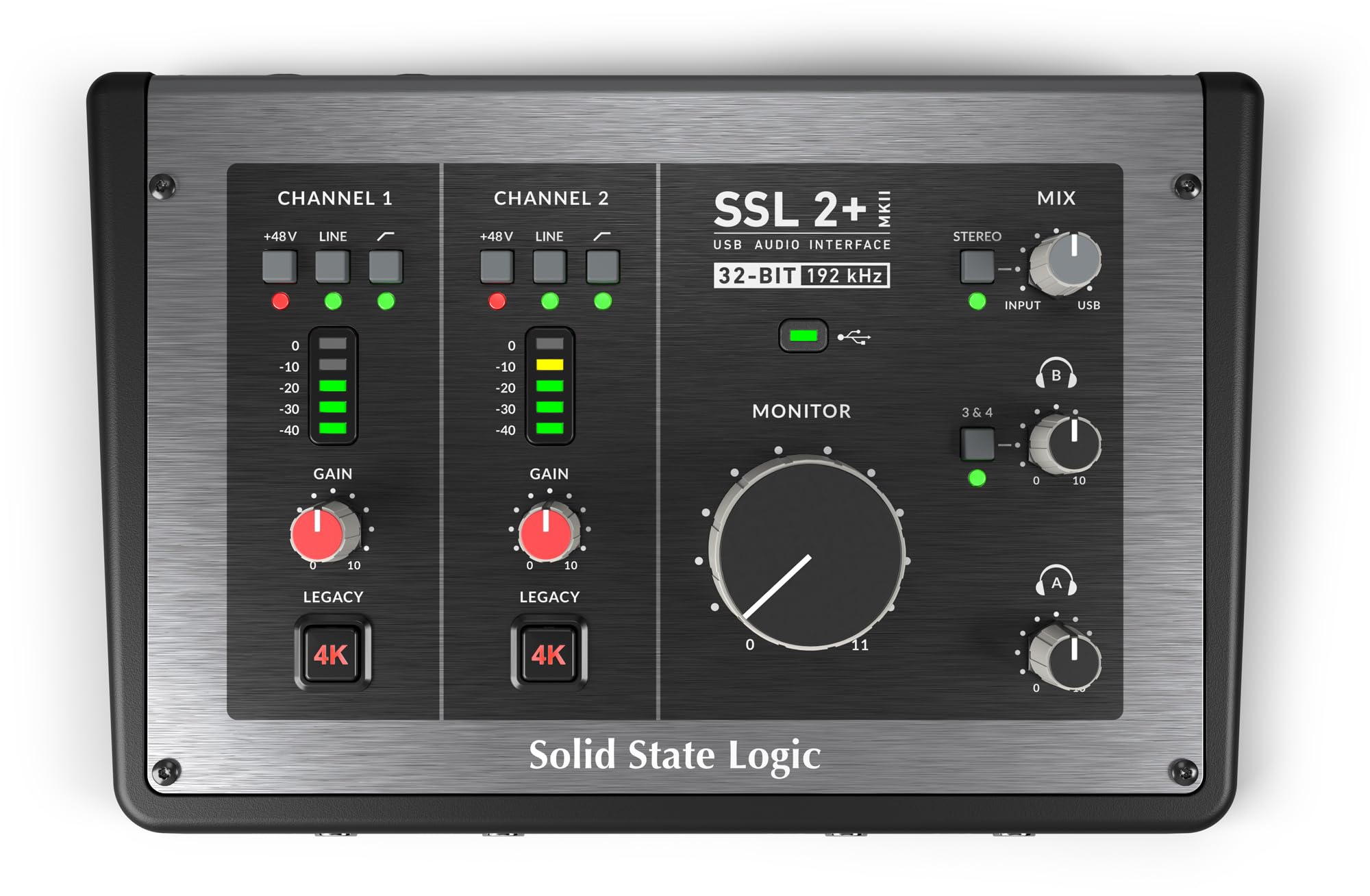
If your show pulls in remote guests, game audio, or a music bed, start with the SSL 2 MKII Plus. Stereo loopback routes computer audio back through the interface, so a guest's voice and your microphone land in the same recording without virtual cables or a second piece of software. Two headphone outputs and separate level control for monitors and headphones mean a co-host can listen without a splitter.

Two XLR preamps and two line/Hi-Z inputs cover a two-mic setup, four line outputs take care of speakers, and the Legacy 4K switch adds the high-mid lift SSL's console channel is known for. The chassis is stainless steel and just under two pounds, bus powered over USB-C, with MIDI on 5-pin DIN for a keyboard or controller.

The knobs are plastic on an otherwise metal body — a small thing you notice every time you reach for gain. Quieter dynamic mics also push the gain dial a long way toward the top, so do not assume your microphone is broken before you have turned it further than feels comfortable. Converters run to 32-bit/192 kHz, but the routing is what you are buying here, not the numbers.

Pros

  • Stereo loopback for streaming and recording
  • Two XLR preamps and four line outs
  • Two headphone jacks with separate monitor level
  • Stainless-steel chassis, bus powered

Cons

  • Plastic knobs on a metal chassis
Our verdict

For streamers juggling guests, game audio, and a microphone, the SSL 2 MKII Plus is the one we point to, with loopback and two headphone outs built in.

Check Latest Price
5

Best Warranty

Arturia MiniFuse 1

92 /100
Keeper Score Outstanding

Key details

Input
1 combo XLR/instrument
Weight
14.4 oz
Warranty
5 years
Max Resolution
24-bit/192 kHz
Check Price on Amazon

Five years of warranty is the longest coverage on this list, and for a box that gets plugged in, unplugged, and shoved into a bag, that is worth more than another line on a spec sheet.

The MiniFuse 1 is genuinely small — about 5.9 by 3.9 inches and 14.4 ounces — and the frame is metal, which is unusual at this price in this group. It runs on bus power, so there is one cable to the laptop, and MIDI gear connects without an extra adapter. The headphone output has more headroom than the size suggests and drove the closed-back pair we keep on the desk without strain.

Setup is where it earned our confidence: no driver install, plug in, and it appears in the DAW. The bundle is broad rather than token — Ableton Live Lite, Analog Lab Intro, Guitar Rig 6 LE, Auto-Tune Unlimited, and a Splice Creator plan — and Arturia's tutorials and ready-made project templates are the part a first-time buyer actually uses.

The single combo input is what keeps it behind the Scarlett Solo. One jack takes a mic or an instrument, not both at once, so a vocal-and-guitar take becomes two passes. If that is your workflow anyway, the MiniFuse 1 is the better-insured purchase of the two, and it is the one we suggest to creators who want to buy once and stop thinking about it.

Pros

  • Five-year warranty, the longest here
  • Metal frame in a palm-sized body
  • Bundle includes Auto-Tune and Guitar Rig
  • Plug-and-play with no driver install

Cons

  • Single combo input records one source at a time
Our verdict

We think the MiniFuse 1 is the safest first interface here, as long as you record one source at a time — the five-year warranty backs a metal box that sounds clean.

Check Latest Price
6

Best Preamp Upgrade

Audient iD14 MKII

91 /100
Keeper Score Outstanding

Key details

Loopback
Yes
Mic Preamps
2 Class-A
Headphone Outs
2
Max Sample Rate
96 kHz
Check Price on Amazon

Both mic preamps in the iD14 MKII come from Audient's ASP8024 HE recording console, and the difference shows up in the least theatrical way: gain stays clean as you push it, with no hiss rising behind a quiet voice.

This is the upgrade pick, and we mean it literally. It is the interface for someone who has outgrown a single-input box and wants the microphone, not the preamp, to be the weak link. Two Class-A preamps, two headphone jacks, monitor mix and panning, and loopback for streaming cover a two-person show without adding a second box.

Monitoring is where the extra money goes: separate control over what you hear and what leaves the interface, panning between sources, and a second headphone jack for a co-host, though both jacks share one volume control. The converter ceiling is 96 kHz rather than the 192 kHz the rest of this group advertises, which we do not think matters a syllable for spoken word — but it is worth saying out loud before you compare spec lines.

Pros

  • Two Class-A console-derived preamps
  • Two headphone outputs and loopback
  • All-metal housing with three-year warranty

Cons

  • Registration and driver download before first use
  • Both headphone jacks share one volume control
Our verdict

When your microphone deserves better electronics than a budget preamp, the iD14 MKII is the upgrade worth paying for: two console-grade preamps and serious monitoring control.

Check Latest Price
7

Best for Multi-Mic Recording

Behringer UMC1820

88 /100
Keeper Score Excellent

Key details

Channels
18-in/20-out
Expansion
ADAT I/O
Mic Preamps
8 Midas
Max Resolution
24-bit/96 kHz
Check Price on Amazon

Eight Midas-designed mic preamps, 18 inputs and 20 outputs, ADAT expansion, and MIDI on one rack unit — the UMC1820 is a different class of tool from everything else on this list.

For a panel podcast, a drum kit, or a creator recording a band in the same room, the channel count is the entire point. ADAT is the part that matters later: eight more channels can join from an external preamp without replacing the box, which is not something the other interfaces here offer.

We think it is the right answer for a fixed recording room and the wrong one for a desk. At 24.35 inches wide it is rack-width, so it wants a shelf or a case rather than a corner of your keyboard tray, and the front panel gets busy once most of the inputs are in use. Set against the two-input units here, it is the only interface that solves a six-microphone problem.

Setup on a Mac is close to nothing — no driver install, the class-compliant device simply appears — and the preamps are clean enough that the box does not announce itself in a recording. If you record one voice at a time, you are paying for inputs you will never plug into.

Pros

  • Eight Midas preamps in one box
  • ADAT input for adding channels later
  • 18-in/20-out with MIDI I/O
  • Plug-and-play on Mac, no driver install

Cons

  • 96 kHz sample rate ceiling
  • Rack-width chassis needs dedicated space
Our verdict

Buy the UMC1820 if your show has more than two voices — eight Midas preamps and ADAT expansion handle a panel or a band, and nothing else here does.

Check Latest Price
8

Travel Recording

Shure MVX2U Gen 2

90 /100
Keeper Score Outstanding

Key details

Gain
Up to +60 dB
Input
1 XLR
Weight
3.53 oz
Phantom Power
48V
Check Price on Amazon

The MVX2U Gen 2 is a single XLR input, a USB-C plug, and about 100 grams of hardware. It turns any dynamic or condenser microphone into a USB mic with up to 60 dB of clean gain and 48V phantom power, and it fits in the pocket of a mic case.

That solves a specific problem well. It appears as an input on a laptop, an iPad, or a phone with no driver and no power supply, and the 60 dB is enough for a dynamic mic of the SM58 sort. The onboard processing — Auto Level, a real-time denoiser, and a digital popper stopper — runs on the unit, so it works in whatever app you already record into.

Control is the catch. Settings live in Shure's MOTIV apps rather than on the hardware, so what you can change depends on which app you are in. Check the level the first time you plug in, too: the microphone can come up at zero gain and read as a dead unit until you move the slider.

The upgrade logic is what sells it. A USB microphone ties you to its capsule forever; this keeps the microphone you already trust and swaps out only the part that goes obsolete. It will not run a desk with monitors and a guitar, and it is not trying to — for a bag, a travel kit, or phone-based recording, it is the most useful thing here.

Pros

  • Turns any XLR mic into a USB mic
  • 60 dB of gain and 48V in a pocket
  • Works with phones, tablets, and computers
  • Onboard denoiser and auto leveling

Cons

  • No instrument input or speaker outputs
  • Processing settings require the MOTIV app
Our verdict

For recording away from a desk with a microphone you already trust, the MVX2U Gen 2 is the piece to buy — 60 dB of gain and phantom power in a pocket.

Check Latest Price

How We Chose and Tested These Audio Interfaces

We started with roughly 30 interfaces and cut that to 10, filtering by input count, USB-C versus USB-A, onboard phantom power and MIDI, and what ships in the box — bundled recording software counts for a lot when you're starting from nothing. Each unit was installed on both a Mac and a Windows PC, plus an iPad wherever tablet support was claimed.

Setup was timed and graded without opening a manual: unbox to first recorded take. Then the units went into real work — voiceover in a bedroom with a blanket on the wall, guitar tracked direct, a synth running over MIDI, and a two-mic interview setup. We pushed every preamp with a dynamic mic to hear where the noise floor started climbing, reached for gain and monitor knobs without looking to see which layouts became muscle memory, and dug through each unit's companion software to see how much routing and monitoring control you actually get.

Build and reliability got the least glamorous tests. Each interface spent a week bouncing around in a backpack, then stayed plugged in for weeks through sleep, wake, and repeated re-plugging, and we noted which ones developed scratchy knobs or demanded a driver reinstall. We also played guitar through each one while monitoring directly, since zero-latency listening is a different experience from hearing yourself round-trip through the computer.

Value, in the end, had less to do with price than with how much of the work the interface quietly did for us. The ones we kept reaching for were the ones we stopped thinking about.

How to Choose an Audio Interface for Content Creators

Count What You Need to Record at Once

Two inputs on the box does not mean two microphone preamps. Many units here pair one XLR preamp with one instrument input, which is two channels but only one voice, and others put everything on a single combo jack so the mic and the guitar take turns. Decide on the largest number of people you will ever record together and buy for that now, because a second preamp is the one thing you cannot add later. If a co-host is a possibility rather than a certainty, the SSL 2 MKII Plus or the iD14 MKII saves you buying twice.

Clean Gain Beats a Converter Number

Everything here records at 24-bit, and the units advertising 192 kHz are not automatically quieter or better for speech. What shapes your recording is how much clean gain the preamp delivers. Dynamic microphones, the SM7B and SM58 family that creators gravitate toward, need roughly 55 to 60 dB before they reach a healthy level, and a preamp that hisses while being pushed puts that noise under every episode. Look at gain range and noise floor, not the largest number on the front of the box.

Know Whether You Need Loopback

Direct monitoring lets you hear your own input without waiting for the computer, which is what stops your voice sounding delayed in headphones. Loopback is different: it sends the computer's own audio back through the interface so a guest, a game, or a music bed can be recorded alongside your microphone. Solo podcasters rarely need it; streamers with guests or gameplay almost always do. Separate monitor and headphone level controls, and a second headphone jack for a co-host, are the other conveniences worth paying for.

Plan Around Drivers, Not Just Hardware

Macs generally recognize a class-compliant interface without help. Windows usually needs the manufacturer's driver, and a few units ask you to register the product before they hand it over. That is not a reason to avoid a good interface, but it is a reason to set the thing up the day it arrives rather than five minutes before a recording. Confirm the maker supports your operating system version, install the driver before opening your DAW, and skip third-party ASIO wrappers unless you have a specific reason.

Weigh the Warranty and the Software Bundle

Warranty coverage varies more than you might expect: five years from Arturia, three from Audient, two from Focusrite and Shure, one from Mackie. On bus-powered gear that lives on a desk and gets plugged in daily, the longer coverage is a real part of the value. Bundled software counts too, but only when it is software you would use — a DAW you never open is worth nothing, while a plugin suite you would otherwise buy is worth actual money.

Frequently Asked Questions

Final Verdict

Buy the Scarlett Solo. For a creator recording one voice, or a voice and an instrument, it does the job with the least fuss and the most useful software, and nothing else in this group matches its combination of quiet gain and simplicity.

Change the requirement and the answer changes. Two microphones at once points to the SSL 2 MKII Plus, whose loopback and dual headphone outs make guest-heavy shows straightforward; if you want the best preamps here, the iD14 MKII is the step up. And if the budget is fixed, the Mackie Onyx Artist 1.2 gets you recording for less than anything else we recommend.