Best Video Switchers of 2026

A video switcher is the box that decides what your audience sees — which camera, which graphic, which mic is live — in the half-second after you press a button. Get it wrong and the cut lands a beat late, or the stream drops out mid-service. Get it right and nobody watching ever thinks about it. I spent the past six months running eight switchers through real broadcasts — a two-camera church service, a podcast, a product demo on YouTube — and the differences showed up where spec sheets don't: how fast one person can cue the next shot, how hot the chassis runs by hour three, and whether the audio side needs a second gadget entirely.

Two things I'd tell a first-time buyer. The input count isn't the number of cameras you can run — leave one for a laptop of slides. And SDI versus HDMI matters more than the listings admit: HDMI is fine across a small room, but long runs get flaky, and that's where SDI earns its keep. The eight units below are the ones that survived a working schedule, not just a spec comparison.

Keeper Score summarizes customer ratings and review volume. Read it alongside the product details and trade-offs. How the score works.

1

Best Overall

Blackmagic ATEM Mini Pro

93 /100
Keeper Score Outstanding

Key details

Inputs
4 x HDMI
Outputs
1 x HDMI, 1 x USB-C
Recording
USB-C external drive
Streaming
Built-in via Ethernet
Check Price on Amazon

Four HDMI inputs and a hardware encoder in a box that weighs about as much as a paperback: that combination is why the ATEM Mini Pro is the switcher we recommend first. It streams on its own over Ethernet — you load a stream key once in the desktop software and the box pushes the show out while your laptop stays shut. For a church, a school gym or a two-person crew, taking the computer out of the chain removes the most common thing that goes wrong on a live morning.

Around that core sits more than the money suggests. Multiview sends all four cameras, preview and program to a single HDMI monitor, so one screen is enough to direct from. There are luma, linear, chroma and pattern keys, a downstream keyer, DVE transitions, and a six-input audio mixer that takes embedded HDMI audio plus two 3.5mm analog sources. The audio section is the part we lean on most: pulling camera sound down and a microphone up without a separate mixer decides whether a stream sounds professional.

Longevity is the caveat worth knowing before you commit. Some units stop passing a picture after a handful of outings. Buy from somewhere with a straightforward return window, run every input on day one, and keep a spare HDMI cable in the case.

Setup deserves a note, because the panel is only half the product. Naming inputs, building keys and entering the stream key all happen in ATEM Software Control on a computer, and doing that work in advance is what makes the hardware calm under pressure — four named buttons are muscle memory where four anonymous ones are a puzzle. Companion support means a Stream Deck can fire the same macros. The ceiling is four cameras and one program output, and that is the honest boundary of this recommendation.

Pros

  • Streams and records with no computer
  • Four-camera multiview on one HDMI monitor
  • Full keyers and DVE transitions
  • Six-input audio mixer with analog inputs

Cons

  • No dedicated power switch
  • Four HDMI inputs only, no SDI
Our verdict

Our default pick for multi-camera streaming: four HDMI cameras, a real multiview, and built-in streaming and recording with no laptop in the chain.

Check Latest Price
2

Best for Multi-Platform Streaming

Osee GoStream Deck

88 /100
Keeper Score Excellent

Key details

Inputs
4 x HDMI
Control
T-bar and macro keys
Outputs
2 x HDMI
Streaming
3 platforms via Ethernet
Check Price on Amazon

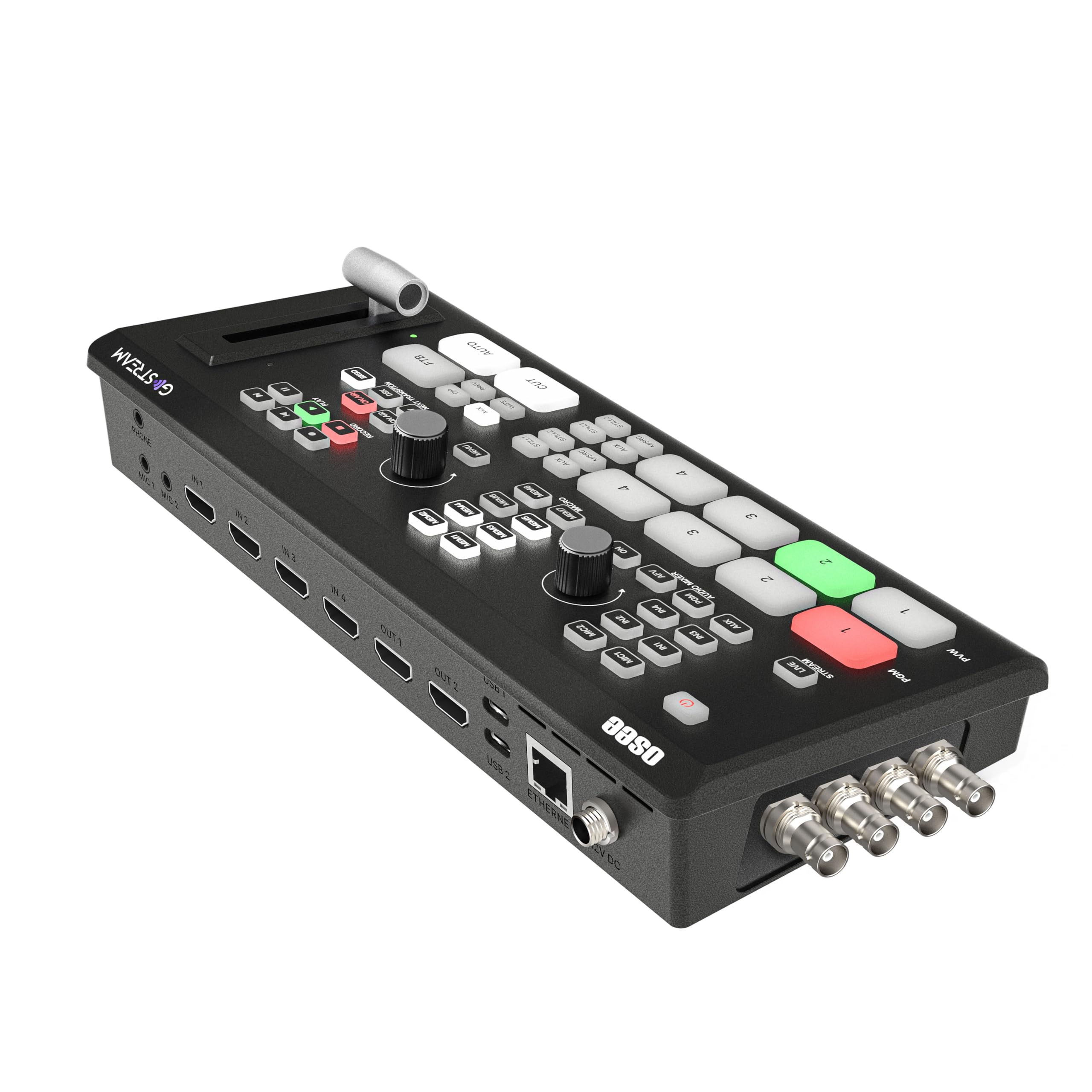
Read the ATEM's spec sheet, wish for a second HDMI output, and you have described the GoStream Deck. Two HDMI outputs where the Blackmagic has one means a projector can take program while a confidence monitor takes multiview, and the Osee does it for less money.

The streaming is what earns it a place in the roundup. Three destinations at once over Ethernet — a church's website, YouTube and a Zoom room, say — is a capability only the two Osee boxes here advertise, and it is the difference between one stream and one stream plus everything else you promised. The hard panel backs it up with separate preview and program buses, a T-bar and macro keys for the shots you take every week. That combination is why we reach for this one when a service has to be everywhere at once.

Budget for the network as well as the box: three simultaneous streams want a wired Ethernet run and upload headroom, and congested venue Wi-Fi will undo the feature you paid for. The menus take an evening to learn before your first live show, and the audio section rewards a proper microphone over camera sound. If your cameras are on BNC, skip this and look at the Duet.

Pros

  • Streams to three platforms at once
  • Two HDMI outputs for program and confidence
  • T-bar, preview/program buses and macro keys
  • Records and plays back from an SD card

Cons

  • No SDI inputs
  • On-screen menus lag slightly when scrolling
Our verdict

Buy this one if your show has to be in three places at once — it is the multi-destination pick, and the T-bar panel is a bonus at the money.

Check Latest Price
3

Best for SDI Camera Rigs

Osee GoStream Duet

88 /100
Keeper Score Excellent

Key details

Inputs
4 x SDI, 4 x HDMI
Weight
2.2 lb
Control
GoStream app, Companion
Streaming
3 platforms at once
Check Price on Amazon

Four BNC connectors are the reason this one is on the page. SDI is what makes a hundred-foot camera run to the back of a sanctuary or a ballroom dependable: the connector locks, the cable carries the distance, and you stop troubleshooting a black screen five minutes before the service starts.

The rest of the package is built for the same crowd. There is a pool of inputs to draw from — four SDI, four HDMI, USB-C and NDI HX over the network — plus SD and SSD playback for bumpers. Control comes from the built-in interface, GoStream's Mac and Windows software, or Bitfocus Companion, which means a Stream Deck can fire your shots. It streams to three destinations at once over Ethernet or a phone hotspot, and at about a kilogram it earns the go-bag reputation.

We recommend it to a specific buyer: the venue or crew that already owns SDI cameras and long cable runs. Coming from an HDMI-only setup it is more switcher than you need, and the extra money goes into converters and an NDI licence rather than into more HDMI sockets. For the right room, that trade is cheaper than wiring three separate adapters and hoping they agree with each other.

Pros

  • Four SDI and four HDMI inputs
  • Companion and GoStream software control
  • Three simultaneous streaming destinations
  • Compact and light enough for a go-bag

Cons

  • Setup assumes prior switcher experience
  • NDI HX needs a firmware update to unlock
Our verdict

The switcher we point at any venue already wired for SDI, where locking BNC connectors and long cable runs matter more than a bigger screen.

Check Latest Price
4

Best for Larger Productions

Roland V-8HD

89 /100
Keeper Score Excellent

Key details

Inputs
8 x HDMI
Weight
5.1 lb
Monitor
Built-in multiview
Outputs
HDMI program and aux
Check Price on Amazon

Eight HDMI inputs changes what a show can be. Four cameras, two laptops, a tablet for lower thirds and a playback deck all stay plugged in, and nobody crawls behind the rack to swap a cable mid-session. At 12.48 inches wide and a little over five pounds it still sits on a table rather than in a flight case.

The built-in multiview monitor is the detail that saves real money, because you don't have to buy a separate preview screen and find desk space for it — it is right there in the panel, with optional output to an external display if you want something bigger. Five layers of effects and keying handle a lower third over a picture-in-picture over a background, and the aux output sends a clean feed to an overflow room that shouldn't be watching your preview.

Sequencing, macros and preset memories are what make it repeatable. A weekly service or a monthly conference tends to run the same five looks, and recalling them from a preset means a volunteer can operate the show without memorizing the panel. The stream itself comes from whatever you feed the program output — a hardware encoder or a capture-equipped computer.

Our judgement is that this is the switcher for a fixed install with a recurring schedule, where the panel being identical every week is worth more than portability. For a one-off stream or a single operator at a desk, four inputs and a much smaller box will do the same job for a fraction of the money.

Pros

  • Eight HDMI inputs with a built-in multiview
  • Aux output for a second destination
  • Macros and preset memories for repeatable shows
  • Five-layer effects and keying

Cons

  • HDMI inputs only, no SDI
  • Needs a separate encoder to stream
Our verdict

The choice for a venue that runs events on a schedule and needs eight sources live at once, with a built-in multiview and repeatable presets.

Check Latest Price
5

Best for Audio-Forward Setups

RØDECaster Video

85 /100
Keeper Score Excellent

Key details

Audio
2 x XLR combo inputs
Inputs
4 x HDMI, 2 x USB
Scenes
7 multi-source scenes
Recording
ISO to USB storage
Check Price on Amazon

Two Neutrik combo jacks with RØDE's Revolution preamps on the same panel as the video buttons is the whole idea, and we think it is the right one for anyone who already owns a good microphone. Most switchers here treat audio as a 3.5mm afterthought; this one expects an XLR condenser and gives it the gain to work with.

The video side is not an afterthought either. Six inputs, four HDMI and two USB, feed seven multi-source scenes you build once and fire from a button, alongside automatic chroma keying, media playback and graphic overlays. Inspect Mode lets you look at an input before it goes to air, the intelligent auto-switching cuts between sources based on who is talking, and it streams over Wi-Fi or Ethernet while recording ISO tracks to external USB storage.

The limits are worth stating plainly. Everything tops out at 1080p60, which is fine for streaming and not fine if you are building a 4K library, and the price puts it at the top of this group alongside the Roland. Where it wins is the desk itself: one box, one power lead, and audio and video finally in the same place.

Pros

  • Two studio-grade XLR preamps on the panel
  • Six video inputs across HDMI and USB
  • Seven multi-source scenes on dedicated buttons
  • ISO recording to external USB storage

Cons

  • Caps out at 1080p60
  • Premium price against the rest of this set
Our verdict

The pick when your microphones matter as much as your cameras — real XLR preamps and six video sources on one desk console.

Check Latest Price
6

Best Small Switcher With a Screen

FEELWORLD LIVEPRO L1 V1

86 /100
Keeper Score Excellent

Key details

Inputs
4 x HDMI, 1 x SDI
Screen
2-inch built-in display
Weight
1.1 lb
Outputs
HDMI, USB 3.0
Check Price on Amazon

A two-inch screen sounds like a gimmick until you are the only person in the room running the show. The L1 V1 shows program, preview and all four HDMI inputs at once on that little panel, with an audio column beside them, so a solo operator can cut a three-camera stream with nothing else on the desk.

That is the reason we keep recommending it to one-person operations. The rest of the box is sensible: four HDMI inputs plus one SDI, 1080p throughout, a USB 3.0 output that any computer sees as a webcam, and a LAN port so a laptop can take over the menus with XPOSE. The screw thread underneath means it can be mounted on a stand instead of sliding around a table, and at 500 grams it goes in a bag with the cables.

Audio is the one place it asks for help: the headphone output is quiet, so plan on a small amp or a mixer with a headphone stage if you monitor during the show. The LAN port is the other fix — connect a laptop and you set inputs and transitions from a keyboard instead of working the menu knob through a thin manual.

Pros

  • Built-in screen shows all four inputs
  • USB 3.0 webcam output works with any software
  • Four HDMI inputs plus one SDI
  • LAN control from a laptop with XPOSE

Cons

  • Runs hot in long sessions
  • Printed manual is thin on detail
Our verdict

Our pick for one person running everything, because the small built-in screen removes the need for a second monitor on the desk.

Check Latest Price
7

Best Budget

RGBlink Mini

83 /100
Keeper Score Excellent

Key details

Inputs
4 x HDMI
Weight
16 oz
Outputs
USB 3.0, HDMI
Preview
6-picture PVW/PGM
Check Price on Amazon

The Mini is the least expensive way into four HDMI inputs here, and it gets there by leaving out the parts that cost money. There is no encoder and no recorder inside: the USB 3.0 port makes it a webcam to a computer, and the computer does the streaming. Its inputs and output top out at 2K.

What you do get is a real switcher. A six-picture preview over HDMI shows program, preview and all four sources; there are 14 transitions and nine picture-in-picture layouts; audio can be embedded and de-embedded; and a browser on the same network can drive it from a phone or laptop without installing anything. At 16 ounces it disappears into a camera bag.

We treat it as the honest budget choice rather than the safe one. Two things decide whether it works for you: your computer needs a spare USB 3.0 port and enough headroom to encode, and the unit itself has to arrive healthy. Some don't produce a picture at all, and an input can drop in and out mid-stream, so buy from a seller with a returns window you trust and run every port the day it arrives, long before it is in front of an audience.

Pros

  • Four HDMI inputs at the lowest price here
  • Six-picture preview over HDMI
  • USB 3.0 webcam output works with OBS
  • 14 transitions and nine PiP layouts

Cons

  • Needs a computer with USB 3.0 to stream
  • 2K ceiling on inputs and output
Our verdict

The budget entry worth considering if you already own a capable laptop and want four HDMI inputs with a real six-picture preview.

Check Latest Price
8

Touchscreen Control

FEELWORLD L4

78 /100
Keeper Score Very Good

Key details

Inputs
4 x HDMI, 1 x SDI
Screen
10.1-inch touchscreen
Outputs
HDMI, SDI, USB 3.0
Input Resolution
Up to 2160p30
Check Price on Amazon

The detail most people miss about the L4 is that the 10.1-inch touchscreen is not a preview monitor bolted onto a switcher — it is the switcher's control panel. Source selection, keys, transitions and menu settings all happen on the glass, with a T-bar at the side for the one gesture that wants to be physical.

Behind it sit five inputs, four HDMI and one SDI, with HDMI, SDI and USB 3.0 outputs available at once, plus chroma key, logo overlay and up to 2160p30 from a computer source. The big screen means you can see your sources and your menu without a second monitor, which on a fixed desk in a small studio is the entire point.

Touch control cuts both ways. It is quick and unambiguous when the interface is in front of you — tap the camera you want and it is live — but there is no tactile confirmation under your fingers, and the glass is harder to read in a bright room. It also has the least track record of anything here, with build quality the recurring doubt, so keep the return window open while you put it through a few shows.

Our read: it suits a permanent position, where being able to see everything at once outweighs the loss of buttons. If your shows move between rooms, the smaller FEELWORLD LIVEPRO L1 V1 or a panel with real keys will survive the road better.

Pros

  • 10.1-inch touchscreen control surface
  • Four HDMI plus one SDI input
  • HDMI, SDI and USB outputs at once
  • Chroma key and logo overlay

Cons

  • Touchscreen is the only way into the menus
  • 1080p60 output ceiling despite 4K input
Our verdict

A good fit for a fixed studio desk where one operator wants a big, bright interface and doesn't need the switcher to travel.

Check Latest Price

What Six Months and Eight Switchers Taught Us

We shortlisted switchers a small production could actually buy: HDMI-only boxes with built-in streaming, SDI/HDMI hybrids, and a few larger units with spare inputs. Filtering came down to input type and count, whether the box streams on its own or needs a computer, whether it records, and how audio is handled — all weighed against price.

Eight units went into service for six months across four recurring setups: a weekly two-camera church stream, a podcast with three cameras and a laptop of slides, a product demo livestreamed to YouTube and Instagram at once, and a live event feeding a projector and a confidence monitor. Each one also got swapped between a solo, one-camera job and a full multicamera event to see how much it genuinely flexed.

Setup and cable math: we timed each box from unboxing to first program output, counted the adapters a full camera lineup needed, and ran HDMI across 25 feet and SDI much farther to see which dropped signal first. Heat over a long stream: every unit ran three hours while recording, and we checked chassis warmth, whether fan noise reached a mic three feet away, and whether settings survived a day of power cycling. One-operator ergonomics: we handed the controls to someone who had never seen the switcher and watched whether they could cut cameras, pull up picture-in-picture, and ride the audio without coaching. Streaming and recording at once, pushed to two platforms, to see if bitrate held and whether the built-in audio was good enough on its own. The winners were the boxes a second person could run ten minutes after being handed the controls — reliability here looks less like a spec than nobody troubleshooting mid-broadcast.

How to Choose a Video Switcher

Standalone streaming or a computer in the chain

Every switcher here takes cameras in; they differ on what happens next. A box with a USB output, like the FEELWORLD LIVEPRO L1 V1 or the RGBlink Mini, looks like a webcam to a computer, and the computer encodes and pushes the stream. A box with its own encoder, like the ATEM Mini Pro or either Osee, connects to a router and streams on its own.

The trap is the word USB on a spec sheet: it does not mean standalone. If you don't want a streaming PC sitting on the desk, look for an Ethernet port, a stream-key menu and a recording option before you look at anything else.

Count inputs, then check the connector

Four inputs covers most small productions — three cameras plus a laptop, or four cameras and nothing else. Eight, as on the Roland V-8HD, suits a show where laptops, tablets and a playback deck all need to stay plugged in. The connector matters as much as the count. HDMI is fine inside one room but degrades over long passive runs, and that is where a lot of unexplained black screens come from; SDI locks into place and travels much further.

The GoStream Duet and the FEELWORLD L4 both take SDI, and the L1 V1 adds a single SDI input beside four HDMI. If your cameras sit at the back of a hall, buy for the connector, not the camera count.

Control surfaces and monitoring

Think about who operates the panel and how often. A T-bar with separate preview and program buses, as on the Osee boxes, gives smooth manual mixes. Macro keys and preset memories, the Roland's strongest feature, matter more than anything else for a weekly show that runs the same five looks. A touchscreen, as on the FEELWORLD L4, is quick to learn and easy to read, but there is nothing under your fingers to confirm a cut.

Then count screens. The ATEM sends a four-camera multiview over HDMI, the Roland builds one into the panel, and the L1 V1 puts a small one on the box itself. A switcher without any of those needs a monitor you have not bought yet.

Audio, heat and the long session

Camera audio is rarely good enough alone, so count the analog inputs: two 3.5mm jacks on the ATEM, XLR combo jacks with real preamps on the RØDECaster Video. Check that the headphone output is loud enough to monitor on, because a quiet one quietly adds an amp to your shopping list.

Fanless bodies warm up over an evening, and the compact FEELWORLD and Osee units in particular want open air rather than a closed rack shelf or a carpeted table. Run a full-length rehearsal before the event that matters, with every camera and every cable in place.

Frequently Asked Questions

Final Verdict

The ATEM Mini Pro is the switcher we point most people at, because it does the two things a first multi-camera production needs — cut between four cameras and stream the result — without a computer in the chain, and it does them with a real multiview and an audio section worth using.

Buy the Osee GoStream Deck instead if you simulcast to three destinations or need a second HDMI output, and step up to the Roland V-8HD when eight inputs and an aux feed define the show. Everything else on this page is a variation on those three decisions.