Best Tablet Stands of 2026

The worst tablet stand is the one that tips over when you tap the screen. I’ve watched an iPad do a slow-motion faceplant into a coffee mug and returned a stand that looked sturdy online but shimmied every time I typed. A good one holds your tablet at eye level, keeps it steady through taps and swipes, and adjusts to the angle you actually need. We put 14 stands through four months of real use—on desks, kitchen counters, nightstands, and living room floors—to find the ones that stay put.

Tablet stands look alike but behave differently once a device is on them. A stand that’s rock-solid with a Kindle can wobble under a 12.9-inch iPad Pro, and a floor stand’s weighted base matters more than its long arm. I paid attention to how each handled tablet sizes and weights, whether the hinges held their angle, and how easy it was to fold. The picks below all share one job: keeping your tablet exactly where you put it.

Keeper Score summarizes customer ratings and review volume. Read it alongside the product details and trade-offs. How the score works.

1

Best Overall

Lamicall Aluminum Tablet Stand

96 /100
Keeper Score Outstanding

Key details

Weight
8.81 oz
Material
Aluminum alloy with rubber pads
Device Fit
4 to 13 inches
Hook Width
18 mm
Check Price on Amazon

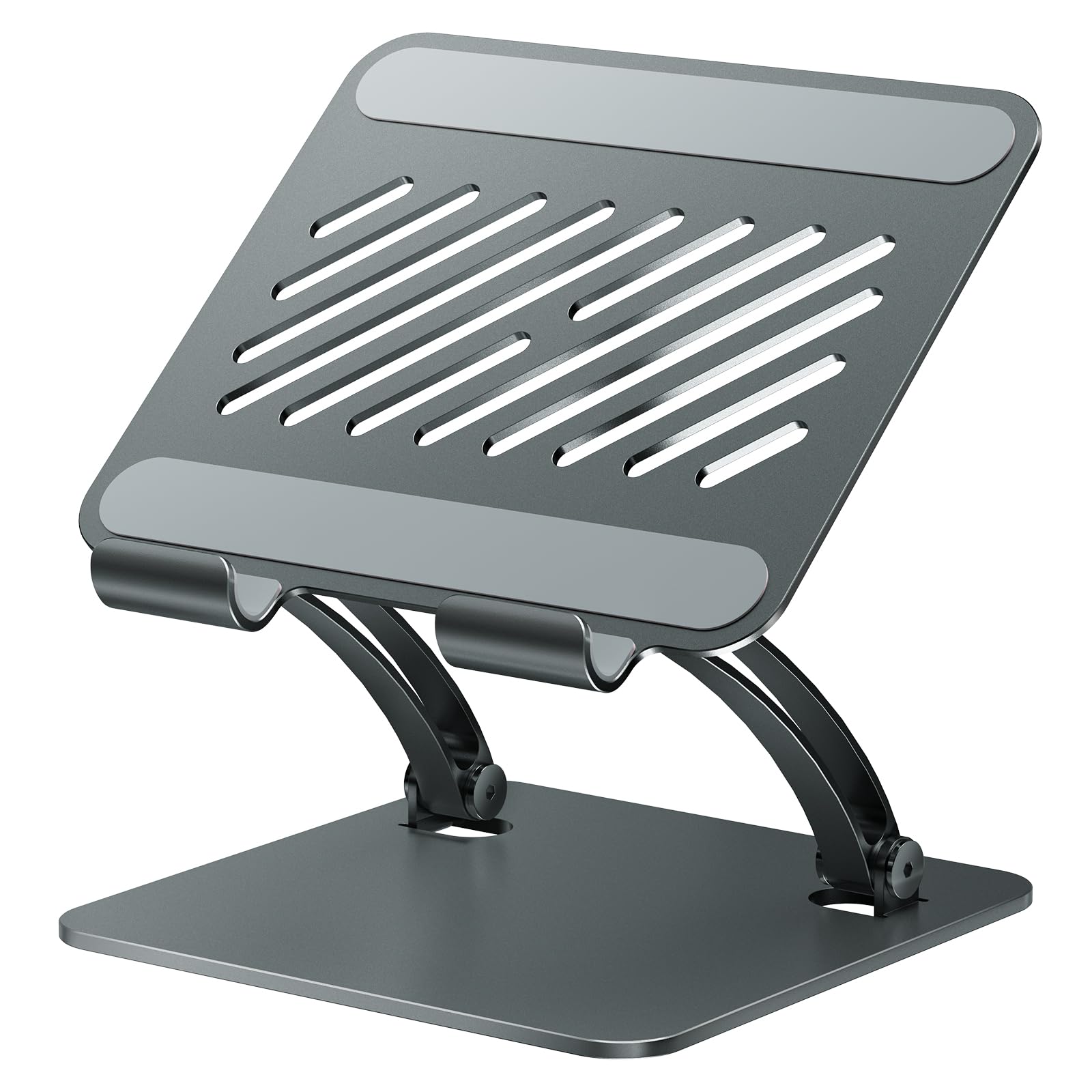
Set a 12.9-inch iPad in this stand and jab the top corner the way you do when you're dismissing a notification: the base stays put, the hinge holds, and nothing walks across the desk. That steadiness is why the Lamicall is our pick for most people. The aluminum body, the rubber pads in the cradle, and the four feet underneath do the work, and the whole stand weighs 8.81 ounces, light enough to lift from the desk to the kitchen counter with one hand.

It's a cradle rather than a clamp. The tablet leans back into the frame and a front hook holds it, in portrait or landscape, at any tilt between nearly upright for a video call and laid back for typing. That hook is 18 millimeters, which is the measurement to check against a thick folio case, and the fit runs from 4 to 13 inches, so a phone or a Kindle sits in it as happily as an iPad Pro. We used it as a second screen beside a laptop more than anything else, and it never needed repositioning mid-task.

The finish is what surprises people. Brushed metal, a rounded backplate, none of the plastic seams you expect at this end of the market — it's one of the least expensive stands here and it doesn't look it. There's even a circular cutout in the back that gives your thumb somewhere to grab when you move the stand with a tablet still sitting on it.

Pros

  • Stays planted while you tap and type
  • 18 mm hook clears a thick folio case
  • Aluminum build that looks beyond its price
  • Fits anything from a phone to a 13-inch iPad

Cons

  • No height adjustment and no rotation
Our verdict

The stand we recommend for most desks: it holds a full-size iPad perfectly still while you type or tap.
Check Latest Price
2

Best for Large Screens

tounee Dual-Rod Tablet Stand

94 /100
Keeper Score Outstanding

Key details

Build
Dual-rod aluminum
Adjustment
Height and angle lock
Device Fit
4.7 to 16.9 inches
Listed Dimensions
7 x 2 x 2 inches
Check Price on Amazon

Sixteen point nine inches is the number that sets this one apart. Nothing else here goes past 15.6 inches, and the tounee keeps going, which is exactly what you want if the thing you're propping up is a 16-inch portable monitor rather than a tablet.

We ran it with an iPad in a thick case and with a portable monitor, and the dual-rod design is why both stayed where we put them: two aluminum uprights share the load instead of one, the locking mechanism holds the height you set, and the shelf didn't creep down while we typed. It's the stand here that feels most like desk furniture — all metal, a weighted base, silicone pads top and bottom, and a proper Allen wrench in the box for snugging the joints.

It folds to a listed 7 by 2 by 2 inches, so it will go in a bag, though nobody would call it a travel stand. The fit range starts at 4.7 inches, so a phone works but sits low in a wide cradle. Where it makes sense is a desk with a big screen on it, and that's a rarer job than it sounds.

Pros

  • Holds 4.7 to 16.9 inches, portable monitors included
  • Dual rods and locking joints stop the shelf creeping
  • All-metal build with silicone pads
  • Folds flat for a bag

Cons

  • Pricier than the basic desk stands here
Our verdict

Buy this one if the screen on your desk is a 16-inch portable monitor or a large tablet — nothing else here reaches that size.

Check Latest Price
3

Best for Travel

LISEN Foldable Tablet Stand

93 /100
Keeper Score Outstanding

Key details

Hold
Gravity cradle, no clips
Weight
15.2 oz
Device Fit
4.0 to 15.6 inches
Listed Dimensions
5.28 x 1.42 x 7.28 inches
Check Price on Amazon

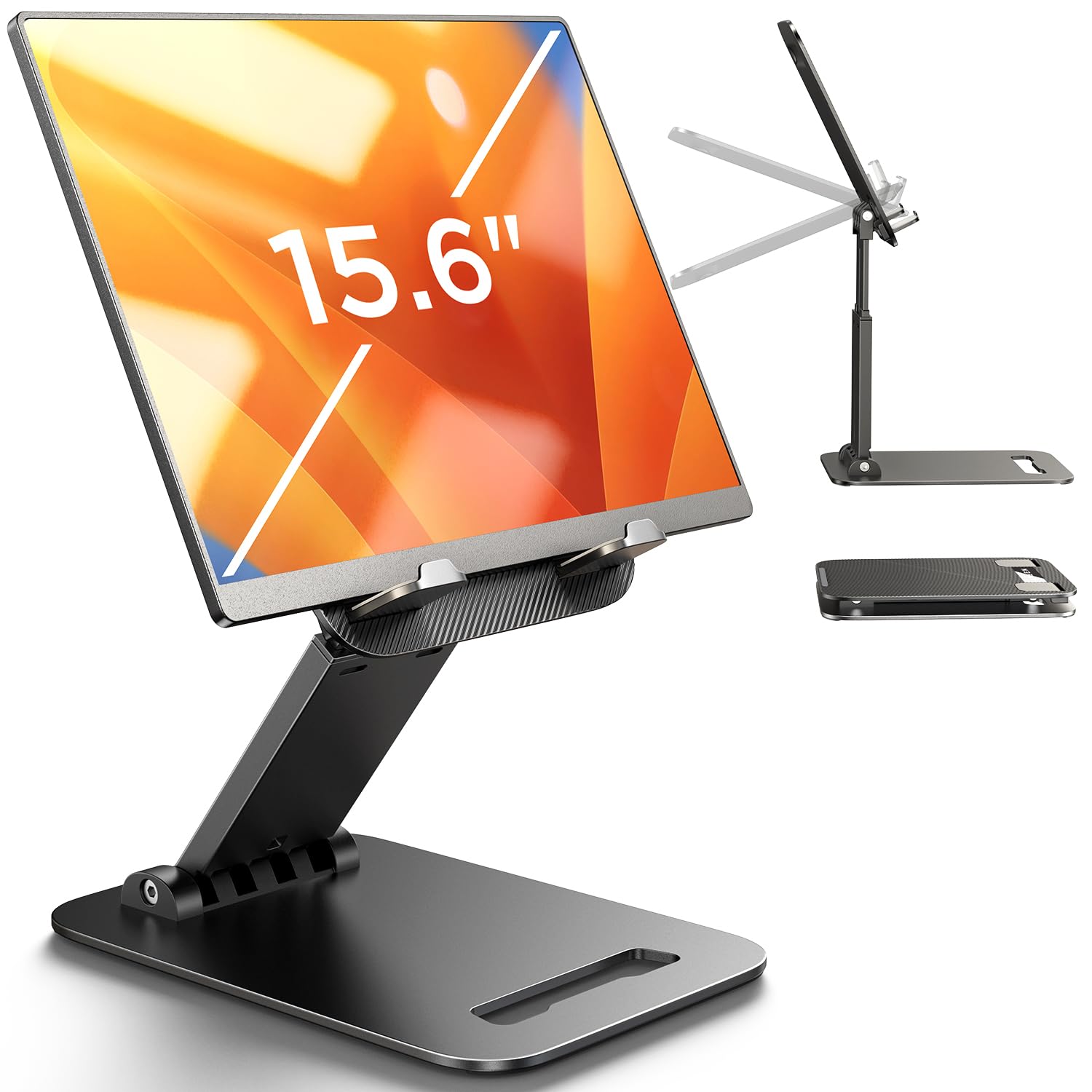
Folded flat, this stand is roughly the size of a hardback book and weighs 15.2 ounces, which is why it's the one that travels. It also does something most folding stands here don't: the height adjusts, so the screen can come up off the table instead of sitting at whatever tilt the hinge allows. It's the folding stand we take when the laptop bag is already full.

The cradle is gravity-fed — no clips, no magnets — so the tablet's own weight tips it back into the frame, and the truss rod has a bridge screw you tighten by hand to lock the height. That's the detail that keeps the screen from drifting down through an afternoon of typing. Set it low for a big tablet and it's steady; crank a 12.9-inch iPad up near the top of the rod and the light base starts to walk.

As a desk stand it's pleasant to live with: the metal base panel and its silicone pad don't skate on a table, the fold is flat enough to disappear into a tote, and portrait and landscape both sit naturally. The cradle itself is plastic, and you can feel the difference beside the aluminum stands here — but you can also feel the difference in your bag at the end of the day.

Pros

  • Folds flat and weighs 15.2 ounces
  • Height and angle both adjust
  • Gravity cradle grips without clips or magnets
  • Fits 4 to 15.6 inches, phones included

Cons

  • Plastic cradle feels less planted than the aluminum picks
Our verdict

The folding stand to buy if the tablet travels with you and you want the screen up off the table.

Check Latest Price
4

Best Floor Stand for Bed

BluuSuuk Floor Stand

93 /100
Keeper Score Outstanding

Key details

Base Weight
6.6 lb
Total Weight
8.4 lb
Device Weight Limit
Under 1.5 lb
Check Price on Amazon

The base is a 6.6-pound slab of metal, and that single number explains why this floor stand holds where cheaper ones don't. It was doubled from an earlier 3.3-pound version, and you feel the difference the first time you swing the arm out over a mattress: the base stays planted instead of trying to follow the tablet.

Above the base it's a two-rod mast with a folding arm and a claw that grips the tablet from the sides. Assembly needs no tools — the sections slot together and the knobs tighten by hand — and the claw has slotted cutouts at the tips, so you slide a Kindle or an iPad in from the side rather than prizing the jaws apart. The device limit is 1.5 pounds, which covers a 12.9-inch iPad Pro; a laptop is out of the question.

Push the arm to full reach with a big tablet and it picks up a shiver when you tap the screen, so we keep it shorter and tuck the base under a bed frame or a sofa leg. Where it earns its place is the long reading session: the tablet floats at eye level, your hands are free, and after ten minutes you stop noticing the hardware. That's the test a floor stand has to pass.

It weighs 8.4 pounds all in, and the sections come apart when you want them to, which is more about storage than travel. Fold the arm in and the whole thing tucks behind a sofa; the base is flat enough to slide under furniture, so a small bedroom doesn't have to give up floor space to it.

Pros

  • 6.6-pound base stays put while the arm swings
  • Slotted claw takes a tablet from the side
  • No-tool assembly in minutes
  • Holds a 12.9-inch iPad Pro within its 1.5 lb limit

Cons

  • 8.4 pounds in total, so it lives in one room
  • Knobs work loose and need retightening
Our verdict

The floor stand we point bedtime readers to: a 6.6-pound base keeps a full-size iPad steady over a mattress.

Check Latest Price
5

Best for Standing Height

XXZU 72-Inch Tablet Tripod

90 /100
Keeper Score Outstanding

Key details

Head
360° ball head
Device Fit
4.7 to 13 inches
Height Range
33.07 to 72 inches
Folded Length
16.93 inches
Check Price on Amazon

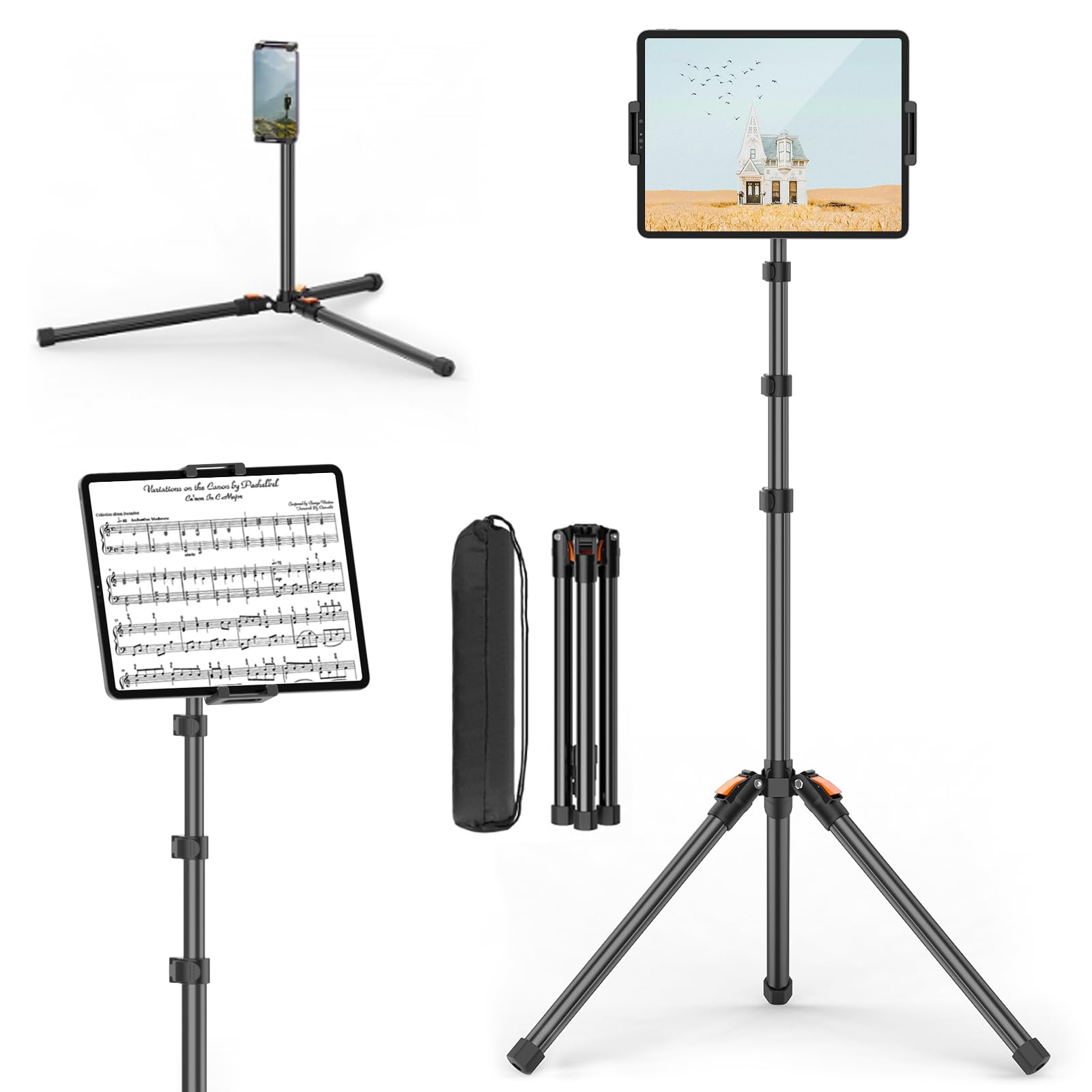
Seventy-two inches is taller than any other stand here, and it puts the screen above your eyeline while you stand. The XXZU is a tripod, not a bedside arm, and once you use it that way — sheet music, a teleprompter, a workout video at chest height — the 33-to-72-inch range stops looking excessive.

The legs lock at three angles and splay to 83 degrees, which drops the rig low and wide for an overhead shot or a tablet on the floor. The 360-degree ball head flips portrait to landscape without unscrewing anything, and the clip takes devices from 4.7 to 13 inches. Folded to 16.93 inches with a carry bag in the box, it's the stand that goes to rehearsal, to a client's office, or into the back seat of a car.

Where it falls down is the floor it stands on. Three legs want clear space, and at full extension a bumped leg sends a visible wobble up to the tablet, so it does better in a corner than in a doorway people walk through. That's the trade for a stand that folds into its own bag and sets up in about the time it takes to open a music stand.

Pros

  • Height range from 33 to 72 inches
  • Three leg angles, splaying to 83 degrees
  • 360-degree ball head for portrait or landscape
  • Folds to 16.93 inches with a carry bag

Cons

  • Clip suits 4.7 to 13 inches; nothing bigger
Our verdict

Buy it if you need the screen at standing height for music, teaching, or video — no desk stand gets close.

Check Latest Price
6

Kitchen Counters

Urmust Adjustable Tablet Arm

89 /100
Keeper Score Excellent

Key details

Weight
2.03 lb
Rotation
360°
Device Fit
4.7 to 15.6 inches
Weight Capacity
2.43 lb
Check Price on Amazon

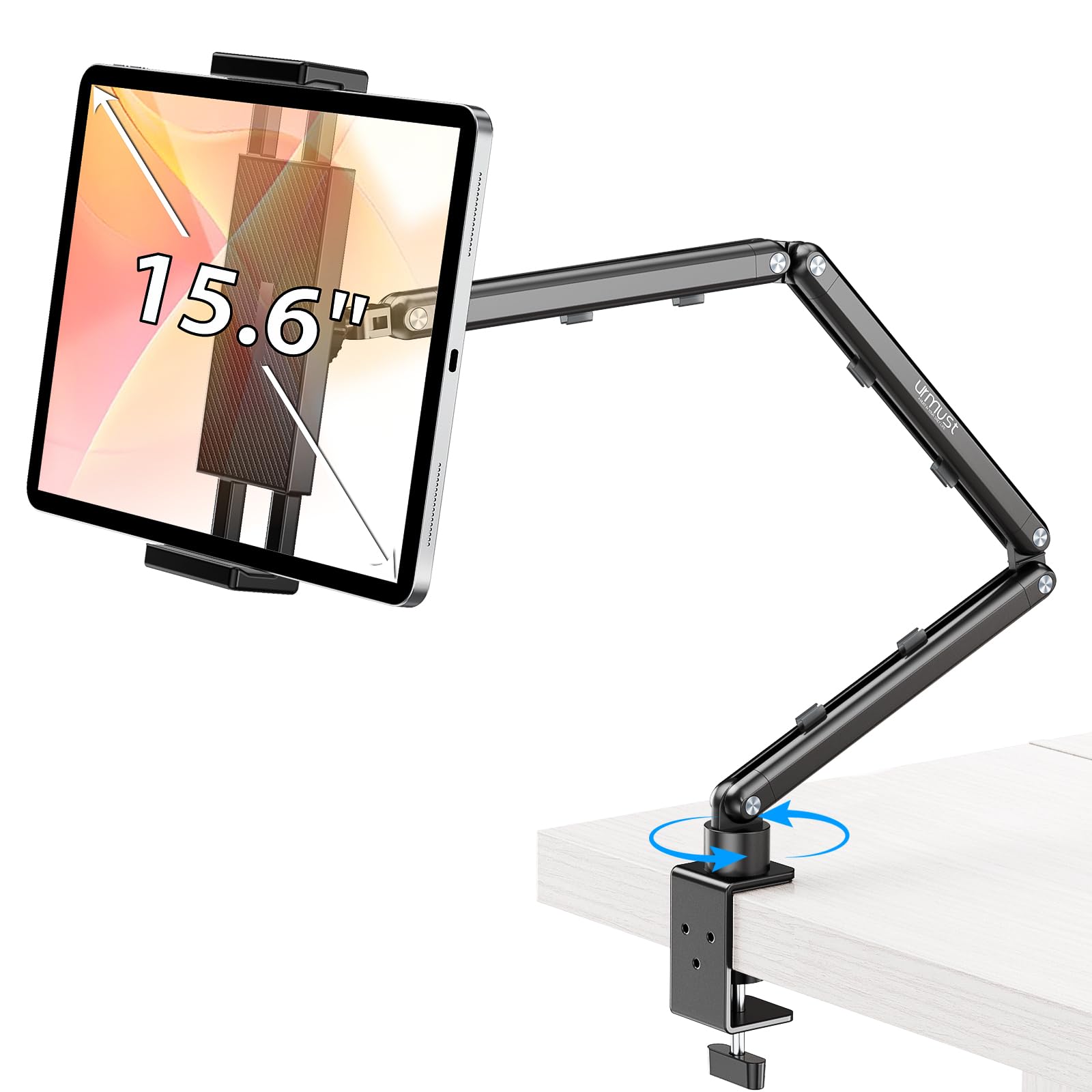
An arm changes what a tablet stand can do. The Urmust lifts the screen off the desktop and holds it out where you want it — over a cutting board, beside a monitor, angled toward you on a call — and the joints are stiff enough that it stays there instead of sagging into your coffee.

The base is a weighted plate that sits on a flat surface, the upright is aluminum, and a 360-degree head turns the tablet between portrait and landscape without a tool. It takes 4.7 to 15.6 inches and holds up to 1100 grams, more than any tablet here weighs, so a 12.9-inch iPad Pro in a case sits well inside the limit.

Two things to know. It's a tabletop stand, not a clamp, so the base needs a surface and won't hang off a desk edge or grab a bed frame. And the joints have to be set with the included wrench: tighten them when it arrives and the arm holds position, but a joint left loose lets the arm drop under a heavy tablet, which is the failure to watch for.

For a kitchen counter or a standing desk, the raised, swingable screen is worth the premium over a fixed cradle — you can push it out of the way for prep and pull it back for the recipe. If your tablet only ever sits on a desk at one angle, a plain stand does the same job for much less.

Pros

  • Lifts the screen off the desk toward eye level
  • 360-degree head plus adjustable height and angle
  • Holds up to 1100 grams
  • Aluminum base and arm with a wrench included

Cons

  • Tabletop base only, with no desk-edge clamp
Our verdict

Worth the premium if you want the tablet raised and swingable over a counter or a standing desk.

Check Latest Price
7

Budget Bed Stand

Elekpopu Tablet Floor Stand

91 /100
Keeper Score Outstanding

Key details

Base Weight
5 lb
Height Range
27.5 to 55 inches
Total Weight
5.8 lb
Device Weight Limit
Under 1.5 lb
Check Price on Amazon

This is the cheaper way to get a tablet hanging over your bed. The Elekpopu is a floor stand with a folding arm and a claw, built along the same lines as our bedside pick, but with a 5-pound base instead of a 6.6-pound one and a much smaller outlay.

The mast runs from 27.5 to 55 inches, which covers a low chair and a standing desk, and the bracket turns through 360 degrees so you can read in portrait or watch in landscape without unclamping. No tools are needed for assembly, and the whole stand weighs 5.8 pounds — light enough to move between rooms, which is not something you can say for the heavier one.

The device limit is where the design shows its price. Anything under 1.5 pounds is fine — a phone, a Kindle, a standard iPad — and the instructions ask you to keep the arm and the base pointing the same way so the stand doesn't tip. Do that and a light tablet sits still. Hang a 12.9-inch iPad Pro out on the arm and the base starts to think about going over.

The clamp is the other variable. It's a friction joint in a plastic housing, and getting it tight enough to hold an angle takes more hand strength than it should; once it's set it stays, so plan on setting it once and leaving it rather than adjusting it every night. For a Kindle or a phone on a treadmill, that's a fair trade at the bottom of the floor-stand prices here.

Pros

  • Reaches over a bed or sofa for hands-free viewing
  • Height adjusts from 27.5 to 55 inches
  • No-tool assembly at 5.8 pounds
  • Far less money than the heavier bed stand

Cons

  • Fits devices up to 11 inches only
Our verdict

A reasonable budget floor stand for a Kindle or a phone, but a full-size iPad wants the heavier base.

Check Latest Price
8

Slim Tablets

UGREEN Portable Tablet Stand

91 /100
Keeper Score Outstanding

Key details

Weight
4.23 oz
Device Fit
4 to 11 inches
Angle Range
15° to 100°
Max Device Thickness
0.55 inches
Check Price on Amazon

Four point seven inches square when folded, and 120 grams: this is the stand that lives in a bag and gets forgotten until you need it. It's plastic rather than aluminum and the price reflects that, but the hinge runs from 15 to 100 degrees and holds where you leave it.

Its real trick is the depth of the cradle. It takes a device up to 0.55 inches thick — a chunky case plus a tablet — and the silicone pads keep both the tablet and the base from sliding. It's happiest with a Mini, a Kindle, or a phone, on a desk or on an airplane tray table, and it folds down to something you can push into a jacket pocket.

Put a 10.5-inch iPad in it and you feel the compromise: the base is small, so a big tablet at a steep angle wants to tip forward, and the stand behaves better set low. For travel it's the one we take; for a desk that stays put, the Lamicall is steadier for about the same money and doesn't take up much more room.

Pros

  • Folds to 4.7 inches square and weighs 120 grams
  • Takes a tablet in a thick case
  • Angles from 15 to 100 degrees
  • Silicone pads hold device and base

Cons

  • Fits 4 to 11 inches, so a 13-inch iPad is out
Our verdict

The one to keep in a bag for a Mini, a Kindle, or a phone — not for a full-size iPad at a steep angle.

Check Latest Price

How We Tested Tablet Stands

We started by pulling together the most-reviewed and best-selling tablet stands, then narrowed the field by size range, build quality, and mounting style—desk docks, arm mounts, floor stands, and tripods. Every stand had to fit tablets from at least 4.7 to 13 inches, and we noted claimed weight limits, larger size ranges, and footprint dimensions before ordering. We ended up with 14 stands and used each one for four months in the places they were designed for: a home-office desk, a kitchen counter, a nightstand, a living-room floor, and a music corner for sheet music.

On the desk, I typed full workdays on a 12.9-inch iPad Pro and a smaller Galaxy Tab, tapping the screen hard enough to mimic real use and watching for wobble, slide, or tilt. At the kitchen counter, I followed recipes with wet hands and checked whether the stand stayed put when I swiped to the next step. For floor stands, I tested the overhead arm while lying in bed and sitting on the couch, adjusting height and angle repeatedly to see if the joints held or drooped. I also folded and carried the portable models between rooms to judge durability and how much space they took up when not in use.

Adjustability got its own round: I moved each stand through every angle, height, and rotation setting, then checked whether the hinge stayed where I left it after a few minutes of use. Fit was just as important—some cradles gripped a thin Kindle loosely but struggled with a thick iPad in a case, and a few floor stands couldn’t reach over a mattress without tipping. The stands that rose to the top were the ones that felt solid under a tap, held their position after repeated adjustments, and matched the device sizes they claimed to support.

How to Choose a Tablet Stand

Match the stand to your posture

Desk, bed, and standing use need different hardware, and no single design covers all three. A cradle stand holds a tablet at typing or viewing angles on a flat surface; a floor stand puts an arm over a mattress or sofa; a tripod brings the screen to standing height; an articulated arm lifts it off the desk toward your face. Decide the posture first — hunched over a table at 8 p.m., flat on your back at midnight, or upright at a music stand — and most of the shortlist writes itself. Buying a desk stand for bed reading is the most common mismatch we see.

Stability is rarely on the spec sheet

Manufacturers print dimensions, not wobble. Two things predict it: how much of the stand's weight sits in the base, and how wide that base is relative to the screen. A 6.6-pound floor base holds a full-size iPad; a 5-pound one with the arm fully extended does not. On a desk, rubber feet and a hinge that is stiff to move beat a clever folding mechanism.

The trap is height. Every inch you raise the tablet raises the stand's center of gravity, so the tallest setting is always the least stable one — and a tripod at 72 inches is steadier against a wall than in a doorway.

Check fit in three places

Screen size gets the headline, but thickness and weight decide whether a stand works with your tablet as you actually carry it. Look for a cradle deep enough for your case — the Lamicall's hook is 18 millimeters, and the UGREEN takes devices up to 0.55 inches thick — and check the weight ceiling on anything with an arm, where 1.5 pounds is the usual limit. If you use a keyboard case or a kid-proof shell, measure the tablet inside it before ordering rather than trusting the size range.

Decide how much adjustment you need

Angle is table stakes; height and rotation are what you pay for. Tilting is enough for typing and watching at a desk, and a fixed stand does it with fewer parts to work loose. Height matters when the screen has to meet your eyes — a standing desk, a treadmill, a music stand — and rotation earns its place only if you share the screen or flip between portrait reading and landscape video. Pay for the extra axis only if you will move it daily.

What folding costs you

Every folding stand trades footprint for stability, and the trade is uneven. Folding is genuinely useful for travel: 120 grams and a 4.7-inch square for the UGREEN, a flat 15.2-ounce package for the LISEN. But a folded stand is still a stand — it needs a hard, flat surface and will not magically work on a mattress. If your tablet never leaves the house, spend the same money on a heavier stand with fewer moving parts.

Frequently Asked Questions

Final Verdict

For a desk, the Lamicall is the stand we point most people to. It holds a 13-inch iPad still while you tap, takes a case in its 18-millimeter hook, and sits at the bottom of the prices here without looking or feeling like it.

The requirement that changes the answer is height. If the screen has to come up to your eyes while you stand, the XXZU tripod reaches 72 inches; if the tablet spends its evenings over a mattress, the BluuSuuk's 6.6-pound base is the one that stays put.