Best Office Headsets of 2026

The fastest way to lose a meeting is to sound like you're calling from inside a wind tunnel. A good office headset fixes that—clear voice, keyboard clatter kept out of your caller's ear, and comfort that lasts past the point when you'd normally take it off. I've taken calls from a closet, a kitchen table, and a shared office where someone else's speakerphone was doing its best to derail the agenda.

Over the past eight months, my team and I have worn 14 office headsets through workdays—back-to-back video calls, softphone meetings, and cell calls. We cared about what the spec sheet glosses over: whether the mic makes you sound like yourself, whether noise cancellation separates your voice from a barking dog, whether the battery survives a full day of meetings, and whether the connection holds when you walk away from your laptop. We noted which ones felt solid after daily mute-button mashing and dongle plugging, and which played nicely with the major calling apps and whatever phone was within reach. The ones below are the ones I kept reaching for.

Keeper Score summarizes customer ratings and review volume. Read it alongside the product details and trade-offs. How the score works.

1

Best Overall

Soothielec KH53 Wireless Headset

90 /100
Keeper Score Outstanding

Key details

Charging
Stand included, 2-hour charge
Wireless
Bluetooth 5.3 + USB-A dongle
Talk Time
40 hours
Multipoint
Two devices at once
Check Price on Amazon

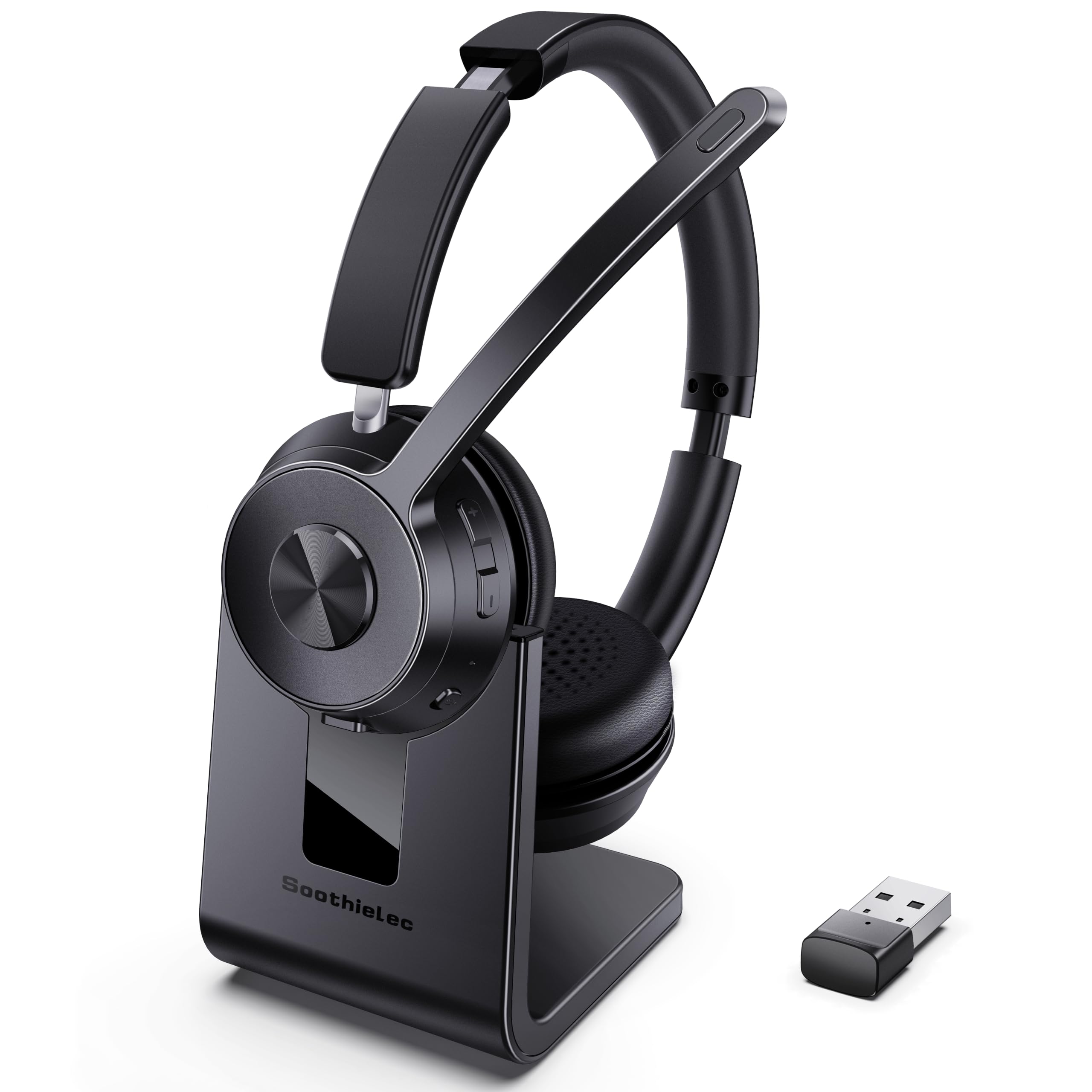
The dongle is what decides this for us. Plug the USB-A adapter into a work laptop that will never let you install anything, and the KH53 shows up as an audio device in seconds; pair it to a phone over Bluetooth and both stay connected, so a call on your cell doesn't mean unplugging from the meeting you're already in. One device with a wired-quality path into the computer and a wireless one to everything else is exactly how an office day works now.

The rest of the package holds up. Forty hours of talk time with a two-hour charge on the included stand means it lives on the desk and is ready when you pick it up, and the memory foam earcups with protein leather covers stay comfortable across a long block of calls. The ENC microphone does the job it's there for: your voice reaches the other end cleanly, with the room pushed back behind it.

Where it gives ground is your side of the call. The noise cancelling works on what you say, not on what you hear, so an open-plan office will still be in your ears — the Angteela below is the pick if that's your problem. And this is a desk headset by design: the stand is how it stays charged, and it isn't the one you throw in a bag. Neither matters if you work from one spot, which most of us do.

Pros

  • Laptop dongle and phone Bluetooth connected at once
  • 40 hours of talk time from a two-hour charge
  • Charging stand keeps it topped up on a desk
  • ENC microphone keeps your voice ahead of the room

Cons

  • Bluetooth range is a short 10 feet
Our verdict

We recommend this to most office workers: it plugs into a locked-down laptop with the dongle, pairs to your phone at the same time, and gives you 40 hours between charges.

Check Latest Price
2

Best Wired

Jabra Evolve 20 (2025)

87 /100
Keeper Score Excellent

Key details

Weight
4.66 oz
Drivers
28 mm
Connection
USB-A or USB-C
Certification
Avaya and Cisco
Check Price on Amazon

Two connectors on one cable is the whole pitch, and it's a good one. The Evolve 20 (2025) takes USB-A or USB-C, which sounds minor until you're the person with a dock that only offers the new port and a desktop that only offers the old one. There's no battery to manage, nothing to pair, and no way for it to quietly connect to the wrong device five minutes before a meeting.

What we appreciate most is how little it asks of you. The dual-ear frame weighs 132 g, the in-line control box handles volume and calls without a driver, and the noise-cancelling boom mic keeps your voice in front of the room. Jabra certifies it for Avaya and Cisco softphones and it works with the major meeting platforms, so it slots into an office that already has a phone system rather than asking you to replace it.

The compromise is the listening side. The 28 mm drivers are voiced for speech rather than music, which is right for a headset and unexciting for a Spotify afternoon. And because it's wired, the cable is part of the deal — it never runs out of charge, and it never lets you walk to the kitchen mid-meeting.

Pros

  • USB-A or USB-C, whichever your laptop has
  • 132 g dual-ear frame with no battery to charge
  • Noise-cancelling boom mic with in-line call controls
  • Certified for Avaya and Cisco softphones

Cons

  • Passive isolation only
Our verdict

Buy this if you want a wired headset that behaves like office equipment: one cable, either USB connector, no battery, and softphone certification your IT team already recognises.

Check Latest Price
3

Best for Microsoft Teams

Yealink BH70 Dual

81 /100
Keeper Score Excellent

Key details

Weight
5.19 oz
Wireless
Bluetooth 5.2 + USB-C/A dongle
Talk Time
35 hours
Certification
Microsoft Teams
Check Price on Amazon

This is the most expensive headset in this guide, so the question is what the extra actually buys. Mostly it buys a headset that will be supported: Microsoft Teams certification, a one-click Teams button on the set, and a device an IT department recognises rather than one they have to be talked into.

The hardware earns its place too. Yealink quotes 35 hours of talk time, a 90-minute charge and a Bluetooth range of 50 metres, which is far enough to walk to the kitchen and back without the call breaking up. At 147 g with soft ear pads it stays comfortable through a long day, and the BT51 dongle covers the USB-C and USB-A ports your laptops are likely to offer between them.

What keeps it off the top spot is the price against one rough edge. Bluetooth reconnection is the weak point — the headset can drop and rejoin on its own — and when it does, reaching for the dongle is a slightly awkward fix on a set this expensive. For a team that lives in Teams with a budget per desk, though, the combination of certification, a stand, a dongle and 35 hours is the one we trust most in this group.

Pros

  • Teams certified, with one-click Teams activation
  • 35 hours of talk time and a 90-minute charge
  • Dongle and Bluetooth 5.2 in the same box
  • 147 g with the charging stand included

Cons

  • Bluetooth can drop and reconnect on its own
Our verdict

The pick for a Teams-based office with a real budget: certified, comfortable at 147 g, with a dongle, a charging stand and 35 hours of talk time in the box.

Check Latest Price
4

Best Noise Cancelling

Angteela M112 Wireless Headset

87 /100
Keeper Score Excellent

Key details

Mute
Flip-up boom
Battery
35 hours
Wireless
Bluetooth 5.4 + USB-A dongle
Noise Cancelling
Hybrid ANC + ENC mic
Check Price on Amazon

Flip the boom up and you're muted; flip it down and you're live. It's the least fiddly mute in this group, and after a week of meetings where you're half listening and half typing, it became the detail we stopped noticing in the best way — there's no hunting along a cable for a button while someone asks you a question.

The other half of the case is that this is the only headset here cancelling noise for both ends of the call. A dedicated ANC button quietens the room for your own ears, and an ENC microphone on a 270-degree boom keeps your voice clean for everyone else. In a room with a TV going and a colleague on speakerphone, that pairing is worth more than any driver figure. Bluetooth 5.4 and the Qualcomm USB-A dongle handle the connection side.

Battery is a stated 35 hours with a two-hour charge on the included stand — a few hours short of our top pick, but still enough that you charge it at the weekend rather than midweek. Because it pairs with two devices, it covers the same ground as the dongle-first sets while adding the quiet. If noise rather than connection is what you're shopping around, this is the one.

Pros

  • ANC for you and an ENC mic for the other end
  • Flip-to-mute boom you can work by feel
  • Bluetooth 5.4 with a Qualcomm USB-A dongle
  • 35 hours of battery with a charging stand

Cons

  • Over-ear cups are bulkier than the on-ear picks
Our verdict

If the open-plan office is your problem, start here: hybrid ANC for your ears, a flip-to-mute boom, and a dongle plus Bluetooth 5.4 for whatever you're calling on.

Check Latest Price
5

Best Budget Wired

Lenovo USB-A Wired Headset Gen 2

83 /100
Keeper Score Excellent

Key details

Weight
4.94 oz
Earcups
Replaceable
Connection
USB-A
Noise Cancelling
AI, via LADM app
Check Price on Amazon

Earcups that come off and go back on are the detail that makes a cheap headset last. Pads are the first thing to flatten on any set, and on the Lenovo wired headset they're a replacement part rather than a reason to buy the whole thing again. At 140 g with an adjustable headband it's light enough that we stopped noticing it during a long block of calls, which is the highest compliment a budget headset gets.

The catch is in the noise cancellation. Lenovo's AI noise cancelling runs through the Accessories and Device Manager app, so out of the box the mic is ordinary — the clever part switches on once the software is installed. On a locked-down work laptop you may not be allowed to install it, and then the mic you get is the mic you get. Worth knowing before you judge it on the first call of the day.

Everything else is plain in the right way. It's a USB-A plug that needs no drivers, an in-line box with volume, mute and call handling, and a double-sided boom you can position where you want it. It works with Teams, Zoom, Google Meet, Slack and Webex without any of them being configured. For a desk that needs a headset for meetings and nothing else, that's the whole brief.

Pros

  • Replaceable earcups stretch out its working life
  • 140 g and comfortable across long call blocks
  • In-line volume, mute and call controls
  • Costs a fraction of the wireless picks

Cons

  • USB-A only
Our verdict

The wired headset we hand to people who need one for meetings and nothing else: light, comfortable, with replaceable pads and no battery to think about.

Check Latest Price
6

Best for Mobile Calls

HEIBAS G7 Bluetooth Earpiece

88 /100
Keeper Score Excellent

Key details

Case
500 mAh, up to 72 hours
Form
Single in-ear earpiece
Mute
Button on earpiece
Battery
18–23 hours per charge
Check Price on Amazon

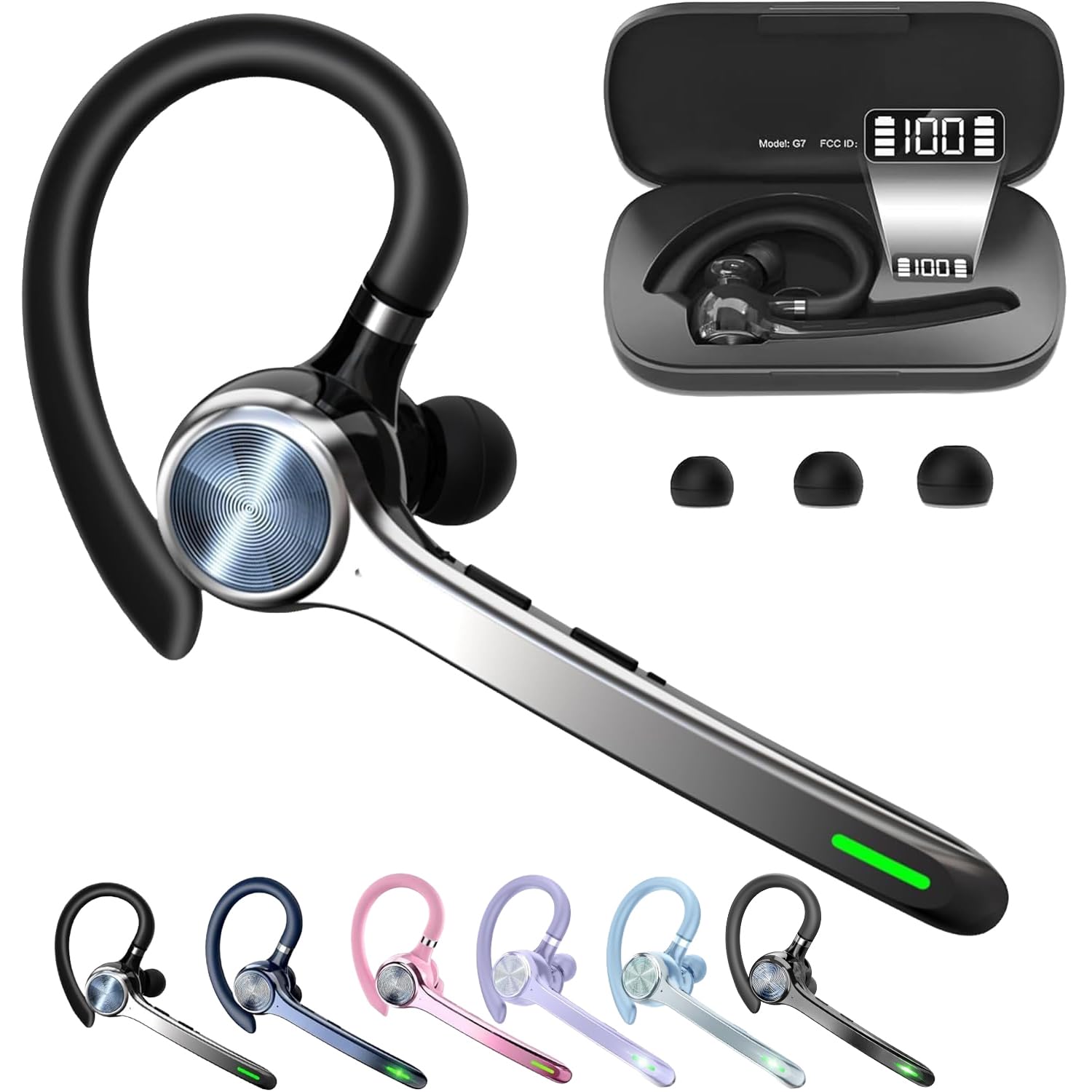
The case is the product here. A 500 mAh battery in a holder about the size of a small wallet gives the G7 roughly 72 hours of use before anything needs a wall socket, and the lid carries a digital readout so you know what's left before a shift rather than guessing from a beep.

On the ear it's light and unobtrusive, sitting in one ear so the other stays open — which is the point for anyone taking calls away from a desk. The mute button lives on the earpiece itself, pairing is quick, and the case means it lives in a bag rather than on a stand. It works with Teams and Webex as a plain Bluetooth headset, with no dongle and no software to install.

We think of it as the second headset rather than the only one: keep a boom-mic set at the desk and this in your pocket for the calls that happen in a car park or on the way to a client. It's a phone-first device, and the calls it's built for are the short ones — a day of back-to-back meetings still belongs on a dual-ear headset with a boom. As an earpiece for the calls in between, it's the one we keep picking up.

Pros

  • Up to 72 hours with the charging case
  • Digital power readout on the case
  • One ear open, so you stay aware
  • Mute button on the earpiece itself

Cons

  • No boom mic
Our verdict

For driving, site visits and calls you take away from the desk, this earpiece and its charging case are the most practical thing here — at the bottom of the price range.

Check Latest Price
7

Long Battery Life

OTYHVV KH122M Wireless Headset

88 /100
Keeper Score Excellent

Key details

Mute
Spoken on/off prompts
Charging
Base with dongle storage
Wireless
Bluetooth 5.2 + USB-A dongle
Talk Time
45 hours
Check Price on Amazon

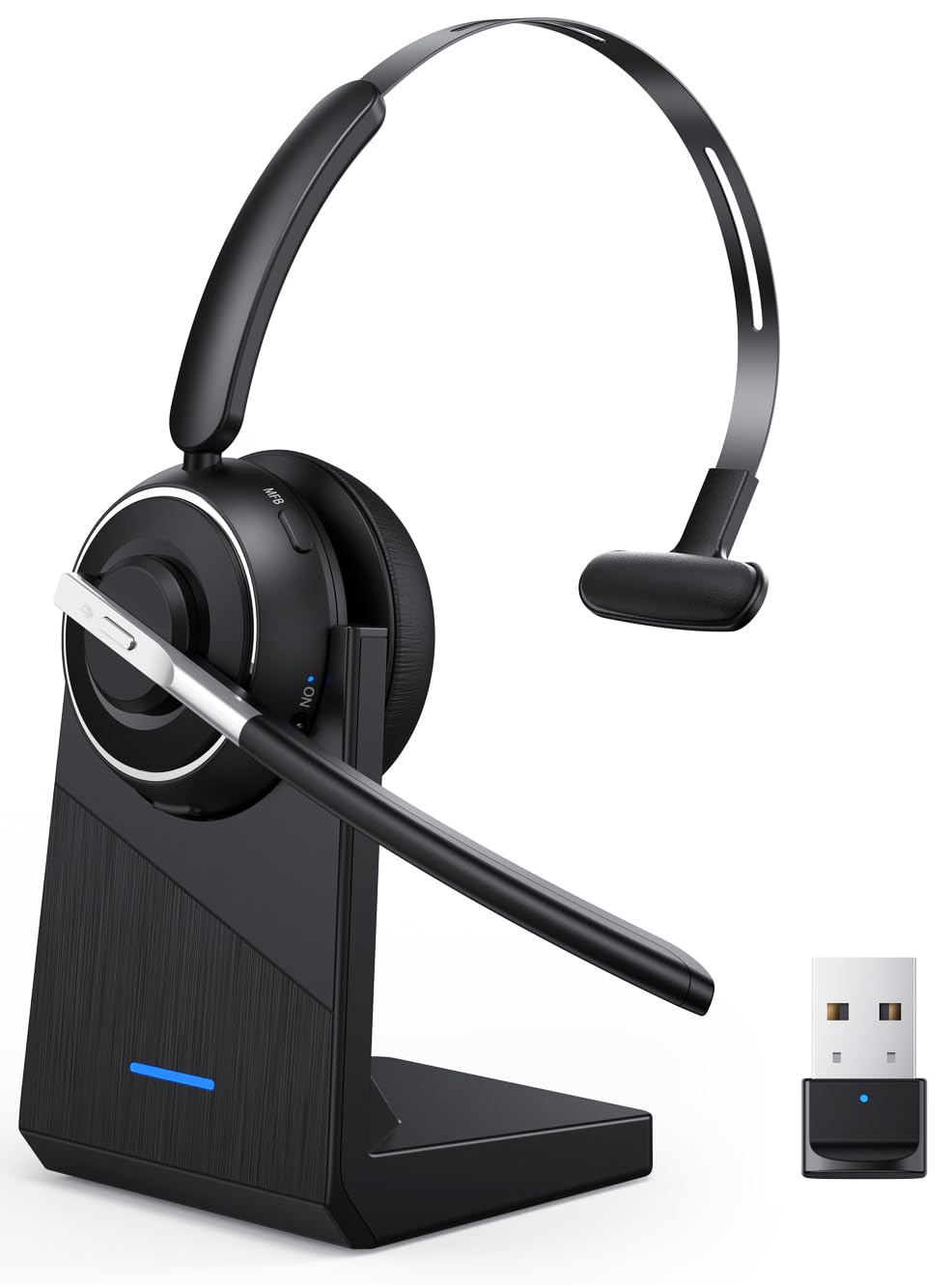
A voice in your ear saying the mute status sounds like a gimmick until the third time you've talked to a silent room. The KH122M announces it, and the button that does it sits on the boom where your thumb expects to find it.

Around that sits a sensible wireless headset. There's a physical on/off toggle instead of a button you hold down, 45 hours of talk time with a two-hour charge, a base that parks the USB-A dongle whenever it isn't in a laptop, and Bluetooth 5.2 for anything without a USB port. The 270-degree boom goes where you put it.

The microphone uses AI noise cancelling, which does the same job as the ENC mics elsewhere here: it works on what the person at the other end hears, not on what reaches your ears. Range is a stated 33 feet, enough for a desk, a room and a short trip down the corridor.

Where our top pick edges this one is multi-device work: the Soothielec holds a laptop and a phone at once, while this one switches between a PC and a phone rather than hearing both. If all your calls land on one machine that distinction disappears, and the longer range plus the spoken mute make this the better desk companion of the two.

Pros

  • 45 hours per charge
  • Spoken mute confirmation and a physical on/off toggle
  • Charging base stores the USB-A dongle
  • 33-foot Bluetooth range

Cons

  • Multi-device use means switching, not both at once
Our verdict

A close second to our top pick on hardware — 45 hours, a dongle, a base — and the one to choose if you want the headset to tell you out loud that you're muted.

Check Latest Price
8

Certified on a Budget

Lenovo Wireless VoIP Headset

82 /100
Keeper Score Excellent

Key details

Weight
4.94 oz
Playback
60 hours
Talk Time
31 hours
Certification
Microsoft Teams
Check Price on Amazon

Microsoft Teams certification is a procurement phrase, but it buys something you notice: a dedicated Teams button, a headset the IT department will support rather than merely tolerate, and a device that behaves the same way in every meeting room you carry it into. This is the cheaper of the two certified wireless sets here.

The numbers land close to the Yealink's for less money: 140 g, 31 hours of talk time or up to 60 hours of playback per charge, Bluetooth 5.3 with multipoint across two devices, and memory foam earcups that are replaceable. That last one is the detail we care about most, because pads are what wear out first on a headset worn eight hours a day.

The supplied receiver is the part that makes it office-proof. It's small enough to leave in a docking station, and when Bluetooth misbehaves on a meeting-room PC, plugging it in is a thirty-second fix rather than a support ticket. There's a protective case in the box as well, which matters more than it sounds for something that travels between home and an office.

Between this and the Yealink, the decision is mostly about what's already on your desk: the Yealink adds a charging stand and a slightly longer battery, while the Lenovo adds a lower price and the same Teams certification. If your company runs Teams and hands out locked-down laptops, the receiver makes this the easier purchase of the two.

Pros

  • Teams certified with a dedicated Teams button
  • 31 hours talk time, 60 hours playback
  • 140 g with replaceable memory foam earcups
  • USB-A receiver for laptops with Bluetooth off

Cons

  • Bluetooth can drop and reconnect on its own
Our verdict

The cheaper way into a Teams-certified wireless headset: 140 g, 31 hours of talk time and a USB-A receiver that works on locked-down laptops.

Check Latest Price

How We Tested Office Headsets

We started by researching headsets sold for hybrid work, call centers, and home offices, then narrowed the field by connection type, ear style, mute controls, and whether replacement earcups or cables were available. Anything that required a proprietary app just to answer a call, or that hid its mute control, was set aside. That left 14 headsets, which we tested over eight months.

We wore each one through ordinary workdays in a closet, at a kitchen table, and in a shared office, with back-to-back video calls, softphone meetings, and cell calls in between. We recorded the same short script through each mic, listened back with and without a fan, mechanical keyboard, dishwasher, and a dog barking in the next room; live calls told us whether voices sounded natural, and a podcast clip revealed hiss or harsh treble. We separated what the wearer hears from what the caller hears, because active noise cancellation and mic noise cancellation get sold as if they are the same thing.

Comfort was judged on full days, not five-minute fit checks: we noted clamp force, ear heat, headband pressure, and whether glasses arms got pinched by hour six; the models with replaceable earcups stayed in rotation long enough to see pad wear. Battery testing meant logging talk time to the low-battery warning, watching how charging stands and cases behaved, and noting whether a quick top-up got through an afternoon. For connectivity and compatibility, we plugged wired models into USB-A and USB-C ports, paired wireless ones through a dongle and to a phone over Bluetooth, switched between softphone and cell mid-call, checked mute in the major calling apps, and walked away to test dropouts. Build quality meant repeated mute toggles, boom-arm rotations, dongle plugging, and a week in a laptop bag; noting creaks, loose joints, and fraying.

How to Choose an Office Headset

Get the connection right before anything else

There are four ways in — 3.5 mm, a USB-A or USB-C cable, Bluetooth, and a USB dongle — and picking the wrong one is the most common reason a headset ends up in a drawer. A corporate laptop with Bluetooth disabled by policy will never see a Bluetooth headset, but it will see a dongle in seconds, which is why the wireless sets we rate highest here all ship with one.

Check your ports while you're at it. The Lenovo wired set is USB-A only, while the Jabra takes either connector; if your laptop is USB-C only, that difference decides the purchase.

Microphone noise cancelling and ANC do different jobs

Almost every headset here claims noise cancellation, and most of them mean the microphone: the person you're calling hears less of your kitchen. Only the Angteela M112 also offers ANC, which quietens the room for your own ears.

So decide which problem you have. If colleagues complain about your background, shop on the mic. If you can't concentrate in an open office, you want ANC or a well-sealed over-ear cup, and paying for ANC on a headset used in a quiet room buys nothing.

Weight, ear count and the fit you'll live with

Everything here sits in roughly the 130 to 150 gram band where a headset stops being a burden, but shape matters as much as the number. Dual-ear sets shut the room out and feel more enclosed; a single earpiece like the HEIBAS keeps one ear free for the colleague at your desk. On-ear cups press against the ear, over-ear cups surround it.

If you wear glasses, the arms compete with the cushions, so favour the lighter sets and give yourself a week to adjust before deciding.

Battery, and why the charging stand matters

Talk time across the wireless picks runs from about 31 to 45 hours with a charge of roughly two hours, so the figure rarely decides anything on its own. The habit does. A headset with a charging base — the Soothielec, OTYHVV, Angteela and Yealink all include one — gets set down and picked up charged; one that charges by cable gets plugged in when somebody notices the low-battery prompt mid-sentence.

If you work from one desk, pay for the base.

The parts that wear out are the real cost

Earcup pads go first on any headset, followed by the cable on a wired set. Two picks here list replaceable pads — the Lenovo wired Gen 2 and the Lenovo wireless — and that single detail is what separates a headset you keep for years from one you replace when the covering splits.

Before ordering, check whether pads are sold as a spare part. If they aren't, treat the purchase as covering a shorter working life.

Frequently Asked Questions

Final Verdict

If we were buying one headset for a general office job today, it would be the Soothielec KH53. The dongle solves the locked-down laptop, Bluetooth covers the phone, and 40 hours on a charging stand means you stop thinking about power altogether.

Spend the difference on the Angteela M112 if you sit in an open office and want the room quiet for your own ears, or on the Jabra Evolve 20 if you would rather have a cable that never runs flat and a set your IT team already supports.