Best Laser Projectors of 2026

Every projector looks like a marvel at midnight with the lights off. The real test is a Sunday afternoon with the blinds half open, a game on, and people wandering through the beam. Laser light sources have made that scenario far more watchable than it used to be, and a good one buys back your evenings — no more scheduling movie night around the sunset.

Nobody warns you about the software. A projector can throw a gorgeous image and still make you cast from your phone because the streaming app you want isn't officially supported, which gets old fast. My team and I spent ten months with eight laser projectors in a living room, a basement, and a mosquito-filled backyard, and the ones that won us over got both halves right: the picture, and the boring stuff you use every night.

Placement matters nearly as much as specs: an ultra short throw sits inches from the wall, while a long throw wants distance and a dark room. The picks below cover both, and a couple that travel.

Keeper Score summarizes customer ratings and review volume. Read it alongside the product details and trade-offs. How the score works.

1

Best Overall

XGIMI HORIZON 20

85 /100
Keeper Score Excellent

Key details

Gaming
240Hz, 1ms input lag
Placement
Optical zoom and lens shift
Brightness
3200 ISO lumens
Native Resolution
3840 x 2160
Check Price on Amazon

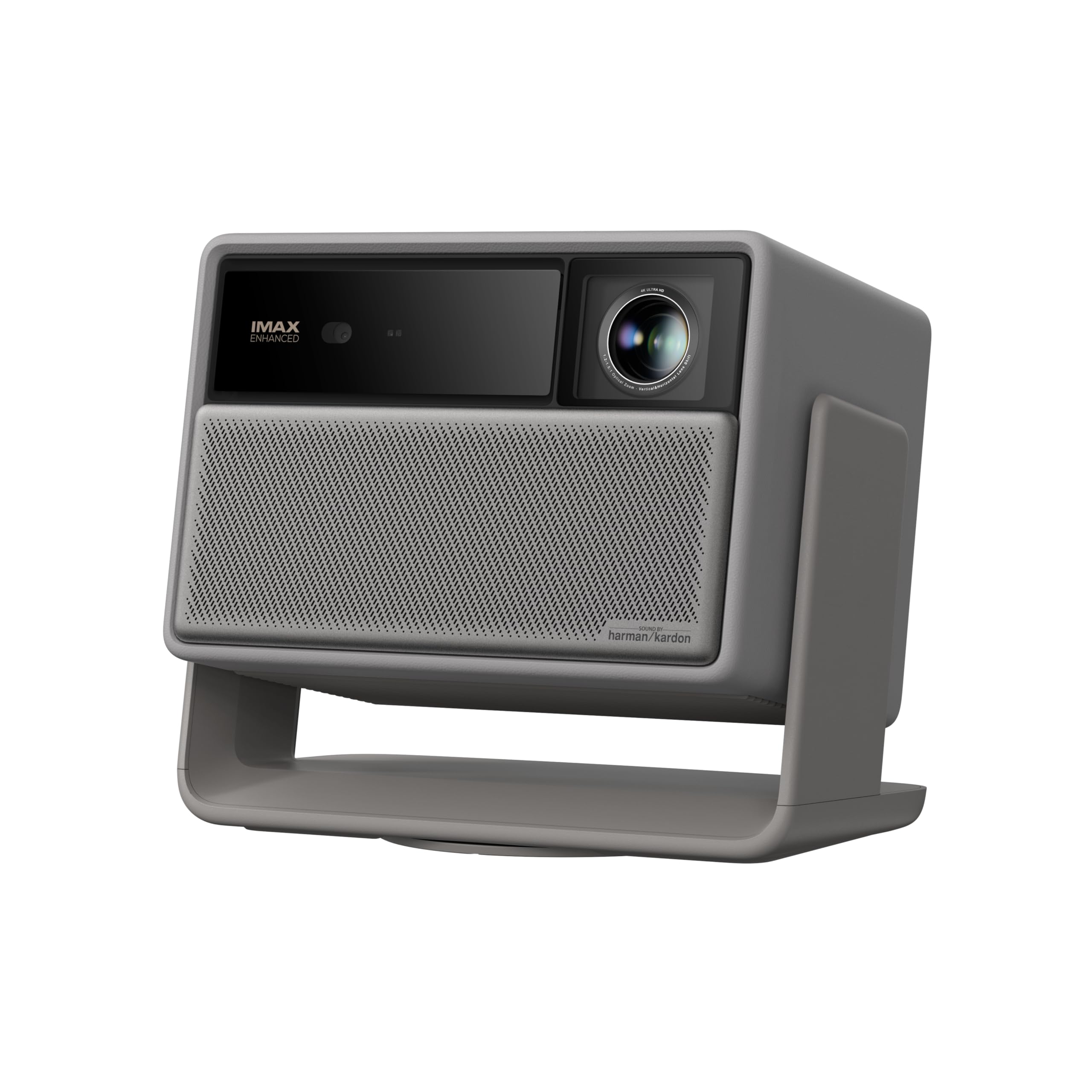
The Horizon 20 is the laser projector we recommend first because it solves the two things that keep projectors out of daily life: placement and streaming. Optical zoom and lens shift let you square the image without fighting keystone, and the integrated stand means it can sit on a coffee table instead of a shelf. Google TV with licensed Netflix is built in, so there is no dongle dangling from the back.

The picture is the main event. A 4K RGB triple-laser engine puts out 3200 ISO lumens with a claimed 100,000:1 contrast ratio, and the combination of IMAX Enhanced, Dolby Vision, HDR10+, and Filmmaker Mode gives you useful picture presets rather than one overbright default. Harman Kardon speakers are a real step above the usual projector tin, and the fan stays quiet enough that we stopped noticing it during dialogue-heavy scenes.

Gaming is not an afterthought. The Horizon 20 supports 240Hz, 1ms input lag, VRR, and ALLM, so a console or PC can use the big screen without the usual lag penalty. The 300-inch maximum image is more than most rooms can take, but it means a 120-inch picture is comfortably within range.

The one caveat is long-term reliability: a small number of units can stop working after purchase. Keep the return window in mind and put the projector through a few long movie sessions early. For most rooms, the balance of image, placement, and gaming speed still makes it the default.

Pros

  • Bright 4K triple-laser image
  • Lens shift and optical zoom simplify placement
  • Google TV with licensed Netflix built in
  • 240Hz and 1ms input lag for gaming

Cons

  • Some units can fail after purchase
Our verdict

We recommend the Horizon 20 as the laser projector most people should start with: it pairs a bright 4K triple-laser image with lens shift, streaming apps, and serious gaming speed.

Check Latest Price
2

Best for Dedicated Home Theaters

Valerion VisionMaster Pro2

88 /100
Keeper Score Excellent

Key details

Contrast
15,000:1 with EBL
Brightness
3000 ISO lumens
Optical Zoom
0.9-1.5x
Native Resolution
3840 x 2160
Check Price on Amazon

Contrast is the number we care about most in a dark-room projector, and the VisionMaster Pro2 leads this group on paper with a 15,000:1 ratio and Enhanced Black Level processing. The anti-RBE treatment is the detail that matters just as much: DLP projectors can show rainbow fringing, and this model is built to reduce it.

We recommend it for a dedicated theater because it puts the money into the image rather than convenience. The 3000 ISO lumen output is enough for a 120- to 150-inch screen, the 0.9-1.5x optical zoom gives you room to place it, and Dolby Vision, HDR10+, IMAX Enhanced, and Filmmaker Mode cover the major formats. Color depth is the strongest in this set, and dark scenes hold together without the gray wash that cheaper lasers show.

The 4ms input lag and 240Hz refresh rate make it a credible gaming projector too, though this is not the one we choose for a bright living room. It weighs 15.4 pounds, so plan on a sturdy shelf or ceiling mount, and the fan is quiet enough for a small theater.

Keystone correction can be fussy at steep angles, so set it as square to the screen as you can. Compared with the Horizon 20, the Valerion gives up some placement ease and streaming polish for deeper contrast and anti-RBE optics.

Pros

  • 15,000:1 contrast with Enhanced Black Level
  • Anti-RBE optics reduce rainbow fringing
  • 0.9-1.5x optical zoom aids placement

Cons

  • Keystone can be fussy at steep angles
Our verdict

For a dark, dedicated room, the VisionMaster Pro2 is the projector in this group we choose for contrast, color control, and anti-RBE optics, with enough brightness for a large screen.

Check Latest Price
3

Best Ultra Short Throw

Hisense PX3-PRO

86 /100
Keeper Score Excellent

Key details

Throw
Ultra short throw
Brightness
3000 lumens
Screen Size
80-150 inches
Native Resolution
3840 x 2160
Check Price on Amazon

An ultra short throw projector changes the room, not just the screen. The PX3-PRO sits on a low cabinet and throws an 80- to 150-inch 4K image from inches away, so there is no ceiling mount, no long HDMI run, and no projector hanging over the sofa.

Hisense uses a triple-laser light source rated at 3000 lumens, with Dolby Vision, Dolby Atmos, IMAX Enhanced, and Google TV built in. The 240Hz refresh rate and Xbox-focused features make it more gaming-friendly than most UST models, and the Harman Kardon speakers are good enough for a family room before you add a soundbar. On a proper UST screen, the image is bright and colorful, with the kind of contrast that keeps dark scenes from flattening out.

We recommend it for a living room where the screen can live on one wall and the projector can stay put. The 150-inch ceiling is the main limit: if you want a 200-inch image, the AWOL Aetherion Pro is the better fit. For most rooms, 150 inches is already enormous, and the PX3-PRO's built-in streaming and sound make it a tidy one-box setup.

Pros

  • 4K ultra short throw image from inches away
  • 3000 lumens with Dolby Vision and Atmos
  • Google TV and licensed apps built in
  • 240Hz gaming support and Xbox features

Cons

  • Screen size tops out at 150 inches
Our verdict

The PX3-PRO is the ultra short throw we recommend for a living room: a bright 4K triple-laser image, Dolby Vision, and Google TV from a cabinet just below the screen.

Check Latest Price
4

Best for Bright Rooms

Epson Pro EX11000

90 /100
Keeper Score Outstanding

Key details

Brightness
4600 lumens
Screen Size
310 inches max
Light Source
20,000 hours
Native Resolution
1920 x 1080
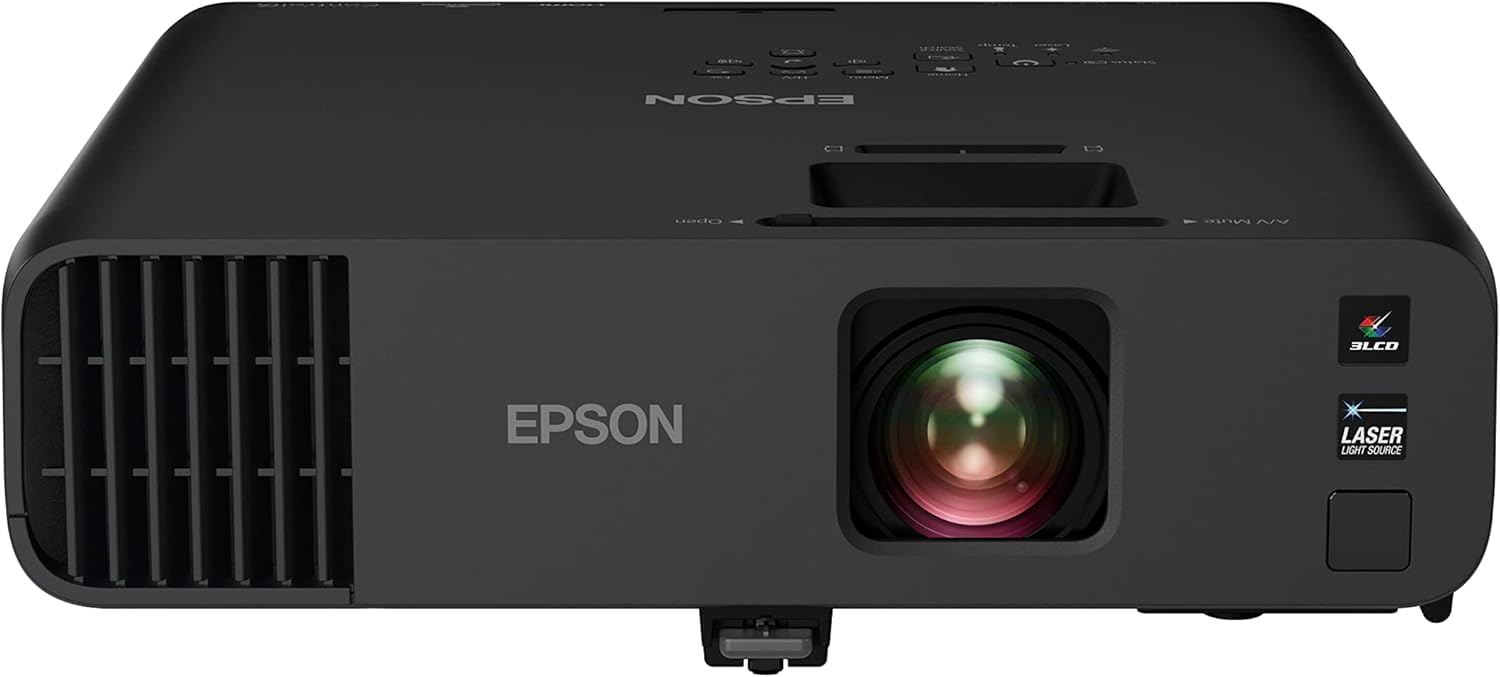
Check Price on Amazon

Daylight is the enemy of most home projectors. The EX11000 is the one in this group we reach for when the curtains are open: 4600 lumens of white and color brightness from a 3-chip 3LCD laser engine, with no color wheel to steal brightness.

The 1080p resolution is the trade-off. On a 100- to 120-inch screen it looks crisp, and the 3LCD color is natural and consistent; push it past 150 inches and the lack of 4K detail starts to show. The 20,000-hour laser light source means no bulb changes, and the 310-inch maximum image gives you room for a large room or a golf simulator.

Setup is straightforward: two HDMI inputs, Miracast screen mirroring, USB power, a 16W speaker, and a carrying case in the box. At 9.5 pounds it is portable enough to move between rooms, though it is happiest on a table or a ceiling mount. Use HDMI for a streaming stick if you want the shortest path.

We recommend the EX11000 for a bright room, a large 1080p image, and simple operation. If you want a sharper 4K picture in a dark theater, the Horizon 20 or VisionMaster Pro2 is the better choice; if the lights stay on, this Epson is the one that keeps the picture readable.

Pros

  • 4600 lumens for bright rooms
  • 3LCD color stays vivid and consistent
  • Easy setup with carrying case included

Cons

  • 1080p resolution limits fine detail
  • Network setup can be fiddly
Our verdict

For a bright room, a big 1080p image, and simple setup, the EX11000 is the laser projector we trust to stay visible when the curtains are open.

Check Latest Price
5

Best Value

JMGO N1S 4K

85 /100
Keeper Score Excellent

Key details

Gimbal
127° vertical rotation
Smart TV
Google TV, Netflix
Brightness
1700 ISO lumens
Native Resolution
3840 x 2160
Check Price on Amazon

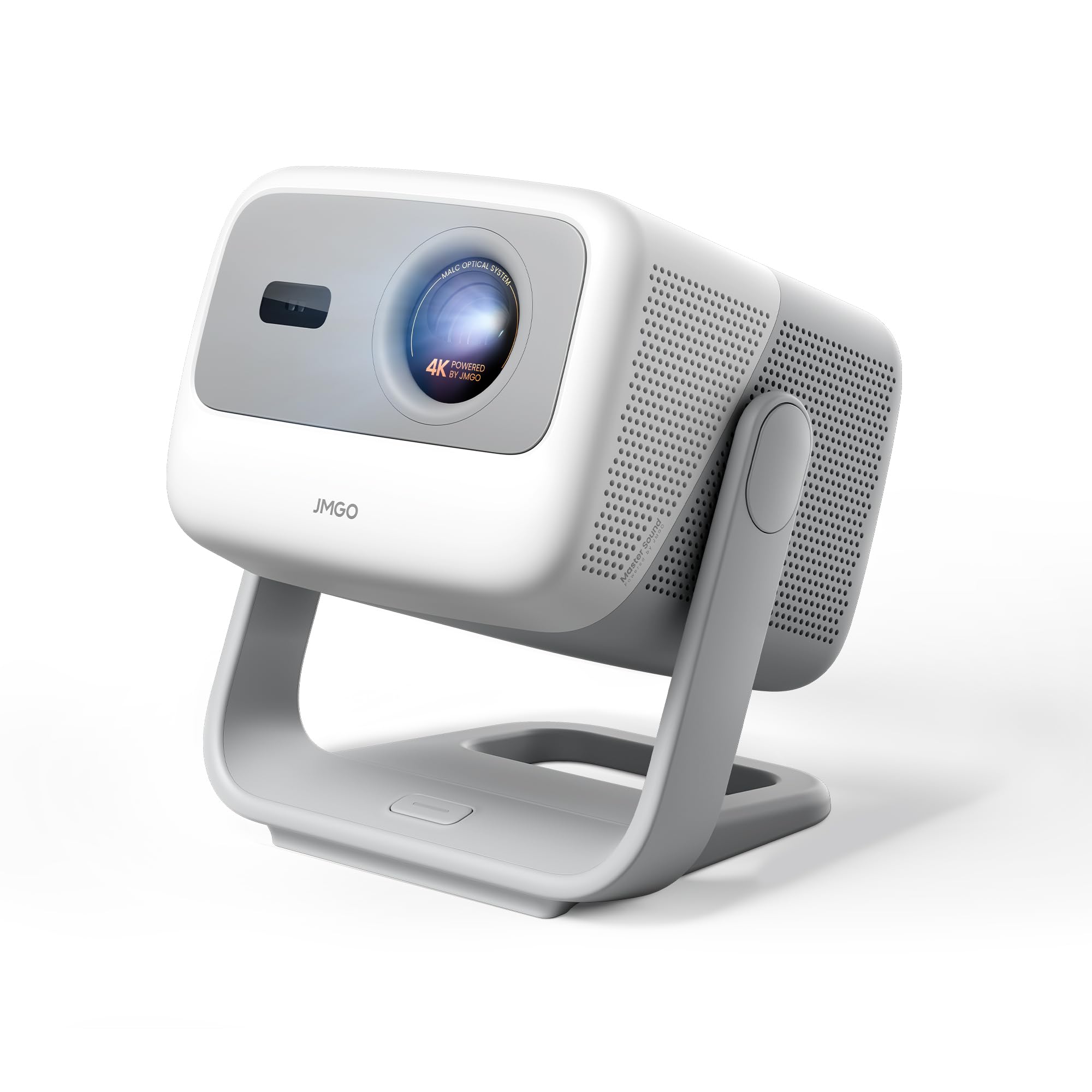
The N1S 4K is the value pick because it puts a 4K triple-laser image, Google TV, and a genuinely useful gimbal stand into a package that weighs about as much as a laptop. The gimbal rotates 127 degrees, so you can aim it at a wall or ceiling and fine-tune the angle with one hand; autofocus and auto keystone do the rest.

At 1700 ISO lumens, it is a dark-room projector, not a living-room replacement. In that setting, the 110% BT.2020 color coverage and HDR10 support give it a richer look than its price suggests, and the 10W Dolby speakers are fine for a bedroom or a small family room. The 200-inch maximum image is generous for the size.

The catch for gamers is that the lowest-latency mode disables keystone correction, so set the projector square before you play. For movie nights, the built-in Netflix and Google TV make it easy to live with, and the carrying bag means it can travel. We like it as a second projector or a first 4K projector for a dark room.

Pros

  • 4K triple-laser image at a value price
  • Gimbal stand with autofocus and auto keystone
  • Google TV and Netflix built in

Cons

  • 1700 lumens needs a dark room
Our verdict

The N1S 4K is the value pick for a dark-room movie setup: it delivers a crisp 4K triple-laser image, Google TV, and an unusually flexible gimbal stand.

Check Latest Price
6

Best for Console Gaming

ViewSonic LX700-4K

82 /100
Keeper Score Excellent

Key details

Gaming
240Hz, 4.2ms input lag
Placement
Optical zoom and vertical lens shift
Brightness
3500 lumens
Native Resolution
3840 x 2160
Check Price on Amazon

Console gamers feel input lag before they see it. The LX700-4K is built around a 240Hz refresh rate and a 4.2ms input lag, with 4K UHD resolution and 3500 lumens, so fast games stay responsive on a screen far bigger than a TV.

We recommend it for a console setup because it keeps the important parts simple: dual HDMI inputs, optical zoom, vertical lens shift, and HDR/HLG support. The 4K image is sharp, and the brightness is enough for a living room with some ambient light. It is not the last word in black levels—dark scenes look more gray than they do on the Valerion—but for games and sports, the trade-off is easy to take.

The fan noise is moderate, and the optical zoom and lens shift let you place it without leaning too hard on keystone. At this size, most buyers will have a soundbar anyway, and that is the better way to listen.

If movie black levels matter more than gaming speed, the Valerion is the step up; if you want a big, fast 4K screen for a console, the LX700-4K is the straightforward pick.

Pros

  • 4K at 240Hz with 4.2ms input lag
  • 3500 lumens for a living room
  • Optical zoom and vertical lens shift

Cons

  • Black levels trail the top picks
  • Built-in speaker can buzz
Our verdict

The LX700-4K is the console projector we choose when lag and refresh rate matter most, with 4K clarity and enough light for a normal living room.

Check Latest Price
7

Best Portable 4K

Hisense M2 Pro

87 /100
Keeper Score Excellent

Key details

Smart TV
Vidaa OS, Netflix
Brightness
1300 lumens
Screen Size
65-200 inches
Native Resolution
3840 x 2160
Check Price on Amazon

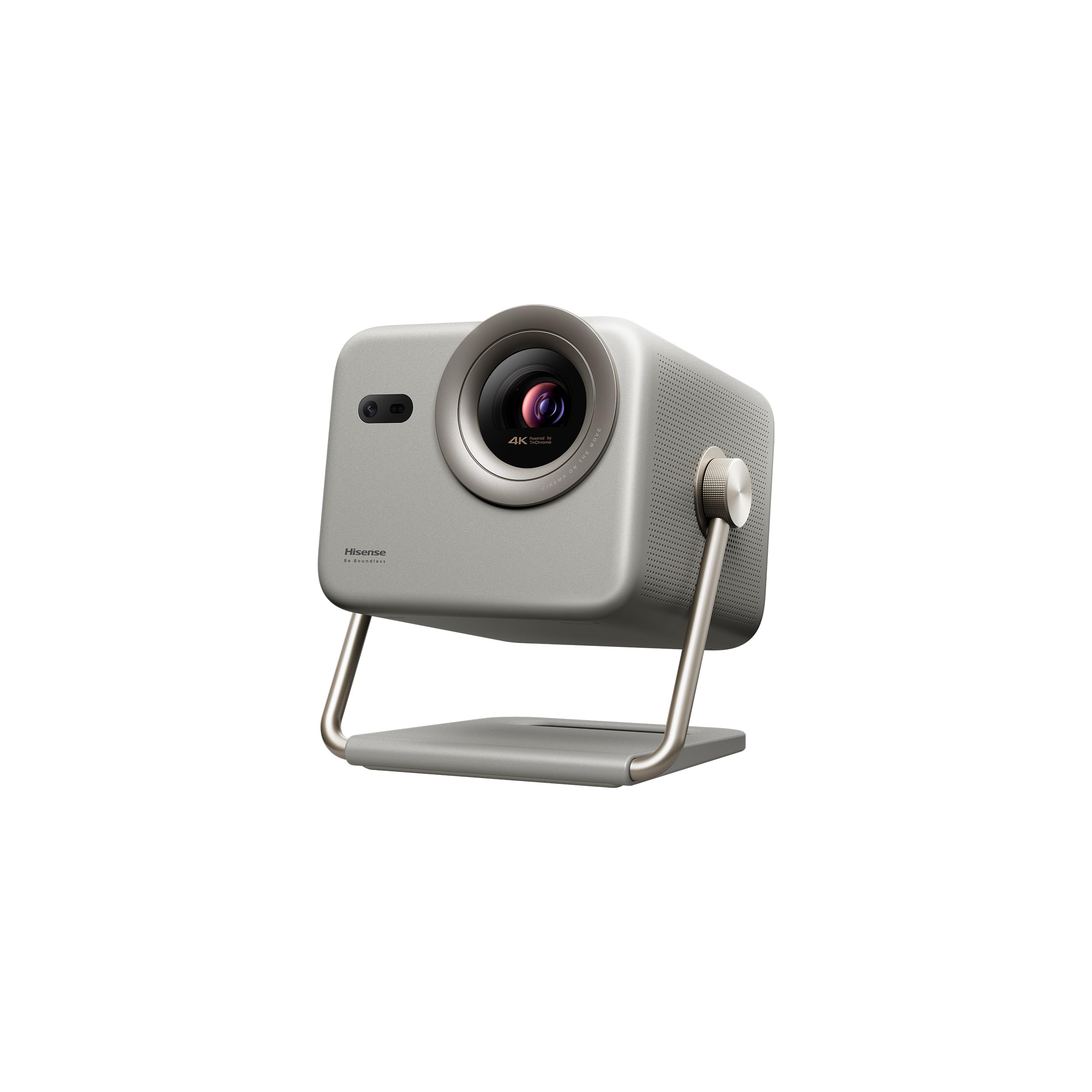
The M2 Pro is the projector we move from room to room when we want a big picture without a permanent install. It weighs 8.6 pounds and uses an auto-adjust system that handles focus, keystone, and screen fit, so you can point it at a wall and let it settle.

The 4K triple-laser image is the reason to choose it over a cheaper portable. Hisense rates it at 1300 lumens, which is enough for a dark or dimly lit room and not much more; the 65- to 200-inch range gives you flexibility, and Dolby Vision and Filmmaker Mode are useful for movies. The Vidaa OS has Netflix built in, and the optical zoom gives you some placement freedom before you touch keystone.

We recommend it for a portable 4K lifestyle setup—a bedroom, a backyard at night, or a living room where the projector comes out for movie nights. The auto adjustments are the part that makes it easy to live with: you do not need to be a projector nerd to get a straight image. The 8.6-pound body is light enough to carry, but there is no battery, so you need an outlet wherever it lands.

Compare it with the JMGO N1S 4K: the JMGO is cheaper and brighter on paper, while the M2 Pro has the more polished auto setup and a wider 200-inch range. If you want battery power, the Nebula Capsule 3 Laser is the one; if you want the more polished portable 4K setup, this Hisense is the pick.

Pros

  • 4K triple-laser image with Dolby Vision
  • Auto focus, keystone, and screen fit
  • Optical zoom and 65-200 inch range

Cons

  • 1300 lumens needs low light
Our verdict

The M2 Pro is the portable 4K projector we reach for when picture quality matters more than battery power, with auto setup that makes room-hopping genuinely easy.

Check Latest Price
8

Backyard and Travel

Nebula Capsule 3 Laser

88 /100
Keeper Score Excellent

Key details

Weight
2 lb
Battery
2.5 hours
Brightness
300 ANSI lumens
Native Resolution
1920 x 1080
Check Price on Amazon

The Capsule 3 Laser is the only projector here that can run a movie without a wall outlet. It weighs 2 pounds, stands about as tall as a soda can, and has a 2.5-hour battery, so it can go from a backpack to a backyard table without a power cable.

The 1080p laser image tops out at 120 inches, and the 300 ANSI lumens are strictly for dark rooms. In that setting, the picture is surprisingly clean for the size, and the 8W Dolby speaker is good enough that you do not need to pair a Bluetooth speaker for a casual movie. Autofocus and auto keystone make setup quick.

The built-in Google TV and licensed Netflix are convenient, but the smart interface is the least dependable part. Apps can be slow or unavailable, so we treat the HDMI input as the reliable path and the built-in apps as a bonus. That is the right way to use this projector: plug in a streaming stick or a console, and let the battery and size do the work.

We recommend the Capsule 3 Laser for a backyard night, a hotel room, or a dorm where a TV is overkill. It is not a replacement for a living-room projector, but as a second projector that actually leaves the house, it earns its keep.

Pros

  • 2 pounds with a 2.5-hour battery
  • Native 1080p laser image
  • Autofocus and auto keystone

Cons

  • 300 lumens requires a dark room
Our verdict

If the plan is a dark backyard or a hotel wall, the Capsule 3 Laser earns its place as a genuinely pocketable projector, with the HDMI input doing the heavy lifting.

Check Latest Price
9

Massive UST Screens

AWOL Aetherion Pro

85 /100
Keeper Score Excellent

Key details

Throw
Ultra short throw
Gaming
240Hz, 1ms input lag
Screen Size
Up to 200 inches
Native Resolution
3840 x 2160
Check Price on Amazon

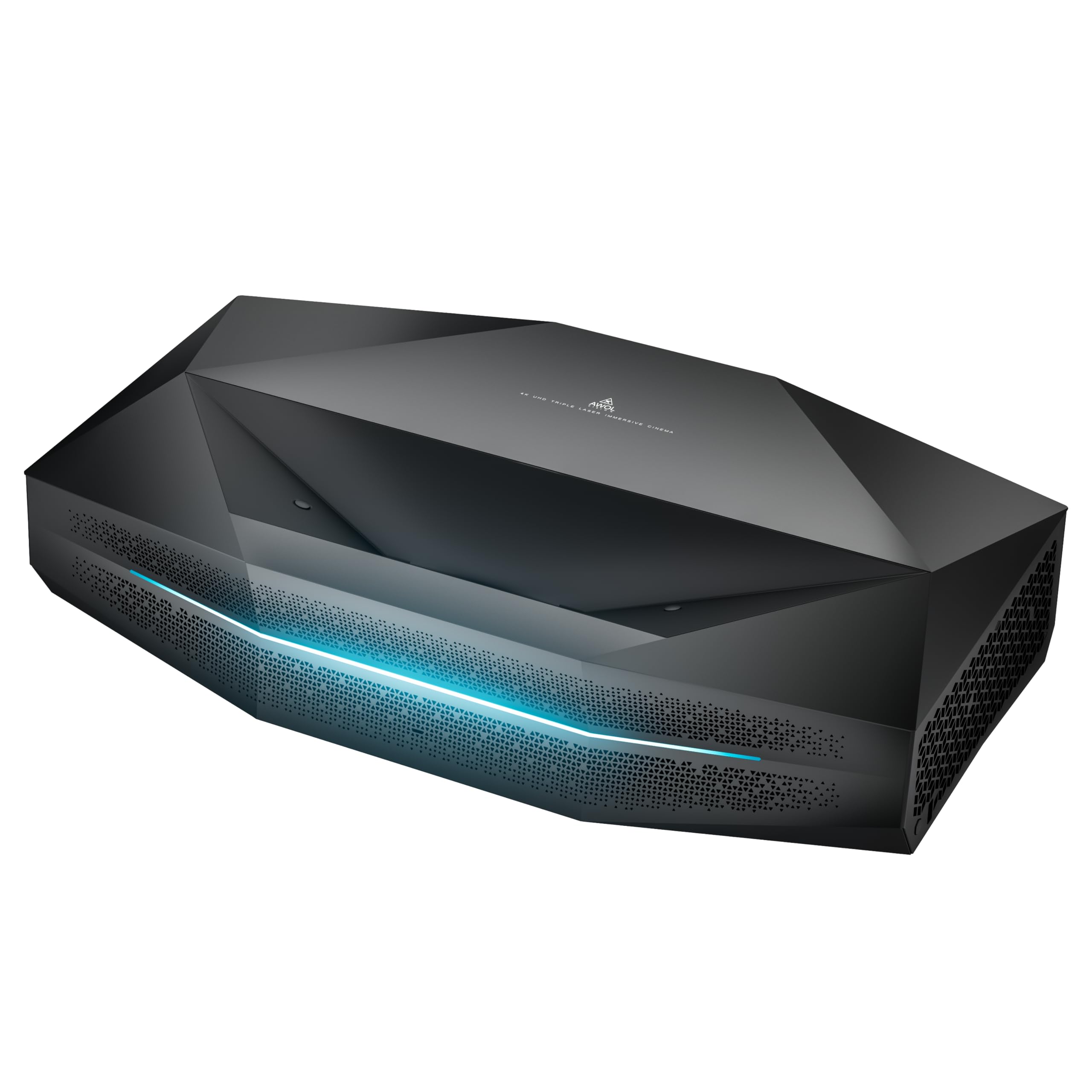
A 200-inch image from a box that sits on the floor is the promise of the Aetherion Pro. It is an ultra short throw 4K triple-laser projector, so it can fill a wall from inches away, and the 200-inch maximum gives it more reach than the Hisense PX3-PRO.

The image is built for a dark theater. AWOL rates it at 2,600 ISO lumens with a 6,000:1 contrast ratio and IRIS processing, and the anti-RBE treatment is designed to reduce rainbow fringing. Dolby Vision, HDR10+, IMAX Enhanced, and Filmmaker Mode are all on board, and the triple-laser color is vivid without looking radioactive.

Gaming is a real strength: 1080p at 240Hz with 1ms input lag, plus VRR and ALLM. The 23.6-inch-wide cabinet is larger than a typical projector, so it needs a deep, stable stand; that is the price of the big UST lens.

Setup is the part that rewards patience. The Aetherion Pro has auto focus, auto screen alignment, and obstacle avoidance, but it still wants a square wall and a careful initial position. On a proper UST screen, the picture is bright, sharp, and stable even on a tan wall.

We recommend the Aetherion Pro for the buyer who wants the biggest ultra short throw image here and is willing to set it up properly. If 150 inches is enough and you want a simpler living-room install, the PX3-PRO is the easier choice; if you want the extra screen size and gaming speed, this AWOL is worth the space.

Pros

  • 200-inch ultra short throw image
  • 240Hz and 1ms input lag
  • Anti-RBE treatment and triple-laser color

Cons

  • Keystone alignment can be fussy
Our verdict

The Aetherion Pro is for the buyer who wants the biggest ultra short throw image here: 200 inches, strong contrast, and gaming speed, with setup that rewards patience.

Check Latest Price

How We Tested (and Lived With) These Laser Projectors

We started with research, rounding up every laser projector we could find from the brands that dominate this space and cutting the list by throw distance, claimed brightness, whether the smart platform actually carries a licensed streaming app, and how much projector you get for the money. Eight models came in for hands-on testing and stayed set up for ten months across a living room white wall, a light-controlled basement, and a backyard after dark.

Picture quality got the most scrutiny. We took meter readings at the screen's center and all four corners in full darkness, with lamps on, and with blinds open at midday, noting where contrast fell apart and color went flat. Night scenes and dark films showed whether blacks stayed black or went milky, slow pans exposed rainbow fringing, and we compared each unit's most accurate picture mode against its brightest one rather than trusting a spec sheet.

Setup was timed: we set each projector down, let auto focus and keystone work, then nudged it on purpose to see whether it recovered or needed manual correction, leaning on optical zoom and lens shift where they were offered. We listened at normal dialogue volume and at maximum, noting distortion and how much fan noise bled into quiet scenes, ran fast pans and a low-lag game in the highest refresh mode, and pulled HDMI cables mid-movie to see how gracefully each one reconnected. Every streaming app got signed into rather than assumed, and we carried each projector between rooms to judge size, weight, and how solid the housing felt.

At the end we asked the only question that matters: whether the picture justified the money next to a cheaper model that got most of the way there.

How to Choose a Laser Projector

Placement Comes Before Picture

Throw distance is the first thing to solve. A standard-throw projector needs several feet behind the seating, a short-throw model works closer to the wall, and an ultra short throw model sits inches below the screen. UST is the easiest living-room install, but it needs a low, stable cabinet and a flat wall, and it is less forgiving of being moved. Optical zoom and lens shift are worth paying for because they let you square the image without leaning on keystone. The XGIMI Horizon 20 is the easiest all-rounder here for placement; the Hisense PX3-PRO is the UST pick. Check the throw ratio against your room before you fall for the screen size.

Brightness Is a Room Match

Laser brightness is not one number with one meaning. A 300-lumen portable like the Nebula Capsule 3 Laser is a dark-room device; 1,300 to 1,700 lumens, as on the Hisense M2 Pro and JMGO N1S 4K, is comfortable in a dim room; 3,000 lumens and up starts to challenge living-room light, which is where the Hisense PX3-PRO and Epson EX11000 live. More brightness can cost black-level depth, so do not buy the brightest projector if you mostly watch in the dark. Match the output to the light you actually have.

Resolution and Screen Size

1080p is still useful. On a 100- to 120-inch screen, a good 1080p projector looks sharp, and the Epson EX11000 uses that to stay affordable and very bright. Step up to 150 inches or more and 4K earns its keep, especially with text, games, and detailed landscape shots. The XGIMI Horizon 20 and Valerion VisionMaster Pro2 are the 4K picks we favor for a big image. Do not buy a 4K projector for a 100-inch screen and then feed it standard-definition cable; the source matters as much as the projector.

Smart Features and Gaming

Built-in Google TV is convenient, but it is not a reason to overlook a weak app platform. The Horizon 20, JMGO N1S 4K, and Hisense models have streaming built in; the Epson and ViewSonic are happier with an HDMI stick or console. For gaming, look at input lag and refresh rate, not just resolution. The ViewSonic LX700-4K is the console specialist at 4.2ms and 240Hz, while the Horizon 20 goes down to 1ms. If you use a low-latency mode, check whether it disables keystone correction before you plan the room.

Portability, Sound, and Running Costs

Portable means different things. The Nebula Capsule 3 Laser has a battery and weighs 2 pounds; the Hisense M2 Pro weighs 8.6 pounds and needs an outlet; the XGIMI Horizon 20 is a move-it-once-a-season projector at 10.8 pounds. Built-in speakers are fine for casual viewing, but a soundbar or AV receiver is a worthwhile upgrade for movie nights. Laser projectors do not need bulb changes, so the running cost is mostly electricity and the occasional streaming device.

Frequently Asked Questions

Final Verdict

The XGIMI Horizon 20 is the laser projector we recommend first because it gets the balance right: a bright 4K triple-laser image, lens shift and optical zoom, Google TV with Netflix, and 240Hz gaming in one package that fits a living room. If your room is dark and dedicated, the Valerion VisionMaster Pro2 is the step up for contrast and anti-RBE optics. For a wall-and-cabinet install, choose the Hisense PX3-PRO; for daylight, the Epson EX11000.