Best HomeKit Cameras of 2026

A HomeKit camera isn't just a webcam that shows up in the Home app. The real draw is HomeKit Secure Video: clips get analyzed on a home hub, encrypted, and sent to iCloud, so the footage isn't sitting on a server you've never seen. The catch is that Apple's club is small, and plenty of cameras claim compatibility while quietly pushing you into a separate app for half the features.

I've had cameras pointed at my front door, my driveway, and a busy cat flap for most of this year, and my team put 12 HomeKit models through six months of testing. The difference between a good one and an irritating one rarely shows up on a spec sheet — it's how fast the livestream opens, whether an alert actually shows a person, and whether two-way audio sounds like a walkie-talkie from 1998.

Resolution also isn't the whole story. A sharp 2K feed with detection that can tell a person from a passing car beats 4K that pings you every time a branch moves, and the picks below got that balance right.

Keeper Score summarizes customer ratings and review volume. Read it alongside the product details and trade-offs. How the score works.

1

Best Overall

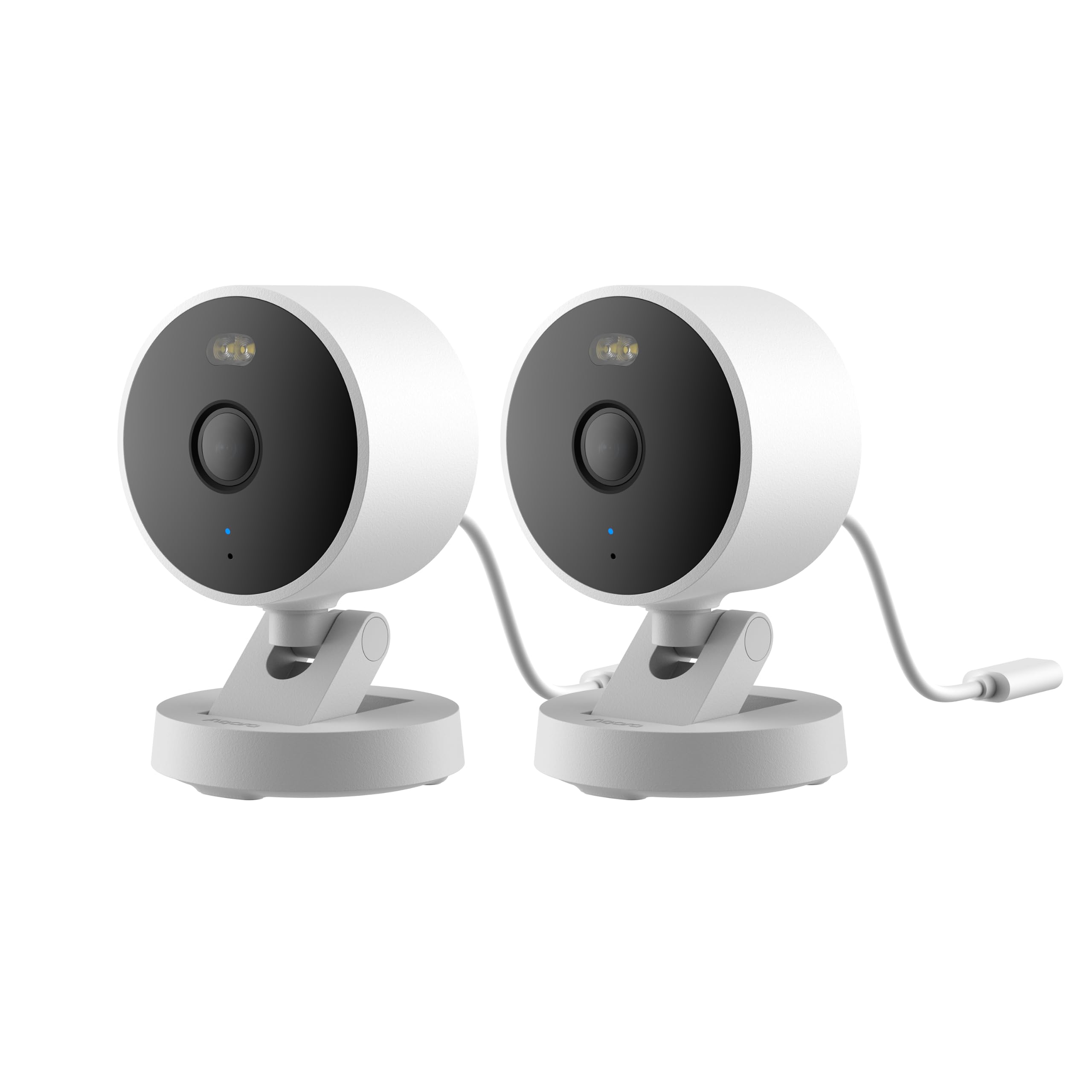
Aqara Camera G100 (2-Pack)

83 /100
Keeper Score Excellent

Key details

Resolution
2K (2304 x 1296)
Field Of View
140°
Local Storage
microSD up to 512GB
Weather Rating
IP65
Check Price on Amazon

The arithmetic of a HomeKit setup changes when two cameras arrive in one box. The G100 kit puts a camera on the front door and another over the back gate for about what a single well-known indoor camera costs, and both units are IP65, so rain, dust, and a hose-down are fine. With a 140° lens on each, a driveway shot takes in the parked car and the path beside it without anyone climbing a ladder to re-aim it.

HomeKit Secure Video is the reason to buy this rather than a cheaper Wi-Fi camera. Added through the Home app, it records encrypted clips to iCloud with Apple's own person, animal, vehicle, and package detection, and it needs the two things Apple always needs: a home hub and an iCloud+ plan. We also appreciate that a microSD card (up to 512GB, sold separately) keeps 24/7 footage on the camera itself, so you have a continuous archive that doesn't count against your cloud storage. At night the built-in spotlight flips the picture from infrared gray to color when something moves, which makes a late arrival much easier to identify.

Two installation details decide whether this is pleasant or annoying. The USB cable is short and fixed to the body, and no power adapter is in the box, so an outdoor position needs an outlet within reach or a USB extension plus a 5V adapter you supply. Pairing is the other: adding the camera to HomeKit can take more than one attempt, and resetting it before you conclude the unit is faulty saves a return. Neither is a dealbreaker for a two-camera kit at this money, but both belong in the plan rather than in the surprise.

Pros

  • Two cameras in one weatherproof kit
  • 2K video with a wide 140° view
  • Records to microSD without a subscription
  • Spotlight delivers color footage at night

Cons

  • No power adapter in the box
  • HomeKit pairing can take more than one attempt
Our verdict

We recommend the G100 kit to anyone starting a HomeKit setup, because two weatherproof 2K cameras with local recording cover more of a house than one fancier camera does.
Check Latest Price
2

Best for Indoor Detail

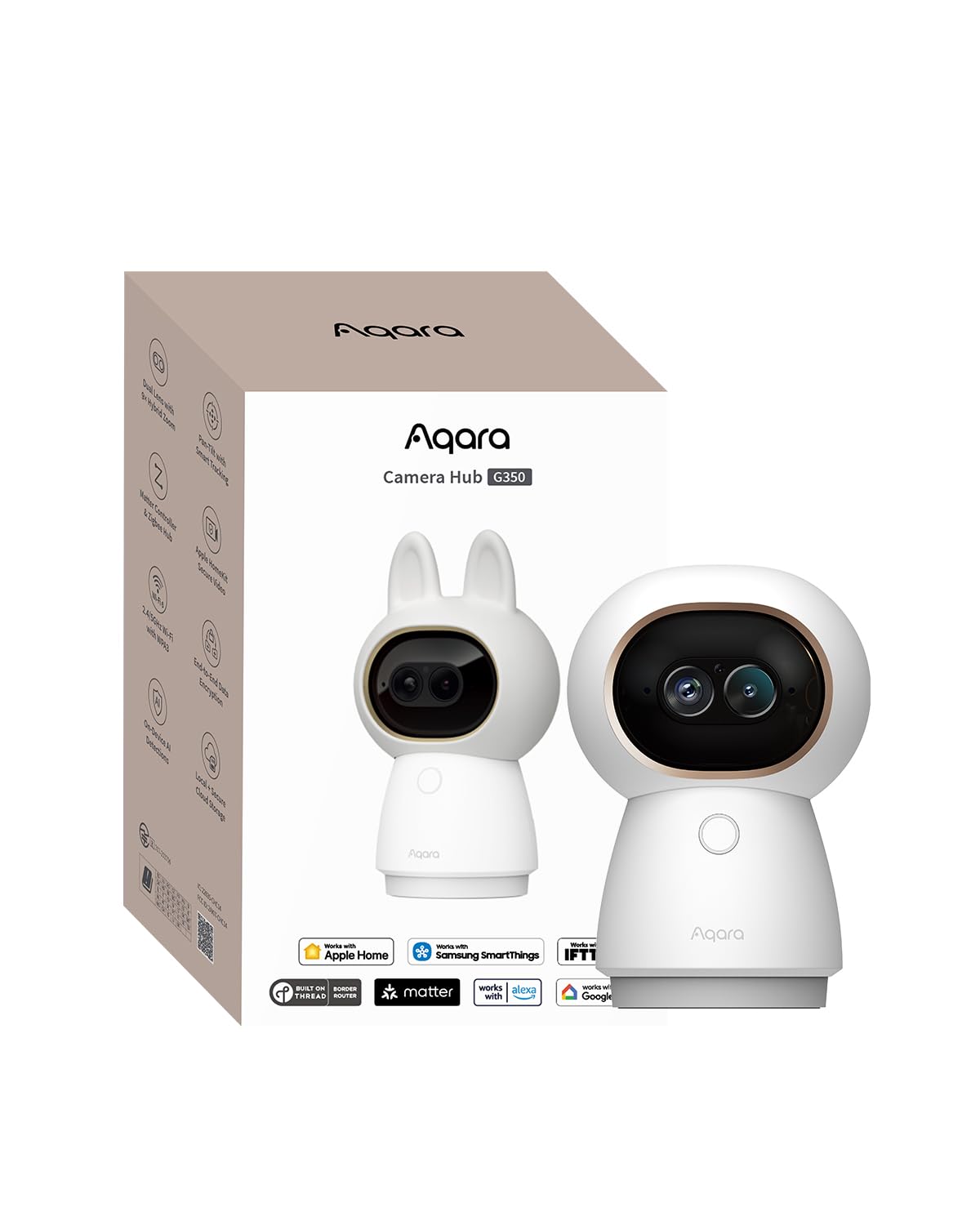
Aqara Camera G350

85 /100
Keeper Score Excellent

Key details

Hub
Zigbee and Thread bridge
Coverage
360° pan and tilt
Resolution
4K wide-angle and 2.5K telephoto
Local Storage
microSD up to 512GB
Check Price on Amazon

Aqara sells the G350 on its brain: face, gesture, pet, and sound recognition processed on the camera itself, plus auto-tracking that swings the lens to follow whatever is moving. Most of that never reaches Apple Home. In the Home app you get the standard Secure Video treatment, meaning live view, event clips, and Apple's person, animal, vehicle, and package categories, while the cleverer detection waits in Aqara's app. We went in expecting the headline features to show in the Home app and had to adjust; once we did, the hardware stopped competing with the software and started earning its place.

The hardware is the most capable in this guide. A 133° 4K wide lens sits beside a 2.5K telephoto, and together they deliver a 9x hybrid zoom that still holds detail when you push in on a face across a room, which is the difference between recognizing someone and guessing. The head pans a full 360° and tilts, so one unit on a bookshelf covers an open-plan floor instead of a corner of it, and the tracking kept a dog framed as it crossed the room without the lurching corrections that make these cameras tiring to watch.

It also works as infrastructure. The G350 is a Matter bridge and a Zigbee and Thread hub, rated by Aqara for up to 80 of the brand's Zigbee sensors, so the camera you bought for video becomes the thing carrying your door and window sensors into Apple Home. Third-party Zigbee devices aren't supported, which matters if you already own a mesh. Local storage is a microSD card up to 512GB, and there's no battery, so it wants an outlet and a shelf or table rather than a wall.

Installation deserves a small warning. The camera and its packaging carry several QR codes, and scanning the wrong one drops you into Aqara's app instead of the Home app; match the code on the quick-start card to the one Home asks for and the rest goes quickly. After that the real work happens in Aqara's app, where the presets and patrol routes live. Set them on the first evening, because a pan-and-tilt camera with nowhere to look is just an expensive fixed lens.

Pros

  • 4K wide lens plus 2.5K telephoto
  • 360° pan and tilt with auto-tracking
  • Doubles as a Zigbee and Thread hub
  • Detection processed on the camera

Cons

  • Indoor use only
  • Face and gesture detection stay in Aqara's app
Our verdict

The G350 is what we point an indoor buyer toward when identifying a face across a room matters more than covering the whole house.

Check Latest Price

How We Tested the Best HomeKit Cameras

We started with every camera advertising Apple Home support, then cut the ones that only get there through a manufacturer bridge or that hide person detection behind a subscription. From roughly 40 candidates we filtered by price, indoor versus outdoor housing, and whether HomeKit Secure Video worked out of the box rather than being promised in a firmware update. Twelve made the cut, and we've lived with them for six months.

I paired each one in the Home app myself, timing how long it took to get from unboxing to a live picture, then added it to a second platform to see whether the pairing carried over or had to be redone from scratch. Every camera ran on my home Wi-Fi for the full stretch, including one spot two walls from the router, and I logged each dropout and failed livestream instead of trusting the app's own uptime claim.

For footage, we mounted cameras over a front door and a driveway and set others on an indoor hallway and the cat flap. We walked past at different distances and speeds, at midday and at dusk with headlights sweeping the frame, and checked whether each alert showed a person, a car, or a shrub moving in the wind. On the pan-and-tilt models we let auto-tracking follow us across a room to see whether it stayed with us or wandered off mid-walk, then killed the lights to compare IR against color night vision and listened to two-way audio from the porch. We also noted each camera's power source, since a standard USB adapter is easy to replace and a short proprietary cable is not.

At the end we rewatched the saved clips, zoomed in to see how much detail survived, and checked which cameras were still recording after a power blip. The ones below are the ones that kept working.

How to Choose a Homekit Camera

Check the hub and the plan first

HomeKit Secure Video is less a camera feature than a hub and a subscription working together. You need an Apple home hub (a HomePod, HomePod mini, or Apple TV) and an iCloud+ plan that covers the number of cameras you're adding, and both of our picks state the requirement plainly in their listings.

Without those, the camera still works, but it works in the manufacturer's app, which is a different experience entirely. Confirm the hub before you shop: it's the part people forget, and it's what turns a Wi-Fi camera into an Apple Home camera.

Fixed wide lens or pan and tilt

A fixed lens like the G100's 140° view takes in a lot at once and never moves, so what you mount is what you get. That suits a driveway, a side gate, or a hallway where the geometry doesn't change, and there is no motor to wear out or re-home itself after a power cut.

A pan-and-tilt head like the G350's covers a whole room and can zoom, but it looks one way at a time, and the coverage you get depends on the presets and patrol you set up. If you need two angles at once, two fixed cameras beat one moving one. If you want one camera to watch an entire open-plan floor, pay for the motor.

Plan the cable run and the weather rating

Every camera worth considering here is corded, so the nearest outlet decides placement as much as the mount does. For outdoor use, look for an IP65 body like the G100's and read the box contents carefully: short captive cables and missing USB power adapters are common, and a USB extension is far easier to plan for before you're on a ladder than after.

Don't mount an indoor-only model under an eave and hope. A camera rated for indoor use has no weather sealing, and the first hard rain will find that out for you.

Know what the extra resolution is for

HomeKit Secure Video records at up to 1080p, so a 2K or 4K sensor's extra detail shows up in the manufacturer's app and on a microSD card rather than in the clip Apple stores. That doesn't make higher resolution pointless, because the sharper stream is what you scrub through when you actually need to identify a face or a car door.

Buy the resolution you'll use. If you'll only ever review footage in the Home app, don't pay a premium for pixels you'll never see there.

Expect two separate sets of smarts

The detection that triggers a recording isn't always the detection a manufacturer brags about. Apple Home records against its own categories: person, animal, vehicle, and package. Face recognition, gesture control, and auto-zoom typically run on the camera itself and surface in the maker's app.

Neither arrangement is better; they're different jobs. Set notifications in the app you'll actually keep open, and check in the first week that the thing you care about, whether that's a pet, a delivery, or a car pulling in, triggers the category you expect.

Frequently Asked Questions

Final Verdict

Most people should start with the Aqara G100 kit. Two weatherproof 2K cameras, HomeKit Secure Video without a manufacturer subscription, and local recording on a microSD card is the combination that covers a front door and a back gate in one purchase, and it's the pick we hand to anyone setting up their first Apple Home camera. Budget for a USB adapter and an extension cable if either unit goes outside.

Spend the extra on the G350 when one room needs watching properly. The 4K wide lens and 2.5K telephoto give you a zoom that identifies rather than guesses, the head covers a full 360°, and it doubles as a Zigbee and Thread hub for the rest of your sensors. It stays indoors and its cleverest detection stays in Aqara's app, but for a nursery, a home office, or a dog you want to keep an eye on, it's the better camera.