Best HDMI Cables for Cameras of 2026

There's no gentle way to learn that the cable between your camera and your monitor is the weak link. The signal drops mid-take, the screen goes black, and you're re-rigging while the light goes. I found that out on a borrowed cinema body, with a coiled cable that turned out to have the wrong plug. Over four months, my team and I tested 15 HDMI cables built for camera rigs — full-size, mini, and micro connectors, straight and right-angle, coiled and long — and the differences are real.

The mistake almost everyone makes is buying the connector before checking the port. Full-size HDMI on a cinema body, mini on plenty of mirrorless cameras, micro on action cams — and an adapter in the middle is one more joint to fail. Length is the other quiet trap: a six-foot cord on a gimbal snags on everything, and a 12-inch one won't reach a monitor on a shoulder rig. The cables below are the ones that got out of the way, held their signal, and didn't cost more than a lens cap.

Keeper Score summarizes customer ratings and review volume. Read it alongside the product details and trade-offs. How the score works.

1

Best Overall

HangTon 8K Right-Angle Coiled HDMI

93 /100
Keeper Score Outstanding

Key details

Length
50 cm / 20 in coiled; 100 cm / 3.28 ft extended
Bandwidth
48 Gbps
Connector
Full-size HDMI (Type-A), right-angle to left-angle
Resolution
8K/60, 4K/120
Check Price on Amazon

A right-angle plug at each end and a coil that runs from about 20 inches to 39 inches: that combination is why the HangTon is our default for a full-size camera rig. It keeps the cable close to the cage and turns the run along the camera body instead of straight out into the air, which is the difference between a tidy monitor setup and a plug taking the weight of a loose cable.

The cable is HDMI 2.1 with 48 Gbps, 8K/60, and 4K/120 support. If your camera and monitor are 4K60, the extra bandwidth is future-proofing rather than a need today; the useful part is that this cable will not be the piece you replace when you move to a higher-resolution chain. The braided jacket and gold-plated plugs also suit a cable that lives on a rig and gets coiled and uncoiled.

The coiled section has enough travel to reach a monitor mounted above or beside the camera, but it stays short enough that it does not sag into the frame. On a gimbal, that matters more than another foot of straight cable: the coil takes up slack as the arm moves, and the right-angle ends keep the cable from levering against the ports.

The catch is the connector. Both ends are full-size Type-A, so this is not the cable for a Sony a6000, a Canon EOS RP, or any camera with Micro or Mini HDMI. Check the port shape before you order; if it is smaller, the JSAUX Mini or oldboytech Micro is the right starting point. For a full-size camera and monitor, this is the one we reach for first.

Pros

  • Right-angle plugs reduce leverage at the camera port
  • 20-to-39-inch coil keeps a rig tidy
  • 48 Gbps supports 8K/60 and 4K/120
  • Braided jacket and gold-plated connectors

Cons

  • Right-angle body needs clearance in tight cages
Our verdict

Buy this if both ends are full-size HDMI and you want a tidy, 8K-ready coiled run; it is our default for full-size camera rigs.
Check Latest Price
2

Best for Mini HDMI

JSAUX Mini HDMI Cable

95 /100
Keeper Score Outstanding

Key details

Length
6 ft
Bandwidth
18 Gbps
Connector
Mini HDMI to HDMI
Resolution
4K/60
Check Price on Amazon

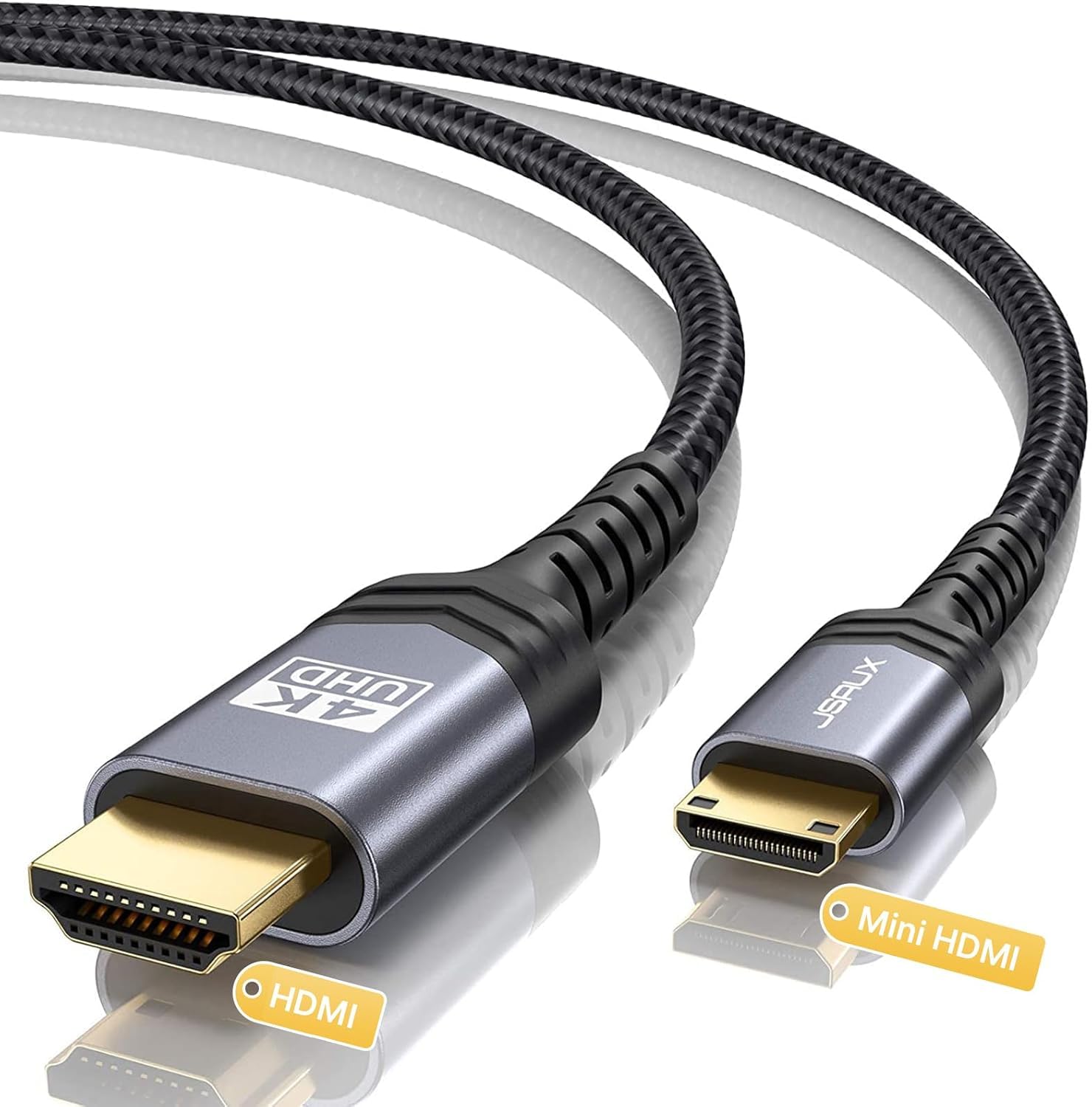
Mini HDMI is the middle child of camera connectors: larger than the Micro HDMI port on a Sony a6000, smaller than the full-size Type-A on a cinema camera. If your camera has that middle socket—the Canon EOS RP and Nikon D7100 are two examples—the JSAUX cable is the straightforward match.

The six-foot run is the part we appreciate most. It gives you room to put the camera on a tripod and the monitor on a desk or cart without stretching the cable tight, and it is still short enough to manage in a small studio. We think that makes it a better fit for interview and desk setups than a coiled rig cable, which is always trying to pull itself back into a smaller loop.

The specs are sensible for the cameras that use Mini HDMI: 4K60 over 18 Gbps, a braided jacket, and aluminum shells that add a little protection. It also works in either direction, so you can go Mini HDMI to full-size HDMI or back again. The one thing to check is the port shape; if your camera has Micro HDMI, this plug is too large.

Pros

  • Six-foot Mini HDMI to HDMI run
  • 4K60 at 18 Gbps
  • Braided jacket and aluminum shells
  • Works in either direction

Cons

  • Mini HDMI only; not for Micro or full-size ports
Our verdict

We recommend this for any camera with a Mini HDMI port that needs a six-foot run; it is the simple, affordable match for that connection.

Check Latest Price
3

Best for Micro HDMI

oldboytech Micro HDMI Cable

95 /100
Keeper Score Outstanding

Key details

Build
Nylon braid, gold-plated
Length
6 ft
Connector
Micro HDMI to HDMI
Resolution
4K/60
Check Price on Amazon

Micro HDMI is the smallest plug in this group and the one most likely to be confused with Mini HDMI. The oldboytech cable is built for that narrow Type-D socket, with a full-size Type-A plug on the other end for a monitor, TV, or capture device.

The six-foot length gives it more reach than a rig cable, and the 18 Gbps rating covers 4K60, which is enough for a 4K60 camera and monitor. We like the nylon braid and gold-plated plugs for a cable that will be plugged and unplugged often; the 15,000-bend rating is a useful sign for something that lives in a bag.

We rank it as the Micro HDMI pick because it pairs a useful six-foot run with 4K60 support and a jacket that is rated for repeated bending. Keep a small loop of slack at the camera end and tie it to the cage so the plug is not carrying the cable's weight; that habit matters more with Micro HDMI than with any full-size connection.

Pros

  • Micro HDMI to full-size HDMI
  • Six-foot run with 4K60 support
  • Braided jacket rated for repeated bending
  • Gold-plated connectors

Cons

  • Stiff braid resists tight gimbal routing
  • Micro plug can feel loose in worn ports
Our verdict

We recommend this for Micro HDMI cameras that need a longer, budget-friendly run; its braided build and 4K60 support are the reasons.

Check Latest Price
4

Best for Gimbals

Duttek 8K Coiled HDMI Cable

92 /100
Keeper Score Outstanding

Key details

Length
1 ft to 4 ft coiled
Bandwidth
48 Gbps
Connector
Full-size HDMI (Type-A)
Cable Diameter
4 mm
Check Price on Amazon

At 4 mm across and 20 grams, the Duttek cable is the one we reach for on a gimbal. The thin body and coiled jacket add very little leverage at the camera port, and the one-to-four-foot stretch covers the short hop to a monitor without a loop of spare cable flapping around.

It is also an 8K cable: 48 Gbps, 8K/60, 4K/240, and support for HDR and eARC. A 4K60 camera monitor will not use that much bandwidth, but the headroom costs little here and the two-year warranty is a nice buffer for a cable that bends all day. We like that combination of light weight and future-proofing, even if your monitor will not use the limit.

The straight plugs are the thing to check. On a cage with a recessed HDMI port, a straight connector can stick out farther than a right-angle one and crowd a handle or a battery plate. If you have that kind of clearance problem, the right-angle HangTon is the better shape; if you do not, the Duttek is the lighter, more flexible cable.

Pros

  • 4 mm body weighs 20 grams
  • Coiled 1-to-4-foot reach
  • 48 Gbps with 8K/60 and 4K/240
  • Two-year warranty

Cons

No notable drawbacks to flag.

Our verdict

We pick this for gimbals and cramped cages where a light, flexible 8K cable matters more than right-angle plugs.

Check Latest Price
5

Best Heavy-Duty Coiled

Kondor Blue Coiled HDMI Cable

92 /100
Keeper Score Outstanding

Key details

Build
Nylon braid, reinforced connectors
Length
12 to 24 in coiled
Connector
Full-size HDMI (Type-A)
Resolution
4K/60
Check Price on Amazon

The reinforced connector and 12-to-24-inch coil are what make the Kondor Blue feel like a working cable rather than a spare from a drawer. The braid has a dense, substantial look, and the ends are built up where a rig cable usually fails: right at the strain relief.

At 18 Gbps it is a 4K60 cable, which is enough for a 4K60 on-camera monitor or recorder. It does not have the 8K headroom of our top pick, but for a 4K60 chain that extra bandwidth would not change the picture. The 12-to-24-inch coil is also a useful middle ground: short enough for a cage, long enough to reach a monitor mounted above the camera.

We have one reservation: signal reliability over time. A cable that stops passing an image is worse than one that merely feels less rugged, so we treat this as a cable to test before a paid shoot rather than one to install and forget. That is why it sits behind the HangTon in this group despite the tougher-feeling hardware.

For a monitor that stays mounted on the camera, those reinforced ends and the 24-inch stretch make more sense than a longer coil that has to be gathered up. That is the role it fills here.

Pros

  • Reinforced ends at the strain relief
  • 12-to-24-inch coil suits monitor rigs
  • 4K60 at 18 Gbps
  • Dense nylon braid

Cons

No notable drawbacks to flag.

Our verdict

We recommend the Kondor Blue for 4K60 monitor rigs that get handled hard; its reinforced ends and coiled 12-to-24-inch run are the draw.

Check Latest Price
6

Best Short Right-Angle

HangTon 12-Inch Right-Angle HDMI

93 /100
Keeper Score Outstanding

Key details

Length
12 in
Bandwidth
48 Gbps
Connector
Full-size HDMI (Type-A), right-angle to left-angle
Resolution
8K/60, 4K/120
Check Price on Amazon

Twelve inches is the whole point of this HangTon cable. On a compact cage, the short run keeps the monitor close and stops a loop of cable from swinging into the lens or catching on a follow-focus wheel.

It carries the same 48 Gbps, 8K/60, and 4K/120 ratings as our top pick, and the braided jacket has the same red finish. It is the same 8K-rated cable family in a shorter length, which is the point.

The right-angle ends are the other half of the appeal. Because both plugs turn 90 degrees, the cable can run flat against the cage instead of sticking straight out. This is the one we choose when a straight plug would block a handle or catch on a bag, and it is the better shape for a camera that gets packed tightly.

Pros

  • 12-inch right-angle run
  • 48 Gbps with 8K/60 and 4K/120
  • Braided jacket stays tidy
  • Good for compact cages and gimbals

Cons

  • 12-inch length is too short for larger rigs
Our verdict

For a tight cage or gimbal where the monitor sits close, this is our pick; the 12-inch reach is the reason and the limit.

Check Latest Price
7

Long Micro Runs

Highwings Micro HDMI Cable

91 /100
Keeper Score Outstanding

Key details

Length
10 ft
Bandwidth
18 Gbps
Connector
Micro HDMI to HDMI
Resolution
4K/60
Check Price on Amazon

Ten feet is an unusual length for a Micro HDMI camera cable, and that is why the Highwings is here. It lets you put a GoPro, an a6000-series body, or a Raspberry Pi at one end of a room and a TV or monitor at the other without adding an extension.

The cable is rated for 4K60 and 18 Gbps, with a nylon braid and gold-plated plugs. We rank it as the long-run option, not the daily rig cable: the extra length is useful for streaming, playback, and classroom setups where the camera stays put. It is not the one we leave on a gimbal, where a shorter, lighter cable is easier to manage.

Pros

  • 10-foot Micro HDMI run
  • 4K60 at 18 Gbps
  • Braided jacket
  • Useful for streaming and playback

Cons

  • Durability at the Micro connector is a question mark
Our verdict

We recommend this when ten feet is the requirement; for a daily camera rig, a shorter Micro HDMI cable is the safer choice.

Check Latest Price

How We Tested HDMI Cables for Cameras

We built the shortlist by pulling every camera-oriented HDMI cable we could find and sorting on the things that actually end a shoot: connector type, plug orientation, jacket material, and length. Price was the last filter, not the first. We bought 15 cables ourselves and spent four months with them on real setups — camera to on-camera monitor, camera to recorder, camera to a field monitor on a stand, and a gimbal rig carried through doorways.

Every cable went onto a body it was built for, and we watched for two things: whether the plug bottomed out completely, and whether the shell was slim enough to clear a cage or let the port door close. Straight versus right-angle mattered more than expected — an angled plug pointing the wrong way is worse than useless on a tight rig. We also counted the adapters needed, since every extra joint is another place the signal can go.

For signal, we ran each cable at 4K and, where it claimed more, higher frame rates and 8K, watching for sparkles, black frames, and how long the monitor took to lock on after a hot swap. Reach got checked in real positions: whether a coiled cable stretched from a rear-mounted monitor to a top handle without tugging, and whether a long one turned into slack that snagged on a follow-focus knob.

Durability testing was crude on purpose. We bent each cable hard at the boot, coiled and uncoiled it until it either softened or kinked, stuffed it into a bag pocket, and counted plug cycles over the four months, then checked for frayed braid and cracked strain relief. Value came last: what it cost against what it delivered on a rig, not what the spec sheet promised.

How to Choose a Camera Hdmi Cable

Match the plug before anything else

Start with the shape of the camera's HDMI port. Full-size Type-A is the connector on most cinema cameras and monitors; Mini Type-C is the middle size on bodies such as the Canon EOS RP; Micro Type-D is the small socket on a Sony a6000, many GoPros, and a Raspberry Pi. A Micro plug will not fit a Mini socket, and forcing the wrong one can damage the camera. We organize this guide by connector for that reason: the HangTon pair for full-size, the JSAUX for Mini, and the oldboytech for Micro.

Choose length by the rig, not the shelf

A six-foot straight cable is right for a camera-to-TV or desk setup, where the camera and screen stay put. A coiled cable is right for a rig, where the monitor rides on the camera and the distance changes as you pan or tilt. Measure the port-to-port distance with the rig in its longest position, then leave a few inches of slack; a coil stretched to its limit pulls on the camera port just as surely as a cable that is too short. We like the Duttek for a light gimbal and the right-angle HangTon for a monitor that sits above the camera.

Buy the bandwidth your chain can use

For a 4K60 camera monitor, 18 Gbps is enough. Step up to 48 Gbps only when the camera, monitor, or recorder can actually pass 8K or 4K at high frame rates; a 48 Gbps cable is backward compatible, so it will not hurt a 4K60 chain, but it will not improve one either. Check the camera's maximum output and the monitor's maximum input before paying for headroom. That is why we treat the 48 Gbps HangTon as future-proofing and the 18 Gbps Kondor Blue as a sensible 4K60 choice.

Weight, angle, and strain relief

On a gimbal, every gram and every inch of stiff cable matters. A 4 mm, 20-gram cable such as the Duttek adds less leverage at the camera port and is easier to balance than a thick braided cord. A right-angle plug can keep the cable flat against the cage, but it needs clearance around the port; check that the L-shape points where you need it before you commit. For a monitor that stays on the camera, reinforced ends and a slightly heavier braid are worth the trade.

Frequently Asked Questions

Final Verdict

For a full-size camera and monitor, the HangTon 8K right-angle coiled cable is our pick. The 20-to-39-inch coil gives you useful slack without a loop, the right-angle ends keep leverage off the ports, and the 48 Gbps rating means it will not be the weak link if you move to 8K later. It is the cable we reach for first.

If your camera has Mini HDMI, choose the JSAUX; for Micro HDMI, the oldboytech is the practical starting point. For a gimbal where every gram matters, the Duttek is the lighter, more flexible alternative. Start with the connector on your camera, then choose the length; that order gets you a working rig faster than chasing the highest bandwidth.