Best FPV Goggles of 2026

FPV goggles are the part of a drone setup that decides whether flying feels like watching a screen or sitting in the cockpit. The wrong pair can turn a quick flight into a headache: a blurry feed, a laggy turn, or foam that presses into your cheekbones after ten minutes. I’ve flown with everything from budget analog boxes to high-end OLED sets, and over the past seven months our team put 10 goggles through repeated flights to see which ones made us want to keep flying.

Goggles are also personal: face shape, eyesight, and whether you fly digital or analog will narrow the field fast. We weighed image quality and reliability against the smaller annoyances—menu clutter, loose antennas, weak wireless sharing—because those show up after the novelty wears off. Value mattered too, but not in a simple dollars way: a set that needs extra modules or a clumsy power setup can cost more in frustration than the sticker suggests. The sets below are the ones that held up after the honeymoon phase, and each earns its place differently.

Keeper Score summarizes customer ratings and review volume. Read it alongside the product details and trade-offs. How the score works.

1

Best Overall

DJI Goggles 3

88 /100
Keeper Score Excellent

Key details

Weight
1.04 lb
Display
1080p Micro-OLED, up to 100 Hz
Works With
DJI O4 and O3 drones and air units
Transmission
DJI O4, 24 ms latency
Check Price on Amazon

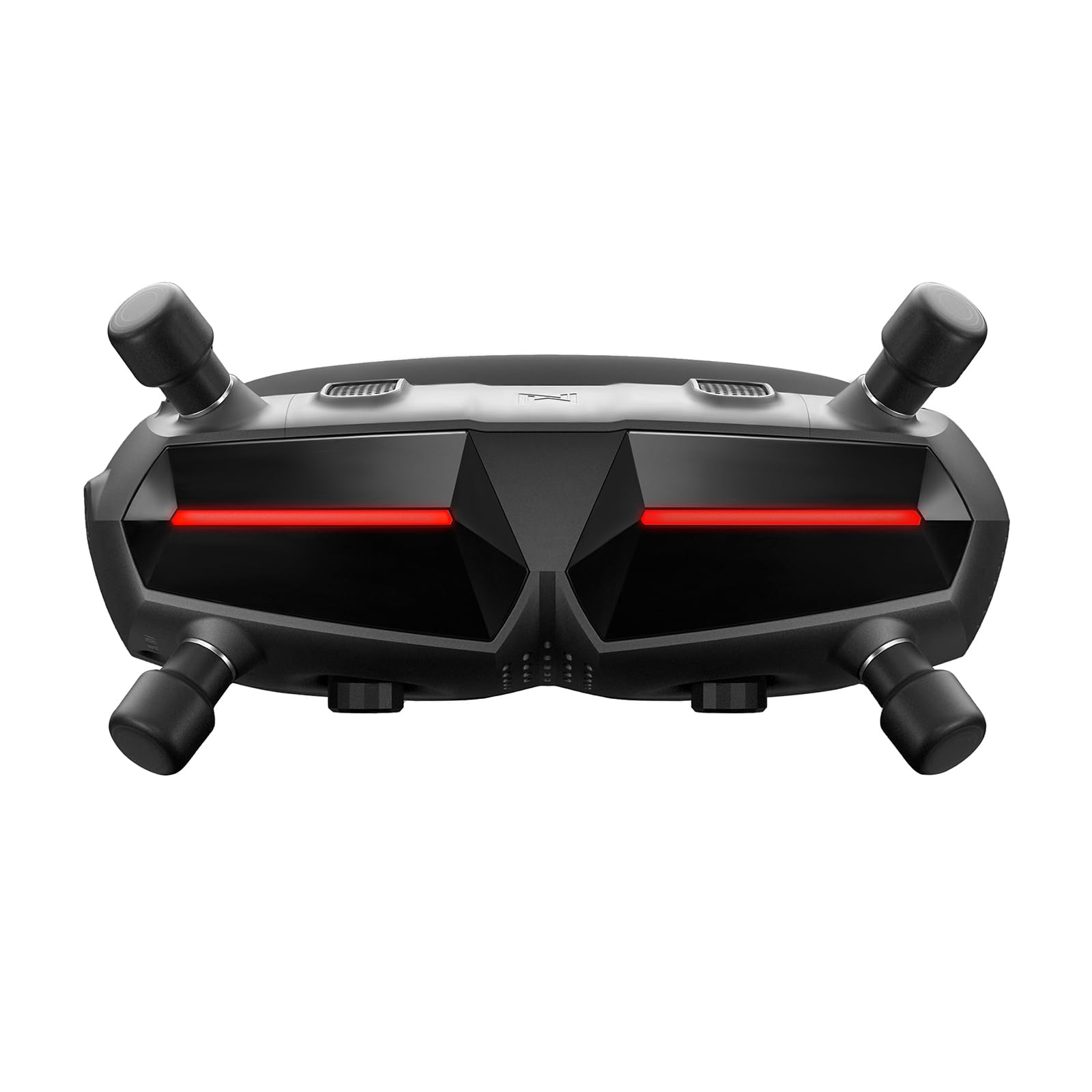
Real View PiP is the reason these goggles are easy to live with. Two cameras on the front feed a small window inside the display, so you can glance at the ground, find your spotter or check who just walked into the field without lifting the goggles off your face. Every other goggle here blacks out the world the moment you put it on; this is the only one that doesn't.

The 1080p micro-OLED panel runs at up to 100 Hz, and it earns the money: motion stays smooth through a fast turn, contrast is deep, and detail holds up out toward the corners of the frame. Pair it with an Avata 2 and the O4 link runs at 24 ms latency and 60 Mbps, which is the difference between reacting to a gap and watching yourself clip it. The compatibility list is unusually generous for DJI — Neo, Avata 2, Mini 4 Pro, Air 3, and the O3 and O4 Air Units — so one goggle covers the camera drone and the FPV quad in the same bag.

Diopters adjust in the menu and a -2.0D corrective pair comes in the box, and we were glad of the one-tap defogging on the first cold morning out. At 0.47 kg it is lighter than the N3 and the Goggles X, which you notice at the end of a session rather than the start. What it will not do is fly anything outside DJI's digital ecosystem, so a mixed fleet needs a second pair. The Walksnail Goggles X matches it panel for panel and costs about the same.

Pros

  • Real View PiP keeps the world visible mid-flight
  • Micro-OLED at up to 100 Hz looks superb
  • Diopters and one-tap defogging built in
  • One goggle for Mini 4 Pro, Air 3, Neo and Avata 2

Cons

  • Works only with DJI O4 and O3 video
Our verdict

We point DJI pilots here first: a 100 Hz micro-OLED view, low-latency O4 and a see-through PiP window, as long as you fly DJI's digital gear.

Check Latest Price
2

Best for Glasses Wearers

DJI Goggles N3

90 /100
Keeper Score Outstanding

Key details

Weight
1.19 lb
Battery
2.7 hours
Display
1080p 60 Hz LCD
Field Of View
54°
Check Price on Amazon

Most goggles assume you will either wear contacts or spend the first minute of every flight turning a diopter wheel. The N3 assumes you keep your glasses on. The interior is deep enough for a normal pair, there is no lens installation to do, and there is no correction to dial in before you take off.

The view is the other reason it earns a place. A 1080p LCD sits behind a 54-degree field of view — wider than the Goggles X's 50 degrees — and width is what sells the sensation of flight, because the edges of the frame are where speed registers. We rate the N3's framing above its panel: blacks lift and fast pans soften slightly next to the OLED goggles here, most obviously in low light, and that is the trade you are accepting.

DJI's O4 link carries a 1080p/60fps feed with automatic frequency switching, and the quoted 13 km range and 2.7 hours of battery add up to a full morning of flying on one charge. The AR cursor is the sleeper feature: with an RC Motion 3 you can nudge settings before takeoff without lifting the goggles, which sounds like a gimmick until you are strapped in and comfortable and do not want to break the seal.

Pros

  • Fits over regular eyeglasses
  • 54-degree view, the widest digital option here
  • 2.7 hours of battery and a 13 km link

Cons

  • 60 Hz LCD gives up contrast next to the OLED picks
  • No diopter adjustment; it assumes glasses
Our verdict

For anyone who flies in glasses, we rate the N3 above the rest: a 54-degree view, 2.7 hours of battery and no diopter wheel to nudge.

Check Latest Price
3

Best for Custom Builds

Walksnail Avatar HD Goggles X

82 /100
Keeper Score Excellent

Key details

Display
Dual 1920x1080 OLED, 100 fps
Latency
22 ms average
Recording
DVR to 256 GB microSD
Field Of View
50°
Check Price on Amazon

This is the goggle that will not talk to a DJI drone, and for the right buyer that is the whole point. The Goggles X is built around Walksnail's Avatar HD system — you pair it with an Avatar VTX on a quad you built or converted — and it is the only pick here with HDMI in and out, which matters when you want to feed it a ground station or push the picture to a monitor.

Dual 1920x1080 OLED panels at up to 100 fps put it level with our top pick on paper, and through the lenses it looks it: bright, saturated and quick enough that fast proximity flying stays readable. The link averages 22 ms at up to 50 Mbps, and the built-in DVR writes to a microSD card up to 256 GB, so there is a record of the flight even when the quad is not carrying a camera. Head tracking with a compatible gimbal such as the GM3 turns your head into camera control, which makes a cinewhoop pass feel like flying rather than aiming.

Two things to know before you commit. At 0.84 kg this is the heaviest goggle in the group, and the stock foam pad sits hard on some nose bridges — try the wide pad that comes in the box before you decide the fit is wrong. And these have frozen at startup, so switch them on and let them settle before you arm anything. Neither is a dealbreaker for a builder who wants DVR, HDMI and head tracking in one unit; both are the price of a bigger, more configurable goggle.

Pros

  • Dual OLED panels at 1080p and 100 fps
  • Built-in DVR to a 256 GB card
  • HDMI in and out for other video sources
  • Head tracking with a compatible gimbal

Cons

  • Only accepts Walksnail Avatar VTX video
  • Heavy at 0.84 kg
  • Has frozen at startup
Our verdict

Our pick for custom builds: dual OLED panels, built-in DVR and HDMI in and out, provided your quad carries a Walksnail Avatar VTX.

Check Latest Price
4

Budget Analog Flying

EV800D FPV Goggles

78 /100
Keeper Score Very Good

Key details

Display
5-inch 800x480 LCD
Receiver
5.8 GHz, 40 channels
Recording
Built-in DVR
Field Of View
82°
Check Price on Amazon

Flip the box up and the EV800D turns into a 5-inch monitor on a strap. The screen accepts an external video signal, so it is the goggle we hand to someone who wants to watch, and the one that ends up next to a camera on the bench when we need a picture without dragging out a laptop. No other pick here keeps working with the visor raised.

On your head it does the analog job properly: a 5.8 GHz, 40-channel receiver that finds your channel on its own, two antennas, and a claimed 82-degree field of view through a single magnified screen. Analog video is soft and staticky at the edge of range, and the 800x480 panel does not pretend otherwise — you are trading detail for a big, bright, immediate picture. What we appreciate is how little there is to go wrong: no pairing, no app, no setup. Power it up and you are watching whatever is transmitting.

The trade is physical. A box goggle puts the screen and battery forward of your face, and 375 g out there feels heavier than the number suggests, so give yourself a session or two to get the strap right. One caution worth passing on: units have turned up that are not the real EV800D board, with the second antenna doing nothing, so buy somewhere with a return window and check that both antennas pull a signal before you fly.

Pros

  • Doubles as a 5-inch monitor for spectators
  • 40-channel 5.8 GHz receiver with auto-search
  • Built-in DVR records the feed

Cons

  • 800x480 panel looks soft beside the digital picks
  • Front-heavy box shape on a strap
Our verdict

We keep one of these around as a budget analog goggle and a bench monitor — just buy from a seller you can return to.

Check Latest Price

How We Tested These FPV Goggles

We started by mapping the current market into analog and digital systems, then narrowed the list by screen type, receiver compatibility, field of view, and whether each set could get a pilot flying without a pile of add-ons. From that shortlist, we tested 10 goggles over seven months. We flew them on open-field drone runs, through tight backyard gaps, on a few evening sessions when the light got flat, and in a couple of slow RC car runs to see how the feed handled ground-level clutter.

Fit was the first filter because discomfort shows up fast. I wore each set for full battery packs—often 15 to 25 minutes—and noted where the foam pressed, whether light leaked around the nose, and if the screen fogged when I turned my head. We also checked how easy it was to adjust the fit and refocus the image, and whether the strap stayed put and the foam held its shape when we handed the goggles to someone else. Setup counted too: we timed from opening the case to a clear image, including menu pairing and button fumbling.

In flight, we looked for what a spec sheet can’t tell you: whether the image broke up behind a tree line, how quickly the feed caught up in a sharp turn, and whether colors stayed readable in shadows. We tested wireless sharing by sending the feed to a second screen and by swapping antennas to see how connections held. After each session we checked for loose cables, overheating, and dropouts that only appeared on the third or fourth pack. We compared what came in the box against what we had to add to get a clean image. At the end, we asked a simple question: which goggles made a five-minute flight turn into a 20-minute one?

How to Choose Fpv Goggles

Start With the Video Link, Not the Goggles

FPV goggles are married to a transmission system. DJI's O4 and O3 gear talks only to DJI goggles, a Walksnail Avatar VTX talks only to Walksnail goggles, and analog 5.8 GHz is the one open standard that any 40-channel receiver can pick up. Buy the goggles first and the air unit second and you can end up with a beautiful pair of screens and nothing to show on them.

If you need to feed the goggles something other than their native link — a ground station, another receiver's HDMI output — the Walksnail Goggles X is the only pick here with an HDMI input. Otherwise, let the air unit you already own choose for you.

Panel Type Sets the Character of the Image

Two OLED panels, as on the Goggles 3 and the Goggles X, give deep blacks and clean motion at up to 100 Hz. That is what makes a fast dive read as smooth instead of smeared, and it is the single biggest reason the premium goggles feel premium. A 60 Hz LCD, as on the N3, is bright and easy on the eye but lifts the blacks and softens quick pans.

Box goggles go further again: one 800x480 screen behind a magnifier, huge apparent size, very little detail. Decide whether you want contrast or size, because at this level you are choosing between them rather than getting both.

Field of View, and Why the Numbers Don't Line Up

Digital goggles in this group run from 50° to 54°, while the box goggle claims 82°, and those figures are not measuring the same thing — a single magnified screen spreads 480 lines of picture across a much wider angle, so width arrives with softness at the edges.

Within the digital range, 50° to 54° is a small difference on paper and a real one in the air: the wider view puts more of the periphery in play when you are threading a gap. If you are new to FPV and prone to motion discomfort, start with the sharper, narrower view and work up.

Fit, Glasses and Weight on Your Face

Nothing on a spec sheet tells you whether a goggle suits your face, and correction plus pressure decide it. The N3 is built to be worn over eyeglasses, the Goggles 3 has adjustable diopters and ships with a -2.0D corrective pair, and the Goggles X includes a wide foam pad because the stock one sits hard on some nose bridges.

Weight matters over a long session — the range here runs from 375 g to 840 g — and a heavy goggle is one you tighten, which is when the pressure starts. Try the spare pad, adjust the strap, and give a goggle a full flight before you judge it.

Latency and Range: Read Them as Best Case

Every digital goggle here quotes latency in the low twenties of milliseconds and range in kilometres, and both are best-case figures: a clean channel, line of sight, antennas pointed the right way. What you can rely on is the ordering. DJI's 24 ms and Walksnail's 22 ms are both fast enough that you stop thinking about the link and start flying the aircraft.

Treat the headline range as an upper bound. Fly to the rules where you live, and keep a spotter watching the sky while the goggles are on your face.

Frequently Asked Questions

Final Verdict

The DJI Goggles 3 is where we send most people, because the see-through PiP window, the 100 Hz micro-OLED panel and the O4 link all land in one unit — and if you fly a Mini 4 Pro and an Avata 2, it is the only goggle here that lists both.

Everything else is a requirement rather than a downgrade. Wear glasses and the N3 is the easier fit; build your own quads and the Goggles X gives you DVR, HDMI and head tracking; fly analog and the EV800D is still the simplest way in.