Best Document Scanners of 2026

A document scanner lives or dies at the paper feed. The spec sheet brags about speed, but the real question is how many pages went through without a double-feed, a crease, or a jam that had you fishing a crumpled receipt out of the rollers. I've had a scanner choke on a single wrinkled tax form and another swallow a year of invoices without complaint.

Over the past six months, my team and I put 12 desktop scanners through that exact kind of backlog — receipts, leases, school forms, insurance paperwork — on both Macs and PCs, over USB and over Wi-Fi. What separates them usually isn't headline speed. It's whether the feeder holds a stack without grabbing two sheets, whether double-sided pages come out in one pass, and whether the software lets you scan, name, and file something without opening a manual.

Compact models earn their shelf space, though the tradeoff is often a smaller feeder and more babysitting. Here's what held up, and what I'd hand to someone facing a shoebox of paperwork and a free afternoon.

Keeper Score summarizes customer ratings and review volume. Read it alongside the product details and trade-offs. How the score works.

1

Best Overall

Epson WorkForce ES-400 II

89 /100
Keeper Score Excellent

Key details

Duplex
Both sides in one pass
Drivers
TWAIN included
Connection
USB
ADF Capacity
50 sheets
Check Price on Amazon

Turn a filing drawer into a folder of PDFs, and the Epson WorkForce ES-400 II is the scanner we hand to almost anyone facing one. The 50-sheet feeder takes a stack rather than a page, single-pass duplex captures both sides in one trip through the paper path, and one click sends the job through OCR into a searchable PDF or an editable Word or Excel file.

What keeps it at the top of this group is how little it asks of you. The connection is a plain USB cable, so there's no wireless pairing to nurse along, and the included TWAIN driver means it can be driven from document management software that has nothing to do with Epson. Scan-to destinations cover email and the usual cloud services, and ScanSmart previews a job before you commit to saving it. Setup is the least dramatic part of owning it, which is the nicest thing we can say about office equipment.

Mixed paper is where a feeder like this wants help. Receipts, curled pages, and anything stapled need to be fed a few at a time or not at all, and a misfeed means opening the paper path and pulling the sheet free. Standard letter and legal paper it takes in stride, which is what most drawers actually hold.

The footprint helps too: about 11.6 inches square and 6.9 inches tall, so it sits beside a monitor without claiming the desk. Ours has stayed parked there without getting in the way, and that is most of what we want from a scanner.

Pros

  • 50-sheet feeder takes real stacks, not single pages
  • Single-pass duplex with one-click scanning
  • TWAIN driver for document management software
  • OCR to searchable PDF, Word, and Excel

Cons

  • USB only
Our verdict

It's the safest first document scanner we can name: 50 sheets, both sides in one pass, TWAIN support, and a USB cable that behaves.

Check Latest Price
2

Best Wireless

ScanSnap iX2500

84 /100
Keeper Score Excellent

Key details

Connection
USB-C and Wi-Fi 6
Scan Speed
45 ppm duplex
ADF Capacity
100 sheets
Desk Footprint
11.5 x 6.26 x 6.34 in
Check Price on Amazon

The iX2500 is the one here that behaves like an appliance rather than a peripheral. Choose a profile on the color touchscreen — receipts, business cards, a named folder — press it, and the scan lands in a cloud service or on another machine with no computer in the loop. For a front-desk scanner that four people share, that independence is worth a lot.

The hardware matches the better desktop units here: a 100-sheet feeder, 45 ppm duplex, 600 dpi, and Wi-Fi 6 or USB-C depending on the day. The paper handling is the thoughtful part — a brake roller feeds sheets evenly, a multi-feed sensor catches pages stuck together, and skew detection straightens what the feeder pulls in, so a mixed stack of invoices, receipts, and photos gets through in one pass.

Wireless is the part to think about before you buy. When the handshake between scanner and network turns difficult, the unit can drop off and need re-pairing, and knowing the USB-C port is there as a fallback is what saves a deadline. If a job has to go out today, plug in.

At 7.7 pounds with a 6.34-inch profile it's a desk fixture rather than something you move between rooms, and it costs more than the Epson top pick — money that goes to the screen, the wireless, and the standalone workflow.

Pros

  • Touchscreen profiles scan without a computer
  • 100-sheet feeder with 45 ppm duplex
  • Wi-Fi 6 plus USB-C connection
  • Multi-feed and skew detection protect pages

Cons

  • Wireless link can drop and need re-pairing
  • 7.7 lb, heavier than the compact picks
Our verdict

Buy it if scans need to happen with no computer switched on: touchscreen profiles, a 100-sheet feeder, and Wi-Fi 6 make it the most independent scanner here.

Check Latest Price
3

Best for Heavy Volume

Epson DS-530X

87 /100
Keeper Score Excellent

Key details

Drivers
TWAIN and ISIS
Scan Speed
45 ppm/90 ipm
ADF Capacity
100 sheets
Daily Duty Cycle
Up to 7,000 sheets
Check Price on Amazon

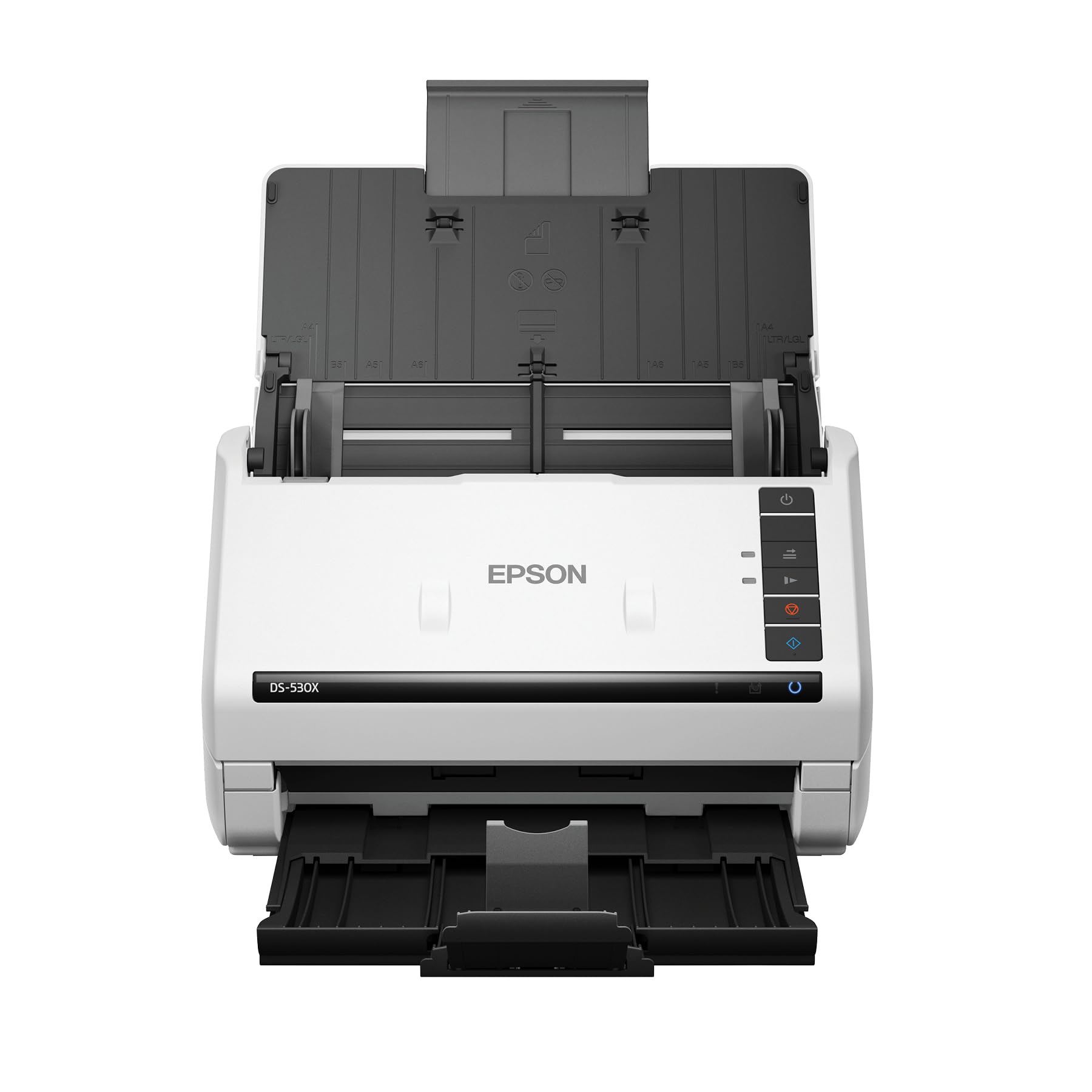
Seven thousand sheets a day is the number Epson puts on the DS-530X, and it's the reason this one belongs in an office rather than a home study. A 100-sheet feeder, 45 ppm/90 ipm single-pass duplex, and a duty rating that assumes the machine stays switched on add up to a scanner built to be fed all day.

It's also the most flexible feeder here. Extra-long pages run to 240 inches, folded sheets up to 11 by 17 inches go through, and ID cards are on the supported list. Ultrasonic double-feed detection stops two sheets going through as one, blank pages drop out automatically, and the image processing protects the paper as much as the scan. TWAIN and ISIS drivers are both included, which is what lets it sit inside a document management system instead of beside one.

Where it wins for us is that combination: TWAIN and ISIS together with a duty cycle you can staff around. If your office runs a records system, that's the difference between a scanner that feeds a workflow and one that feeds a folder. It asks for more setup patience than the consumer units — driver and profile configuration takes real time rather than a plug-in — and with no wireless option it wants a USB cable and a permanent spot.

Pros

  • 7,000-sheet daily duty rating
  • TWAIN and ISIS drivers included
  • 45 ppm/90 ipm with a 100-sheet feeder
  • 240-inch pages and folded 11x17 supported

Cons

  • Setup takes real driver and profile work
  • USB only
Our verdict

The workgroup pick: TWAIN and ISIS drivers, a 7,000-sheet daily rating, and 45 ppm duplex for an office that scans all day long.

Check Latest Price
4

Best for Small Spaces

ScanSnap iX1300

84 /100
Keeper Score Excellent

Key details

Height
3.3 in
Connection
USB and Wi-Fi
Scan Speed
30 ppm duplex
ADF Capacity
20 sheets
Check Price on Amazon

At 3.3 inches tall and 4.4 pounds, the ScanSnap iX1300 fits where a document scanner usually can't: under a monitor riser, on a shelf, in a drawer it gets lifted out of. The footprint is 11.7 by 4.5 inches, and it still scans both sides at up to 30 ppm with automatic de-skew, blank-page removal, and color optimization from a single touch.

We kept coming back to it for small jobs — a few invoices, a receipt, an ID card — and the trade it makes is worth it at that scale. The manual feed path takes thick items and plastic cards alongside paper, so an ID or a laminated document doesn't need a separate trip to a copy shop, and ScanSnap Home handles naming and filing over USB or Wi-Fi.

Longer stacks are where the feed gets fussy: pages can skew in the rollers and the unit can stall mid-batch. It's a scanner for a job you can hold in one hand, not for a records room, and it behaves beautifully once you feed it that way.

Pros

  • 3.3 inches tall and 4.4 pounds
  • 30 ppm duplex in a compact body
  • Manual feed takes cards and thick stock
  • USB or Wi-Fi with ScanSnap Home

Cons

  • 20-sheet feeder needs reloading on big jobs
  • Wi-Fi pairing can be stubborn
Our verdict

The compact pick: a 3.3-inch-tall body that still scans both sides at 30 ppm, for a desk where the scanner can't claim a square foot.

Check Latest Price
5

Best Budget

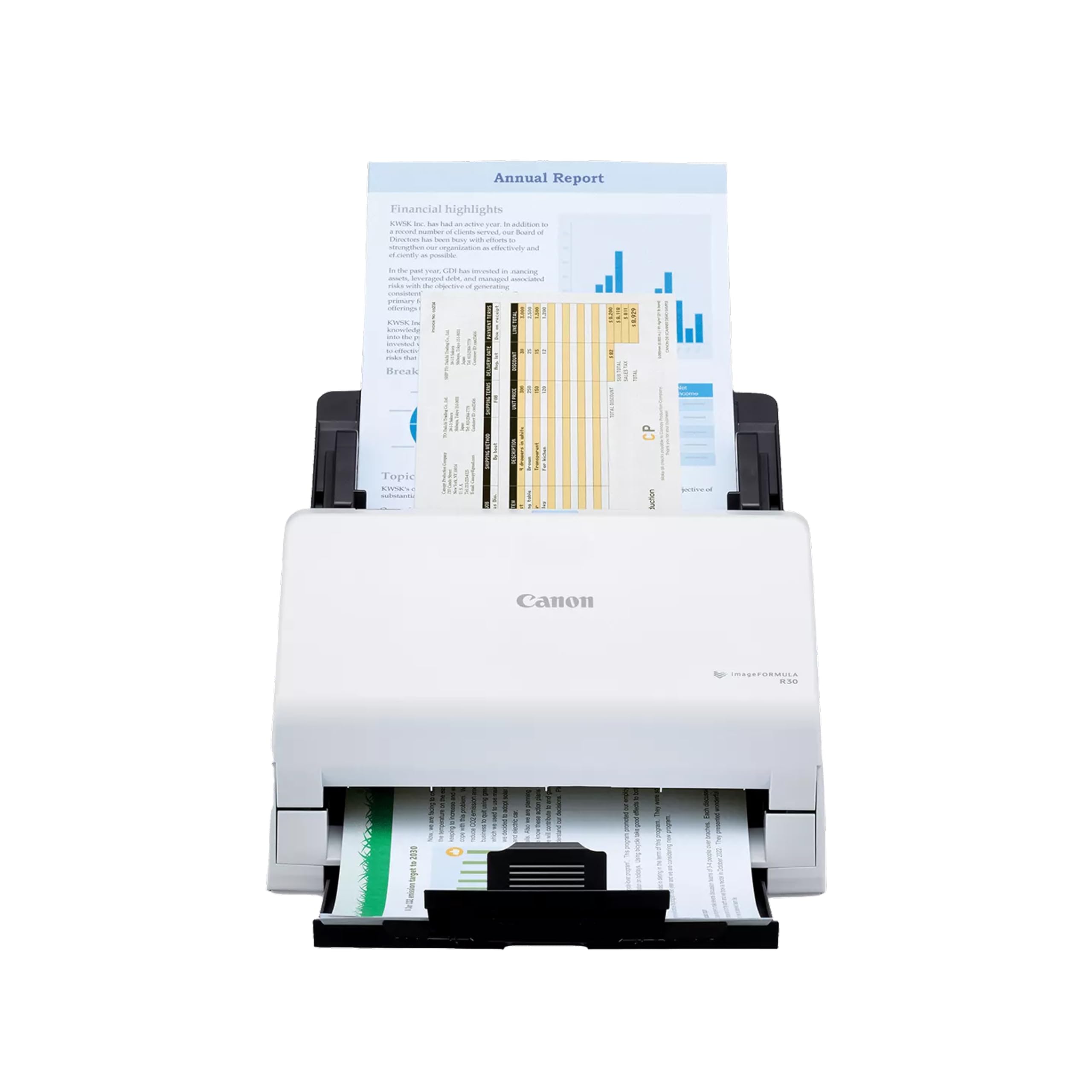
Canon imageFORMULA R30

80 /100
Keeper Score Excellent

Key details

Software
Embedded, no install
Connection
USB
Scan Speed
25 ppm
ADF Capacity
60 sheets
Check Price on Amazon

The R30 is the least expensive way into a 60-sheet feeder in this group, and it doesn't read as a stripped-down machine. Mixed batches go through the same hopper — invoices, contracts, business cards — both sides captured in a single pass, at up to 25 ppm.

Setup is the part we appreciated most. Canon embeds the scanning software in the device, so there's nothing to install on the computer and updates arrive on their own — the sort of detail that matters at a reception desk, where the person scanning isn't the person who configured it. Scans come out clean, and the image cleanup handles the ordinary mess of office paper.

Height is the practical wrinkle: 9.65 inches with the cover closed makes it the tallest unit here, so it won't slide under a shelf and it needs clearance above it. Give it a proper spot and it does the job without fuss.

Pros

  • 60-sheet feeder at the lowest price here
  • Single-pass duplex scanning
  • Device-embedded software, no install
  • Handles mixed batches including cards

Cons

  • 25 ppm is the slowest feeder here
  • USB only
Our verdict

The budget feeder: 60 sheets, both sides in one pass, and software that lives in the device instead of on your computer.

Check Latest Price
6

Networked Workgroups

Ricoh fi-8170

76 /100
Keeper Score Very Good

Key details

Connection
USB 3.2 and Ethernet
Scan Speed
70 ppm/140 ipm
ADF Capacity
100 sheets
Passport Scanning
ISO/IEC 7810 ID-3, 7 mm
Check Price on Amazon

An Ethernet port is the unusual thing here. The fi-8170 is the only scanner in this group that joins an office network by cable, and with 70 ppm/140 ipm duplex and a 100-sheet feeder it is also the fastest unit on paper.

The media list is unusually broad: A4, A5, A6, B5, B6, letter, legal, postcards, business cards, and personalized sizes, plus passports that meet ISO/IEC 7810 ID-3 at 7 mm or less unfolded. A manual feed mode covers the awkward items, the CCD sensor is paired with 600 dpi resolution, and USB 3.2 handles a single-machine setup.

We recommend it for one job: a workgroup with a network drop, a records room's worth of paper, and ID documents in the mix. Nothing else here touches 70 ppm, and nothing else plugs into the network as a shared device. The trade is money and reach — it is the priciest scanner in this set, and the wired link only pays off if the cable run already exists.

Pros

  • 70 ppm/140 ipm, the fastest here
  • Gigabit Ethernet and USB 3.2
  • 100-sheet feeder with manual feed mode
  • Passport scanning to a stated standard

Cons

  • Priciest scanner in this group
  • Wired only
Our verdict

We recommend it for a networked workgroup that needs 70 ppm and passport handling — no other scanner here is built for that job.

Check Latest Price

How We Tested Document Scanners in a Working Home Office

We started by pulling together every desktop scanner we could find with an automatic document feeder, from compact units that sit on a shelf to workgroup machines that hold a full ream. Then we filtered by what actually differs between them: feeder capacity, whether the machine scans both sides in a single pass, whether the drivers cover both Windows and Mac, and whether it connects by USB only or also over Wi-Fi. That left 12 machines, which we rotated through a home office over six months.

Every scanner worked through the same backlog: a year of household receipts, a stack of double-sided lease and insurance documents, school forms, and one deliberately abused 200-page batch of mixed paper weights. We timed a 30-page double-sided stack from load to finish, and counted every jam and double-feed by checking page numbers as the sheets came out. We also fed crumpled receipts and thin carbon copies to see which feeders grabbed two sheets at once.

For scan quality, we ran the same faded receipt, a snapshot, and a page of small-print fine print through each machine and compared the results side by side on screen. We installed every scanner on a Windows laptop and a Mac, timed the setup, then tried scanning to a shared folder and to the cloud from a phone in another room. Along the way we noted footprint on the desk, how loud the feeder was during a conference call, whether filing a document took one pass through the software or three menus, and whether the extras that push a price up were features we actually used.

How to Choose a Document Scanner

How Big a Stack Do You Actually Feed?

The feeder's sheet count shapes daily life, because every batch ends when the hopper empties. A 20-sheet unit like the ScanSnap iX1300 suits a handful of invoices; the 50- and 60-sheet models handle a normal afternoon; the 100-sheet units here — the iX2500, the DS-530X, and the fi-8170 — take a whole drawer before you reload. That rating assumes flat, uniform paper, though: receipts, folded contracts, and mixed sizes count for less than the number suggests. Estimate a real job in pages per sitting, not pages per year, and buy for the sitting.

Read the Speed Rating as a Ceiling

Page rates are quoted in ppm for single-sided work and ipm for duplex, so a 45 ppm scanner is handling 90 images a minute, and single-pass duplex means both sides travel through once rather than twice. Those figures are the maker's best case, usually in the simplest mode, so treat them as a ceiling rather than a promise. For a few dozen pages a week, 25 to 30 ppm is comfortable. For a records room or a shared office, 45 ppm and up is where the afternoon stops disappearing.

Decide Whether a Computer Is in the Loop

A USB-only scanner is a peripheral: no computer, no scan. That is fine at a desk where one machine is always on, and it is what the ES-400 II and the R30 assume. The touchscreen models push a scan to email or cloud storage with nothing else attached, which suits a shared front desk. Wi-Fi is convenient but it is also where this category misbehaves, with pairing that drops and needs redoing, so look for a wired fallback. Ethernet, on the fi-8170, is for a workgroup that wants the scanner on the network as a shared device.

Check the Drivers Before You Check Anything Else

If the scanner has to feed a document management system, an EHR, or accounting software, the driver list matters more than any feature bullet. TWAIN and ISIS are the interfaces those programs expect; the ES-400 II includes a TWAIN driver, and the DS-530X ships with both. Some units lean on the maker's own application — the Canon's software lives in the device and needs no installation at all — so confirm that the interface your records system expects appears on the list before you order, not after.

Match the Machine to Volume and to Paper

Only one scanner here publishes a daily duty rating — the DS-530X at up to 7,000 sheets — and that figure tells you what a machine is built to survive, not just what it can do once. The paper list matters as much: folded 11-by-17 sheets and pages up to 240 inches on the DS-530X, passports to ISO/IEC 7810 ID-3 on the fi-8170, thick cards through the iX1300's manual path. Buy for the oddest item you will feed regularly, not the easiest one.

Frequently Asked Questions

Final Verdict

For most people, the Epson WorkForce ES-400 II is the answer: a 50-sheet feeder, single-pass duplex, TWAIN support, and a USB cable that behaves. It clears a drawer of standard office paper without asking you to configure a network or learn a new application, and that is the whole job.

Change the requirement and the pick changes. If scans have to happen with no computer switched on, the ScanSnap iX2500 and its touchscreen earn the extra outlay. If a records room is waiting, the Epson DS-530X's TWAIN and ISIS drivers, 7,000-sheet rating, and 45 ppm duplex are worth the setup effort.