Best Desk Power Strips of 2026

A tidy desk undoes itself fast: a laptop charger, a monitor, a phone, a lamp, and suddenly there's a power brick on the floor and a cord climbing the wall. A desk power strip fixes the part of that mess you can control — where the outlets live. Clamped to an edge or screwed underneath, it puts the outlets and USB ports within reach instead of six feet away.

I've done the floor-brick thing and the velcro-and-prayer thing, and the strips that stick around are the ones that hold on. Over the past seven months, my team and I have lived with 12 of them, and the differences show up fast: a clamp that won't grip a thick tabletop edge, a USB-C port that slows to a crawl once a second device is plugged in, a strip that sags under a laptop brick. Port count on the box tells you very little.

The picks below are the ones that earned a permanent spot — clamp, screw mount, or something you can carry between rooms.

Keeper Score summarizes customer ratings and review volume. Read it alongside the product details and trade-offs. How the score works.

1

Best Overall

Anker Nano Power Strip

94 /100
Keeper Score Outstanding

Key details

Outlets
6 AC + 4 USB
Desk Fit
0.6–1.8 in edges
USB-C Power
70W max
Surge Rating
1500 joules
Check Price on Amazon

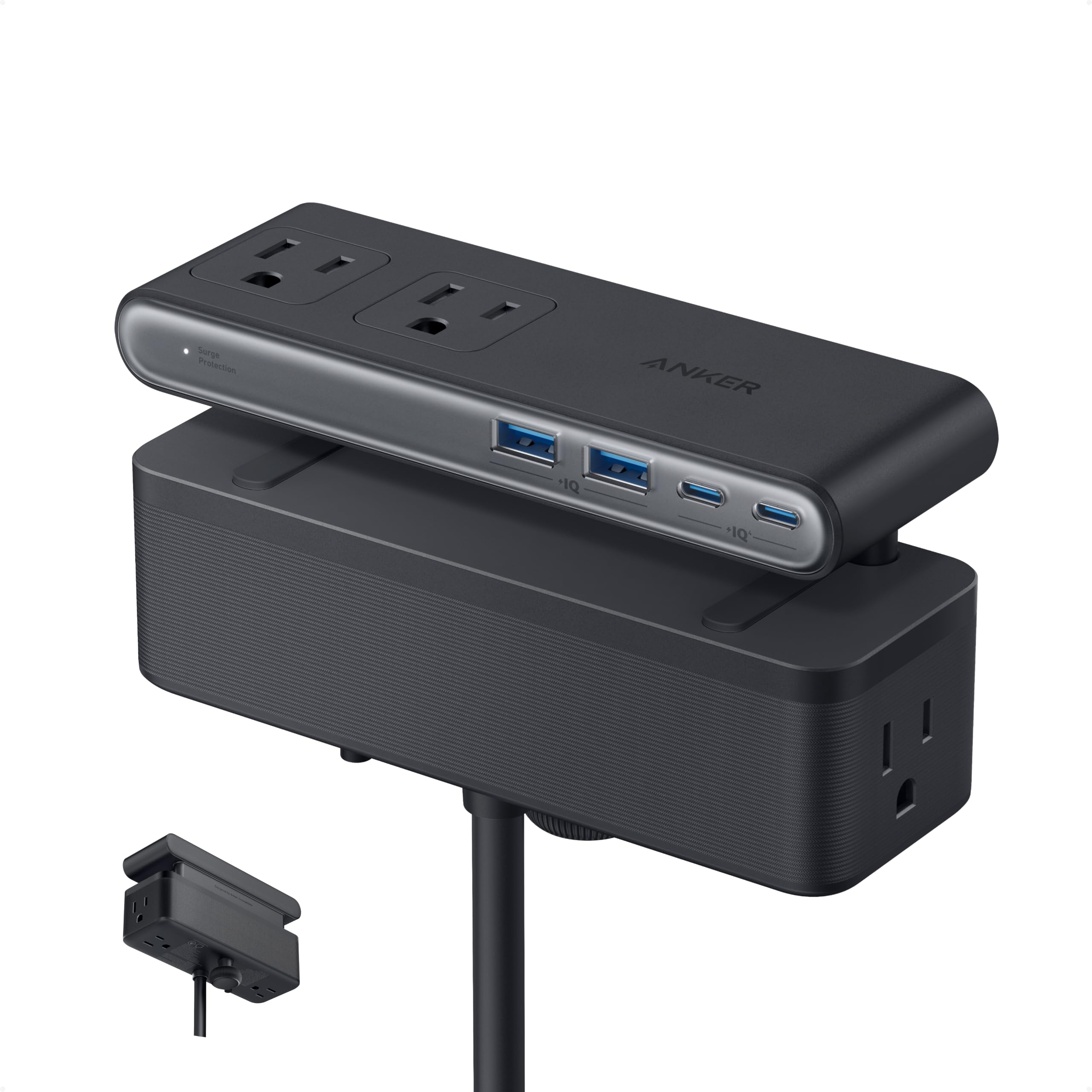
A desk strip earns its keep when it can retire the laptop brick. The Anker Nano is the only pick here that does: one USB-C port delivers up to 70W, enough to charge a thin laptop or fast-charge a tablet, while the other USB ports handle a phone and accessories.

What makes it our top pick is the 10-port layout. Six AC outlets and four USB ports are split into top and bottom zones, so a chunky monitor plug on the lower row does not block the quick-access ports above. We liked that the clamp holds the body steady enough to plug in one-handed, which is the difference between a desk accessory and a thing you fight. The 1500-joule rating gives a reasonable cushion for a desk full of electronics.

The clamp fits desk edges from 0.6 to 1.8 inches; measure before you commit, because curved or steeply sloped edges are outside its range. The five-foot cord is the other spec to check—on a deep desk or a standing desk far from the wall, plan a short extension. Neither issue undercuts the recommendation for a laptop-heavy desk; they just decide where it goes.

Pros

  • 70W USB-C laptop charging
  • Dual-zone layout keeps bulky plugs apart
  • Clamp holds steady for one-hand plugging
  • 1500-joule surge protection

Cons

  • Costs more than the other picks here
Our verdict

The Anker Nano is the desk clamp we recommend first for a laptop-heavy setup, because its 70W USB-C port replaces a charger and its clamp stays put.
Check Latest Price
2

Best High-Capacity

Acozvin Desk Clamp Power Strip

93 /100
Keeper Score Outstanding

Key details

Cord
10 ft
Outlets
9 AC + 8 USB
Desk Fit
Up to 1.7 in
USB Power
40W total, two 20W PD ports
Check Price on Amazon

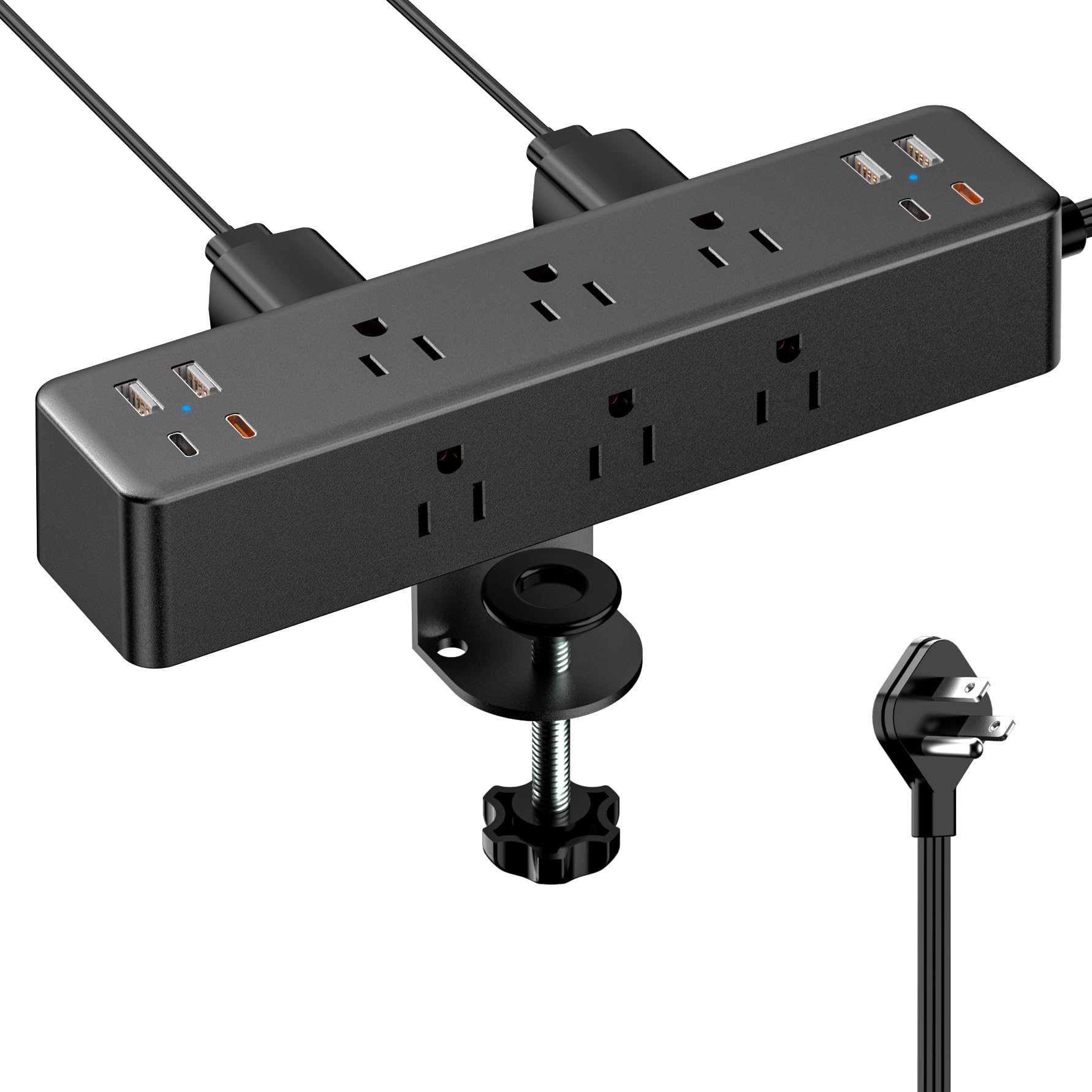
The Acozvin's ten-foot cord is the first thing we noticed, because it decides whether a clamp strip can live where the desk actually is. With nine AC outlets and eight USB ports, it turns one wall socket into a small charging station for a shared desk, a gaming setup, or a workbench.

The outlets are arranged around the body rather than in one tight row, so monitor bricks and laptop adapters can share the strip without covering each other. The clamp bit into the desk edge and stayed firm in our setup, and the flat plug is easy to tuck behind a drawer.

We recommend it for the desk that keeps adding devices. The two orange USB-C ports are the fast ones at 20W PD, but the whole USB bank shares 40W total—plug in four phones and none of them gets a headline number. That is the trade-off for the outlet count. If your desk is mostly AC-powered gear with a phone or tablet on the side, it is an easy pick.

Pros

  • Nine AC and eight USB ports
  • Ten-foot cord reaches across a room
  • Two 20W USB-C PD ports
  • Clamp holds firmly to the desk edge

Cons

  • Clamp tops out at 1.7-inch desk edges
Our verdict

For a shared desk with more devices than outlets, the Acozvin is the high-capacity clamp we recommend, as long as you accept its shared 40W USB budget.

Check Latest Price
3

Best for Maximum Outlets

HOPOW Dual Layer Desk Clamp

88 /100
Keeper Score Excellent

Key details

Cord
10 ft
Mount
Dual-layer desk clamp
Outlets
13 AC + 4 USB
Surge Rating
1700 joules
Check Price on Amazon

Thirteen AC outlets is more than most desks need—until two monitors, a computer, speakers, a lamp, and a row of chargers all want a home. The HOPOW dual-layer strip is built for that desk, and it is the only pick here with this much AC capacity.

The two layers put outlets on more than one face, so a large power brick on the top row does not block the sockets below. The 1700-joule rating is high for this group, and the ten-foot cord gives you room to route the strip away from the wall. We found the clamp holds once you get it seated, but the body hangs off the edge and takes a little patience to line up.

This is not the strip for a minimal desk with four devices; it is for the desk that has run out of outlets and does not want a second strip on the floor. For a studio or a shared workbench, that capacity is the whole point.

Pros

  • Thirteen AC outlets plus four USB
  • 1700-joule surge protection
  • Ten-foot cord
  • Dual-layer faces fit bulky adapters

Cons

  • Included screws can be too small
Our verdict

The HOPOW is the right clamp for a studio desk with a dozen AC devices, and its 13 outlets and 1700-joule protection justify the extra edge space.

Check Latest Price
4

Best Compact

Mifaso PD30W Desk Clamp

92 /100
Keeper Score Outstanding

Key details

Outlets
4 AC
Desk Fit
Up to 1.96 in
USB-C Power
30W PD
Surge Rating
1080 joules
Check Price on Amazon

The Mifaso is the one we reach for when the desk is small and the outlet is already behind a monitor. Its clamp body is compact, the four AC outlets are spaced widely enough for two power bricks side by side, and the white finish disappears against a pale desktop.

We like the 30W USB-C PD port for a tablet or a smaller laptop, and the 1080-joule rating is sensible for a desk with a monitor and a computer. The wide spacing is the other practical win: two chunky adapters can sit side by side without covering the next socket. We noticed that the angle of the outlets makes a right-angle plug easier to fit than a straight one.

The clamp has foam pads, which we appreciated on a painted desk, and it tightens without tools. The white finish is a nice change from the black boxes that dominate this category, and it makes the strip feel less like a piece of networking gear bolted to the desk.

Pros

  • Wide-spaced outlets fit bulky adapters
  • 30W USB-C PD
  • Compact clamp with foam pads
  • 1080-joule surge protection

Cons

  • Only four AC outlets
  • Five-foot cord is short
Our verdict

The Mifaso is the compact clamp we recommend for a small desk where four AC outlets, wide spacing, and a 30W USB-C port cover the essentials.

Check Latest Price
5

Best for Bulky Adapters

TROND Desk Clamp Power Strip

92 /100
Keeper Score Outstanding

Key details

Outlets
5 AC + 3 USB
Desk Fit
Up to 1.97 in
USB-C Power
15W
Surge Rating
1440 joules
Check Price on Amazon

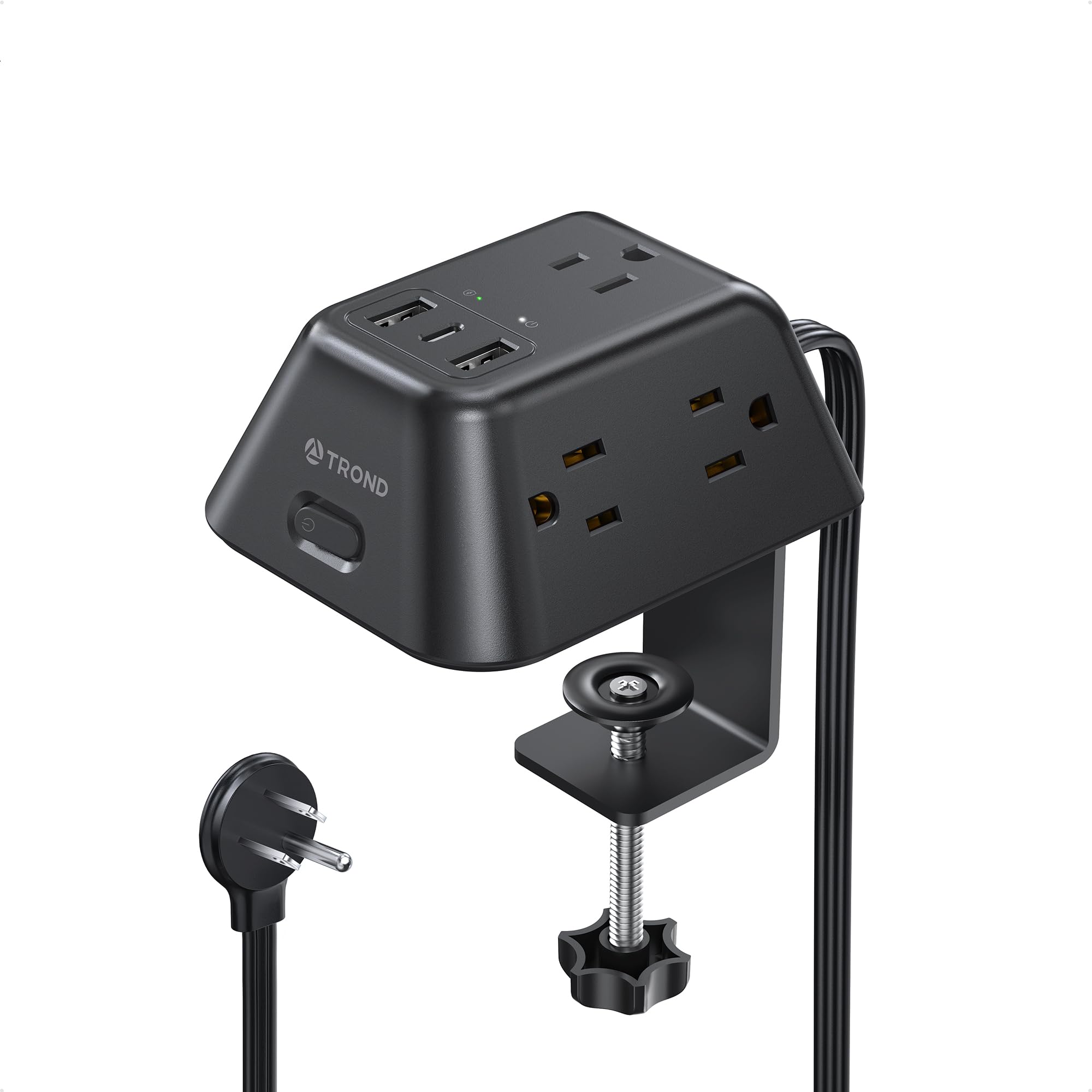
The TROND's five AC outlets sit on three faces of a small block, which is the detail that makes it useful. A laptop brick, a monitor plug, and a lamp adapter can each take a different side instead of fighting for the same row. We found that layout easier to live with than a flat strip with the same outlet count.

The clamp is the other reason it earns a place. It tightens onto an edge up to 1.97 inches and stays put when you pull a plug, which matters on a desk you actually use. The 1440-joule rating gives it more surge headroom than the Mifaso, and the compact body leaves more desktop visible.

The three-sided layout is the reason to choose it over a conventional strip. If your desk is mostly AC-powered gear, that is the right trade; the TROND is the tidy choice for a workstation that has outgrown a flat strip.

Pros

  • Three-sided layout fits bulky adapters
  • Clamp holds firmly
  • 1440-joule surge protection
  • Compact body saves desk space

Cons

  • USB-C tops out at 15W
Our verdict

The TROND is the clamp we recommend for bulky adapters, because its three-sided outlet layout makes five AC sockets feel roomier than they look.

Check Latest Price
6

Best Under-Desk Mount

ANNQUAN Under Desk Power Strip

87 /100
Keeper Score Excellent

Key details

Mount
Screw-mount under desk
Outlets
12 AC + 4 USB
USB Power
40W total
Surge Rating
1200 joules
Check Price on Amazon

The ANNQUAN is not a clamp; it is a long, four-sided block designed to mount under a desk or workbench. That format is the point. With 12 AC outlets and four USB ports, it can power a row of tools or a whole home-office setup while staying off the desktop.

The four-sided arrangement is what makes 12 outlets useful: adapters plug into different faces, so a wide brick does not block the next socket. The 1200-joule rating is adequate for a desk of electronics, and the six-foot cord is long enough for most under-desk runs. On a workbench, the screw mount keeps the strip out of the sawdust and off the floor.

It screws in rather than clamping, so this is a permanent installation rather than a strip you move between desks. We recommend it for a fixed under-desk setup where the outlet bank stays put; if you want to reposition power as your desk changes, a clamp is the better shape.

Pros

  • Twelve AC outlets
  • Four-sided layout separates adapters
  • 1200-joule surge protection
  • Four USB ports with 20W PD

Cons

  • 40W total shared across USB ports
Our verdict

The ANNQUAN is the under-desk pick for a permanent workstation, with 12 AC outlets and a four-sided layout that keeps bulky adapters from blocking each other.

Check Latest Price
7

Best Versatile Mounting

vipwell 360° Mountable Power Strip

87 /100
Keeper Score Excellent

Key details

Cord
6 ft
Mount
360° bracket
Outlets
6 AC + 4 USB
Surge Rating
1800 joules
Check Price on Amazon

The vipwell's 360-degree bracket is the reason to look at it. Instead of clamping to a desk edge, it can be fixed under a desk, on a wall, or in a corner, which suits a workstation with no free edge or a workbench pushed against a wall. The 12.8-inch body is long enough to spread outlets out and narrow enough to tuck away.

On the power side, six AC outlets and four USB ports cover a computer, monitor, lamp, and phone without a second strip. The 1800-joule rating is the highest in this set, and the flat plug is a useful detail behind furniture. We appreciated that the mounting hardware is included, because a bracket is only useful if you can install it without a hardware-store run.

The flat plug and six-foot cord are the practical details: the plug sits close to the wall, and the cord is long enough to reach a floor outlet without a tight bend. The long body can be oriented under a desk or along a wall, which is more flexible than a clamp.

We recommend the vipwell for the desk where a clamp cannot go. It is the least fussy way to get six AC outlets and four USB ports off the floor when the mounting surface is a wall, a cabinet, or the underside of a workbench. If you want a clamp you can reposition in a minute, the Anker or Acozvin is the better shape.

Pros

  • 360-degree bracket mounts almost anywhere
  • 1800-joule surge protection
  • Six AC plus four USB ports
  • Flat plug fits tight spaces

Cons

  • Not a desk-edge clamp
Our verdict

The vipwell is the flexible-mount pick for a desk, wall, or cabinet where a clamp will not fit, with 1800-joule protection and six AC outlets.

Check Latest Price
8

Budget Outlet Count

BEVA Desk Clamp Power Strip

86 /100
Keeper Score Excellent

Key details

Outlets
10 AC + 4 USB
Desk Fit
Up to 1.96 in
USB-C Power
20W PD
Certification
ETL listed
Check Price on Amazon

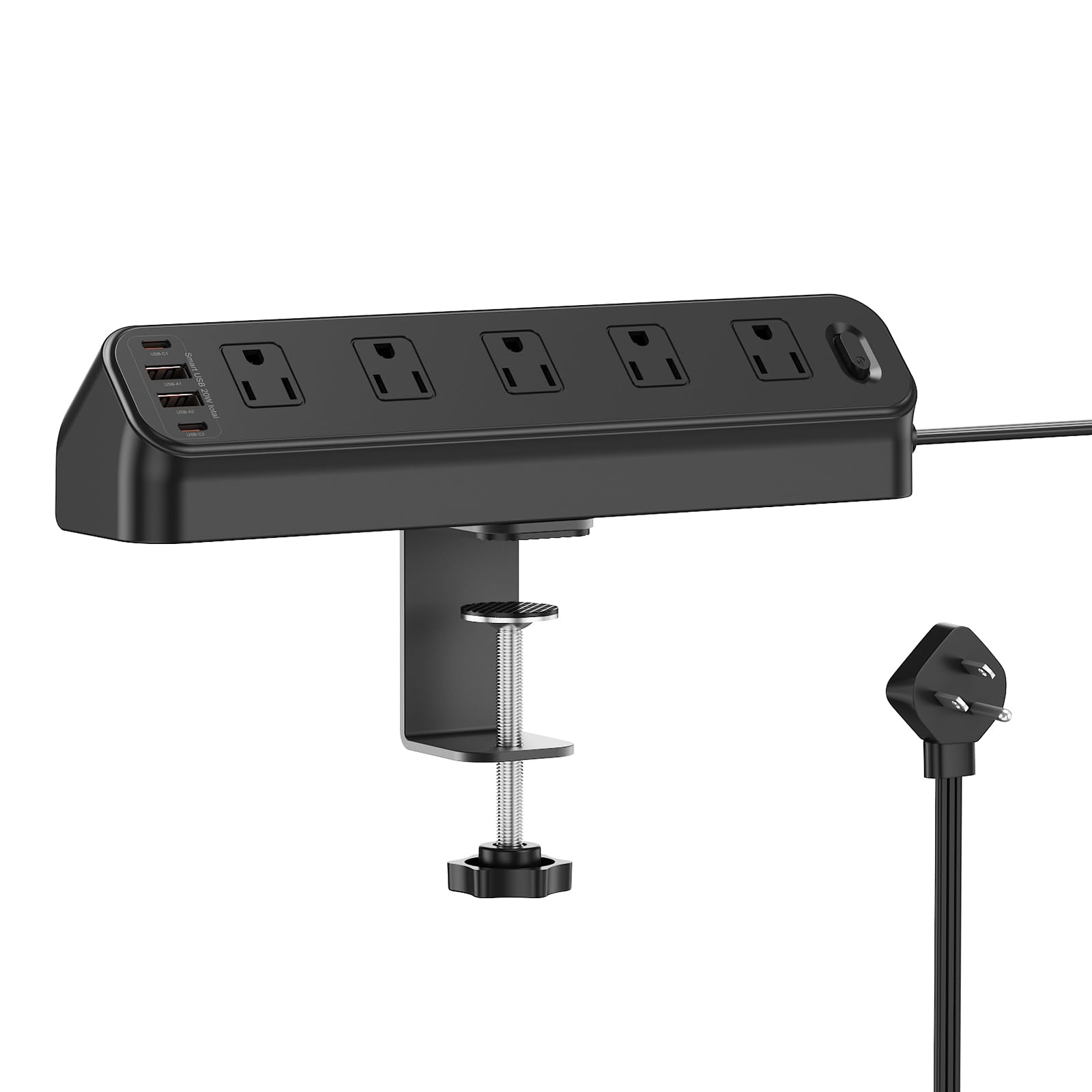
The BEVA is the outlet-count bargain in this group: 10 AC sockets and four USB ports for less than most of the clamp strips here. That matters if your desk is a sewing table, a hobby bench, or a home office where the device count keeps climbing and the USB charger is secondary.

The four USB ports include two 20W PD USB-C ports, which is enough to top off a phone or tablet, plus two USB-A ports for accessories. The six-foot cord and flat plug make it easy to route behind a desk, and the ETL listing is a useful reassurance for a strip that lives within arm's reach.

The clamp fits edges up to 1.96 inches and has a slim body that does not crowd the desktop. We noticed that the outlets are spaced for ordinary plugs rather than a row of giant bricks; if your desk is built around a laptop dock and a monitor brick, the wide-spaced TROND or the dual-layer HOPOW will be easier to live with.

We recommend the BEVA for the desk that needs more AC outlets than USB charging. It is the strip we reach for when the collection of plugs matters more than a single high-watt port. For a hobby desk or a family workstation, that is a sensible trade.

Pros

  • Ten AC outlets
  • Four USB ports with two 20W PD
  • Six-foot cord and flat plug
  • ETL listed

Cons

  • USB-C tops out at 20W
Our verdict

The BEVA is the outlet-count pick for a hobby desk or family workstation, with 10 AC sockets and a clamp that stays out of the way.

Check Latest Price

How We Tested Desk Power Strips

We started by pulling every clamp-on, under-desk, and edge-mount strip we could find, then filtered for a published clamp range, at least four outlets, USB-C charging, and a cord long enough to reach a wall outlet from a standard desk. That left 12 strips, which we clamped to real desks for seven months: a home office with two monitors, a garage workbench, and a gaming setup that gets rearranged more often than it should.

Every strip went onto a one-inch edge first, then onto the thickest edge it claimed to fit, and we plugged a laptop brick in at a downward angle and tried to rotate the thing by hand. Clamps that slipped stayed in place for weeks so we could see whether they crept. We installed every screw-mount option too, with the supplied hardware and then with our own, noting whether the holes lined up, whether the strip sat level once loaded, and whether the clamp blocked a drawer or a leg.

Charging got timed rather than eyeballed: we ran a phone from empty to half full on each USB-C port alone, then repeated it with every other port occupied, and logged the drop. We counted usable outlets instead of advertised ones — whether a chunky adapter blocked its neighbor, whether a port sat where a hand could actually reach it. Over seven months of daily plugging we watched for loosened outlets, flexing housings, and warm cords, then weighed all of it against what each strip costs.

How to Choose a Desk Power Strip

Start With the Mount, Not the Outlet Count

Clamp strips put power on the desk edge, where you can reach it without crawling under the desk. They suit a desk with a free lip and a thickness inside the clamp's range; the Anker Nano covers 0.6 to 1.8 inches, while the Acozvin tops out at 1.7 inches. Check the edge for a curve or a steep bevel, because a clamp that cannot sit flat will never feel secure.

Screw-mounted and bracket strips are better when the desk has no usable edge or you want the strip out of sight. The ANNQUAN is a screw-in under-desk block; the vipwell uses a 360-degree bracket for a wall, cabinet, or underside. These take more planning but keep the desktop clear.

Count Outlets by Shape

Two strips can both list five AC outlets and feel completely different. A flat row is fine for lamp cords and small adapters, but a monitor brick can cover the next socket. Outlets spaced around three or four faces—as on the TROND and ANNQUAN—give each bulky adapter its own side. The HOPOW's dual-layer body does the same thing vertically.

Count the power bricks, not just the devices. A monitor, laptop dock, speakers, and lamp may need four AC sockets before you add a charger, which is why the 10- and 13-outlet picks exist. If you are shopping for a small desk, start with four and move up only when you can name the fifth plug.

Read USB-C Wattage and the Total Budget

A 20W USB-C port is fine for a phone or tablet; a laptop needs a higher-wattage port and USB Power Delivery. The Anker's 70W USB-C port is the one here that can replace a laptop charger. The Mifaso's 30W port is a useful middle ground for a tablet or a smaller laptop, while the Acozvin's 20W ports are best for phones and accessories.

The second number is the total. The Acozvin spreads 40W across eight USB ports, and the ANNQUAN does the same across four. Plug in several devices and the headline per-port figure is not what each one gets. Buy for the total you need at once, not the biggest single number.

Surge Protection and Electrical Headroom

Joule ratings describe how much surge energy a strip can absorb, not how many outlets it has. The picks here range from 1080 to 1800 joules; a higher rating gives more headroom, but no strip is a lightning-proof barrier. For a desk with a computer, monitor, and dock, a 1500-joule class strip is a sensible starting point.

Match the strip to the load. Most full-size picks here are rated for 15A or 13A, and the smaller TROND is 10A. That is plenty for desk electronics, but a space heater or a large appliance belongs on a wall circuit, not on a strip shared with your computer.

Cord Length and Plug Shape

A five-foot cord is enough when the outlet is near the desk; a ten-foot cord gives you room to route behind a drawer or across a standing desk. The Anker uses a five-foot cord, while the Acozvin and HOPOW run ten feet. Measure from the wall outlet to the desk edge, then add slack for a standing desk's travel.

A flat plug helps behind furniture, but check the plug's depth and the outlet's orientation before you count on it. The Mifaso and several others use a 45-degree flat plug, which is useful when the wall socket sits low or behind a bookcase.

Frequently Asked Questions

Final Verdict

The Anker Nano is the desk strip we recommend first for a laptop-heavy desk. Its 70W USB-C port replaces a charger, the dual-zone layout keeps bulky plugs out of the way, and the clamp holds the strip where you can reach it.

If your desk needs more AC outlets than USB, the Acozvin adds capacity and a longer cord; for a small desk, the Mifaso is the tidier fit.