Best Camera Desk Mounts of 2026

A camera clamped to the edge of a desk is a small act of faith. Your lens hangs out over the keyboard, and the only thing between it and the floor is a clamp you tightened by feel. What these mounts actually buy you is hands-free overhead framing — recipes, sketches, soldering, keyboard demos, any top-down shot — without tripod legs eating the floor space you're trying to film in.

For the past four months my team has had 12 of them clamped to desks at the office and at home, hanging cameras, phones, and lights off the arms and repositioning them dozens of times a day. The pattern that emerged: reach matters less than the clamp, and the load rating printed on the box is a best-case number measured with the arm pointing straight up. A mirrorless body on a fully extended boom will find the real limit fast. The picks below are the ones that stayed put, adjusted without a fight, and didn't cost more than the camera they were holding.

Keeper Score summarizes customer ratings and review volume. Read it alongside the product details and trade-offs. How the score works.

1

Best Overall

NEEWER TL283 Desk Mount

94 /100
Keeper Score Outstanding

Key details

Max Load
6.6 lb
Height Range
17 to 40 inches
Mount Thread
1/4 inch screw
Clamp Opening
Up to 2 inches
Check Price on Amazon

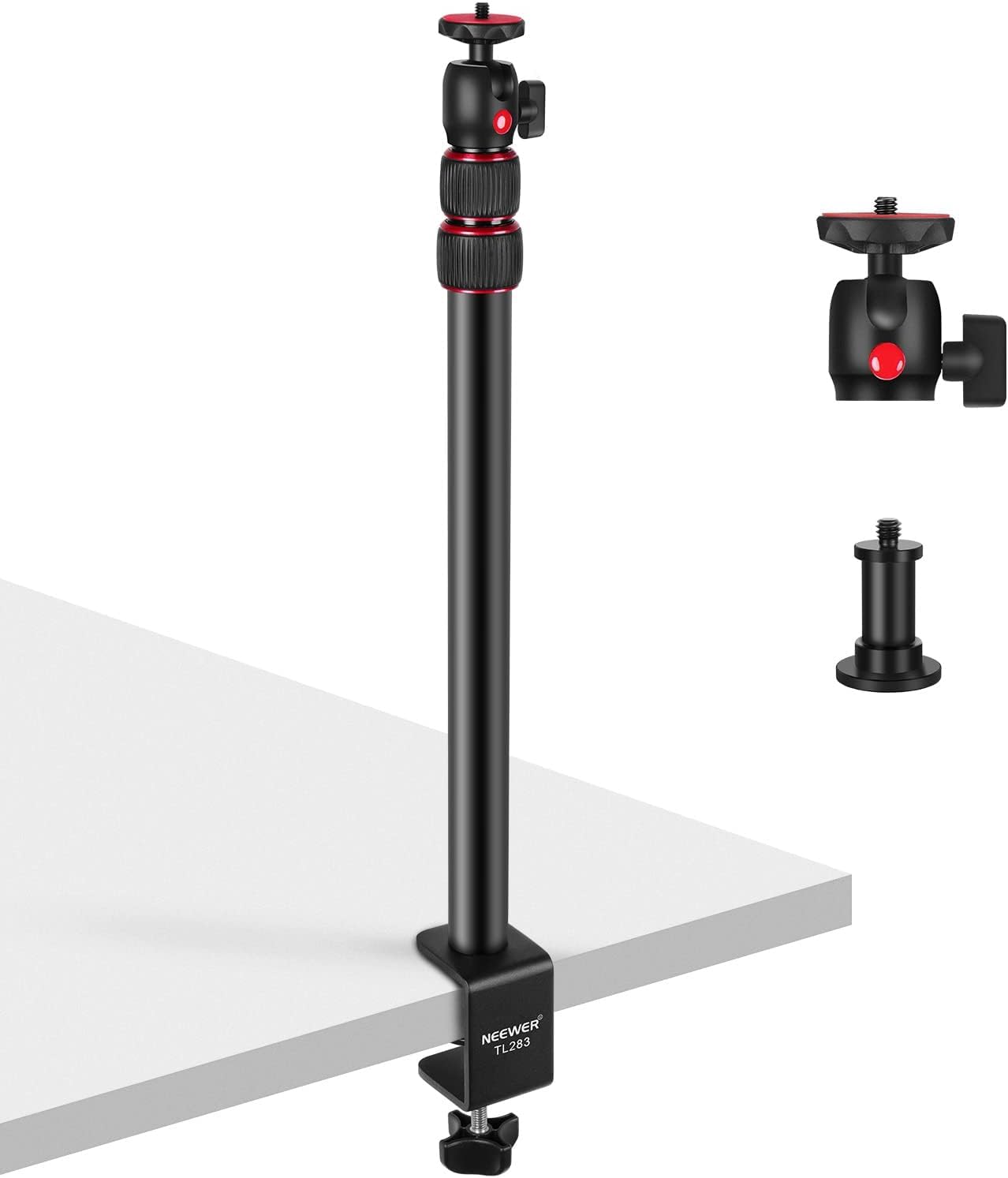
The TL283 is a tabletop C-stand rather than a magic arm: a three-section aluminum pole that clamps to the desk edge and telescopes from 17 to 40 inches, with a ball head on top that swivels a full 360 degrees and tilts from 45 degrees below horizontal to 90 degrees above. Clamp it, screw a camera to the head, and you can put the lens level with your eyes, above the monitor, or angled down at the keyboard.

Height is what most desk setups are short of, and that's why we reach for this one first. The C-clamp opens to two inches, which covers most desk tops and plenty of folding tables, and the 6.6-pound rating takes a mirrorless body with a lens, a webcam, a small LED panel, or a microphone without complaint. Because it's one rigid pole there are no joints to creep between takes, which matters more than the spec sheet suggests once a session runs long.

What a pole won't do is reach. It stands where you clamp it, so it can't hold a lens out over the middle of the desk the way an articulated arm can; for a true straight-down flat-lay of a wide surface, the UA057 below is the better tool. And if your desk has an apron or a drawer front just under the edge, measure before ordering — the clamp needs clear space underneath to close.

Two details we were glad to find: the included 1/4-inch male-to-female adapter lets you hang a device in a fixed vertical position instead of on the ball head, and the stand folds to 43 cm, short enough to drop in a drawer between sessions.

Pros

  • Lifts a camera 17 to 40 inches off the desk
  • Rigid pole drifts less than jointed arms
  • 6.6-pound rating covers a mirrorless body and lens
  • Ball head tilts to a steep downward angle

Cons

  • Pole can't reach over the middle of a desk
Our verdict

The desk mount we recommend first: a rigid pole that puts a camera above your monitor or at eye level and keeps it there, without the drift of a jointed arm.
Check Latest Price
2

Best for Overhead Angles

NEEWER UA057 Magic Arm

89 /100
Keeper Score Excellent

Key details

Threads
1/4 inch and 3/8 inch
Max Load
1.1 lb
Arm Length
22 inches
Clamp Opening
Flat to 2 in, round to 1.6 in
Check Price on Amazon

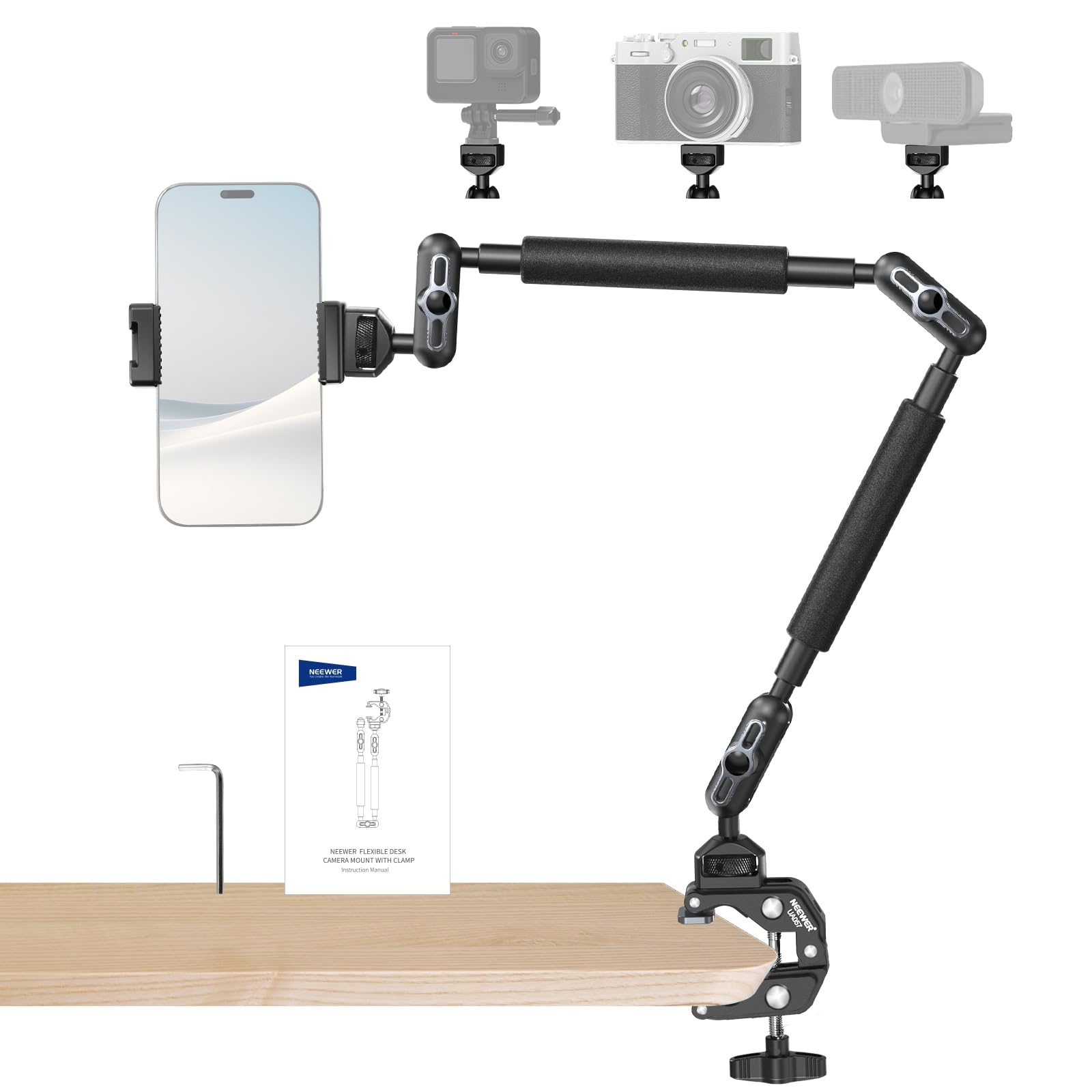
Straight down over the middle of the desk is the shot a pole can't take, and it's the reason to own an arm like this one. The UA057 gives you 22 inches of boom on three pairs of 360-degree ball joints, each with its own locking collar, so you can set one elbow at a time instead of fighting the whole arm at once.

What we liked most is the clamp. It grips flat surfaces to two inches thick and round tube to 1.6 inches across — a tripod leg, a shelf edge, a light stand — and the anti-twist pins at each mounting interface stop a camera or a phone from spinning on the thread once it's tight. All of it is aluminum, and nothing in the box feels like the part that will fail first.

Respect the 500-gram payload. A phone, a webcam, an action camera, a small mirrorless body: all fine. A DSLR with a zoom: not this one, and the TARION further down is where that camera belongs. On a long boom, keep the weight close to the clamp rather than hanging off the far end and tighten the joints nearest the clamp first; that's the difference between an arm that holds all evening and one that sags by the second take.

A phone holder and a 1/4-inch to 3/8-inch adapter are both in the box, so the two most common fittings are already covered. For a streamer who needs a camera looking down at a keyboard, a sketchbook, or a workbench, this is the most direct route in this group.

Pros

  • 22-inch boom reaches over the desk
  • Clamp grips flat tops or round tube
  • Anti-twist pins stop devices spinning
  • All-metal build with 1/4-inch and 3/8-inch threads

Cons

  • 500-gram payload rules out a DSLR and zoom
Our verdict

For overhead work this is the arm we point to: 22 inches of reach on locking ball joints, a clamp that bites almost anything, and a payload that suits phones and small cameras.

Check Latest Price
3

Best for Heavy Camera Rigs

TARION Titanrig Lite Z

85 /100
Keeper Score Excellent

Key details

Weight
6.94 lb
Max Load
17.6 lb
Arm Length
18.9 inches
Clamp Type
Double C clamp
Check Price on Amazon

A 17.6-pound rating is unusual on a clamp mount, and it's the whole point of the Titanrig Lite Z: this is the one for a real camera rather than a webcam. The main body is aluminum, the desk clamp is doubled, and at 3.15 kg the stand carries enough mass that a DSLR with a long lens doesn't turn it into a pendulum.

The arm runs 48 cm and articulates 360 degrees vertically and 180 horizontally, and the position lock is a flip knob rather than a friction collar you have to guess at. Setup is quick: clamp, connect the two pole sections, drop the arm in from the top, tighten. The 1/4-inch and 3/8-inch dual-thread screws sit on the arm, with an adapter and a tablet holder in the box.

The double clamp is what makes the load rating believable, because it spreads the grip across two points on the desk edge instead of levering one. It also needs a lip with some length to it and clear space underneath for both jaws — on a shallow or heavily rounded edge, a single clamp is the easier fit.

Portability is where this one loses ground. At 3.15 kg it dominates a bag, and it's happiest left clamped where you shoot. If the camera is a mirrorless body or a webcam, the NEEWER TL283 does the same job with a fraction of the weight.

Pros

  • 17.6-pound rating takes a DSLR and long lens
  • Double clamp spreads load along the edge
  • Flip knob locks position in one turn
  • Dual threads plus a tablet holder in the box

Cons

  • 3.15 kg is heavy to move or pack
Our verdict

Clamp this one when the camera is heavy: a doubled clamp, 17.6 pounds of rated load, and enough mass to stop a DSLR and long lens from drooping.

Check Latest Price
4

Best Lightweight Stand

SMALLRIG 3488 C Stand

90 /100
Keeper Score Outstanding

Key details

Mount
1/4 inch ball head
Weight
15 oz
Height Range
15 to 35 inches
Pole Sections
3
Check Price on Amazon

This is the stand that goes in the laptop bag, and that's the reason we keep choosing it for small desks and for travel. Fifteen ounces covers the pole, the clamp, and the ball head, and the three sections collapse into something you carry in one hand.

The pole runs from 15 to 35 inches and the ball head rotates 360 degrees with a 90-degree drop, enough for a webcam at seated eye level or a camera angled down at a notebook. The clamp adjusts to desk thickness with a button at the base, so you set it by hand on whatever table the day hands you, and the same 1/4-inch thread takes a ring light adapter when you need light rather than a lens.

Thirty-five inches is the ceiling, and it's the number to think about. If your monitor sits high or you shoot standing, the taller NEEWER pole is the better buy; for a seated desk this one is plenty, and it leaves more of the surface clear than the arm-style mounts do.

SmallRig's machining is the quiet pleasure here. The matte finish wipes clean, the joints move without grit, and the clamp jaws grip firmly without scarring the desk edge.

Pros

  • 15 ounces makes it easy to pack and carry
  • Clamp width adjusts by hand at the base
  • Ball head rotates 360 and drops 90 degrees
  • Doubles as a light or ring-light stand

Cons

  • Stops at 35 inches, low for a standing desk
Our verdict

The one to buy if the mount has to travel or fit a small desk: 15 ounces, 35 inches of height, and a clamp that adjusts by hand.

Check Latest Price
5

Best for Two Devices

SMALLRIG DTCK001 Desk Mount

89 /100
Keeper Score Excellent

Key details

Mounts
1/4"-20 screw and 3/8"-16 hole
Max Load
4.41 lb
Ball Head
Detachable 360°
Height Range
30 to 73 cm
Check Price on Amazon

If your desk has to hold a camera and a light at the same time, this is the mount built for it: a 1/4-inch-20 screw on the ball head for the camera and a 3/8-inch-16 hole at the top of the pole for whatever else needs to be in the frame.

The pole adjusts from 30 to 73 cm and the extension arm slides and locks on it with a modular metal knob — one turn holds height and angle together, which is the sort of thing you notice every time you re-aim. Thicker pipe walls, a widened base, and a gear structure inside take the rated 2 kg: a small mirrorless body with a compact lens, a webcam, or a light.

Two kilos is also where this one stops. The NEEWER TL283 is rated for 6.6 pounds at about half the money, and the TARION takes 17.6, so what you're paying for here is the second mounting point and the locking hardware, not capacity.

What sold us is how the arm moves on the pole: a camera can sit out over the desk instead of beside the monitor, and the whole thing breaks down to 17.3 inches when the desk needs to be a desk again.

Pros

  • Second 3/8-inch mount for a light or mic
  • Metal knob locks height and angle together
  • Arm slides out over the desk
  • Breaks down to 17.3 inches for storage

Cons

  • Costs more than mounts with higher load ratings
Our verdict

A tidy two-device mount for a small mirrorless camera or a webcam, with the best locking hardware here — worth the extra only if you'll use the second mount.

Check Latest Price
6

Fixed Overhead Work

JEBUTU MS05 Stand

85 /100
Keeper Score Excellent

Key details

Mount
1/4 inch screw
Weight
2.2 lb
Height Range
14.5 to 41 inches
Clamp Opening
Up to 1.96 inches
Check Price on Amazon

The MS05 comes apart. Three aluminum sections unscrew from one another, so you can run the full 41 inches for an overhead shot, drop a section for a lower camera, or break the whole stand down flat for storage.

The C-clamp has an enlarged handle and opens to about two inches, and each section rotates 180 degrees left and right at its joint. Every pole in the set carries its own 1/4-inch screw, which means a light can hang on the middle section while a camera sits on the top one.

At 2.2 pounds the stand is light enough to move with one hand, and the aluminum holds a webcam or a compact camera firmly once the joints are properly tightened. Treat it as a mount you set and leave: the section locks want a firm turn, and a camera that gets re-posed all day will work them loose.

Fixed overhead work is where it earns its place — a webcam above a monitor, a camera over a craft table or a projector for tracing. Of the two JEBUTU stands here, this is the one for a camera with any weight to it; the cheaper one below is a phone-and-webcam mount.

Pros

  • Reaches 41 inches on three removable sections
  • 1/4-inch screw on every section
  • Enlarged clamp handle tightens by hand
  • Light at 2.2 pounds

Cons

  • Clamp needs a desk edge under about two inches
Our verdict

Good value for a camera that stays put: 41 inches of clamp-on height, sections you can shorten, and joints that want setting once rather than daily.

Check Latest Price
7

Deep Desks

ULANZI ZJ02 Arm

88 /100
Keeper Score Excellent

Key details

Reach
98 cm
Max Load
4.41 lb
Clamp Opening
Up to 48 mm
Overhead Height
65 cm
Check Price on Amazon

Measure the desk edge before ordering this one: the C-clamp opens to 48 mm, just under two inches, and it wants a flat lip with clear space underneath.

Get that right and reach is the whole case for the ZJ02. Most desks put the monitor a good distance from the edge, and 98 cm of boom with 65 cm of overhead height gets a camera out over that space where the shorter stands run out of length. The 1/4-inch ball head carries a camera or a light to 2 kg, and the toothed joints hold an angle instead of easing out of it.

Build is aluminum and behaves like it: the sections slide without slop and the clamp has a silicone pad so a finished desk doesn't pay for the grip. The trade-off of a long arm is leverage — fully extended with weight on the end, a knock to the desk shows up in the frame, so run the boom no longer than the shot needs.

It's a mount for a wide desk in a fixed location. If the setup moves between rooms, or the desk has a thick rounded edge, the SMALLRIG C stand will suit you better.

Pros

  • 98 cm of reach over a large desk
  • Toothed joints hold an angle
  • 2 kg capacity for a camera or light
  • Silicone pad protects the desk edge

Cons

  • Clamp stops at 48 mm of desk thickness
Our verdict

Buy this one for a deep desk: 98 cm of reach puts a camera further from the clamp than anything else here, and the clamp tells you quickly whether your desk is eligible.

Check Latest Price
8

Phones and Webcams

JEBUTU Overhead Desk Mount

86 /100
Keeper Score Excellent

Key details

Max Load
1.1 lb
Arm Length
13 inches
Stand Height
21.65 inches
Clamp Opening
Up to 1.77 inches
Check Price on Amazon

This is the cheapest way onto the list, and you still get a real overhead arm: a steel and ABS stand with a 13-inch holding arm, a 360-degree ball head, and a padded C-clamp that opens to 1.77 inches.

Half a kilogram is the honest limit — a phone, a webcam, an action camera, or a compact light. Within that it does what the expensive stands do: the clamp grips, the ball head angles, and the holder takes a handset without the slow droop that bendy gooseneck arms develop.

For a streamer who wants a second camera over the keyboard, or a crafter filming their hands, we think this is the right first mount: it costs the least here, and the included phone holder means there's nothing else to buy before you start. Just don't ask it to carry a camera with a lens on it.

Pros

  • Lowest price of the mounts here
  • Includes a phone holder and ball head
  • 13-inch arm reaches over a keyboard
  • Padded clamp opens to 1.77 inches

Cons

  • 0.5 kg limit suits phones and light webcams only
Our verdict

The budget pick, and a good one for a phone or webcam: an overhead arm and a phone holder for the least money here, as long as half a kilogram is enough.

Check Latest Price

How We Tested Camera Desk Mounts

We started with the specs that decide whether a mount is usable at all: how wide the clamp opens, how far the arm reaches, and whether it ends in the two thread sizes most cameras and lights use, 1/4"-20 and 3/8"-16. From there we filtered by price and skipped anything whose load rating only made sense on a vertical arm. Twelve mounts earned a desk.

Each of the 12 spent four months clamped to a working desk — an office desk edge, a narrow writing desk at home, a kitchen counter for overhead recipe shoots — and we moved them between rooms rather than leaving them in one spot. We measured every clamp's jaw opening against a one-inch maple desktop and a thin hollow-core one, then rocked the loaded arm by hand to see whether the jaws crept or the pads marked the finish. To check stability honestly, we hung a mirrorless body and lens at full extension and measured how far the joint dropped overnight.

Adjustability we judged by doing: swinging from straight-down overhead to a 45-degree angle, then tightening everything one-handed while the camera was still on the arm. We weighed each mount packed and noted which ones felt top-heavy once a heavy lens went on. Mounting versatility got the same treatment — a phone, a webcam, a microphone, and a small LED panel each went on and off the 1/4"-20 screw and 3/8"-16 thread to see whether the ball head held its angle. After four months of daily repositioning, we went back through every joint for wobble, every collar for cracks, and every thumb screw for whether it still held torque.

How to Choose a Camera Desk Mount

Start With What It Has to Hold

Load ratings across this group run from 500 grams to 17.6 pounds, and the figure covers everything hanging off the mount: the camera, the lens, the phone clamp or thread adapter, and a little for cable strain. Weigh the body and lens you actually plan to use and choose above that number rather than right at it. A webcam or a phone weighs a few hundred grams and almost any mount here will do; a DSLR with a zoom moves you into the TARION's territory and out of reach of the ball-jointed arms.

Pole or Articulating Arm

Poles put the camera up; arms put it out. A clamped pole such as the NEEWER TL283 rises above the monitor and holds an eye-level or slightly-down angle with almost nothing to adjust, which is what most video-call and streaming setups need. An arm with ball joints reaches over the work surface for a genuine top-down shot, and it's the only way to film your hands on the far side of the desk.

Arms carry more joints to manage and lose position faster with weight on a long boom, so choose one when the shot genuinely requires the reach rather than because it looks more flexible on the listing.

Measure the Desk Edge, Not the Desk

Every mount here grips the edge, and the edge is where setups fail. Three things decide it: the thickness the clamp opens to, which runs from 48 mm at the tight end to about two inches at the generous end; a flat lip the jaws can seat on; and clear space underneath. An apron, a drawer front, or a cable tray directly below the edge will stop a C-clamp from closing no matter how wide it opens.

On glass or a thin hollow-core top, check the desk's own limits before adding a clamp's concentrated load to the edge — a padded jaw protects the finish, not the structure.

Joints, Locks, and Drift

A mount is only as good as its ability to stay where you put it. Ball heads give smooth, continuous angles and suit a single camera; toothed or geared joints click into place and resist easing under weight; friction collars hold well when new and want re-tightening over months. Tighten the joint nearest the clamp first and work outward, and keep a heavy camera closer to the pole than the end of the boom. That habit does more for a steady frame than any rating on the box.

Frequently Asked Questions

Final Verdict

If you want one mount and no further decisions, clamp the NEEWER TL283 to the desk. It lifts a camera to eye level or above the monitor, holds a mirrorless body without drifting, and costs less than most of the arms here.

Choose the TARION Titanrig Lite Z only when the camera is a DSLR with a long lens, and take the NEEWER UA057 when the shot has to sit directly above the middle of the desk.